








.avif)
.avif)
.avif)


Product
What Is a Design System? How to Build One in 8 Steps
Design teams use Claude to turn a component's real state in Figma into a plain-language usage guideline: what it's for, its variants and props, the do's and don'ts that actually get followed, and a short changelog line whenever it changes. Claude does not replace the design decisions. It takes notes that already exist in someone's head, in Slack, or in a half-finished Notion page, and turns them into a doc with the same structure every time, so people actually read it.
The result is not shorter work. It is more consistent work. A team that documents ten components with Claude ends up with ten docs that read the same way, cover the same sections, and use the same words for the same ideas. That consistency is the part that is hard to get from a person writing docs between other tasks, because doc quality usually drifts depending on who wrote it and how much time they had that week.
Claude is useful for design system docs at three points: writing the first draft of a component's usage guideline from its actual variants and props, turning scattered notes and Slack threads into one consistent page, and drafting a short changelog line whenever a token or component changes. A person who owns the component still reviews and approves every draft. Claude is the first pass, not the source of truth.
Most design systems do not fail because nobody wanted documentation. They fail because writing it competes with shipping the next screen, and writing loses. A component ships, works, and gets used a dozen times before anyone circles back to write down what it is for. By then, three people have already built slightly different versions of the same pattern because nobody could find a doc that said not to.
The other common failure is inconsistency. One component has a detailed page with examples. The next has a single screenshot and the word "self-explanatory." A new designer or engineer cannot tell which components are safe to use as-is and which have rules attached, so they either ask in Slack every time or guess. Both cost more time than writing the doc would have. A design system that grows for a year without anyone circling back to tidy the docs ends up with a library nobody fully trusts, which is worse in some ways than having no documentation at all, because it teaches people to stop checking.
Claude fits into this gap well because drafting is the part that gets skipped under time pressure, not the part that requires design judgment. Someone still has to decide what the component is for. Claude is good at turning that decision, once stated, into a doc that reads clearly and matches the shape of every other doc in the library.
Before asking Claude to draft anything, it helps to agree on what a usage guideline actually needs to cover. Teams that skip this step end up with docs that are long but still missing the one thing someone needed, like whether a component works inside a modal.
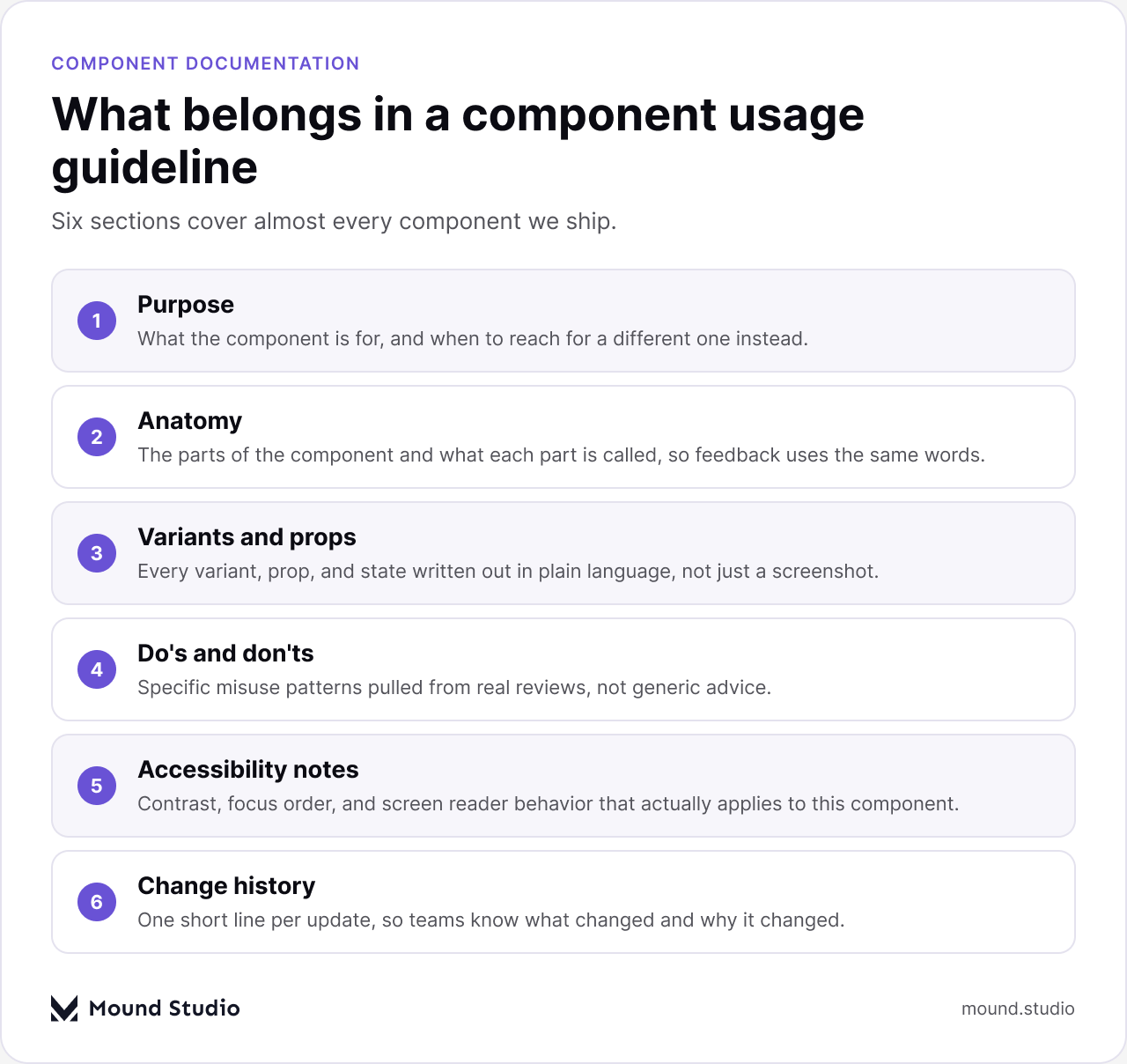
Purpose and anatomy are the easy part. Variants and props take longer because someone has to actually check the component in Figma rather than describe it from memory, which is exactly where Claude helps: point it at the component's current variants and props, and ask it to describe each one in a sentence instead of a label. The do's and don'ts section is the one worth spending the most care on, because a vague rule like "use sparingly" does not change anyone's behavior. A rule paired with a real example does.
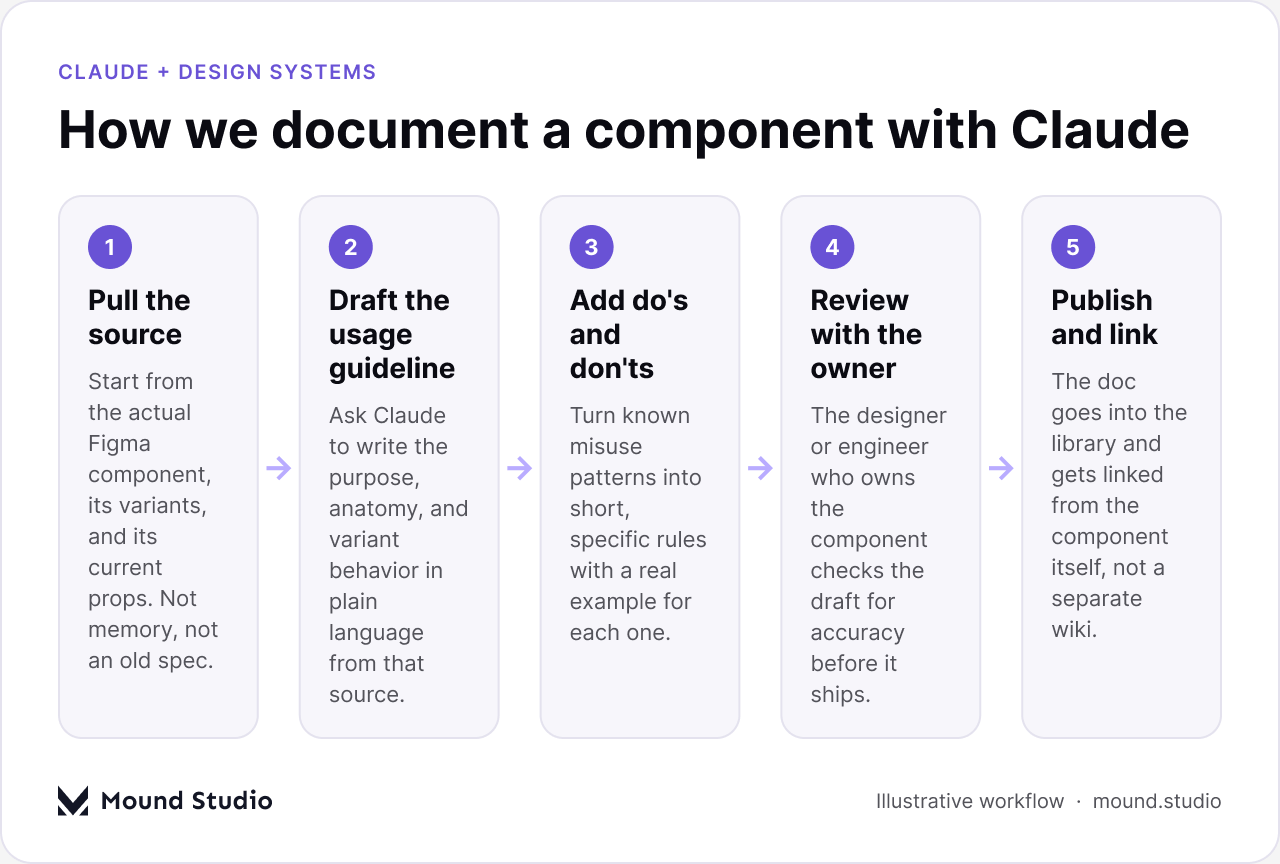
The mechanical part of this is not complicated once you have decided what the doc should cover. The steps that make the result usable are less about the AI and more about what you feed it and who checks it after.
A do's and don'ts list only works if it is specific enough to settle an argument in a design review. "Use consistently" settles nothing. "Don't pair this button style with a destructive action; use the red variant instead" settles something, because it names the exact situation and the exact fix.
| Weak rule | Specific rule |
|---|---|
| Use this component sparingly | Limit to one primary call-to-action per screen; secondary actions use the outline variant |
| Keep labels short | Labels stay under three words; if it needs more, use a tooltip instead |
| Don't overuse the alert style | Reserve the alert style for errors that block the user from continuing |
Claude is good at generating the specific version once you describe the situation that prompted the rule. It is not good at inventing that situation from nothing, which is why the most useful do's and don'ts come from real design reviews, real support tickets, or a real moment where two designers built the same thing two different ways.
Most teams do not start from a blank page. They start from a Notion doc that three people have edited over a year, a Figma page with sticky notes, and a handful of Slack threads that everyone half-remembers. The fastest use of Claude here is not writing something new. It is feeding in all of that messy material and asking for one page, organized under the sections your team has agreed on, in one consistent voice.

This is where teams get the most obvious payoff, because the alternative to using Claude here is not "write it properly." It is "nobody rewrites it, and the mess stays." A consistent doc, even an imperfect first pass, beats a scattered one every time someone new joins the team and has to learn the system from whatever they can find. It also gives the whole team one page to argue about and improve, instead of three different half-versions that nobody wants to touch.
Documentation rots the moment nobody updates it after a change, and updates are exactly the task that gets skipped when a team is moving fast. A spacing token gets renamed, a component gains a new state, and the doc still describes the old version six months later. Claude is well suited to the specific, bounded task of turning a change into a one- or two-line changelog note, because that task has almost no ambiguity: something changed, and someone needs to say what.
| Change type | What the changelog line should say |
|---|---|
| Token renamed or merged | Old name, new name, and what to search-and-replace in existing files |
| New variant added | What the variant is for and when to reach for it instead of an existing one |
| Prop deprecated | What replaces it and a rough date after which the old prop stops working |
| Behavior changed silently | What used to happen, what happens now, and which screens to check |
The habit that makes this work is small: whenever a component or token changes, paste the before-and-after into Claude and ask for a changelog line before moving on. It takes under a minute and it is the difference between a changelog that exists and one that quietly stopped three releases ago. Teams that keep this habit for a few months usually notice that the "why did this change" question in Slack becomes rarer, because the answer is already sitting next to the component.
Claude will write a confident, well-structured paragraph about a component whether or not the details you gave it are current. It has no way to know that a prop was renamed last week unless you tell it. Treat every draft as a draft, not a publish-ready doc, and have the person who actually owns the component check it against the real thing before it ships.
It also can't decide design intent for you. If nobody has decided what a component is for or when to use it over another one, Claude will still produce fluent sentences, and those sentences will read as authoritative even when the underlying decision was never actually made. That is worse than an empty doc, because an empty doc at least signals that nobody has answered the question yet.
If most of these are a "no" for your current library, start with the components that get asked about most often in Slack. That short list tells you exactly where the documentation gap is actually costing time, and it is usually a shorter list than teams expect once they write it down.
No. Someone still has to decide what belongs in the system, what a component is for, and when a rule changes. Claude speeds up the writing and the reformatting, not the judgment behind it. Teams that get the most out of this treat Claude the way they'd treat a fast first draft from a new hire: useful, worth reading closely, and never published without a second pair of eyes from whoever owns the component. Our guide on what a design system actually is covers the decisions that come before any of this documentation work, and our developer handoff checklist is a useful companion once a component's doc is ready to ship to engineering.
A design system doc is only useful if people read it, and people only read docs that are consistent, specific, and current. Claude is a fast way to get a first draft that hits all three, drawn from the actual component instead of memory, but the decisions still belong to whoever owns the system. If your design system documentation has fallen behind and you want a hand getting it back to something your team will actually use, tell us where it stands and we'll help you find the fastest way back to consistent.
No. Claude drafts the usage guideline, do's and don'ts, and changelog notes once you give it the component's real variants and props. A person who owns the component still reviews and approves the draft before it publishes.
Purpose, anatomy, variants and props, do's and don'ts, accessibility notes, and a short change history are the six sections we use for every component, in the same order each time.
Paste the before-and-after into Claude whenever a token or component changes and ask for a one- or two-line changelog note. It takes under a minute and keeps the changelog from quietly going stale.
Yes. Feed it the scattered notes, Slack threads, and half-finished pages you already have and ask for one page organized under your team's standard sections. The content is usually already there; it just needs one consistent shape.
No. Someone still has to decide what a component is for and when a rule applies. Claude speeds up the writing, not the design judgment behind it.




.png)


