








.avif)
.avif)
.avif)

Webflow
Webflow AI Tools: Where They Help and Where They Fall Short
Claude does the thinking and drafting work before anyone opens the Webflow Designer, and Webflow stays the tool where the site actually gets built, wired up, and published. On a typical project we ask Claude to draft CMS copy for a new collection, sketch a page hierarchy from a client brief, write alt text for a batch of images, or explain what a broken custom code embed is doing. A designer then takes that draft into Webflow, checks it against the brand and the CMS structure, and builds the version that actually ships. Claude never touches the live site. It writes the first pass; Webflow is where the first pass becomes a real page.
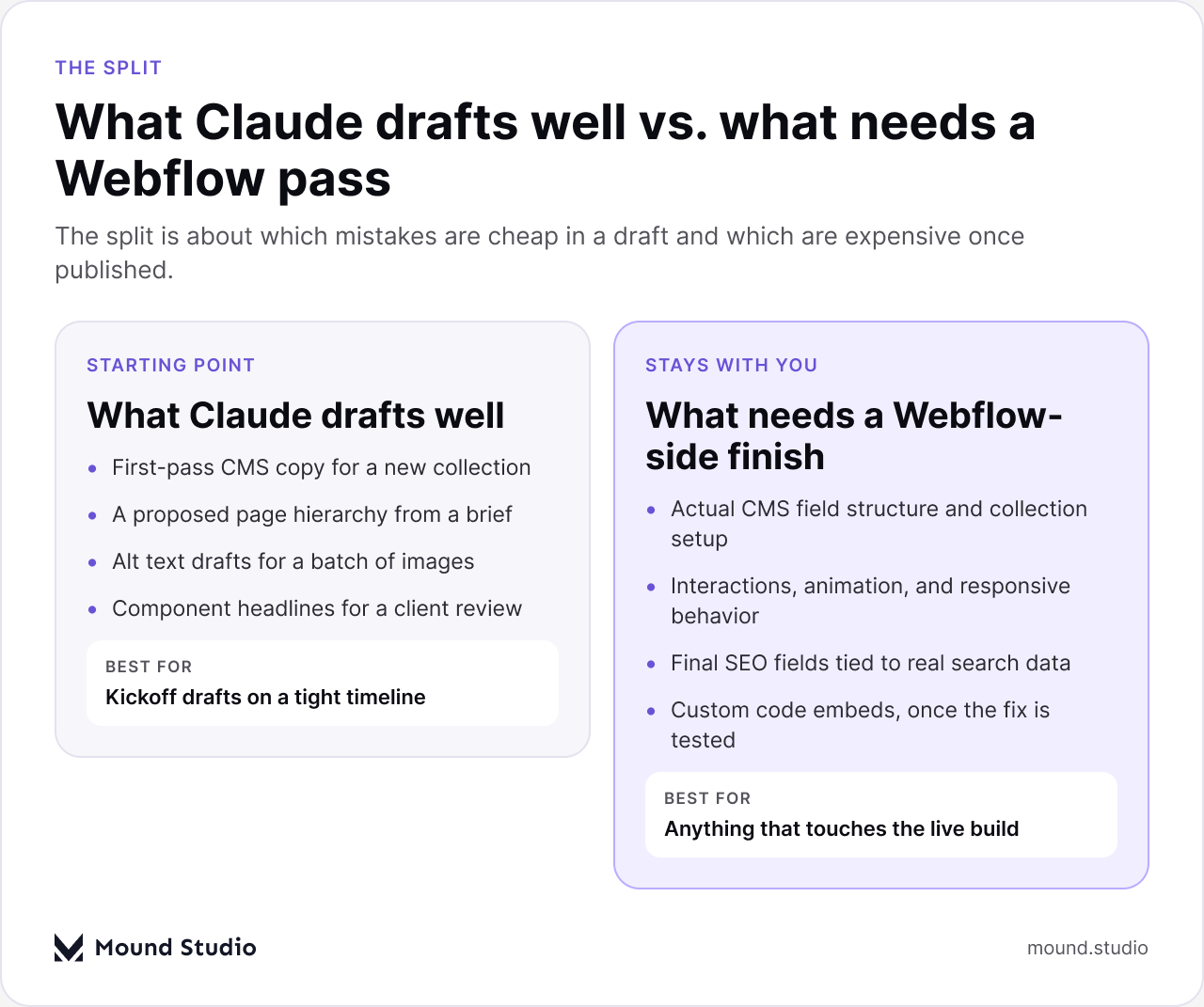
Use Claude for anything that starts as a blank page: a first draft of CMS content, a proposed sitemap, alt text for images, component copy for a client review, or a plain-language explanation of what a script embed is trying to do. Keep the actual build inside Webflow: the CMS field structure, the interactions, the responsive behavior, the final SEO fields tied to real search intent, and anything that touches the live, published site. The split isn't about which tool is smarter. It's about which mistakes are cheap to fix in a draft and which are expensive once a client has already seen the published page.

Most of the places Claude fits into a Webflow build sit before or alongside the Designer, not inside it. It reads a brief, a spreadsheet, or a folder of images and turns that into a first draft someone on the team can react to. Here's where that shows up in practice, phase by phase.
| Project phase | What we ask Claude for |
|---|---|
| Kickoff | A proposed page list and CMS collection structure from the brief |
| Content | First-pass copy for pages and CMS items the client will edit |
| Assets | Alt text for a batch of images before they go into the CMS |
| Client review | Component headlines and button copy dropped into a rough layout |
| Build | A plain-language read on what a custom code embed is doing |
Webflow's CMS is only as good as what's sitting in the fields, and a blank collection is a slow start to any project. Before we touch the Designer, we often give Claude the brief, a few reference pages, and the collection fields we've planned, and ask for a first pass at the copy: blog post drafts, product or service descriptions, FAQ entries, or short summaries for a card grid. None of it goes live as written. It gives the client's writer or our own copy pass something to react to instead of a blank field, and it means the CMS structure gets tested with real-length content instead of placeholder text that hides layout problems until later.
This matters more than it sounds like it should. A card component that looks fine with "Lorem ipsum" can break the moment a real title runs two lines longer. Drafting the content early, even roughly, surfaces those problems while they're still a five-minute fix in the Designer instead of a client-facing bug after launch.
A new site brief usually arrives as a document, not a sitemap. We ask Claude to turn that brief into a proposed page list and hierarchy: what's a top-level page, what's a CMS template, what belongs in a dropdown, and where the client's own naming for things should show up in the navigation instead of generic labels. That draft becomes the starting point for a conversation with the client about what's actually needed for launch versus what can wait for a second phase.
The value here isn't that the first draft is perfect. It's that arguing about structure on a page list takes minutes, and arguing about structure after the Designer file already has forty pages in it takes days. Settling the hierarchy early also determines the CMS collections you'll need, which affects how the whole project gets scoped. Our guide to Webflow CMS best practices covers how we structure collections once that hierarchy is settled.
Alt text is one of the first things to get skipped on a deadline, and it's one of the easiest to fix with a first draft. We give Claude the actual images, not just file names, and ask for alt text that describes what's in the image and why it's there, in plain language, without stuffing it with keywords. For a product gallery, a blog's hero images, or a batch of team photos, that turns an hour of manual writing into a review pass: read each draft against the image, adjust anything that's vague or wrong, and move on.
The review step is not optional. Claude describes what it sees in an image, and it can miss context a person on the project already has, like a client's preferred name for a product or a detail that matters for a specific page. Treat the draft as a starting point for every image, not a batch you paste in and forget.
Client reviews move faster when every component on a page has real words in it instead of placeholder copy the client has to imagine past. Before a review call, we'll ask Claude for headline options, button labels, and short supporting copy for the components already laid out in Webflow, based on the brief and whatever positioning the client has already given us. We drop a few options into the layout and let the client react to actual sentences.
None of that copy is meant to survive untouched. It's there so the conversation in the review is about the message and the layout, not about squinting at grey placeholder bars and imagining what might go there later.

Webflow projects often end up with a handful of custom code embeds: a script for a third-party widget, a small interaction Webflow's native interactions can't quite do, or a snippet a client's developer handed over. When one of those breaks, or behaves differently after a Webflow update, we'll paste the script into Claude and ask what it's doing and where it's likely failing. That's often faster than reading through unfamiliar code line by line, especially when the embed was written by someone no longer on the project.
Claude can point at a likely cause and suggest a fix. It can't see the live page, the rest of the Designer file, or how the embed interacts with Webflow's own scripts, so every suggested fix gets tested in a staging environment before it goes anywhere near the published site. Treat it as a second set of eyes on the code, not a replacement for actually running the fix.
The real comparison isn't Claude against a person. It's a drafted starting point against a blank one. Either way, a person on the team is reading every draft, testing every fix, and making every decision that touches the published site. We cover the wider pattern, across the tools we use beyond Webflow, in our look at where Webflow's own AI tools help and where they fall short.
| Task | Without a draft | With a Claude first draft |
|---|---|---|
| New CMS collection | Writer starts from an empty field | Writer edits a rough version already sitting in the field |
| New site's page list | Team debates structure from a blank sitemap | Team edits a proposed hierarchy from the brief |
| Alt text for 40 images | Written one by one from scratch | Drafted in a batch, then checked against each image |
| Broken code embed | Read through the script line by line | Get a likely cause first, then test it |
The mistakes we see aren't really about the tool. They're about skipping the review step Claude's output was always meant to get.
Before asking Claude to draft something for a Webflow project, we run it through a short checklist:
If a task passes that checklist, drafting it with Claude usually saves real time. If it doesn't, it's faster in the long run to start from scratch inside Webflow with a person doing the first pass.
The single biggest risk isn't a bad individual draft. It's a set of drafts that drift from each other because nobody reads them as a group. A blog collection where every third post has a slightly different tone reads as sloppy even if each post is fine on its own. Before publishing a batch of AI-drafted CMS content, we read it in sequence, not just one entry at a time, and check that the voice, the level of detail, and the formatting stay consistent across the set. The same applies to a batch of alt text or a set of component headlines drafted for one review. Check the batch, not just the sample.
It also helps to be specific about what "good" looks like before asking for a draft. Giving Claude a real example of the client's voice, a finished page to match, or the actual CMS fields it needs to fill produces a far more useful starting point than a general request. The better the brief going in, the less editing a draft needs coming out, and the more the process actually saves time instead of just moving the work around. This is the same discipline we apply anywhere AI shows up in a project; our guide to how AI fits into a modern product design workflow goes into it beyond Webflow specifically.
Claude is useful on a Webflow project for exactly the things that are supposed to start as a draft: CMS copy, a proposed sitemap, alt text, and a first read on a broken script. Everything that touches the live, published site, from the CMS structure to the final interactions, stays a Webflow task a person does and checks. Used that way, it's one more tool in the process, not a shortcut around the review that every client project still needs.
Planning a Webflow build and want a team that treats AI drafts as a starting point, not a shortcut? Tell us about your project and we'll walk you through how we'd approach it.
No. Claude drafts content that a person then reviews and enters into Webflow's CMS fields. It doesn't have access to the live site or the CMS itself.
It can point at a likely cause and suggest a fix, based on the script you paste in. Every suggested fix still gets tested in a staging environment before it goes near the published site.
It speeds up the drafting phases — CMS content, sitemaps, alt text — because there's a starting point to react to instead of a blank page. The build itself, inside Webflow, takes the same care either way.
Treat it as a starting point for a conversation with the client, not a final decision. Structure is cheap to change on a page list and expensive to change once the Designer file is built around it.
No. It gives a writer a rough draft to edit instead of a blank field. The writing, editing, and final voice check still come from a person on the team.



.png)


