








.avif)
.avif)
.avif)

Ai
How AI Fits Into a Modern Product Design Workflow

Vibe coding means describing what you want in plain language and letting an AI coding tool write the actual code, while a person reviews the result and steers it toward what they meant. Instead of opening a code editor and writing markup line by line, someone types a prompt, gets back a working screen or feature, and then asks for changes the same way they would brief a teammate. The code exists. Nobody on the team necessarily wrote it by hand.
For a design-led studio, that is a bigger deal than it sounds. Design has always stopped at the edge of a static file: a Figma frame, a prototype link, a set of specs handed to a developer. Vibe coding pushes that edge further. A designer can now produce something that actually runs, click by click, without waiting on an engineering sprint to see if an idea holds up.
Vibe coding stopped being a niche hobby project once the tools that do it moved from side projects into products people use every day. What used to require a developer copying AI-generated snippets into an editor is now built into browsers, design tools, and standalone apps that go from a prompt straight to a running interface. Non-developers noticed first: marketers building their own landing pages, founders testing an idea before hiring anyone, and designers prototyping screens that used to sit in a backlog.
The bigger shift is who is doing it. A few years ago, AI-assisted coding was mostly a productivity boost for engineers who already knew what they were doing. Now the same tools are aimed directly at people who do not write code for a living. That is the part worth paying attention to if you run a design team: the barrier between "I can imagine this screen" and "I can show you this screen running" has gotten much thinner.
Three broad categories cover most of what people mean by vibe coding right now. Chat-to-app builders take a written prompt and produce a full working project in one pass, then let you keep refining it through more prompts. Assistants built into code editors sit next to a real codebase and write, edit, and explain code as a developer works, which is closer to AI-assisted engineering than pure vibe coding but blurs into it once someone stops reading every line. Browser-based design-to-code tools sit closest to design work: they take a rough layout or description and turn it into a working page, which is where most non-developers on a design team are likely to start.
The exact tools shift fast enough that naming specific products in an article like this would go stale within a season. What matters for a design team is the pattern behind all three: natural language in, running software out, with a human checking the result before it goes anywhere near a real user. Judge a tool by that loop, not by its marketing.
The process looks the same across most of the current tools, whatever the interface looks like. It is worth walking through, because each step is also where a design team adds (or loses) control.
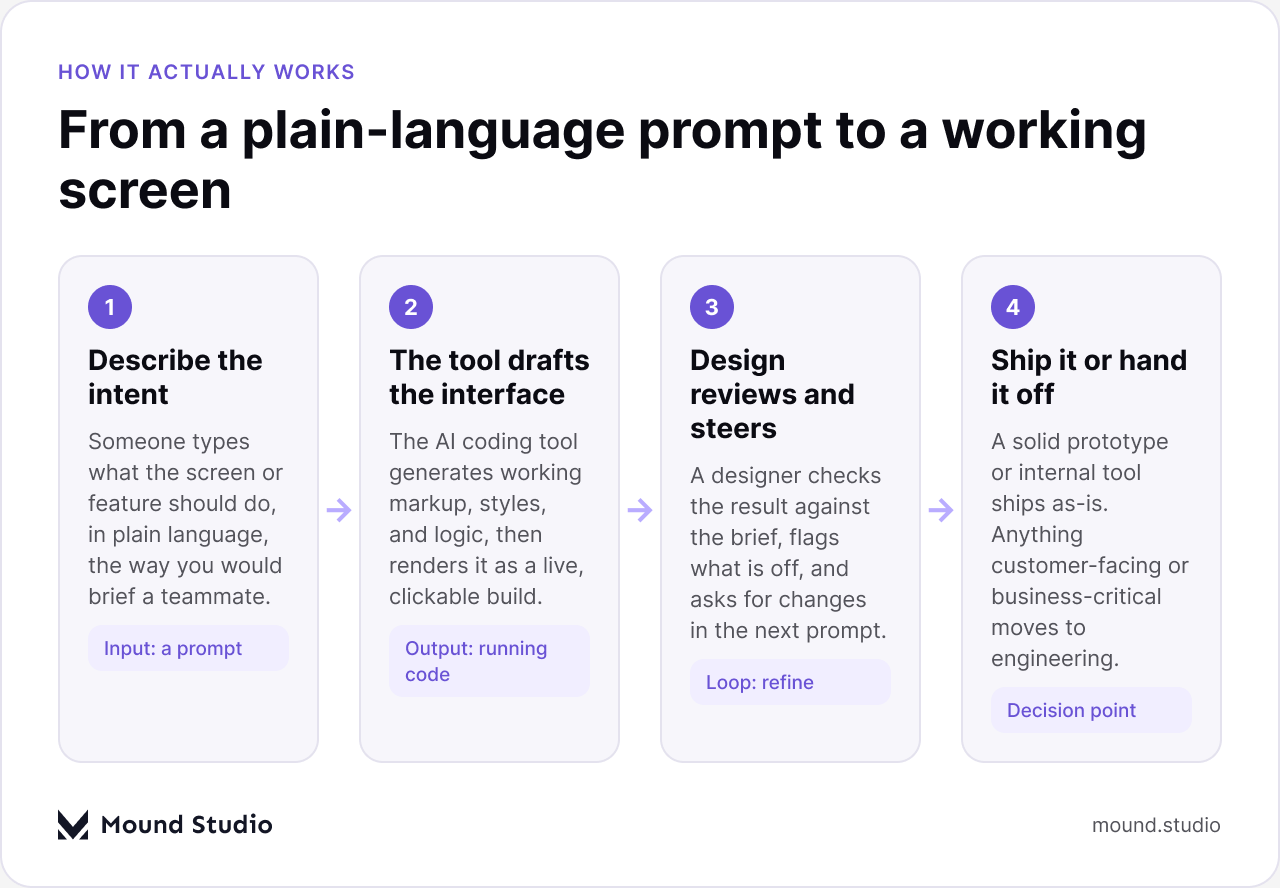
Someone writes what the screen should do, who it is for, and what it should look and feel like. The clearer the brief, the closer the first draft lands. This is the step where design thinking still matters most: a vague prompt gets a generic result, the same way a vague creative brief gets a generic design.
The AI coding tool turns that prompt into working code and renders it as a live, clickable build, not a picture of one. This is the part that used to take a developer hours or days. Now it takes minutes, which is exactly why the practice caught on outside engineering teams.
Someone with a design eye checks the result: spacing, hierarchy, tone of the copy, whether the flow actually makes sense. They ask for changes in the next prompt, the same loop a designer runs with a developer, just faster and with fewer handoffs in between.
A prototype used for user testing, an internal tool, or a marketing page can often ship as-is. Anything that touches customer data, payments, or a production codebase needs to move to an engineering team before it goes anywhere near real users. This last step is the one teams get wrong most often, and we come back to it below.
The short answer: vibe coding is a strong fit for speed and exploration, and a poor fit for anything that has to hold up under real-world load, security requirements, or years of maintenance. The line is not about how "good" the code looks on the surface. It is about what happens if it breaks.
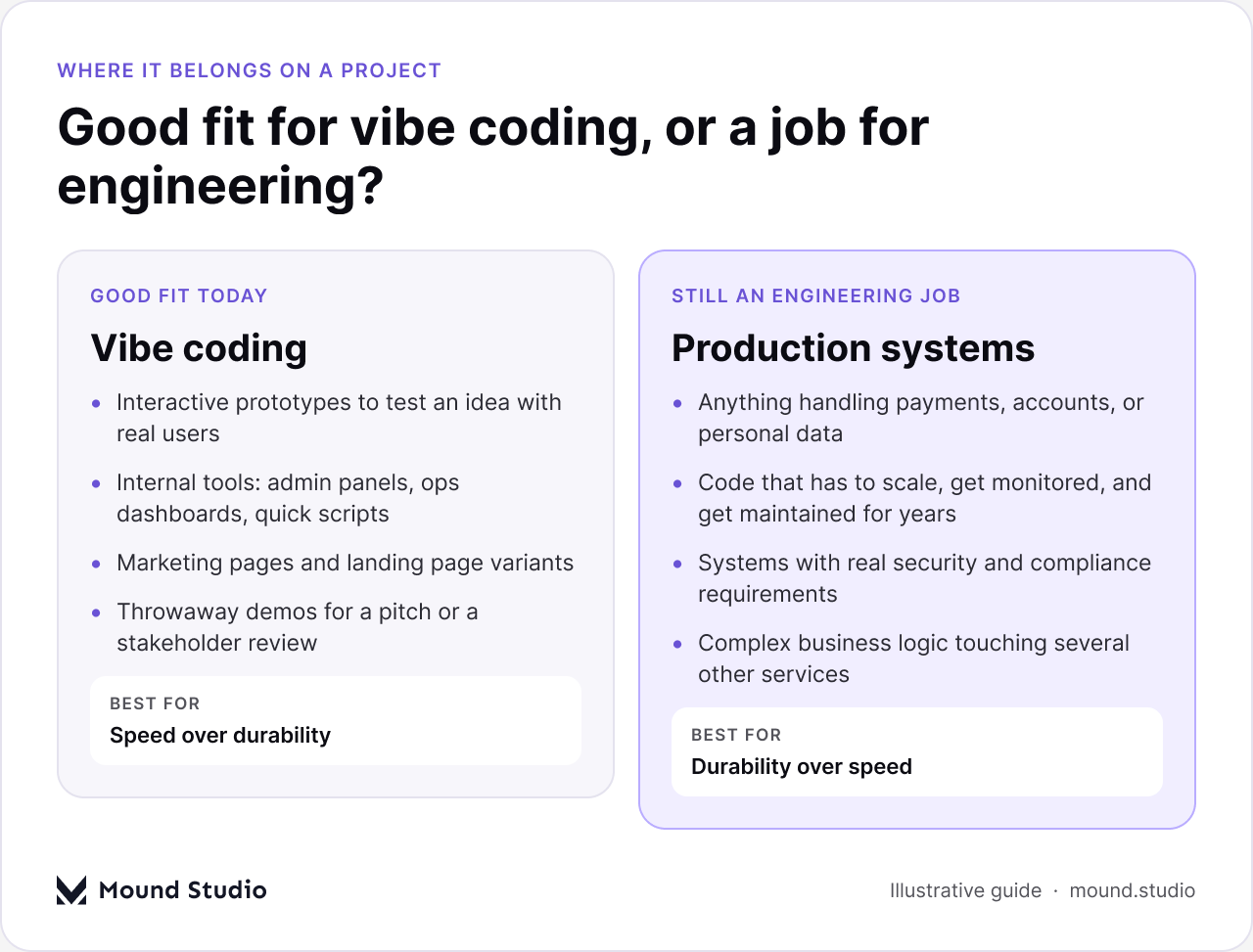
On a typical agency project, we reach for vibe coding when the goal is to test a direction quickly: a clickable prototype for a usability session, a rough internal dashboard so an ops team can stop working from a spreadsheet, or a handful of landing page variants to see which message lands before a campaign goes live. In every one of those cases, the cost of being wrong is low, and the value of moving fast is high.
We do not reach for it when the code has to carry real weight: anything handling payment details or personal data, anything that needs to scale past a handful of users, anything with compliance requirements attached, or any feature that plugs into several other systems at once. That work still needs an engineering team that understands the codebase, writes tests, and takes ownership of what happens after launch. An AI tool can draft a working screen. It does not carry the accountability that comes with a production system, and it will not be the one debugging it at two in the morning.
Design teams already juggle a few ways to turn an idea into something real. Vibe coding is a new entry on that list, not a replacement for the others. Here is how the three usually stack up on an agency project.
| Approach | Best for | Design control | Needs engineering next? |
|---|---|---|---|
| Vibe coding | Prototypes, internal tools, quick marketing pages | High during the prompt-and-review loop | Usually, before anything customer-facing ships |
| No-code / Webflow | Marketing sites, content-driven pages, client-editable sites | High, with a visual canvas built for design work | Rarely, for most marketing and content sites |
| Hand-coding | Production apps, complex logic, anything long-lived | Indirect, through specs and review with developers | This is the engineering step itself |
None of these three replaces the other two. A studio that only offers one of them ends up either over-building simple marketing sites or under-building real products. The useful skill is recognizing, early in a project, which column a request belongs in.
A simple way to sort a request before any code gets written: ask who will see it, and how long it needs to stay alive.
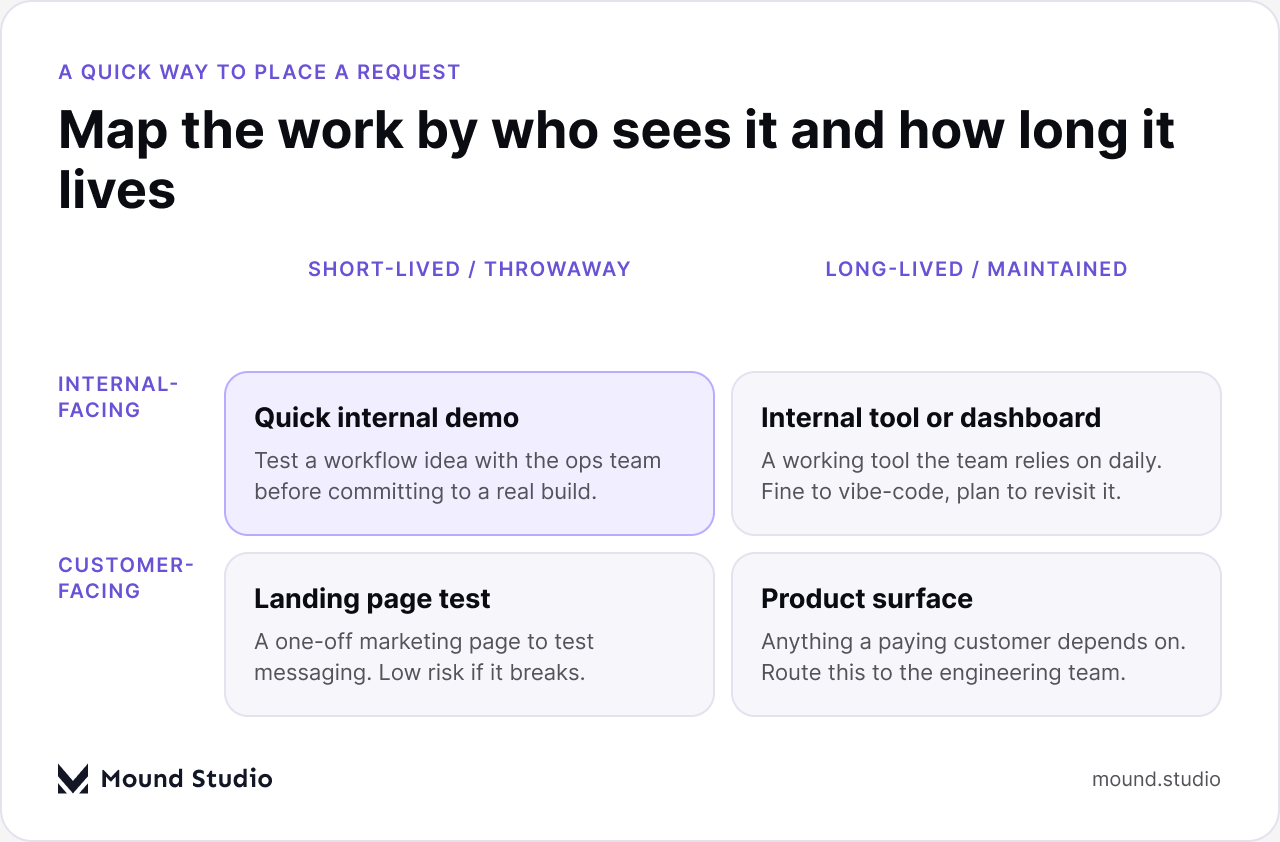
Internal, short-lived work is the easiest yes: a demo for an ops team, a one-off script, a quick way to test a workflow before anyone commits budget to it. Internal, long-lived tools sit a step further out, fine to start with vibe coding, but worth a plan for who maintains it once the team depends on it daily. Customer-facing, short-lived work, like a landing page test, is usually still safe, because the risk of it breaking is low and the fix is quick. Customer-facing, long-lived work is where we stop and bring in engineering, because that is the surface a paying customer is trusting with their time, their data, or their money.
Whoever owns the project should be the one making this call, not whoever happens to be fastest with a prompt. On a project with a client, that usually means a short conversation up front about which parts of the build are exploratory and which parts are the real deliverable, so nobody is surprised later when a prototype needs a second, properly engineered version before launch.
We see the same handful of mistakes across clients experimenting with this for the first time, and almost all of them come from treating a working demo as if it were a finished product.
Before anything built this way goes in front of real users or a client, run it through a short check by phase.
| Phase | What to check |
|---|---|
| Before you prompt | Audience, goal, tone, and any brand or accessibility requirements written down first |
| After the first draft | Layout, hierarchy, copy, and whether it actually solves the brief, not just looks finished |
| Before anyone outside the team sees it | Basic accessibility (contrast, keyboard use), broken states, and mobile behavior |
| Before it goes anywhere near production | Security review, data handling, and a sign-off from an engineering team |
| After it ships | A clear owner for maintenance, even if the owner is "we plan to rebuild this properly later" |
The honest position is that vibe coding is a genuine addition to how a design team works, not a threat to replace either design or engineering. It moves prototyping and internal tooling out of the backlog and into something a client or a stakeholder can click through the same week an idea comes up. That changes how fast feedback loops move, and it changes what a designer can hand over: not just a file, but something running.
What it does not change is who is responsible for what ships to real customers. We treat it as a fast way to explore and to build the tools that support a project, sitting next to the rest of how AI fits into a modern design workflow and alongside the same prompting skills covered in our look at AI prototyping tools for UX designers, not as a shortcut around the decision between custom development and no-code for anything meant to last. Teams that keep that line clear get the speed without the cleanup. Teams that blur it usually end up rebuilding the same feature twice: once fast, and once properly.
For a studio, that also means being upfront with clients about which parts of a project were vibe-coded and which parts went through a full design and engineering process. Clients rarely mind a fast, rough prototype. They do mind finding out later that something they thought was production-ready was never meant to be.
Vibe coding is a real, useful addition to a design team's toolkit for prototypes, internal tools, and marketing pages, and it is not a substitute for an engineering team on anything that has to hold up in production. The skill worth building is not prompting. It is knowing, quickly, which side of that line a request sits on. If you want a second opinion on where a project of yours falls, talk to us.
It means describing what you want in natural language and letting an AI coding tool generate the actual working code, while a person reviews the result and asks for changes instead of writing every line by hand.
Yes, for prototypes, internal tools, and marketing pages. The skill that matters most is still design judgment: writing a clear prompt and knowing what to check in the result, not knowing a programming language.
Not on its own. It is fine for prototypes and low-stakes internal tools. Anything handling customer data, payments, or business-critical logic needs an engineering team to review and maintain it before it goes live.
No. It changes what happens before engineering gets involved, by making it faster to test an idea, but production systems still need people who can build, secure, and maintain code over time.
Start with prototypes and internal tools, be clear with clients about what is exploratory versus production-ready, and keep a standing point where engineering reviews anything before it reaches real customers.


.png)


