








.avif)
.avif)
.avif)

Webflow
Webflow vs WordPress in 2026: Which Should You Choose?
"Should we go no-code or custom?" sounds like a technology decision. It is really a question about what your product needs to do, who will maintain it, and how fast you need to move. Get those three right and the tool follows.
We build both, so we have no reason to push one. This guide explains when no-code is the right call, when custom code earns its cost, how the hybrid setup works, and how to decide with five questions and a short checklist.
Choose no-code, such as Webflow, when you are building a marketing site, blog, or landing pages that your team edits often. Choose custom development, such as React or Next.js, when you are building software with accounts, roles, billing, deep integrations, or heavy scale. Many companies use both: a no-code marketing site and a custom product behind the login.

Tools like Webflow are a strong fit when:
For many companies, this is all they ever need. Choosing custom code for a five-page brochure site is like buying a truck to carry groceries. It works, but you pay for capacity you never use.
More than most people expect. A Webflow site can run a CMS with hundreds of entries, animated interactions, gated content through integrations, forms that send data to your CRM, and custom code for small extras. The limit is not features. The limit is application logic: things that depend on who is logged in and what is stored about them.
The limits show up in a few predictable places. Complex filtering across large data sets can get awkward. Logic that changes what a page shows for each visitor needs workarounds. Very custom back-end workflows, such as multi-step approvals, usually end up in a separate tool. None of this is a flaw. It is the trade you make for speed and easy editing. Know where the edges are before you commit, and you will rarely be surprised.
Custom code makes sense when one or more of these is true.
If you are planning a software product, our guide to SaaS MVP development shows how to keep the first version small while still building on a solid base.
Writing the code is the visible part. Around it sits a lot of work that no-code platforms quietly handle for you. Someone sets up hosting and deployment. Someone monitors errors and applies security updates. Someone reviews changes before they go live and keeps a staging copy for testing. Someone owns the database and its backups.
If you have an engineering team, this is normal work and it pays off. If you do not, budget for it or hire a partner who will carry it. A custom build with no owner is the fastest way to end up with a product nobody dares to touch. For a look at how hosting and speed differ on the no-code side, see our Webflow site speed guide.
| Factor | No-code | Custom |
|---|---|---|
| Speed to launch | Fast for content-driven sites | Slower upfront, fewer ceilings later |
| Flexibility | Guardrails that help until you outgrow them | Almost no limits |
| Maintenance | Platform handles much of it | Someone must own updates, monitoring, and deployment |
| Cost over time | Cheaper to start | Can be cheaper at scale |
| Who can ship changes | Designers and marketers | Engineers, with review and a pipeline |
Notice that neither column wins every row. That is the point. The right answer depends on which rows matter most for your project.
You do not have to pick one for everything. A common setup is a Webflow marketing site for speed and easy editing, plus a custom-built product, on something like React or Next.js, behind the login. The marketing team moves fast, and the engineers own the app.

A shared design system is what makes two separate builds feel like one product. If you have not built one yet, read what a design system is and why it pays off.
Here is a scenario we see often, described as typical practice rather than one specific client. A small software company has a working product and a dated website. The marketing team wants to publish pages weekly. The engineers want to stay focused on the app.
The result is two teams that stop blocking each other. The marketing team ships a new landing page in an afternoon, and no engineer is pulled off product work to do it.
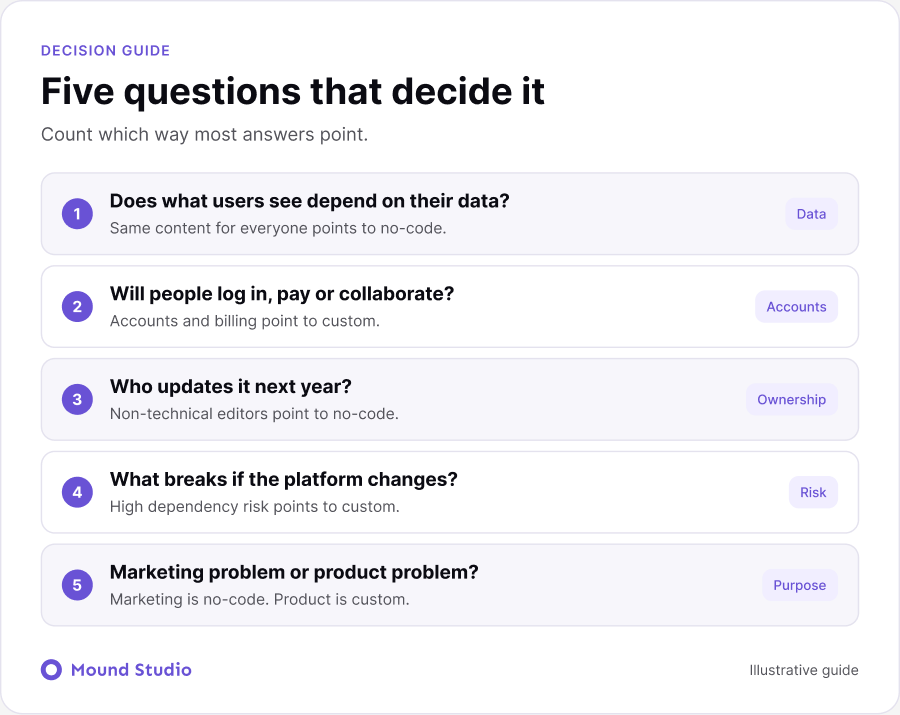
If most answers point to content and marketing, start no-code. If they point to accounts, data, and logic, plan for custom.
| What you are building | Usual fit | Why |
|---|---|---|
| Company website or blog | No-code | Content and design matter most |
| Landing pages for campaigns | No-code | Fast to build, easy to test |
| Online course or member area | Depends | Simple gating can work, complex access needs code |
| SaaS dashboard | Custom | Accounts, data, and permissions |
| Marketplace or booking system | Custom | Payments, matching, and real-time state |
| SaaS with a public website | Hybrid | Marketing speed plus product control |
Starting no-code does not lock you in. Plan the exit early and it stays cheap.
Most teams never need the full move. They add a custom product next to the site, which is the hybrid setup above. If cost is part of the question, our guide to SaaS website design cost explains what drives the price of the public side.
Most of them come from deciding too early, with too little information. A team picks a tool because a competitor uses it, or because one developer prefers it. Then the project grows in a direction nobody planned for. The fix is simple. Before choosing, write down what the product must do in its first year, what it might do in its second, and who will be responsible for it. Then pick the option that handles the first year cleanly and leaves the second year possible. You do not need to solve every future problem. You only need to avoid closing doors you will want open. Involve the people who will use the tool every day. Editors and engineers see different problems, and both views matter. Review the decision every six months. A short check-in costs an hour and can save a rebuild.
Whoever builds it, ask questions that reveal how they think about the long term.
A good partner answers plainly and admits trade-offs. Be cautious of anyone who recommends one approach for every project. If you are also weighing a content platform, how to choose a CMS covers the questions worth asking there.
If you are also comparing website platforms, our guides to Webflow vs WordPress and Webflow vs Framer cover the no-code side in more detail.
No-code is not a shortcut, and custom is not a status symbol. Match the tool to the job, and be ready to change the answer as the product grows.
Deciding between the two for your project? Tell us what you are building and we will point you to the simplest option that will hold up.
Webflow is built for websites and content. Product logic such as accounts, permissions, and billing usually needs custom code, so many SaaS teams use Webflow for the marketing site only.
It costs more to start. At scale it can cost less, once you stop working around platform limits.
Yes. Many teams keep their marketing site in Webflow and build the product separately. Plan a shared design system so the move stays smooth.
A hybrid setup uses a no-code site for public pages and custom code for the product behind the login. Each side uses the tool that suits it.
The platform handles hosting and security. Your team edits content and manages integrations. Custom projects need an engineer or agency to own updates and deployment.

.png)


