








.avif)
.avif)
.avif)

Website
Custom Web Development vs No-Code in 2026: How to Choose the Right One
A SaaS MVP, or minimum viable product, is the smallest working version of your software that solves one real problem for real users. It is not a rough prototype and it is not a cut-down copy of a finished product. It is a focused first release that lets you learn what people want before you invest in everything else.
The point is learning. Every feature you add before launch is a guess. An MVP replaces guesses with evidence, and it does that while changes are still cheap.
This guide walks through how we plan, design, and build a SaaS MVP in seven steps. It covers how to decide what goes in, which build approach fits, how to measure whether it worked, and the mistakes that cost founders the most time.
Founders usually want to launch something complete. Shipping less feels risky, and every stakeholder has one more feature that seems essential. But the longer you build in private, the more you assume, and the more you have to undo when real users behave differently than expected.
A smaller first release gets feedback sooner and costs less to change. The risk of launching too little is small. The risk of building the wrong thing for six months is not.
The seven steps below fit into four stages: understand the problem, define the core flow, prototype it, then build and learn. The visual shows how they connect.
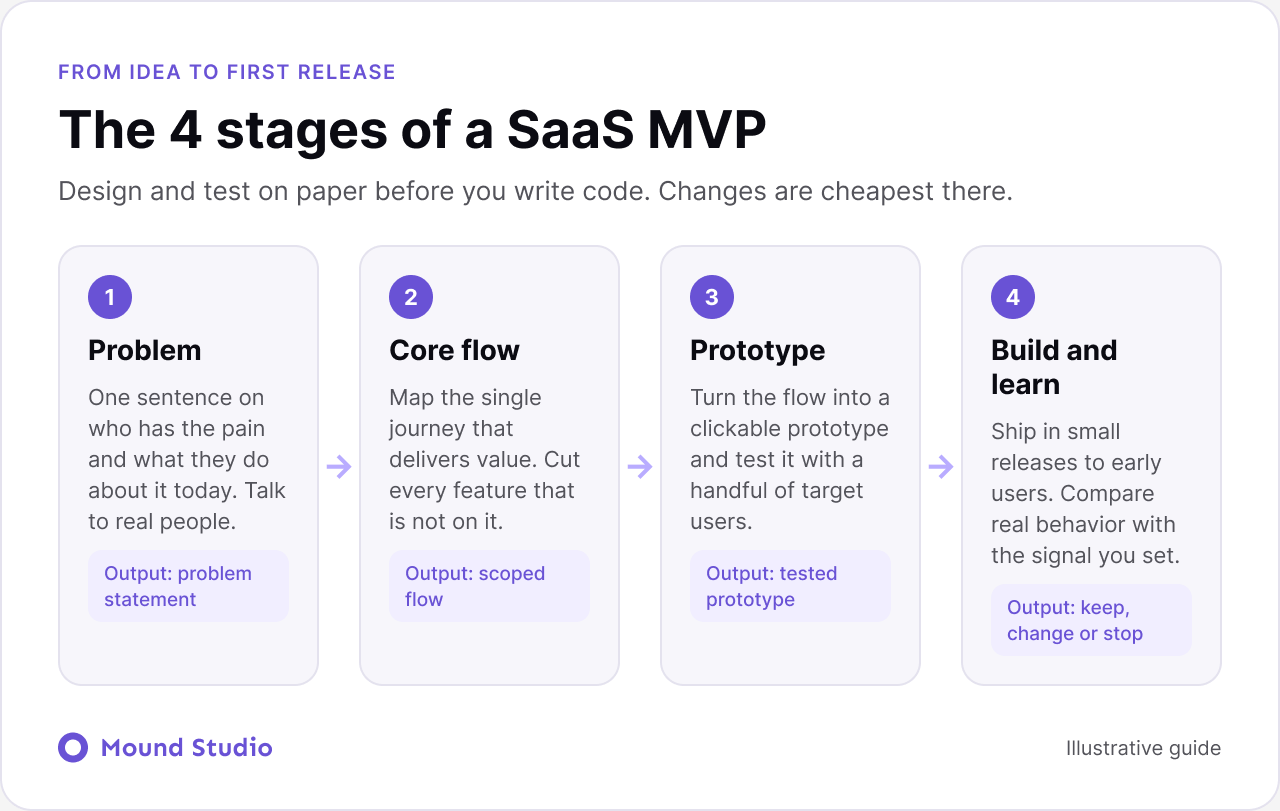
Write one sentence: "We help [specific person] do [specific job] without [specific pain]." If you cannot fill it in, the idea needs more thought before any design or code. Talk to people who have the problem. Ask how they handle it today, what they use, and what annoys them. Their current workaround is your real competitor, even when it is a spreadsheet.
Every product has one journey that delivers its value. A user connects data and sees a report. Or books a service. Or sends an invoice. Map that flow end to end, from the first click to the moment the user gets the result. This becomes the heart of your MVP, and everything else has to justify its place next to it.
List every feature you can think of, then sort each one by two questions. Does the core flow need it? How hard is it to build? The matrix below is the tool we use in scoping workshops.

Only the top row goes into the first release. Things like advanced settings, many user roles, and deep integrations can usually wait. If a feature makes you say "but some users will expect it," ask which users, and whether they are the ones you are trying to learn from.
Sketch the flow, then turn it into a clickable prototype in Figma. Test it with a handful of people from your target group. Ask them to complete the core task without help and watch where they hesitate. Changing a prototype takes hours. Changing shipped code takes days. Good UX work at this stage saves a lot of development time.
The design steps follow the same order we describe in our mobile app design process, and the same logic applies to web products.
Match the tool to the product, not to a trend. Each option has a place.
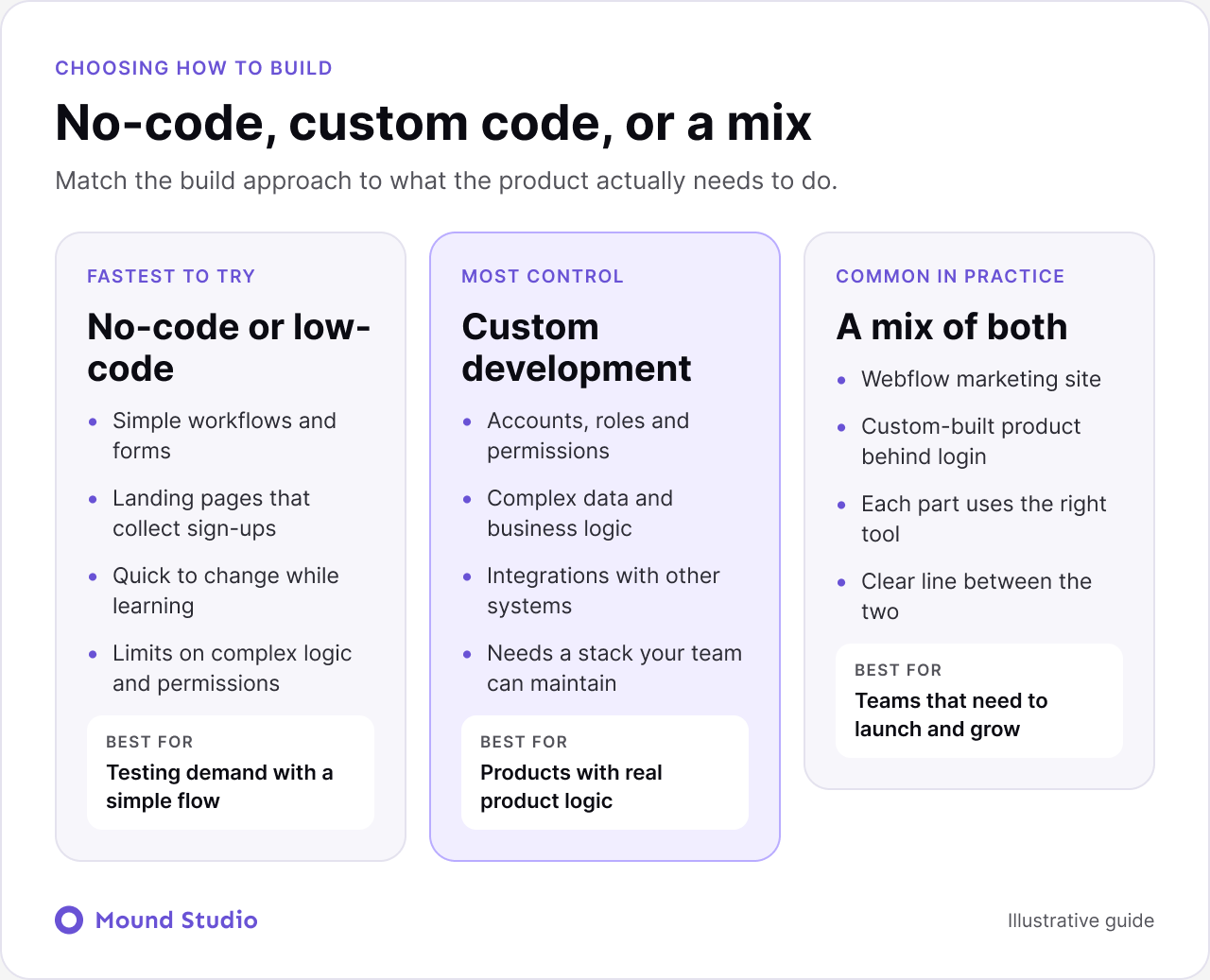
| Approach | Works well for | Watch out for |
|---|---|---|
| No-code or low-code | Simple workflows, internal tools, sign-up pages, quick tests of demand | Limits on complex logic, permissions, and data volume |
| Custom development | Accounts, roles, data, integrations, and real product logic | More time and a stack your team must maintain |
| A mix | A Webflow marketing site plus a custom-built product | Keeping design and behavior consistent across both parts |
We cover the trade-offs in more depth in custom development vs no-code. Pick a stack your team can maintain, and avoid choices that lock you in before you know what you need.
Ship the core flow first, then add pieces in short cycles. Release to a small group of early users, watch how they use it, and fix what confuses them. Resist adding features to please one loud opinion. One request is a signal to note, not a reason to build.
Before launch, decide what success looks like. After launch, compare real behavior to that. Then choose one of three paths: keep going, change direction, or stop. Stopping early is a valid result. It costs far less than finding out later.
| Signal | What it tells you | How to check |
|---|---|---|
| Users finish the core flow | The product delivers its main value and is understandable | Track completion of the key steps |
| Users return the following week | The problem repeats and the product helps again | Compare first-time and returning sessions |
| Users ask for a feature you planned | Your roadmap matches real needs | Tag and count feedback and support messages |
| Users leave at the same step | A specific part of the flow is broken or unclear | Watch recordings and funnel drop-off |
The first few users teach you more than any survey. A little structure makes those sessions far more useful.
About five sessions will show you the main patterns. If three people stall at the same step, that step needs work before you add anything new. If nobody stalls but nobody returns either, the problem may be the idea, not the design.
Keep the first release narrow. This table works as a scoping checklist for most SaaS products.
| Area | Include in version one | Leave for later |
|---|---|---|
| Accounts | Sign-up and sign-in | Many roles and detailed permissions |
| Core flow | The main journey, end to end | Side features and rare cases |
| Onboarding | A short guide to the first result | Long tours and tutorials |
| Feedback | A simple way to tell you what is wrong | A full community or help center |
| Data | Basic analytics on key steps | Detailed reports and dashboards |
| Settings | The few that affect the core flow | Deep customization and integrations |
Here is a made-up example, to show the thinking. A founder wants to build software for small clinics to manage appointment reminders. The list of ideas is long: calendar sync, patient portal, billing, reports, staff roles, and text reminders.
The core flow is simple: a clinic uploads its appointments and patients get a reminder. That is the value. So version one covers upload, reminder sending, and a basic view of which reminders went out. Calendar sync, the portal, billing, and reports wait until clinics show they use the core flow. The founder can now test the idea with a handful of clinics instead of building for a year first.
The pattern is what matters, not the industry. Find the one journey that delivers value, and put your first effort there.
It depends on the scope and how quickly decisions are made. A tightly scoped MVP moves much faster than one that keeps growing. Three things stretch a timeline more than the code itself: unclear scope, slow feedback from stakeholders, and changing the core flow halfway through. The best way to keep the timeline short is to keep the first release small, and to decide quickly when questions come up.
A tested prototype is not yet a build plan. Before development starts, tidy the files so the team does not have to guess. Name screens clearly, show the empty, loading, and error states for each one, and mark which parts are reusable components. Write down how the product should behave on a small screen, and note any rules that are not obvious from the picture, such as what happens when a form fails.
A short call between designer and developers also helps. Ten minutes of walking through the core flow prevents days of rework. Our Figma developer handoff checklist lists what to include, and it applies to an MVP as much as to a large product.
Many founders skip this step because it feels slow, yet it is the cheapest part of the project. Aim for short, plain conversations with people who have the problem.
After a handful of conversations, patterns appear. The pattern tells you which problem is worth solving first, and that shapes the core flow you choose in step two.
Build the MVP if:
Pause and do more research if:
If the second list sounds like you, a short round of interviews and a clickable prototype will teach you more than code will. Many products at this stage also need a shared visual base early, and a design system with a few core components keeps the first version tidy as it grows.
Once early users have tried the core flow, you will have real information. Sort what you learned into three groups: things that block the core flow, things that would deepen it, and new ideas. Fix the blockers first. Add depth next. Leave new ideas in a list until they show up more than once.
Two areas usually need attention soon after. The first is onboarding, since a first-time user needs to reach the first result quickly. Our guide to SaaS onboarding UX shows how to plan that path. The second is the wider product experience, which our SaaS UX design best practices guide covers. If people also need to find you, a focused SaaS landing page helps the right users arrive with the right expectations.
Build the smallest thing that proves your idea, design the core flow carefully, and let real users guide what comes next. An MVP is a way to learn cheaply, not a reduced version of the final product.
Have a SaaS idea and want to plan a focused first version? Tell us about it and we will help you scope what to build first.
MVP stands for minimum viable product: the simplest version of your software that lets real users get value and lets you learn from them.
As few as it takes to solve one core problem well. If a feature is not needed for the core flow, it can wait for a later release.
It depends on the product. No-code works for simple workflows and quick tests. Products with accounts, permissions, and complex logic usually need custom development. Many teams use a mix.
Decide the signal before you launch: people finishing the core flow, coming back the next week, or asking for a feature you planned. Then compare it with real usage.
Yes, at least a clickable prototype of the core flow. Testing it with a few target users is the cheapest way to find problems before they turn into code.

.png)


