








.avif)
.avif)
.avif)

Website
Custom Web Development vs No-Code in 2026: How to Choose the Right One
Most people asking "Webflow or WordPress?" are really asking three other things. Who will run this site every week? What does it need to do in two years? And how much upkeep are we willing to own? Answer those, and the platform choice usually makes itself.
We build on both, so we have no reason to push one over the other. This guide compares them on the points that decide real projects: design freedom, SEO, speed, maintenance, content, plugins, and cost. It ends with a decision guide and a checklist you can run in ten minutes.
Choose Webflow when design control, speed to launch, and low maintenance matter most. Choose WordPress when you need a large plugin ecosystem, complex content workflows, or full ownership of your hosting and code. Both can rank well, and both can be built badly. The platform matters less than the way the site is planned, built, and looked after.
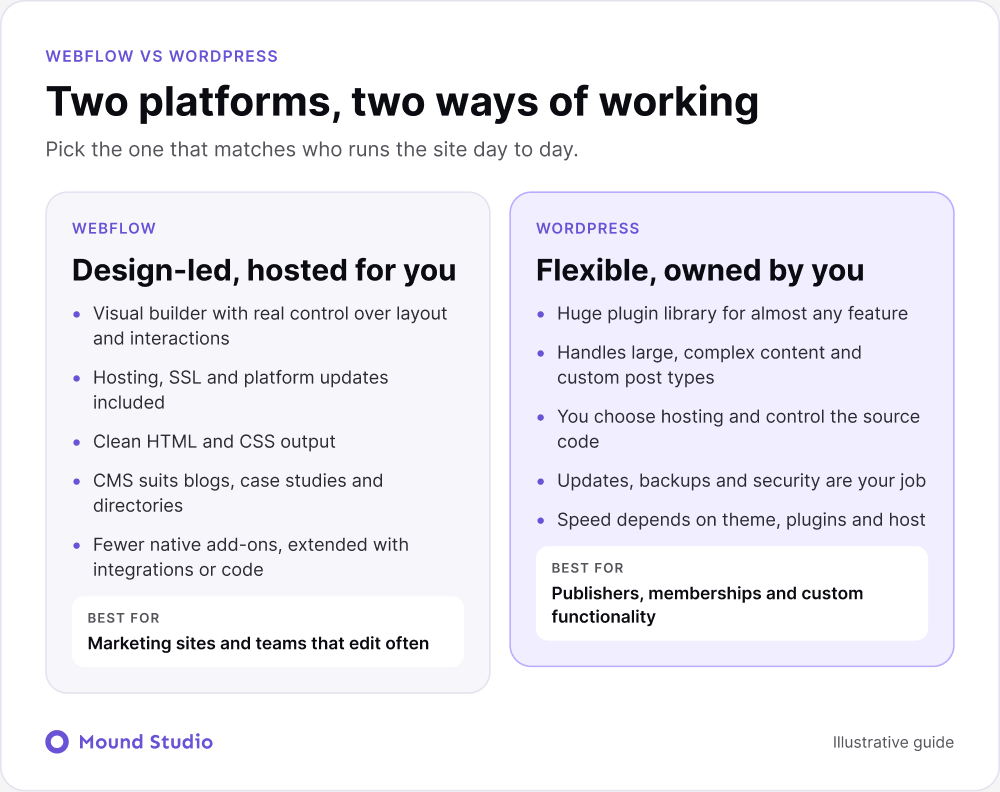
| Area | Webflow | WordPress |
|---|---|---|
| Design control | Visual builder, no template to fight | Depends on the theme or page builder |
| Hosting | Included with the plan | You pick and manage a host |
| Maintenance | Handled by the platform | Updates, backups, and security are yours |
| Extending it | Integrations and custom code | Thousands of plugins |
| Complex content | Good, with limits on very large sets | Excellent, with custom post types |
| Best team fit | Designers and marketers | Developers and publishers |
Webflow lets designers build custom layouts visually, with real control over spacing, interactions, and responsive behavior. There is no template to fight, and the output is clean HTML and CSS. What you design in Figma is usually what ships.
WordPress can look just as good, but the route matters. A custom theme gives you a lot of freedom. A ready-made theme plus a page builder plus a stack of plugins often gives you a heavier site that is harder to fine-tune. When a WordPress design feels stuck, the cause is usually the theme, not the platform.
Ask this before you decide: does your brand need a layout that no template offers? If yes, Webflow or a custom WordPress theme both work. If a template is fine, WordPress has plenty.
Neither wins on the platform alone. Both let you control titles, meta descriptions, URLs, redirects, image alt text, and schema. Webflow includes most of this out of the box. WordPress gets there through plugins such as Yoast or Rank Math.
Rankings depend far more on content quality, site structure, internal links, and page speed than on the platform. If you want to write for AI assistants as well as search engines, read our guide to optimizing your website for AI search. The same habits work on both platforms.
Webflow sites are hosted for you on a global CDN, which gives a solid baseline. WordPress speed depends on your hosting, theme, and plugins. A well-built WordPress site can be very fast. A neglected one with twenty plugins usually is not.
On both platforms, the biggest speed problems come from the same places: oversized images, heavy scripts, and too many third-party tools. We cover the fixes in our guide to Webflow site speed optimization.
Picture a marketer who publishes one article and updates one landing page each week. On Webflow, she opens the editor, changes the text, checks it on a phone view, and publishes. Nothing else needs her attention. On WordPress, she does the same edit, and then someone also needs to check whether any plugin or core update is waiting. If a plugin update changes how a form or a layout behaves, the fix may need a developer.
Neither week is bad. The difference is how much of the week belongs to the site itself and how much belongs to keeping the site healthy. Small teams feel that difference most, because there is nobody else to pick up the slack.
This is where the two differ most. Webflow handles hosting, updates, and security for you. WordPress puts those jobs on your side: core updates, plugin updates, backups, and security hardening. If nobody on your side owns that work, it gets skipped, and skipped updates are how sites get hacked.

A quick test: name the person who will update WordPress plugins every month. If you cannot name someone, budget for a maintenance plan, or lean toward Webflow.
If you choose WordPress, plan for a routine and write it down. A sensible one includes these jobs:
None of this is difficult. It is easy to forget, and that is the point. A named owner and a calendar reminder turn a risk into a habit.
Webflow's CMS is easy for marketing teams to edit, and it works well for blogs, case studies, team pages, and directories. It has limits on very large or highly related content, such as tens of thousands of entries with complex relationships.
WordPress handles large, complex content structures and custom post types very well. That is why publishers, magazines, and big content sites stay on it. If your site is mostly a library of articles with many editors and approval steps, WordPress is often the more natural home.
Consider two typical projects. The first is a design-led services company with eight pages, a blog and a case study section. It wants a distinctive look and a marketer who can edit without help. Webflow fits well: the layout is custom, the CMS is small and flat, and nobody needs to think about hosting or updates.
The second is an independent publisher with a large archive, many contributors, paid memberships and a need for editorial approval steps. WordPress fits better here. Custom post types, mature membership plugins and user roles are already solved problems on that platform, and the team has developers who can own the hosting.
The same questions sorted both projects: who edits, how complex is the content, and who owns upkeep. When you answer them for your own site, the choice tends to be clear.
WordPress has an enormous plugin library, and almost anything you need already exists. Webflow has fewer native options, but it connects with most tools through integrations, automation tools, or custom code. For memberships, complex e-commerce, or specialized workflows, WordPress tends to have more ready-made answers.
More plugins are not always better. Each one adds code, update work, and a possible point of failure. The best WordPress sites use a short, deliberate list.
Webflow charges a hosting plan, often with a CMS or workspace plan on top. WordPress software is free, but you pay for hosting, premium plugins, and ongoing maintenance. Over a few years the totals can be closer than people expect, so compare total cost of ownership rather than the sticker price.
| Cost item | Webflow | WordPress |
|---|---|---|
| Software | Included in the plan | Free core, paid themes and plugins |
| Hosting | Part of the site plan | Separate, varies by host |
| Updates and security | Platform handles it | Your time or a maintenance plan |
| Design and build | Visual build, faster to iterate | Theme setup or custom theme work |
| Changes later | Editors and designers can do it | Often needs a developer |
Year one hides most of the difference. Look further ahead and think in categories. With Webflow, expect the site plan, any extra seats, and design or development help when you change the structure. With WordPress, expect hosting, premium theme or plugin licenses, maintenance time, security tooling, and developer help for updates and fixes.
Neither list is short. What changes is who does the work and how often it is billed. If you have in-house developers who enjoy WordPress, the ongoing cost may be small. If you would hire outside help every time something breaks, the ongoing cost can pass the build cost. For a wider view of design and build budgets, our guide on how much UI/UX design costs explains what goes into the price.

A short brief saves a lot of back and forth. Before you speak to an agency or freelancer, gather these items:
Good builders will ask about all of these anyway. If the theme or page builder question is still open on the WordPress side, our comparison of a custom WordPress theme vs a page builder helps, and the wider question of picking a content system is covered in how to choose a CMS.
Yes. Many teams start on one platform and move as their needs change. The move works best when you plan the URL map first, migrate the content, set up 301 redirects, and check the new site before switching over. Our guide to moving from WordPress to Webflow walks through the steps. If you are also weighing other builders, see Webflow vs Framer.
Pick based on who will run the site day to day and what it needs to do in two years, not on which platform is trending. A good build on either beats a rushed build on the "right" one.
Not sure which fits? Tell us about your project and we will give you a clear recommendation, even if it is not what we sell most.
Neither wins on the platform alone. Both give you control over titles, meta descriptions, URLs, redirects, and schema. Rankings depend far more on content, structure, and speed.
Not always. WordPress is free software but needs hosting, plugins, and maintenance. Webflow bundles hosting into its plans. Compare the total cost over a few years.
Webflow is usually easier for non-technical editors, because content and design live in one visual place. WordPress works well too, especially with a well-built theme and a clear editing setup.
Yes. Plan the URL map first, migrate the content, and set up 301 redirects so rankings carry over.
Webflow handles security at the platform level. WordPress can be very safe, but only when updates, backups, and hardening are kept up by someone who owns the job.


.png)


