








.avif)
.avif)
.avif)


Website
Is Framer Good Enough For A Business Website?
A complete Framer handoff gives the client's team everything they need to run the site without calling a developer for routine changes: CMS access and a walkthrough of how content is structured, a style guide and component reference, a clear picture of the staging-versus-published workflow, written notes on any custom code, and transferred ownership of the domain, DNS, and the Framer plan itself. Skip any one of these and the client ends up stuck waiting on an agency for things they should be able to do themselves.
The rest of this guide walks through each piece of that handoff, what belongs in it, who should own updates going forward, the mistakes that come up most often, and a checklist you can run through before calling a project closed. None of this is specific to one tool, but Framer's split between a visual canvas and a CMS layer makes the handoff worth spelling out clearly, since it's easy for a client to come away from launch knowing how the site looks without knowing how it actually works behind the scenes.
A handoff isn't a single email with a login attached. It's a short sequence of steps that moves ownership from the agency to the client without anything breaking in between.
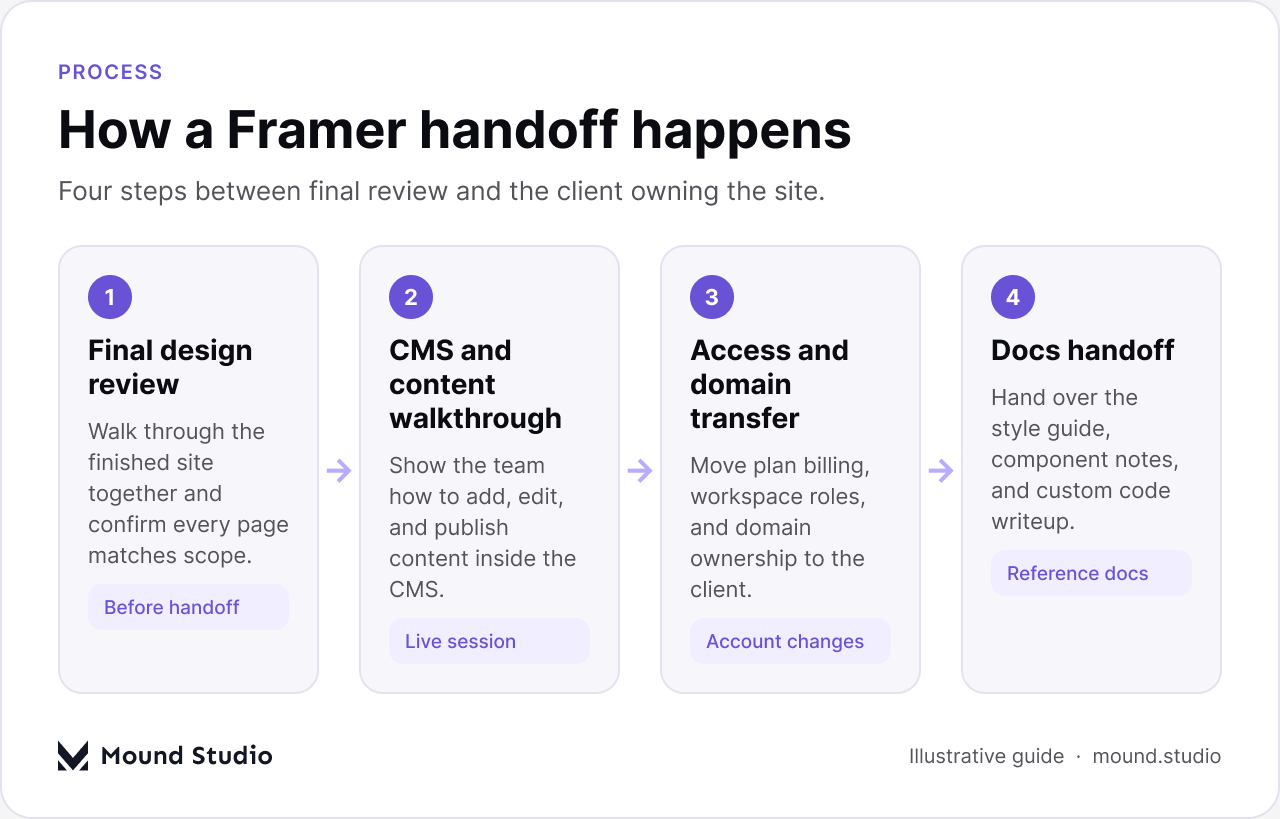
Each of those steps matters on its own, but the order matters too. Transferring the domain before the client understands the CMS just means a confused client owns a site they don't know how to update. Walking through content first, then handing over accounts, keeps the handoff calm instead of rushed.
Beyond the big four (CMS, style guide, workflow, access), there's a longer list of smaller things that make the difference between a client who feels confident and one who emails the agency every week.
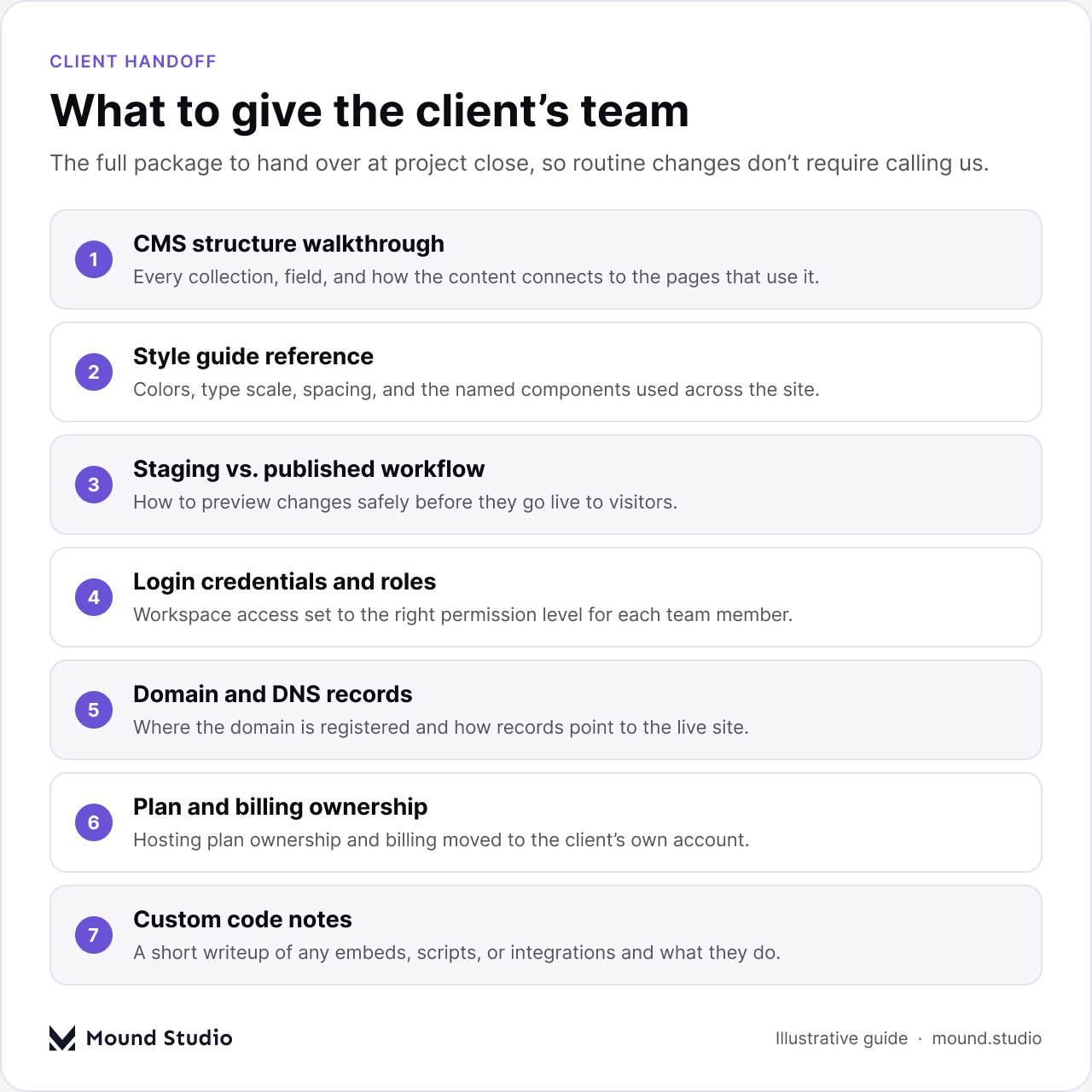
None of these take long to put together if they're planned from the start of the project. They take a lot longer to reconstruct after the fact, which is why we treat handoff documentation as part of the build, not an afterthought tacked on at the end.
Most client confusion after launch isn't about design — it's about not knowing where content lives. A short, structured walkthrough fixes most of that in one session.
If the client's team includes more than one person who will touch the CMS, it's worth running the walkthrough with all of them in the room. A single point of contact who later leaves the company is a common reason sites stop getting updated.
A style guide isn't a design deliverable that gets filed away after launch — it's the reference that keeps a client's own edits consistent with the rest of the site. Without one, a client adding a new page tends to reach for whatever font size or color looks close enough, and the site slowly drifts away from its original design.
| Style guide item | Why the client needs it |
|---|---|
| Color palette with names | Keeps new sections on-brand without guessing at hex values |
| Type scale | Shows which heading level to use for which kind of content |
| Spacing rules | Prevents cramped or uneven sections on new pages |
| Component list | Shows what's already built and reusable before building something new |
| Image guidelines | Keeps photography and illustration style consistent over time |
The component reference doesn't need to be a polished document. A short page showing each reusable section, what it's for, and when to use it is usually enough for a client team that isn't designing from scratch — they're assembling pages from parts that already exist. Naming matters more than it seems: a component called "Hero — dark" is something a client can find again in six months, while one called "Group 42" is not. Clean names in the component list are a small thing that saves real time later.
Framer separates what's being edited from what visitors actually see, and this is one of the most misunderstood parts of a handoff. Clients who don't understand the difference either publish half-finished changes by accident or are afraid to touch anything at all.
The walkthrough should cover, plainly: where changes are previewed before they go live, how to generate a shareable preview link for internal review, what "publish" actually does, and how to tell at a glance whether a page has unpublished changes sitting on it. This is also the moment to agree on a simple internal rule — for example, nothing gets published without a second person checking it first, or published changes are limited to specific days. The rule matters less than the client's team agreeing on one and sticking to it.
Almost every project ends up with a few lines of custom code somewhere — an embed, a script for a form integration, a small interaction that isn't native to the page builder. None of it is obvious to someone reading the page later without context.
A short written note for each piece of custom code should answer three questions: what it does, where it lives (which page, which component, head or body), and what happens if it's removed. That's often one paragraph per snippet, not a technical document. The goal isn't to teach the client to read code — it's to stop a future developer, possibly at another agency, from deleting something load-bearing because nobody explained what it was for.
This is the question every handoff eventually has to answer, and getting it wrong in either direction causes problems. Draw the line too narrow and the client calls a developer for things they could do themselves. Draw it too wide and they break something they weren't equipped to fix.
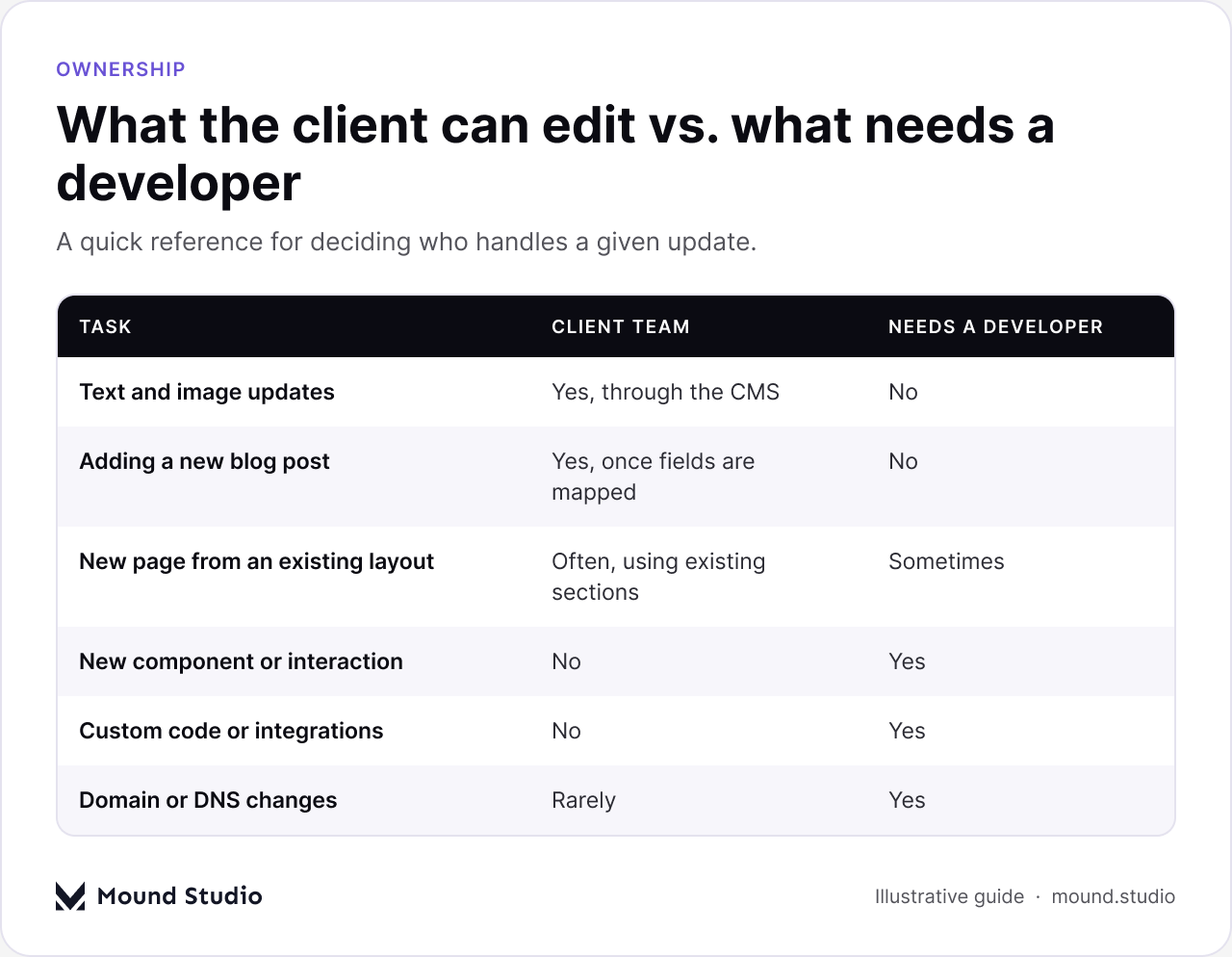
As a general rule, anything that happens inside the CMS — text, images, adding new items to an existing collection — belongs to the client. Anything that changes the structure of the site — new page types, new interactive components, custom code, integrations — belongs with a developer. The table below breaks that down further.
| Update type | Typical owner | Reason |
|---|---|---|
| Editing existing page copy | Client | Pure content change, no structural risk |
| Publishing a new blog post | Client | CMS fields are already mapped to the layout |
| Reordering sections on a page | Client, with care | Possible if sections are modular and documented |
| Adding a new interactive component | Developer | Requires building and testing a new pattern |
| Changing DNS or domain settings | Developer | Mistakes here can take the whole site offline |
This part of the handoff is less visible than the design work, but getting it wrong is what actually breaks a site after launch. Three things need to move cleanly to the client:
None of this needs to happen on launch day. It's reasonable to keep the agency's access in place for a short transition window while the client gets comfortable, as long as there's a clear, agreed date when ownership fully moves over. A handoff with no end date tends to never actually finish.
It's also worth documenting what happens to the old site, if there was one. Redirects from old URLs to their new equivalents need to be checked, not assumed, and any email service tied to the domain needs its own records confirmed separately from the website's. A domain transfer that quietly breaks a client's email is a worse first impression than almost anything else on this list.
Most handoff problems come from skipping a step under deadline pressure, not from a lack of care. The usual ones are worth checking for specifically before calling a project closed.
| Mistake | What it causes | How to avoid it |
|---|---|---|
| No written CMS reference | Client forgets the live walkthrough within weeks | Leave a short written or recorded reference behind |
| Domain stays on the agency's account | Site can go offline if the relationship ends | Transfer registration to the client before closing out |
| Custom code with no notes | A later developer removes something working by mistake | Write one paragraph per snippet explaining its purpose |
| Only one person trained on the CMS | Site updates stop when that person leaves | Train everyone who will realistically touch the CMS |
| No agreed publishing rule | Half-finished changes go live by accident | Agree on a simple review step before publishing |
Most of these are cheap to prevent and expensive to fix later. A single written reference document covers more of this list than any individual training session does, because it's still there after the memory of that session has faded.
Before closing out a Framer project, it's worth running through a short, final list rather than trusting memory:
If every item on that list is checked, the project is actually done — not just launched. A site that's live but poorly handed off tends to come back to the agency anyway, just later and with more frustration attached. Some agencies also set a short, defined support window after handoff — a few weeks where quick questions are still answered directly — which gives the client a safety net while the new workflow settles in, without turning into open-ended free support.
A related question worth settling at the same time is whether Framer was the right fit for the project in the first place, since that shapes how much of the handoff depends on custom work versus built-in CMS structure. If the project started from a clear website design brief, the handoff is usually simpler too, since ownership and scope were already defined before the build began.
A Framer handoff is finished when the client can run the site day to day without needing an agency on call for routine changes: they know the CMS, they have a style guide to stay consistent, they understand staging versus published, custom code is documented, and they own their own domain, DNS, and plan. If you're planning a Framer project and want the handoff built in from the start rather than rushed at the end, get in touch with our team.
A Framer handoff should include CMS access and training, a style guide and component reference, an explanation of the staging-versus-published workflow, written notes on any custom code, and transferred ownership of the domain, DNS, and the Framer plan.
Yes, for anything inside the CMS — text, images, and new items in an existing collection. Structural changes, new components, and custom code still need a developer.
The client should own the domain outright, registered under an account they control. Keeping it on the agency's account is a common reason a site can go offline later over an unrelated billing issue.
Only as long as needed for a short transition window, with a clear, agreed date when access and ownership fully move to the client. An open-ended handoff tends to never fully close.
Staging is where changes are being edited and previewed; published is what visitors actually see. The handoff should make clear how to preview a change safely before it goes live.



.png)


