








.avif)
.avif)
.avif)

Webflow
Webflow vs WordPress in 2026: Which Should You Choose?
Both tools build good websites without hand-written code, and choosing between them is one of the questions we hear most from founders and marketing leads. We build on both, so this guide is written from the practical side: what each tool does well, where each one strains, and how to decide without watching another round of demos.
Choose Webflow when you need control over structure, a CMS with relationships between content types, or a site that several people will edit and grow for years. Choose Framer when you want to launch a polished, design-led marketing site quickly, in a workflow that feels close to a design tool. Neither is better in general. The better one is the one that fits your content, your team and your plan for the next two years.

Webflow is a visual development platform. You work with real HTML and CSS ideas such as classes, flexbox and grid, but through a visual interface. That gives designers a lot of control and also a real learning curve. It has a mature CMS, a large ecosystem of templates and integrations, and years of use on sites of every size.
Framer started as a prototyping tool and grew into a website builder. It feels closer to Figma: you place and style things on a canvas, and it handles much of the layout logic for you. It is known for smooth animation and for getting a good-looking page live fast.
Here is the side by side view we use in discovery calls. It is qualitative. It reflects how we build with both tools, not a lab test.
| Criteria | Webflow | Framer |
|---|---|---|
| Design control | Deep, close to real CSS | Fast, canvas based |
| CMS depth | Relational collections | Simpler collections |
| Learning curve | Steeper, more to learn | Gentler for designers |
| Motion | Capable, more setup | Strong out of the box |
| Team editing | Editor and CMS roles | Familiar to design teams |
| Long-term scale | Proven on large sites | Best for focused sites |

Both can produce beautiful, custom work. Webflow gives you fine-grained control over responsive behavior and structure. You can build a class system, reuse components, and control how every section behaves at each breakpoint. Framer makes it quick to build expressive layouts and motion, and the canvas feels natural if you already design in Figma.
If your design leans on animation and you want to move fast, Framer is appealing. If your design needs strict systems, many templates and reusable structures, Webflow gives you more to work with. If you plan to build a design system for the site, our guide on what a design system is shows what to set up first.
This is often the deciding factor. Webflow's CMS handles collections, references between collections and dynamic pages well. That suits blogs with authors and categories, case studies linked to services, directories and resource libraries. Framer has a CMS too, and it works well for simpler content such as a blog or a set of case studies.
A quick test: sketch your content types on paper. If you have three or more types that point to each other, such as posts, authors, categories and related posts, lean toward Webflow. If you have one or two flat lists, either tool will do.
Take a startup with a home page, a pricing page, an about page and a short blog. In Framer, a designer can often assemble the pages directly on the canvas, add motion, and publish quickly. The work feels like designing, because it is. In Webflow, the same site starts with structure: a class naming system, shared components, and CMS collections for the blog. That setup takes more time at the start. It pays back when a second designer or a new editor joins.
This is typical practice, not a rule. A designer who knows Webflow well can move fast, and a Framer project with many page variations can get complicated. Skill with the tool matters as much as the tool itself, so ask who will actually build the site and which tool they know best.
Most of the cost of a website appears after launch. New pages, new campaigns, new sections, small fixes. In Webflow, those changes usually reuse classes and components that already exist, so the site stays consistent as it grows. In Framer, changes are quick to make, and consistency depends on how carefully the components were set up in the first place. Either way, a short handover document and a shared component list save hours later.
Both let you control titles, meta descriptions, URLs, redirects and social images, and both host your site for you. Neither guarantees rankings. Page speed depends on how the site is built: image sizes, fonts, scripts and animation. A heavy animated page can be slow in either tool. See our guide to Webflow site speed for the fixes that matter most, most of which apply to any builder.
Think about the people, not the tool. Webflow lets marketers update content in the CMS or the editor without touching the design, and it has roles for editors and admins. Framer also supports content editing, and its collaboration feels familiar to design teams.
If several non-designers publish often, have them try the editing experience before you choose. Ask one editor to add a blog post and change a headline on a real draft. What they find confusing in ten minutes will annoy them for years.
Do this before you compare plans or watch more demos.
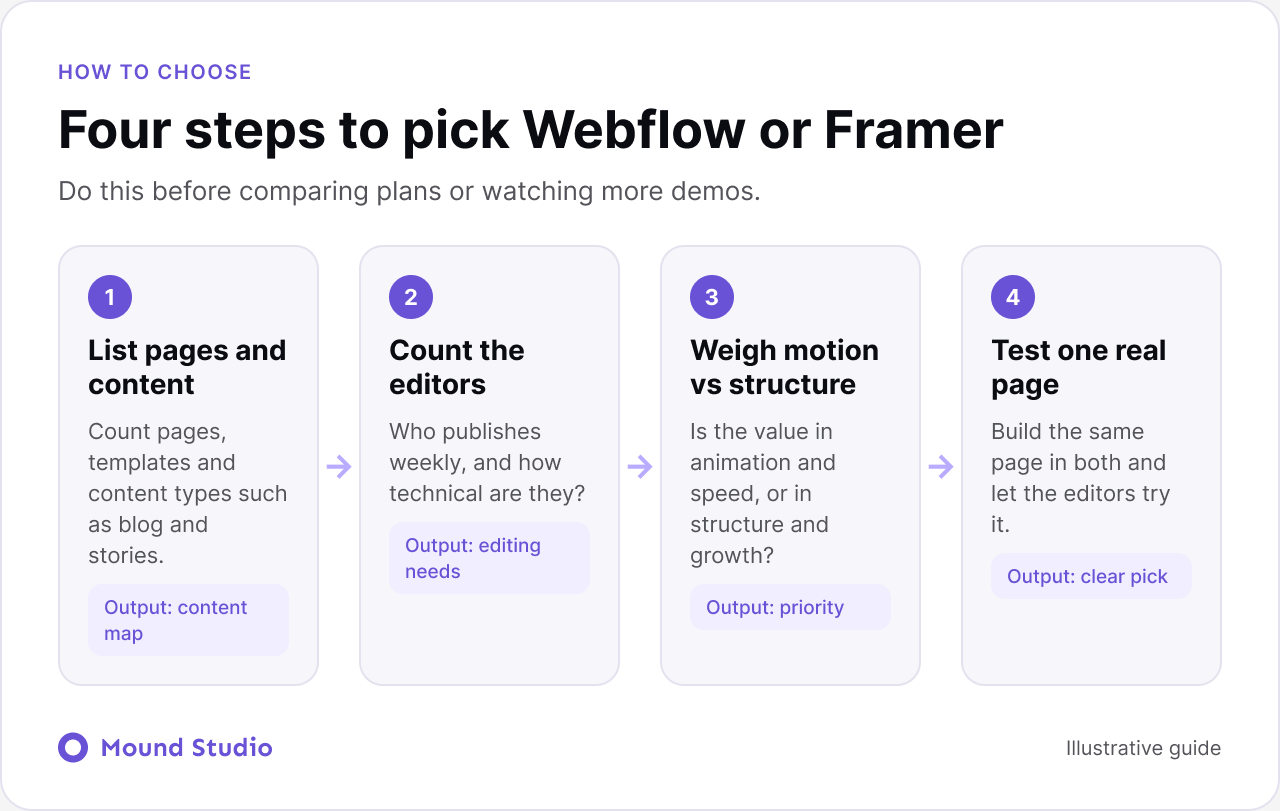
Picture a product company with a marketing site, a resource library and a customer stories section. The team publishes two or three articles a month, and sales wants new landing pages for each campaign. Here is how we would think it through.
With that picture, the content structure and editing needs outweigh the appeal of motion, and Webflow is the natural fit. Change one detail and the answer changes too. If the same company were launching a single product page for a beta, with one owner and no blog, Framer would get it live sooner with less setup. The lesson is to decide from the facts, not from the tool.
| Project | Better fit | Why |
|---|---|---|
| Startup landing page | Framer | Fast launch and motion |
| Blog with categories and authors | Webflow | Relational CMS |
| Product marketing site | Either | Depends on team habits |
| Multi-editor company site | Webflow | Roles and structure |
| Portfolio or campaign page | Framer | Expressive layouts |
Both charge for hosting and plans, and pricing changes over time, so check each provider's current plans before you decide. Then add build time, the cost of any extra tools, and how much you will pay to maintain and extend the site. A cheaper plan that needs constant developer help is not cheaper.
Many teams reading this are not starting from nothing. They have a site on another platform and want to move. The same questions apply, with one addition: what is worth keeping? Before you move, list the pages that bring in traffic, the forms that bring in leads, and the URLs other sites link to. Those need redirects and careful testing. Everything else is a chance to simplify.
Moving is also a good moment to tidy content. Merge thin pages, retire old ones, and fix the structure. A new tool will not fix a confusing site by itself, but a clear plan will. If you are leaving a traditional CMS, our guide to moving from WordPress to Webflow walks through the steps in order.
A test only helps if it is fair. Use the same design, the same copy and the same images in both tools. Give each build the same amount of time. Then compare on these points:
Keep notes as you go. A short list of what annoyed you in each tool is often more useful than a scorecard. If you are still unsure after the test, a design brief helps everyone stay focused, and our guide to a website design brief shows what to write down.
Whether you hire an agency or a freelancer, a few questions reveal a lot.
Good answers are specific and mention trade-offs. Be cautious of anyone who says one tool is right for everything. If you are choosing a partner as well as a tool, our guide on how to choose a web design agency covers what to look for.
If you are also weighing a traditional CMS, our Webflow vs WordPress guide covers that choice, and custom development vs no-code helps when you wonder if you need code at all.
Pick based on your content, your team and where the site is going, not on which tool is trending. Try both on a real page if you can, and the right choice usually becomes clear quickly. Deciding between the two? Tell us about your project and we will give you a clear recommendation.
Neither is better in general. Webflow tends to suit content-heavy sites, several editors and long-term growth, while Framer suits fast, design-led marketing sites. It depends on the project.
Yes. Both let you set titles, descriptions, clean URLs and redirects. Rankings depend far more on content, structure and speed than on the tool.
Designers often find Framer quicker to pick up because it feels like a design tool. Webflow takes longer because it exposes more of how websites are built, and that is also where its control comes from.
Both can run a blog. Webflow's relational CMS suits blogs with authors, categories and related posts. Framer works well for a simpler blog with a flat list of posts.
Yes, but it means rebuilding pages and moving content. Choose for where the site is heading, not only where it is today.

.png)


