








.avif)
.avif)
.avif)

Webflow
Webflow vs Framer: Which Should You Choose in 2026?

Framer is a strong fit when you're building a small, design-led site, such as a marketing page, a portfolio, or a campaign landing page, where animation and visual polish matter as much as the words on the page. It's a weaker fit when your site needs to manage a large content library, complex logic, or e-commerce, because its CMS and integration ecosystem are lighter than what a dedicated CMS platform or custom code can offer. The right answer depends less on which tool is trending right now and more on what your content actually looks like, today and a year from now.
Choose Framer when you need a fast, animation-forward build for a handful of pages, and one team owns both design and publishing. Choose Webflow when you want that same visual control paired with a more structured CMS built for a growing content library. Choose custom code when you need logic, integrations, or scale that no page builder covers cleanly. None of these is a wrong answer on its own. Each is built for a different shape of project, and the mismatch usually shows up later, not on day one.
Framer is a visual website builder that lets designers work close to the level of code without writing code. You position elements, define animation and interaction states, and publish directly from the canvas to a live site. It grew out of a prototyping tool built for motion and interaction design, and that history still shows: Framer treats animation and micro-interactions as a core part of the tool, not a plugin bolted onto a page builder.
That focus is why design-led teams reach for it. A designer can build the real page, not a static mockup of the page, and see exactly how a scroll effect or a hover state behaves before anyone writes a line of production code. For a studio or a founder who wants to move from concept to a published marketing site quickly, that loop is a real advantage, since there's no gap between the design intent and what actually ships.
It also means Framer sits in a slightly different category than a general-purpose CMS platform or a hand-coded site. It isn't trying to be everything for every project. It's aimed squarely at the kind of site where visual craft and motion are the point, and it does that job well. Understanding that focus is the first step in deciding whether it fits what you're building.
Framer's strengths line up closely with why people pick it in the first place.
Taken together, these strengths explain why Framer shows up so often in agency portfolios and designer showcases. The projects being shown off tend to be exactly the kind of site Framer is built for: a handful of carefully designed pages where the interaction design carries as much weight as the copy.
The same build that reads polished on a five-page marketing site can turn into a maintenance problem once a project grows past what it was designed for. None of this makes Framer a bad tool. It means the tool has a scope, and projects that step outside that scope start to feel the edges. A few limitations show up consistently.
Framer's CMS handles blog posts and simple collections well, but it doesn't go as deep as a dedicated CMS platform when it comes to relational fields, nested content types, or large libraries of interconnected items. If your site needs a blog that links posts to authors, categories, and related products across several collections, that structure is harder to model in Framer than in a platform built around a relational CMS from the start.
Framer isn't built for checkout flows, inventory logic, or app-like behavior. You can extend it with code overrides and third-party embeds, but the deeper the logic gets, the more you're working against the tool instead of with it. Past a certain point, that effort is better spent on a platform or a codebase designed for that kind of complexity.
Because Framer is younger and more narrowly scoped than more established platforms, it has fewer native integrations and a smaller plugin marketplace. That's rarely a problem for a simple marketing site. It becomes one the moment your stack depends on an integration that only a more mature ecosystem supports.
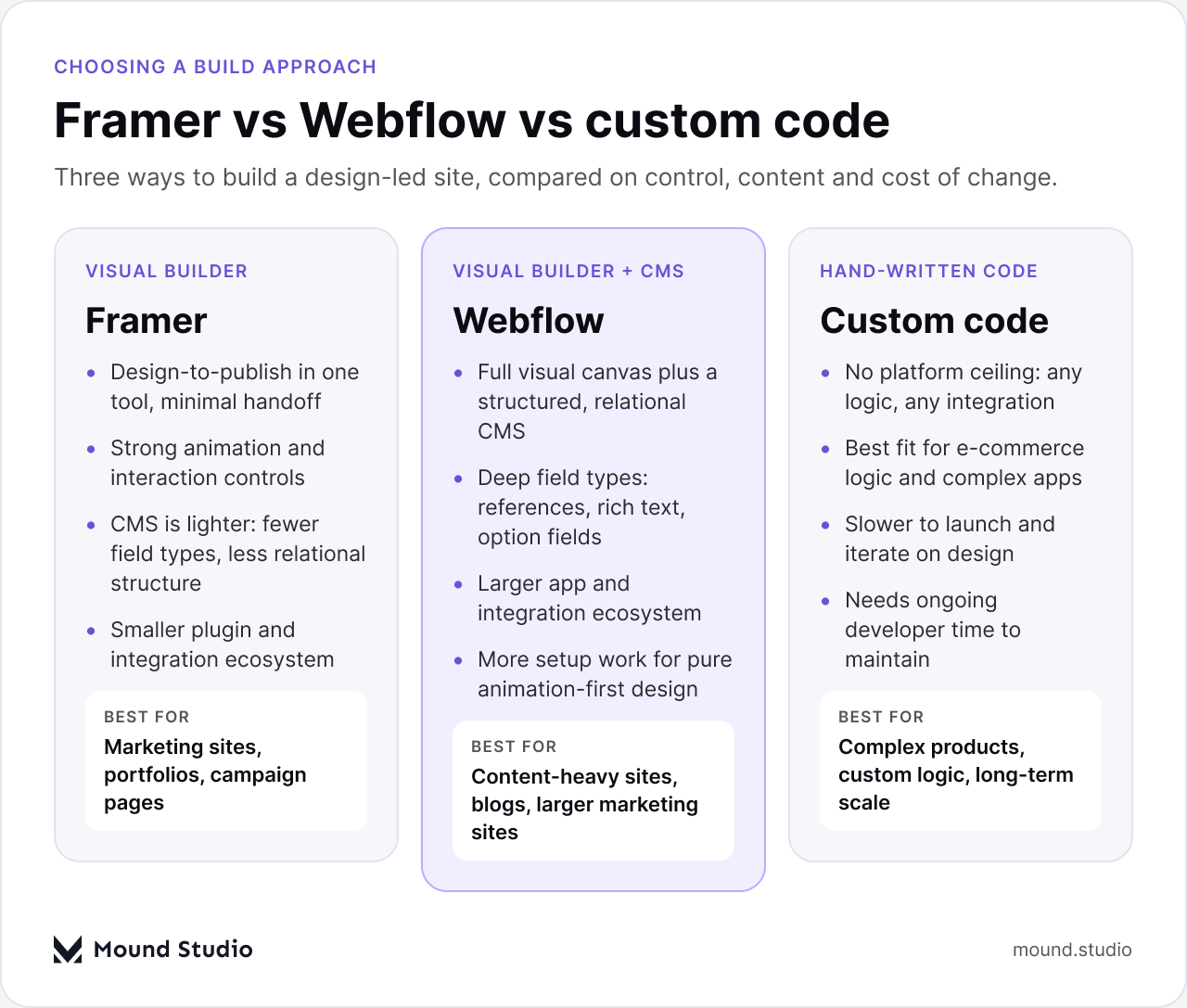
None of these three options is objectively better. They trade off control, speed, and long-term flexibility in different ways, and the right pick depends on the project in front of you rather than a general ranking. Our Webflow vs Framer comparison goes deeper on the two visual builders specifically. Both let you design visually and publish without a separate deploy step, but Webflow pairs that with a more structured CMS built for larger, more relational content libraries. Custom code removes every ceiling a page builder imposes, at the cost of needing a developer for nearly every change, big or small. If you're weighing a page builder against a hand-coded build in general, our piece on custom development vs no-code covers that trade-off in more detail.
| Capability | Framer | Webflow | Custom code |
|---|---|---|---|
| Design-to-publish speed | Fast, minimal handoff | Fast, slightly more setup | Slowest, needs a build step |
| Animation and interaction | Strong, built-in | Strong, more configuration | Unlimited, fully custom |
| CMS depth | Lighter, simpler collections | Deeper, relational fields | Whatever you build |
| E-commerce and complex logic | Limited | Native e-commerce available | No ceiling |
| Integration ecosystem | Smaller | Larger, more mature | Anything you integrate yourself |
| Ongoing maintenance | Low, one team can own it | Low to moderate | Needs developer time |
Read this table as a starting point, not a scorecard. A project rarely needs to win on every row. What matters is which rows matter for your specific site, and how much weight you give each one when the choice comes down to a final decision.
A useful way to think about this is on two axes: how complex your content is, and how much you need the site to scale. A simple set of pages that needs to launch fast sits comfortably on Framer. A large, relational content library, or a site built for years of growth, sits better on Webflow or custom code, depending on how far that growth needs to go. Mapping your project plainly onto these two axes, before you pick a tool, avoids most of the regret that shows up six months in, once the content has outgrown the platform that shipped it.
This is also where a lot of the trend-driven decisions go wrong. A tool can look perfect in a showcase reel and still be the wrong pick for a site with fifteen content types and three user roles. The axes don't care how a tool trends on social media. They only care what your project actually needs to hold.

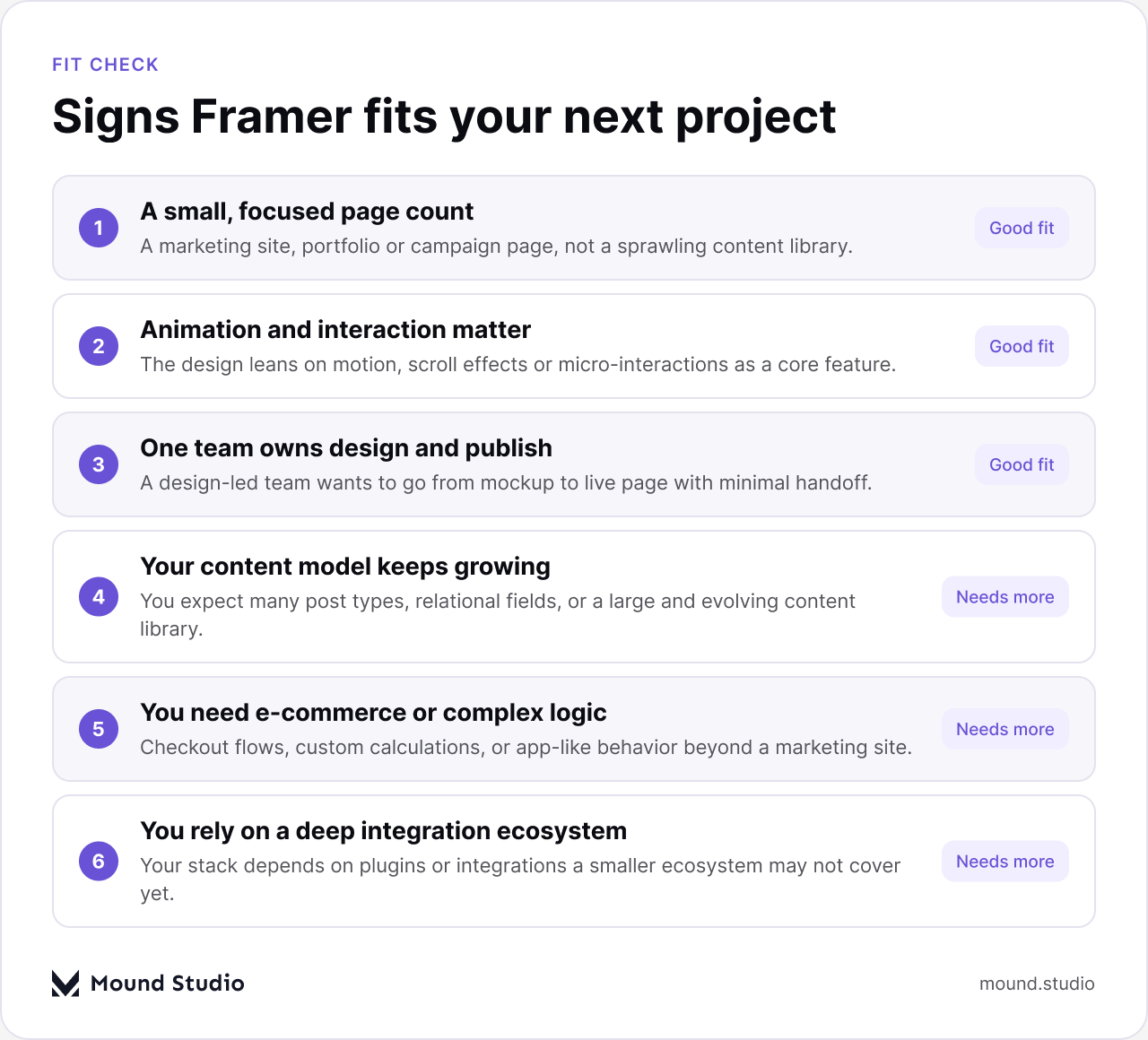
Framer is a strong choice for:
These projects share a common thread: a clear, bounded scope and a team that can move from design to publish without a lot of back and forth. If that describes your project, Framer's strengths line up directly with what you need.
Reach for Webflow or custom code instead when your project involves:
These are the projects where a lighter CMS or a smaller integration ecosystem stops being a minor trade-off and starts shaping how much work every future change takes. In these cases, the extra structure a dedicated CMS platform or a custom build provides tends to pay for itself well before the second year of the site's life.
Most of the regret we see after a website launch traces back to one of a small handful of decisions made at the very start of the project, well before any design work happened.
A tool getting attention in design circles is not the same as a tool that fits your content. Picking Framer because it's the tool everyone is talking about, without checking whether your content model fits, is how teams end up rebuilding a site a year later on a different platform. The starting question should always be about your content and your roadmap, not about which builder is most talked about this quarter.
A site that starts as "just a blog" often grows authors, categories, related posts, and custom fields within the first few months. If that growth isn't anticipated, the CMS becomes the bottleneck, not the design. Before committing to a builder, sketch out the content types you expect to need, not just the ones you need on launch day.
A site built for five pages today can become a site with fifty pages in two years. Choosing a platform based only on the current page count, without asking how the content is likely to grow, is one of the most common and most expensive planning mistakes. Our guide on designing a website that converts touches on how structure decisions made early tend to compound over time.
Before you commit to Framer, Webflow, or custom code, work through this list:
If most of your answers point to a small, fixed scope with animation at the center, Framer is likely a good fit. If several answers point toward growth, relational content, or logic beyond a marketing page, it's worth weighing Webflow or a custom build before you commit.
| Choose Framer if | Choose something else if |
|---|---|
| Your site is a small, fixed set of marketing or portfolio pages | Your content library is large, relational, or growing fast |
| Animation and interaction are central to the design | You need e-commerce, gated access, or custom logic |
| One team wants to design and publish with minimal handoff | You depend on integrations outside a smaller plugin ecosystem |
| The project has a short, defined lifespan, like a campaign | You're planning for years of content growth on the same site |
Framer is a capable tool for the job it's built for: fast, animation-forward, design-led sites with a manageable content footprint. It's not the right tool for every job, and neither is Webflow or custom code. Each one solves a different problem well, and the projects that go smoothly are the ones where the tool was picked to match the content, not the other way around. The decision that holds up over time is the one based on your actual content and growth plans, not on which platform is easiest to demo in a fifteen-minute call. If you want a second opinion on which approach fits your project, talk to us about what you're building.
Yes, for a small, focused site like a marketing page or portfolio where visual polish and animation matter. It's less suited to a business site that expects to add many content types or complex features over time.
Framer can run a simple blog, but its CMS is lighter than a dedicated CMS platform. A blog with authors, categories, and related content across multiple collections is easier to model in Webflow or a custom build.
Neither is better overall. Framer favors speed and animation for smaller sites; Webflow pairs similar visual design with a more structured CMS for larger content libraries. The right pick depends on your content and growth plans.
Framer is not built for complex e-commerce logic like checkout flows or inventory management. Projects with real e-commerce needs are usually better served by a platform with native e-commerce support or a custom build.
Sketch out the content types, user roles, and integrations you expect to need in a year, not just at launch. If that list includes relational content, e-commerce, or complex logic, plan for a platform built to handle it from the start.

.png)


