








.avif)
.avif)
.avif)

Website
Website Redesign Checklist for 2026: What to Do Before, During, and After
Every year brings a fresh list of web design trends, and most of them are screenshots of what other sites just shipped. That is a poor way to decide anything. This guide sorts the 2026 trends by the job they do, so you can pick what helps your visitors and skip the rest.
The trends worth using are the ones that solve a real problem: type-led hero sections for clarity, bento grids for scanning, purposeful motion for feedback, dark mode for comfort, interactive product previews for proof, and accessibility built in for reach. Anything that only decorates the page can wait.
We design and build websites, mostly in Webflow, for businesses that need pages to bring in enquiries. So our lens is simple. Does this trend make the offer easier to understand, or the next step easier to take? If yes, it earns a place. If not, it is decoration.

A trend has no value by itself. A large headline is not good because many sites use one. It is good when visitors grasp your offer in a few seconds. Framing every choice as a job keeps the design tied to a goal and gives your team a clear reason to say yes or no.
Here is the test we use on every trend before it reaches a design file:
If a trend fails two of these, we drop it or simplify it.
Yes. A type-led hero puts a large, clear headline, one supporting line and one button above the fold. There is no busy illustration competing for attention. The words do the work, which is why it suits service businesses and software products alike.
The catch is the copy. A big headline that says nothing is still nothing. Write the promise first, then design around it. If you cannot state the offer in one sentence, fix that before you touch the layout.
They can. A bento layout splits content into tidy tiles of different sizes, like a lunchbox. It works well for feature overviews, plan comparisons and short proof points, because each tile holds one idea and the eye can jump between them.
It goes wrong when every section becomes a grid. Tiles of equal weight give no hierarchy, and visitors do not know where to look. Use one grid for one job, then return to a plain layout for the rest.
Yes. Purposeful motion shows that something changed: a button confirms a click, a menu slides in from where it was triggered, a section fades up as you reach it. It gives feedback and guides the eye. Constant movement, parallax on every block and autoplaying loops do the opposite and tire people out.
Keep transitions short and consistent. Offer a reduced motion setting for people who need it. In Webflow, this is easy to plan early and painful to retrofit.
Support it when your audience asks for it. Developer tools, finance dashboards, media sites and products used late in the day benefit most. A second colour theme that follows the visitor's system setting feels considerate.
The cost is real, though. Every colour, image and shadow needs a dark version, and contrast has to be checked twice. If you have no time to maintain a second theme, a single well-made light theme beats two half-finished ones.
For software, often yes. A clickable demo or a live component lets buyers see the product before they book a call. It builds trust because it shows the real thing instead of a claim.
It also needs real build time and testing, and it must load fast. If you are not ready, an annotated screenshot with clear captions is a fair stand-in.
It is now a baseline that buyers, regulators and search engines all notice. Good contrast, visible focus states, readable type, labelled forms and reduced motion support make the site easier for everyone, not only for people with disabilities. Building it in from the start costs far less than fixing it later.
Take a typical software company that wants to refresh its home page. The team arrives with a list of eight ideas from other sites. We would not build any of them yet. We would sit with the current page and ask what visitors fail to understand or fail to do.
Say the audit shows that visitors cannot tell what the product does in the first screen, and that the features section is a long, even column of text. Two trends match those problems directly: a type-led hero for the first, and one bento section for the second. The other six ideas match nothing on the list, so they wait.
The refresh ends up smaller than the team expected, and it targets real problems. That is the point of an audit. It turns a wish list into a short plan with a reason behind each item.
Use this table to weigh the trade-offs at a glance. The effort and risk notes come from what we see on real builds, not from a study.
| Trend | Job it does | Effort | Main risk |
|---|---|---|---|
| Type-led hero | Clarity in seconds | Low | Vague headline |
| Bento grid | Fast scanning | Low to medium | Everything looks equal |
| Purposeful motion | Feedback and guidance | Medium | Slows the page |
| Dark mode | Comfort in long sessions | High | Double the upkeep |
| Product preview | Proof before a call | High | Heavy to load |
| Accessible defaults | Reach and trust | Low if early | Costly to retrofit |
The simplest rule is this: use a trend when it solves a real job, skip it when it is only decoration. The comparison below turns that rule into a quick filter you can run in a meeting.
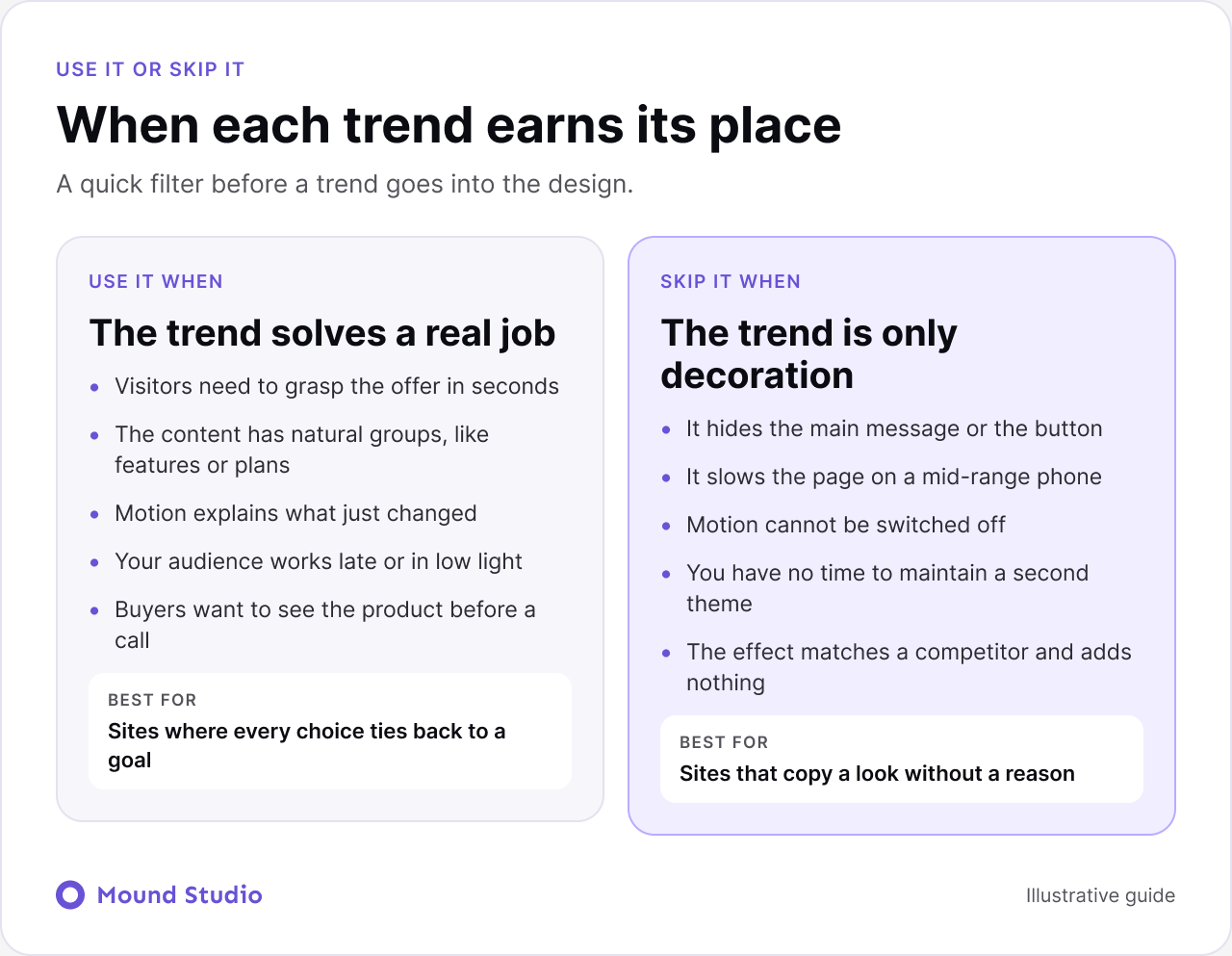
Notice the last skip signal: the effect matches a competitor and adds nothing. Copying a rival is the most common reason we see trends added. It also makes your site look like theirs, which is the opposite of what a brand needs.
Start with what is cheap and useful, then move to what is costly and useful. The map below places each trend by effort and payoff.

In practice, the first pass is a type-led hero and accessible defaults. Both are mostly copy, spacing and contrast decisions. They fix clarity and reach in one round. The second pass adds a bento section or subtle motion where they help scanning. Interactive previews and dark mode come last, and only if your audience calls for them.
Speed is where trend choices most often go wrong, because the designer's laptop hides the cost. Every effect adds something to load, and a mid-range phone on a weak connection shows it first.
Our guide to Webflow site speed optimization goes through the checks we run before launch. Do them before adding a trend, not after.
A good brief names the problem, not the look. Instead of asking for a bento layout, say that visitors miss the plan differences and need to compare them quickly. Then let the designer propose the right form.
Our website design brief guide covers this in more detail and gives you a structure to follow.
Use this short guide. Answer each question for your own audience, not for the trend.
| If this is true | Then consider | Skip if |
|---|---|---|
| Visitors bounce before the offer is clear | Type-led hero | The copy is not settled |
| You have many features or plans | Bento grid | You have only one message |
| Users need confirmation after actions | Purposeful motion | You cannot offer reduced motion |
| Your audience works late or in long sessions | Dark mode | You cannot maintain two themes |
| Buyers ask to see the product first | Interactive preview | The build would delay launch |
If your site is already live and you are unsure whether it needs a refresh, our guide on when to redesign your website helps you decide, and the website redesign checklist keeps the work organised. If you are choosing the platform for a new build, see Webflow vs Framer.
Trends age. What felt fresh becomes a sign of a site built on autopilot. The safest defense is to rely on the job, not the look. A clear headline and a readable page do not go out of date.
Watch for three signals. First, visitors comment on the effect and not on the offer. Second, your page looks interchangeable with the last five in your category. Third, the effect needs constant repair as the site grows. When you see them, simplify. Remove the piece that no longer earns its place, and keep the structure that helps people act. For the wider picture of what makes a page bring in enquiries, read how to design a website that converts.
Trends are tools, not goals. Pick the ones that make your offer clearer, your pages faster to scan and your site easier to use, and leave the rest for someone else's redesign. If you want help choosing and building the right mix, talk to Mound Studio about your website.
The trends we see working are type-led hero sections, bento grid layouts, purposeful motion, dark mode support, interactive product previews and accessibility built in from the start. Each one solves a specific problem, so pick by problem.
No. A trend is worth using only when it helps visitors understand the offer or take the next step. If it adds nothing to the goal, skip it, even when competitors use it.
They can. Heavy animation, large videos and layered effects slow pages, especially on mid-range phones. Test on a real device and cut anything that delays the main message or button.
It is worth it when your audience works late, uses the product for long sessions, or expects it. It means a second set of colour and contrast checks, so plan the upkeep before you start.
Start with the lowest effort, highest payoff options: a clear headline hero and accessible defaults. Add interactive previews or motion once the basics convert.


.png)


