








.avif)
.avif)
.avif)

Product
Mobile App Onboarding Design: How to Get Users to Finish
Mobile app UI/UX design cost depends mainly on how much there actually is to design: how many platforms, how many screens and flows, how many user roles, and how deep the research and testing go. A lean app with one platform and one core flow costs far less than a product with two platforms, several user roles, and a full component system behind it. There is no single number that applies to every app, because "mobile app design" can mean a ten-screen utility tool or a two-hundred-screen platform with onboarding, payments, notifications, and an admin panel.
That is why the useful question is never "what does it cost," but "what exactly am I asking someone to design." Once you can answer that, a quote stops looking arbitrary and starts looking like arithmetic. This guide breaks the price into the parts that actually move it, the pricing models agencies use for mobile work, the mistakes that quietly inflate a budget, and the questions worth asking before you commit to a number.
Mobile app UI/UX design cost is set mostly by scope: platform count, the number of screens and flow states, the number of user roles, and how much research and testing the project includes. A reusable design system, native-feeling motion, and a thorough developer handoff sit on top of that base scope, and they add real value, but they also add hours. The single biggest lever is platform count, because shipping iOS and Android as two native flows can mean designing most screens twice over.
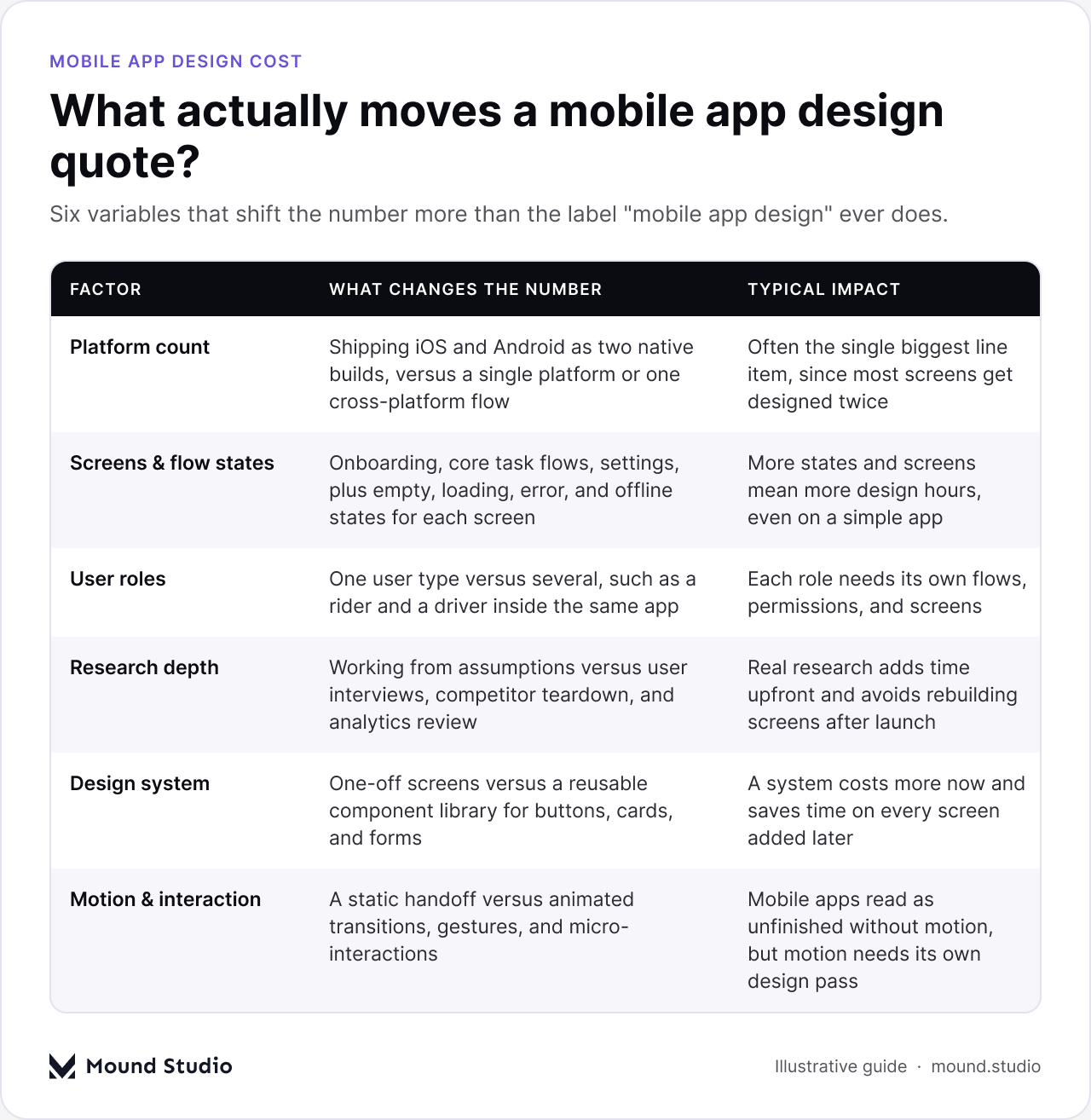
Every one of these adds or removes hours from a quote. Walk through them against your own app before you ask anyone for a number, and the range you get back will make a lot more sense.
A single platform, built once, is the cheapest starting point. Two native platforms designed with their own patterns, spacing, and navigation conventions add real work, since Android and iOS users expect different gestures, system components, and layout rules. A shared cross-platform flow reduces this, but still needs checks for where the two platforms actually diverge in navigation, gestures, and system patterns users already expect from their phone.
Onboarding, the core task flow, settings, and any secondary features each bring their own screens. Then every screen needs its states: empty, loading, error, offline, and success. Teams usually budget for the "happy path" screen and forget the four states around it, which is where a mobile app quote quietly grows after the first draft. A simple utility app with one or two core tasks stays relatively contained once every state is counted; a product with a dashboard, search, and messaging multiplies that screen count well beyond what the feature list alone suggests.
An app with one user type is simpler than one with several, such as a buyer and a seller, or a rider and a driver, inside the same product. Each role sees different screens, different permissions, and often a different version of the same flow. Two roles rarely mean double the work, but they mean noticeably more than one.
Do you already know who opens this app and why they give up halfway through a flow? If yes, design can move fast. If not, interviews, competitor teardown, and a look at app store reviews for similar products come first. Skipping research feels like saving money, and it usually means redesigning the same screen after launch instead.
A one-off set of screens is cheaper today. A component library your developers can reuse across every new screen and future feature is cheaper over the next year, because each addition is assembled from tested parts instead of drawn from scratch. Most apps that plan to keep shipping features need the second option, even if it costs more upfront.
A clickable prototype tested with a handful of real users on an actual phone catches most obvious problems while they still cost an afternoon to fix. Mobile also lives on motion: transitions, gestures, and small feedback moments that make an app feel native instead of like a web page in a frame. Skipping this pass is common, and it shows immediately once real people open the app, especially in a flow like first-run onboarding, where a confusing first screen costs you the user before they reach anything else.
Handoff means annotated files, every screen state, spacing and type specs, and answers to questions while developers build. A thin handoff does not disappear as a cost, it just moves to your engineering team, who then guess and rebuild what was never fully specified. When comparing quotes, ask exactly what your developers will receive at the end, not just what you will see during design.
Most full mobile app design engagements move through four phases, and each one ends in something you can actually review before approving the next. Our guide to the mobile app design process walks through this in more depth if you want the full picture.

| Phase | What happens | What you receive |
|---|---|---|
| Discovery | Goals, target users, competitor apps, and platform constraints | A written brief and a flow map of the core task |
| UX design | Information structure, wireframes, a clickable prototype, and testing | Wireframes, a tested prototype, and findings |
| UI design | Visual language, components, and every screen in every state | High-fidelity screens and a component library |
| Handoff | Specs, naming, motion notes, and support while developers build | A developer-ready file and ongoing answers |
Delays inside any one phase stretch the whole timeline, and a stretched timeline costs money under almost any pricing model. The fastest way to keep a mobile app project on budget is a single decision-maker who reviews each phase promptly, rather than a group whose feedback arrives in pieces over several weeks.
Mobile app design work is usually priced one of three ways, and picking the wrong one is a common source of friction between a team and the people paying for the work.
| Model | How it works | Best fit |
|---|---|---|
| Fixed price | One total for an agreed, documented scope | A defined MVP or a scope that will not shift mid-project |
| Monthly retainer | Ongoing capacity, billed per month, for continuous work | A live app with features shipping every sprint |
| Per-screen or per-flow | A rate tied to the number of screens or flows designed | A small, well-scoped addition to an existing app |
A fixed price gives certainty when the scope is settled: a defined MVP, a single new feature, a rebuild of one flow. A retainer fits a product that keeps evolving, where new screens and tests happen every sprint and you are paying for capacity rather than a one-time deliverable. Per-screen pricing works for small, contained additions, but it breaks down fast on anything with real flow complexity, since a "screen" rarely captures the states and edge cases around it.
Two variables do most of the work in setting a mobile app design budget: how many platforms you are shipping, and how much of the feature set needs designing on day one. Looking at them together is more useful than any single number, because the same app can sit in a very different tier depending on which combination applies.
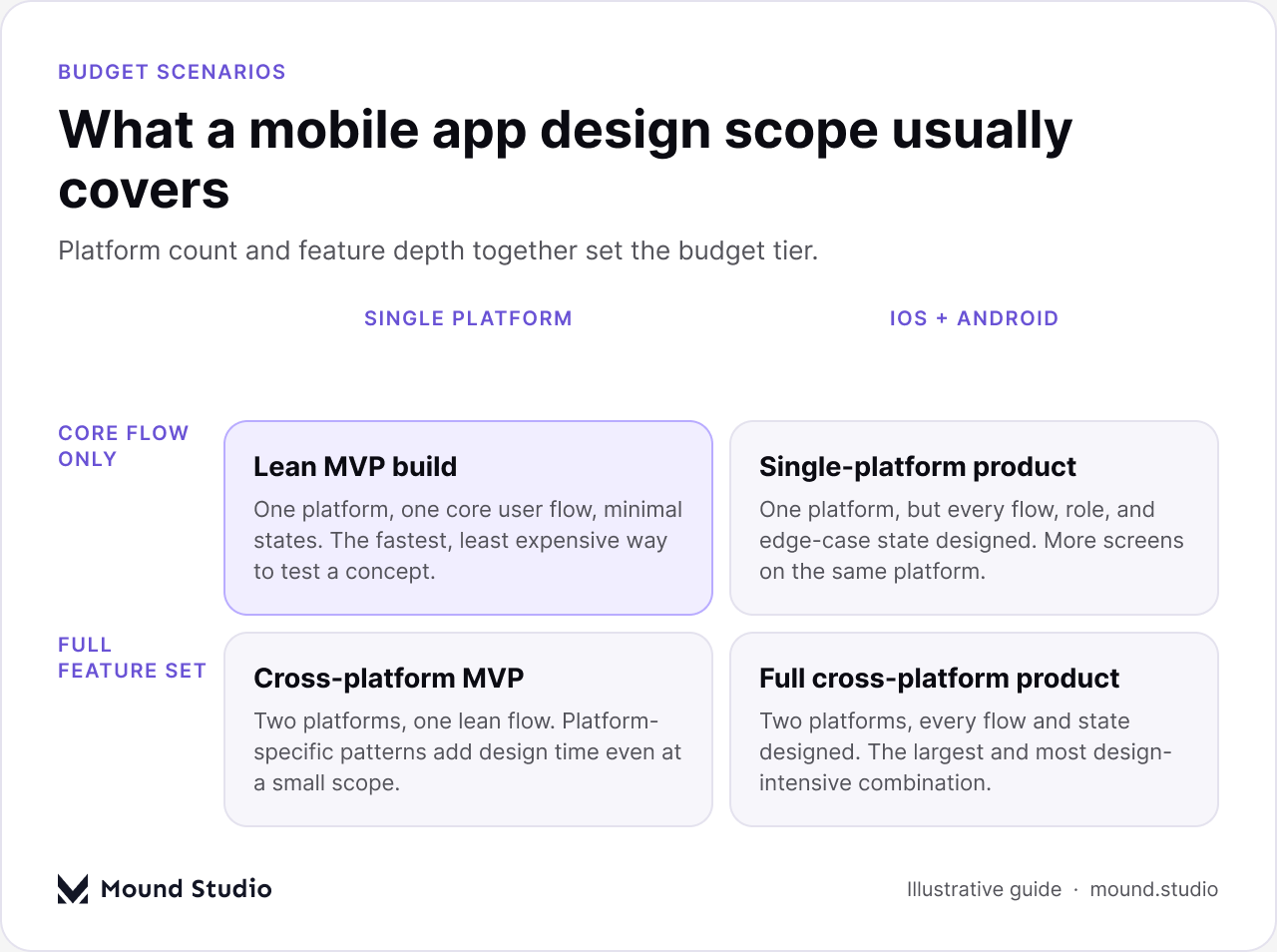
A lean, single-platform build that proves one core flow sits at the smaller end. A full cross-platform product with every role, state, and secondary feature designed from the start sits at the larger end, and most real projects land somewhere between the two, rather than at either extreme.
Before asking for a number, put together a short brief that answers the questions a quote depends on. It takes an afternoon and saves several rounds of back and forth later.
It also helps to know who you are hiring, since the same scope costs differently depending on who designs it and what else comes bundled with the work.
The three options are not interchangeable, and the right one depends more on how long the work continues than on the size of the first project.
| Option | Strong when | Watch out for |
|---|---|---|
| Freelancer | One well-defined flow or screen set, and you already know what you need | Limited capacity, one point of failure, and gaps in research or motion skills |
| Agency | Research, design, and developer-ready files need to come from one team | A higher day rate, and results depend on who is actually assigned |
| In-house designer | Mobile work never really stops, with new screens every sprint | Salary, tools, and management overhead, even in a quiet month |
A freelancer is often the right call for a single, well-scoped flow such as a redesigned onboarding sequence or a new settings area. An agency fits when you need research, design, and development-ready files handled by one team, without hiring several specialists yourself to cover research, UI, and motion separately. An in-house designer earns their cost once the app has a steady release cadence and design work never fully pauses between features. Our guide to design agency cost breaks down how agency pricing compares with hiring directly, if you are weighing that decision for a bigger product rather than a single app.
A mobile app UI/UX design quote is not random, even when two numbers for the same app idea look far apart. Platform count, screen and state count, user roles, research, a design system, and handoff quality are the real inputs, and once you can describe those clearly, any quote you receive becomes easy to check against the work it actually covers. Cheap design that gets rebuilt after launch rarely stays cheap, and an expensive quote with no clear scope behind it does not buy you a better app either. The number that matters is the one tied to a specific, written-down scope.
Scoping a mobile app and want a number tied to your actual flows instead of a guess? Tell us what you are building and we will walk you through what it takes.
It depends mainly on platform count, screen and state count, user roles, and research depth, so ask for a scoped estimate against your actual flows rather than relying on a general range.
Usually, yes. Android and iOS have different navigation patterns and system components, so most screens end up designed twice rather than once, even with a shared visual language.
If you plan to keep adding features, yes. A component library costs more in the first phase and saves time on every screen you add after launch.
Fixed price covers an agreed, documented scope for one total. A retainer covers ongoing capacity for a product that keeps shipping new screens and features every sprint.
Research, the states around the happy-path screen, a reusable design system, and a proper developer handoff are the most common gaps in a low quote.



.png)


