








.avif)
.avif)
.avif)

Product
SaaS Dashboard Design: 9 UX Best Practices for 2026

Add an AI agent only if your product already has a workflow that is repetitive, made up of several steps, and safe enough to hand off with a review step. If the task is a single action, or a mistake is expensive to undo, a plain feature or a smarter default usually serves the user better than an agent. The real question is not whether you can add an agent. It is whether one specific part of your product actually benefits from one, and whether your team can build the trust that makes people use it.
Since design tools like Figma started shipping an agent that can plan and carry out multi-step edits on request, the same expectation has spread across the wider SaaS market. Product teams keep hearing some version of the same request: can we add an agent like that? The pressure is real, but it rarely arrives with a clear answer to what the agent would actually do inside the product, or why a user would trust it to do it unsupervised.
The same pattern shows up in support tools that draft and send replies, sales tools that update records across a pipeline, and finance tools that reconcile line items on their own. The common thread is not the industry. It is that each of those products already had a repetitive, multi-step workflow sitting in plain sight, and the agent was built to take over that specific workflow rather than to be a general assistant bolted onto the whole app. That is the part worth copying. The label "AI agent" on its own copies nothing useful.
An AI agent, in this sense, is different from a chatbot or a search box. A chatbot answers a question and stops. An agent takes multi-step action on the user's behalf inside the product: it reads the current state, plans a sequence of steps, and carries them out, ideally in a way the user can see, adjust, or undo. That distinction matters, because most of the risk and most of the design work sits in the "takes action" part, not the "understands a request" part.
An agent earns its place when a task inside your product is repeated often, involves several steps a user currently does by hand, and the outcome of getting it wrong is recoverable. Reporting, data cleanup, bulk edits, scheduling, and repetitive configuration work are common candidates, because the value comes from doing the same multi-step process many times, not from any single clever answer. A one-off decision, a task with financial or legal weight, or a workflow your users already finish in a click or two, are usually not good candidates. Adding an agent there adds a new layer of interface and a new source of doubt, without removing meaningful work.
Before any design or engineering work starts, walk the same four questions in order. Each one either clears the feature to move forward or sends the team back to a plain UI improvement instead.
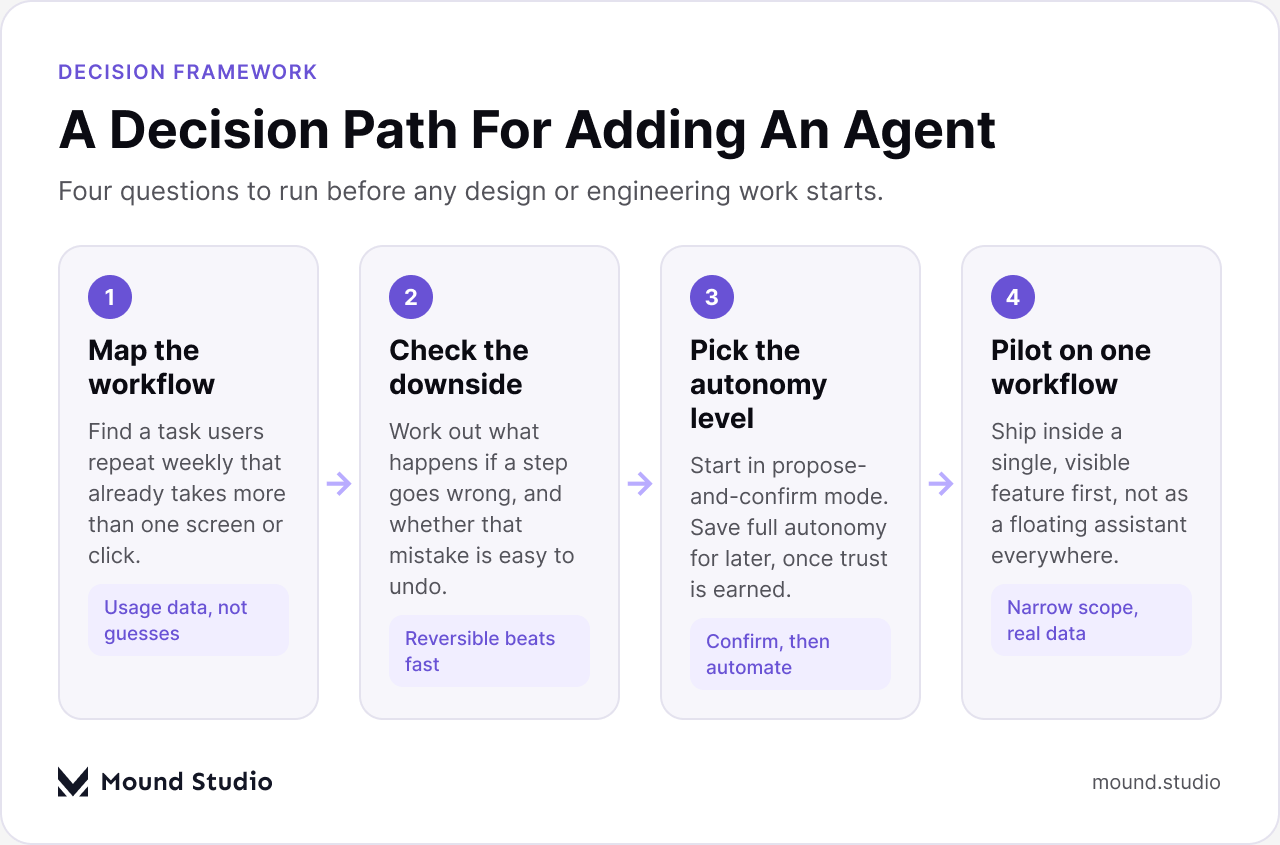
Look at your product's usage data, not your roadmap wish list. Which task does a meaningful share of users repeat weekly, and which of those tasks take more than one screen or more than a few clicks? An agent that automates a rare action saves almost nothing. An agent that automates a task done dozens of times a month changes how the product feels to use.
Every agent will make mistakes eventually. If a wrong step means a user has to re-enter a form field, that is a minor cost. If it means sending an email to the wrong customer, changing a live price, or deleting records, that is a different category of risk entirely. Map the worst case before you map the happy path.
Most teams should start an agent in "propose, then confirm" mode: it plans the steps and shows them, the user approves, then it runs. Full autonomy, where the agent acts without a checkpoint, should be earned over time as users see it get things right, not granted from the first release.
Ship the agent inside one workflow first, not as a floating assistant that reaches across the whole product. A narrow pilot is easier to explain, easier to monitor, and easier to walk back if it is not working.
The table below turns those four questions into a quick filter you can run against any feature idea on your roadmap.
| Signal in the workflow | Points toward an agent | Points toward a plain feature |
|---|---|---|
| Frequency | Done many times a week by the same users | Done rarely, or by very few users |
| Steps involved | Several steps across screens or tools | One field, one click, one screen |
| Cost of a mistake | Easy to review and undo | Hard to reverse, costly, or public-facing |
| Current pain | Users complain about the manual grind | Users complete it quickly already |
Not every task fits an agent, even one built well. Mapping a task on two dimensions, how often it repeats and how easy a mistake is to undo, makes the decision clearer than any pitch deck slide can.
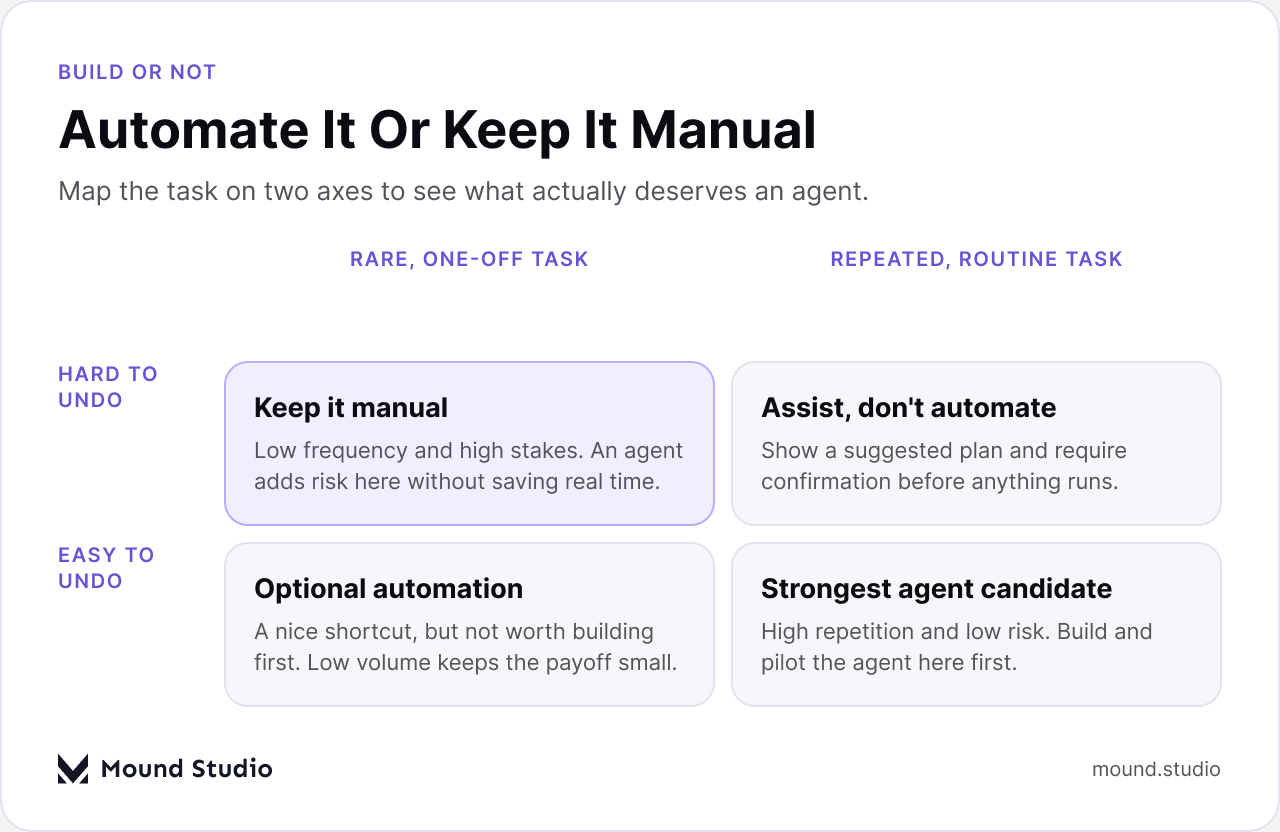
Tasks in the bottom right, repeated often and easy to undo, are the strongest candidates for a fully agentic feature. Tasks in the top left, rare and hard to reverse, should stay manual, no matter how capable the underlying model is. The two remaining quadrants call for something in between: an agent that suggests and waits for confirmation, or a small automation that is optional rather than a headline feature. Teams that skip this mapping tend to build the agent for whichever task is easiest to demo, not the one users repeat most.
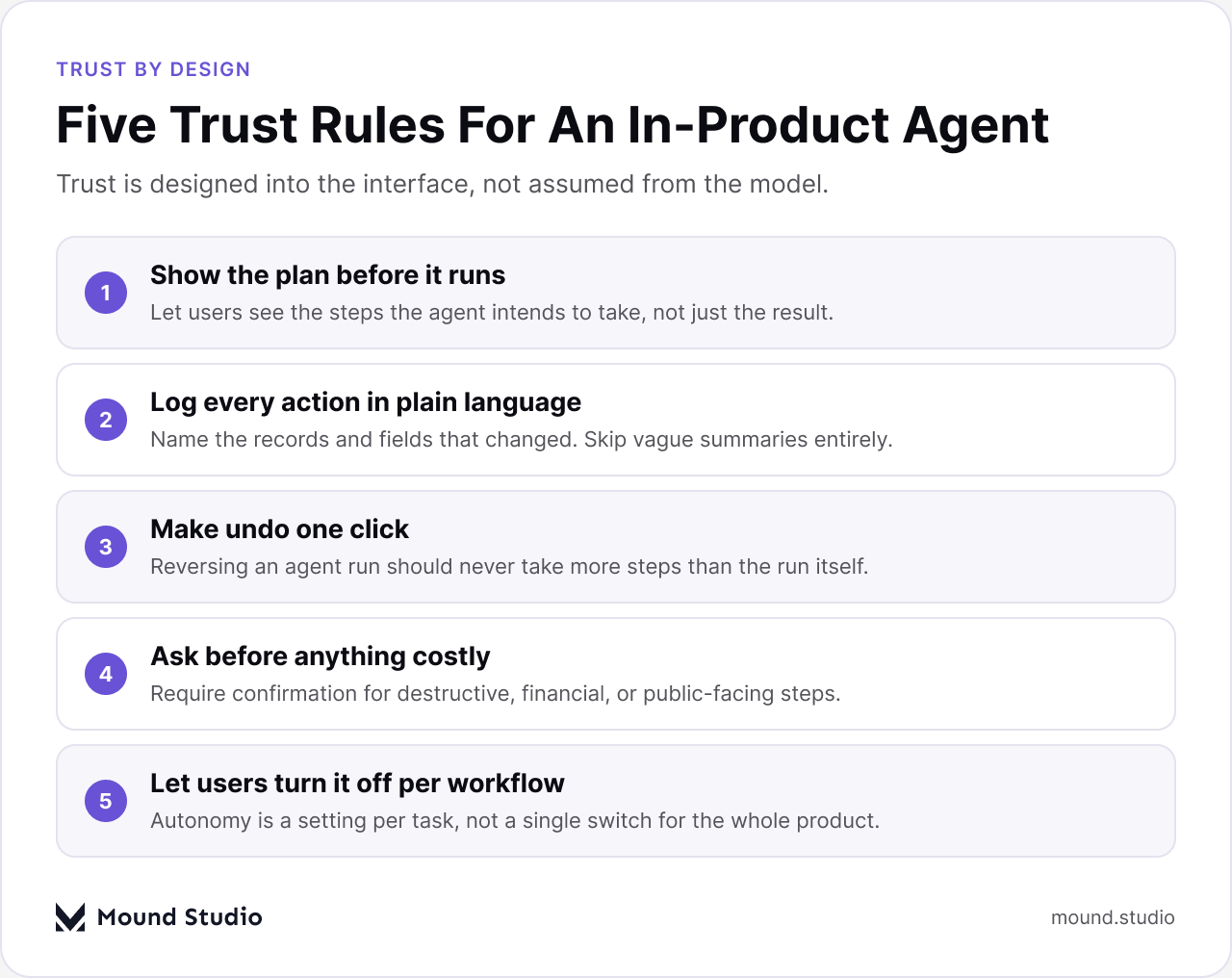
An agent that takes action without explaining itself will get turned off, even if it is usually right. Trust is built through the interface around the agent as much as through the quality of what it does. A few rules hold up across most products we have worked on.
Read more on how AI is changing the broader design workflow in how AI fits into a modern product design workflow, which covers how these same principles show up earlier, at the design stage.
Beyond the five rules above, keep the agent's language plain. Users should never have to decode what "optimized 14 records" or "applied 3 adjustments" actually changed. Name the fields, the records, and the values. Vague summaries are the fastest way to turn a helpful agent into one nobody double-checks, or worse, one nobody trusts enough to use at all.
An agent changes what a new user needs to learn in the first session. Instead of teaching every screen, onboarding needs to teach one thing clearly: what the agent is allowed to do, and how to check its work. Introduce the agent on a task the user is already trying to complete, not as a separate tour step, and let the first run happen on real, low-risk data so the first result is something the user can verify themselves.
It also changes the empty state. A blank dashboard with no data yet is a poor place to introduce an agent, because there is nothing for it to act on and nothing for the user to check against. Wait until there is at least one real record, then offer the agent as a shortcut for the next step, framed around the specific task the user just did manually. Our guide to SaaS onboarding UX goes deeper into sequencing first-session tasks like this one.
Once an agent can act, the dashboard needs a place to show what it did, not just what the account currently looks like. That usually means a visible activity log, a way to filter for agent actions specifically, and a one-click path back to the state before the agent ran. None of this is optional polish. Without it, users cannot tell what changed on their own and what the agent changed, and that ambiguity is what erodes trust fastest.
| Dashboard area | Before an agent | After an agent |
|---|---|---|
| Activity feed | Shows user actions only | Separates agent actions from user actions clearly |
| Undo | Per-field or per-record undo, if any | One-click undo for an entire agent run |
| Permissions | Set once at the account level | Scoped per workflow, adjustable as trust grows |
| Notifications | Alerts for user-triggered events | A distinct alert style for what the agent did on its own |
Our piece on SaaS dashboard design best practices covers the layout and hierarchy questions that sit underneath all of this, agent or no agent.
Ship the pilot, then watch three things instead of guessing. First, how often people actually let the agent run versus doing the task manually next to it, since a feature that sits unused is telling you something regardless of how well it was built. Second, how often a run gets edited or undone before it is accepted, which is a direct read on accuracy and on how much the current scope should expand or shrink. Third, how the time to finish the workflow compares with the manual version, start to finish, including the time spent reviewing what the agent did. If review time eats most of the saved time, the workflow was not ready for an agent yet, or the interface around it needs more work before adding more autonomy.
Treat the first release as a starting point rather than a finished feature. Widen its scope only after the undo rate has stayed low across a real stretch of usage, not after a single good demo.
An AI agent is worth building when it removes real, repeated manual work from a workflow your users already do often, and it is worth trusting only when its actions are visible, explained in plain language, and easy to undo. If your product does not have a workflow that clears those bars yet, a better dashboard, a smarter default, or a simpler flow will serve your users more than an agent bolted on for the sake of keeping up. If you are weighing whether an agent fits your product, talk to us about your specific workflow before you commit engineering time to it.
No. An agent only helps when a workflow inside the product is repeated often and involves several steps. Many products are better served by a smarter default or a simpler flow.
Start in propose-and-confirm mode instead, where the agent plans a step and a user approves it. Expand autonomy only after the agent's accuracy is proven in real use.
Hidden actions. If users cannot see what the agent changed or cannot undo it easily, they will stop trusting the feature even when it works correctly most of the time.
Onboarding needs to teach what the agent is allowed to do and how to check its work, introduced on a real task the user is already doing rather than as a separate tour step.
Track how often people let it run instead of doing the task manually, how often a run gets edited or undone, and whether the time saved outweighs the time spent reviewing it.



.png)


