








.avif)
.avif)
.avif)

Product
SaaS Dashboard Design: 9 UX Best Practices for 2026

You can spend months on acquisition and still lose many new users in their first session. They sign up, land on an empty screen, click around for a minute, and never come back. The product may be great. They just never reached the moment where it proved itself.
Onboarding is the design work that closes that gap. It is not a product tour or a welcome email. It is the path from sign-up to the first real result, and everything that helps users get there without friction. In this guide we walk through the steps we follow when we design first-run experiences for SaaS products, with examples, patterns, and the mistakes we see most often.
Good SaaS onboarding gets new users to their first meaningful result, often called the aha moment, as quickly as possible. Ask for as little as you can at sign-up, tailor the path with one or two questions, guide users to the single action that creates value, use empty states and checklists instead of long tours, and follow up with lifecycle emails for users who stall.
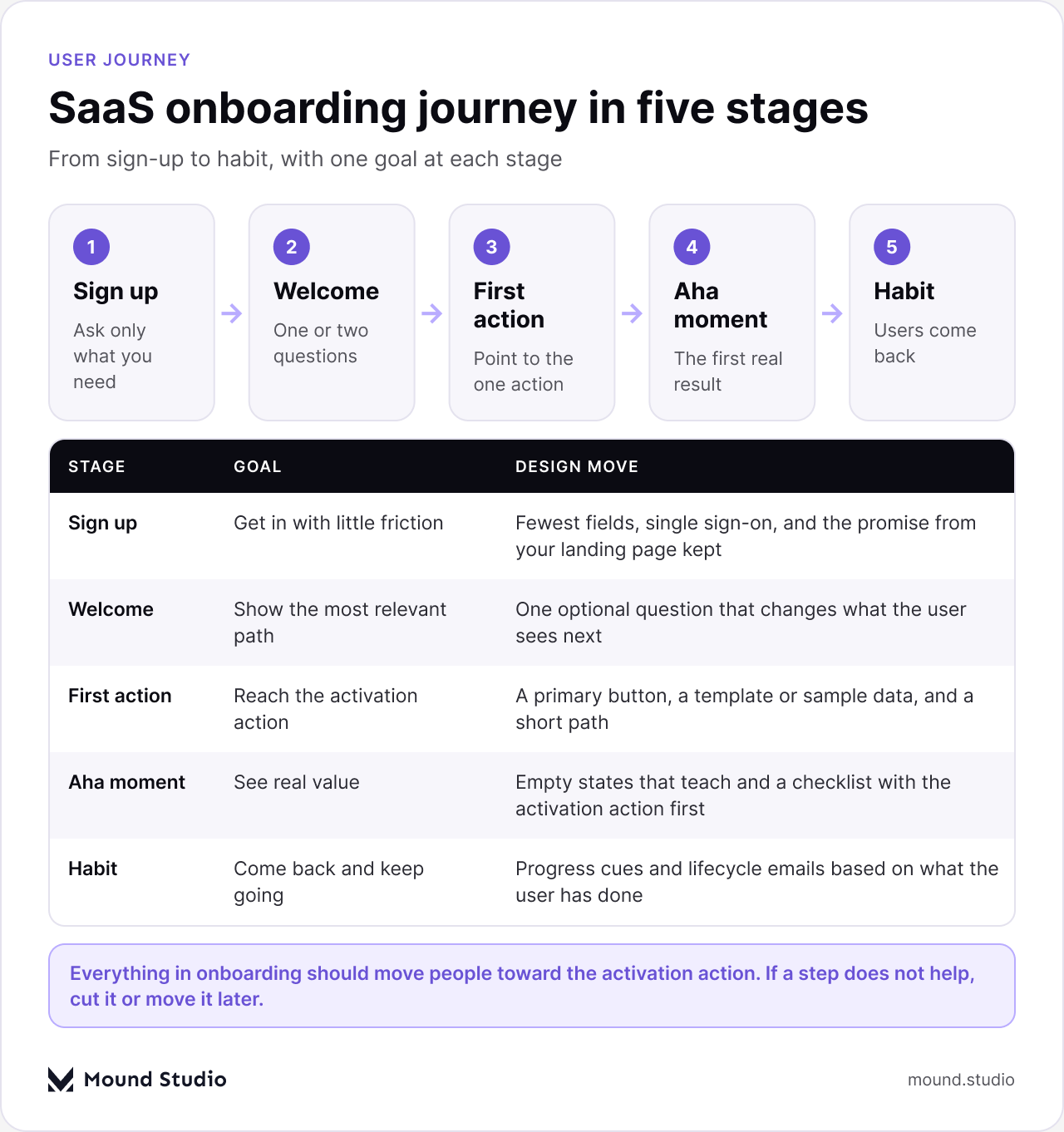
Before designing any screens, decide what "activated" means for your product. It should be a specific action that strongly signals a user has seen value: sending the first invoice, publishing the first page, inviting a teammate, connecting a data source. Look at your data: which early actions do retained users take that churned users do not?
Everything in onboarding should move people toward that action. If a step does not help, cut it or move it later. The table below shows how the activation moment differs by product type, and what first-run help fits each one.
| Product type | Likely activation moment | Best first-run help |
|---|---|---|
| Project management tool | Create a project and add a first task | A ready-made project template |
| Invoicing or finance app | Send the first invoice | Sample client and pre-filled invoice |
| Analytics product | See the first real data on a dashboard | Guided data connection with a demo view |
| Team collaboration app | Invite a teammate | Simple invite step with a clear reason |
| Website or content builder | Publish the first page | Starter layouts and a publish checklist |
These are examples, not rules. Your own data will tell you which action predicts retention.
A good test is to remove one field and see what you lose. Most teams find that fields they thought were essential are not.
A short welcome question, such as "What do you want to do first?" or "What is your role?", lets you show the most relevant path, template, or example. Keep it optional and quick. Every question should change what the user sees next. If it does not, remove it.
For example, a project tool might ask whether the user plans to work solo or with a team. Solo users go straight to a personal board. Team users see an invite step early. The question earns its place because the screens that follow are different.
Open on a screen that points clearly to the one action that matters. Use a primary button, a short explanation, and, where possible, a template or sample data so users can see a finished result before they build their own.
Keep the path short. Every extra screen between sign-up and the first result is a place where people leave. If a setup step is not needed for the first result, offer it later, once the user has seen value.
An empty dashboard is the first thing many new users see. Instead of a blank table, explain what will appear there, why it matters, and give one clear action to fill it. Empty states are some of the most valuable screens in a SaaS product, and they are often designed last. Our guide to SaaS dashboard design covers this in more detail.
A good empty state has three parts: a short line saying what belongs here, a reason it is useful, and one button that starts the work. Add an example image or sample data if it helps people picture the result.
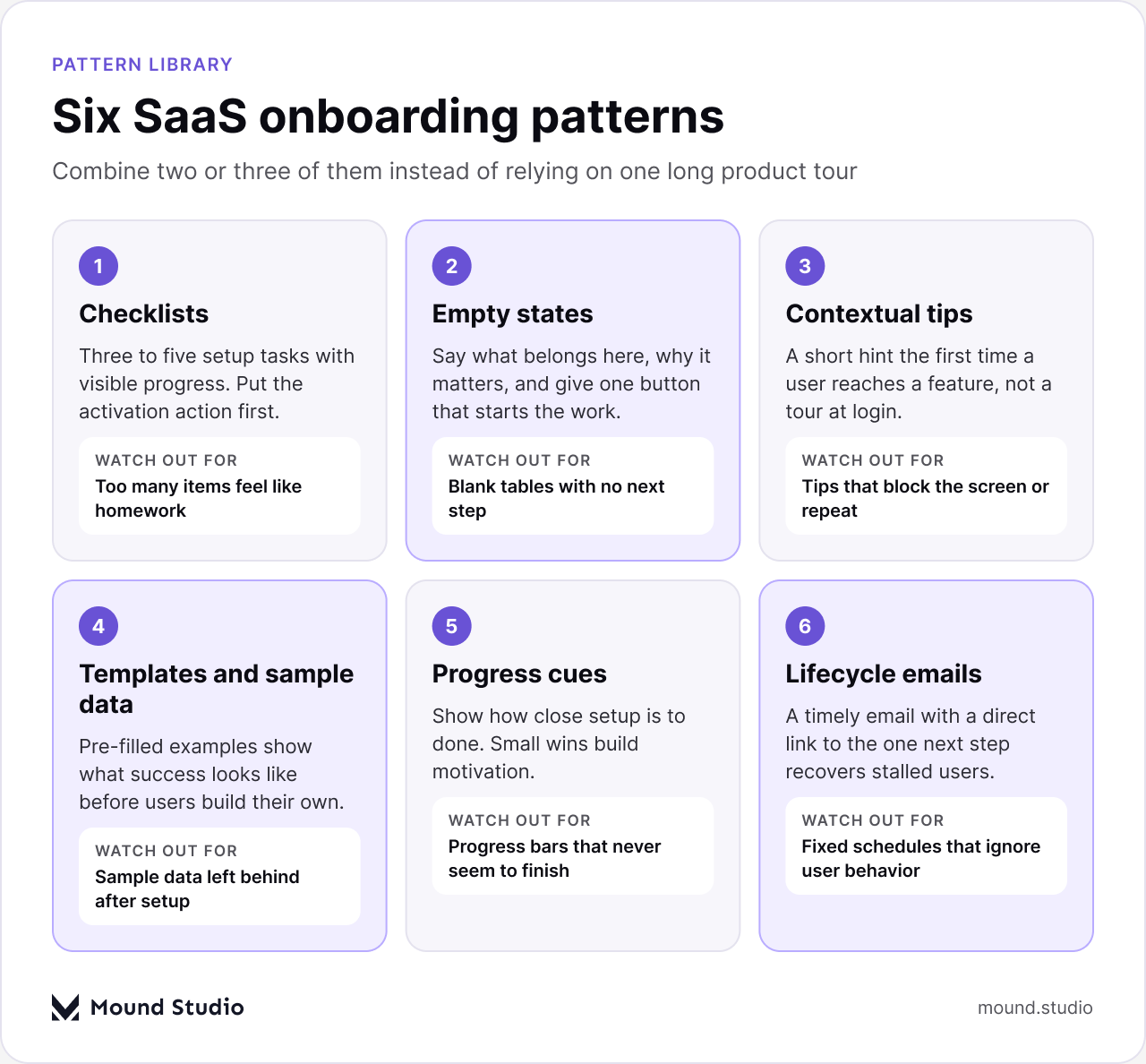
No single pattern fits every product. Most good onboarding combines two or three. This table shows when each one helps and what to watch out for.
| Pattern | Use it when | Watch out for |
|---|---|---|
| Checklist | Setup has several clear tasks | Too many items make it feel like homework |
| Contextual tips | A feature needs a hint at first use | Tips that block the screen or repeat |
| Templates and sample data | Users start from a blank state | Sample data left behind after setup |
| Progress cues | Setup takes more than one session | Progress bars that never seem to finish |
| Lifecycle emails | Users stall before activating | Fixed schedules that ignore user behavior |
A short list of three to five setup tasks with visible progress gives users a clear path and a sense of momentum. Put the activation action first.
Show a short hint when a user reaches a feature for the first time, rather than a ten-step tour on login. People learn best at the moment they need something.
Pre-filled examples let users see what success looks like before they invest effort. They also make empty screens feel useful from the first minute.
Show how close setup is to done. Small wins, such as a completed step or a first result, build motivation to continue.
Some users will stall. A timely email that points to the one next step, with a direct link back into the product, recovers many of them. Base the message on what the user has and has not done, not on a fixed schedule alone.
Take a typical invoicing app. A new user signs up with a work email and lands on a welcome screen with one question: are you sending invoices for yourself or for a team? Choosing "for myself" opens a pre-filled sample invoice with a clear button to send it to a real client. There is a short checklist on the side with three items: add your business details, send your first invoice, and connect a bank account. The activation action comes first, and the bank connection, which needs more effort, comes last.
Nothing here is complicated. The user never sees a tour, never fills in a long profile, and reaches a real result in a few minutes. That is the pattern we aim for: one question, one action, one visible result.
Invited teammates are easy to forget, yet in many products they outnumber the people who signed up first. They skip the sign-up story and land inside an account that already has data in it. They need a different path.
This path is short, but it matters. A team product only works when the invited users come back, so their first session deserves the same care as the owner's.
Onboarding text should be short and specific. Use the words a new user would use, not internal product terms. Say what will happen after a click, and say why a question is being asked. "We ask so we can show you a relevant template" is better than a bare "Tell us about yourself".
Keep buttons descriptive. "Send my first invoice" tells people more than "Next". Avoid cheerful filler that adds words without adding meaning, and keep tone calm and helpful, since new users are often unsure whether they are doing things right. For more on this, see our notes on product design in SaaS UX design best practices.
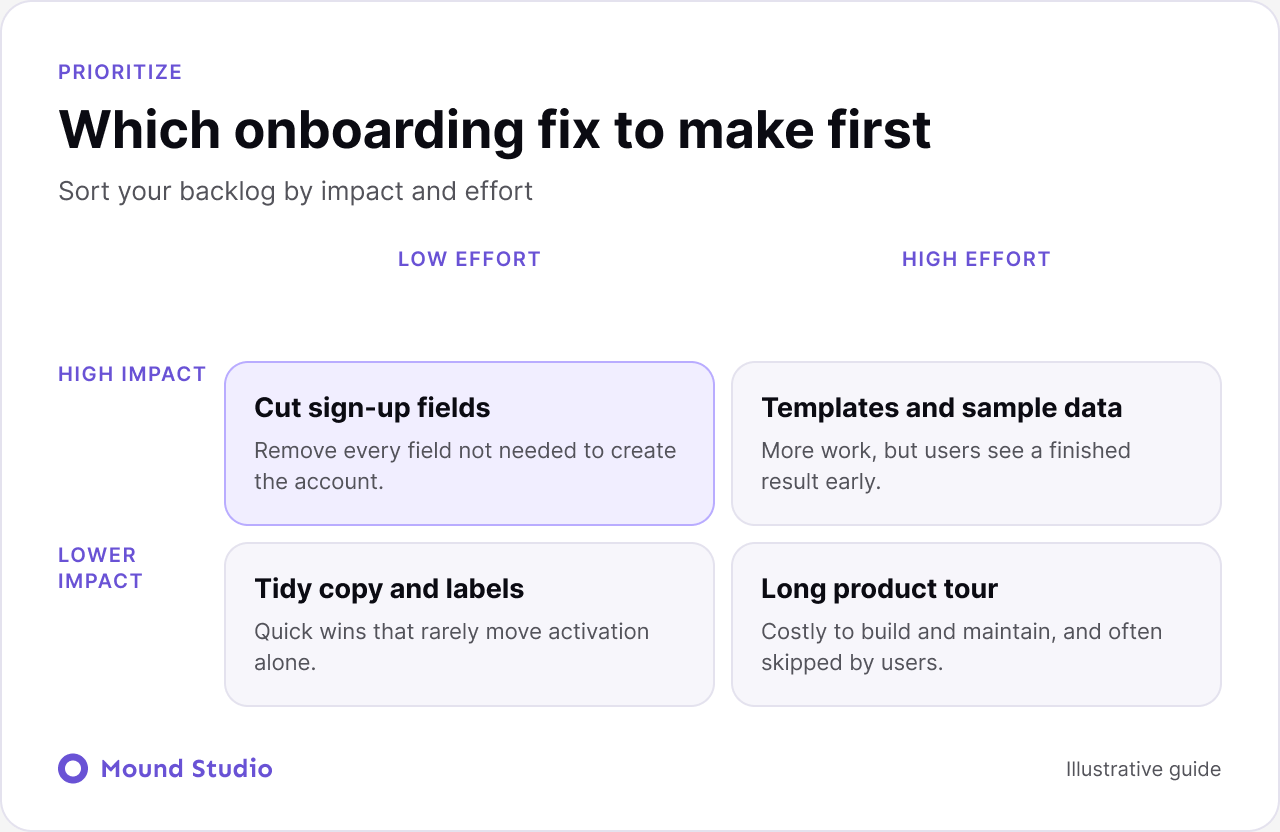
Most teams have a long list of onboarding ideas and limited time. Sort them by impact and effort, then start with the top left. Removing sign-up fields and clarifying the first screen usually cost little and help a lot. Templates and sample data take more work but often pay off. Full product tours tend to cost the most and help the least.
Measuring completion of the tour, not of the goal. A high tour completion rate can hide the fact that users never did the thing that matters. Track the activation action, not the number of tooltips dismissed.
Adding more steps to fix drop-off. When users leave during setup, the instinct is to add explanation. Usually the better fix is to remove a step or move it later.
Hiding the skip option. People who already know the product resent forced walkthroughs. Let them skip, and let them return to the guide later from a help menu.
Track the share of new sign-ups who reach your activation action, how long it takes them, and where they drop off. Watch session recordings of first sessions, interview a few new users, and change one thing at a time so you can see what worked.

Numbers show where users leave. Recordings and interviews show why. Use both, because a drop-off chart alone cannot tell you whether a screen is confusing or simply unnecessary.
Small screens make friction more expensive. Every extra tap, permission prompt, or long form loses more people than on a laptop. Ask for permissions when they are needed, explain why in plain words, and keep the first session focused on one task. Our guide to mobile app onboarding design goes deeper on these patterns.
Sign up as a new user, on a clean account, and record what you see. Count the screens between sign-up and the first result. Note every field, every popup, and every moment where you were unsure what to do. Then repeat it as an invited teammate. If you want a structured method for this, our guide to how to do a UX audit shows how to run one, and the notes from that review make a solid base for a list of fixes.
The best onboarding does not feel like a separate layer. It is built into the product through clear empty states, helpful defaults, and a design system that makes guidance consistent. If your trial users are not converting, our web app and SaaS design team can review your first-run experience, and you can get in touch to start. You may also find our guide to SaaS MVP development useful when you are deciding what to build first.
SaaS onboarding is the experience that takes a new user from sign-up to their first meaningful result in the product, including sign-up, setup, guidance, and follow-up messages.
It is a specific action that shows a user has experienced real value, such as creating a first project or inviting a teammate. Users who reach it are more likely to stay.
Short, contextual tips usually work better than long tours shown at login. People learn features best at the moment they need them.
Track activation rate, time to activation, and where users drop off during setup. Combine the numbers with session recordings and short user interviews.
As few as possible. A checklist of three to five setup tasks is a common, effective pattern, with the activation action first.


.png)


