








.avif)
.avif)
.avif)

Ai
Claude vs ChatGPT: Which AI Fits Your Design Workflow

Claude is an AI assistant built by Anthropic. You talk to it through chat, similar to how you would use ChatGPT, but it is built for longer, more structured conversations. For a product or design team, that means you can hand it a full brief, a stack of interview transcripts, or a messy set of meeting notes, and it holds onto that context while you work through a task together, instead of answering one question and forgetting everything before the next.
It writes, summarizes, reasons through problems, and turns a rough idea into a structured draft: a set of user flow steps, a first pass at UX copy, a synthesis of research findings, or a plain-language explanation of a technical decision. It does not replace research, testing, or design judgment. It speeds up the part of the job that involves turning raw material into a clear first draft, which is a bigger share of a typical week than most teams admit.
You can use Claude directly through a chat interface on the web or a desktop app, or through a developer platform if your team wants to build it into an internal tool. For most product and design teams, the chat interface is where the day-to-day value shows up first, and where it is worth starting before considering anything more involved.
Claude is a general-purpose AI assistant that product and design teams use mainly for writing, research synthesis, structured thinking, and documentation. It is not a design tool on its own and will not draw pixels inside Figma, but it works well alongside one: drafting copy you paste into a design file, breaking a vague brief into a workable structure, or turning a call transcript into a list of decisions and open questions.
Most of the value shows up in the parts of the job that involve reading a lot of material and producing a clear first pass at something. Here is where we have seen it help most, in a typical agency or in-house product team, roughly in the order a project usually touches them.
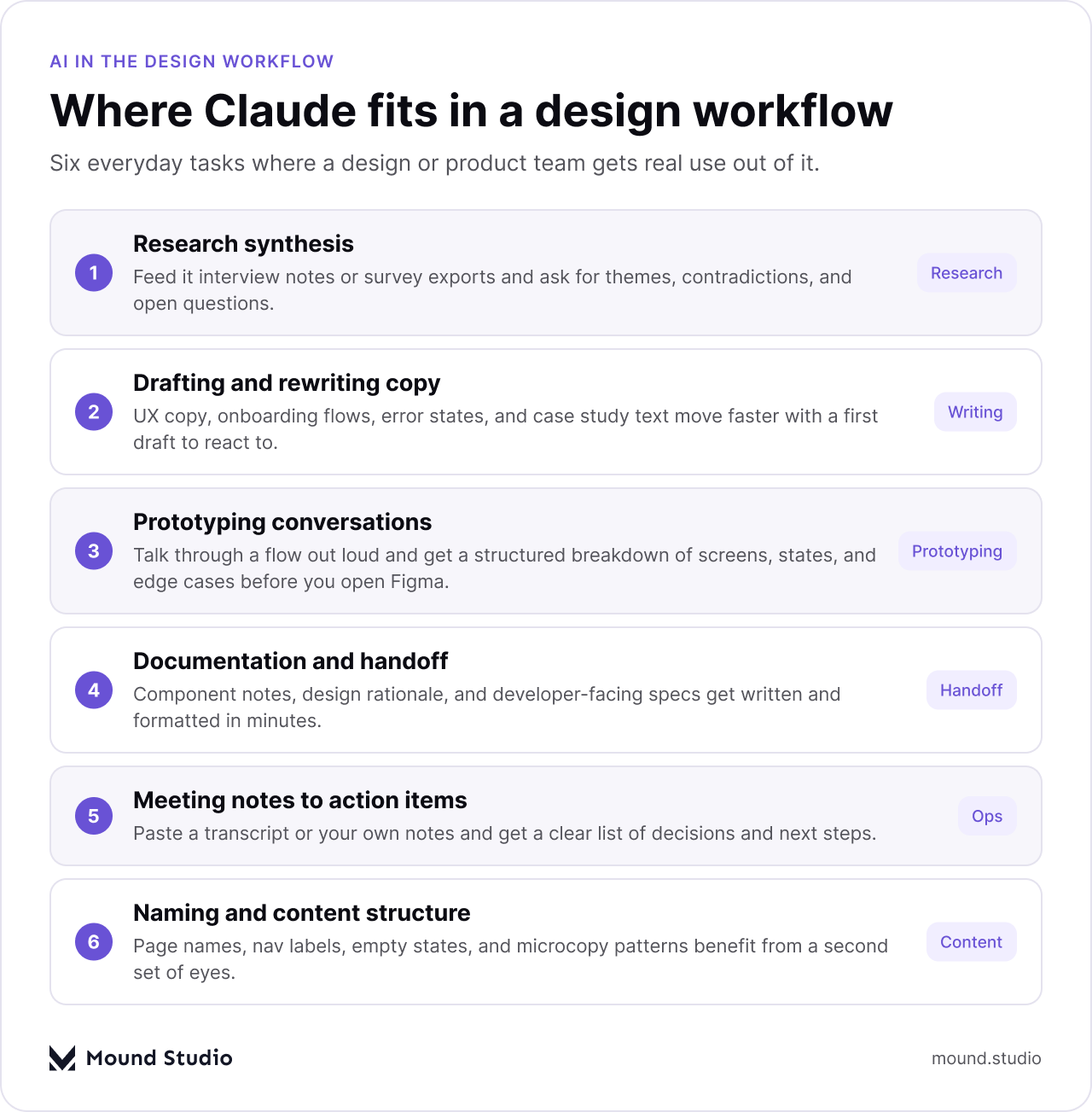
Paste in interview notes, survey exports, or a stack of support tickets and ask for themes, contradictions, and open questions. It will not replace your own judgment about what matters, but it gives you a first pass through material that would otherwise take an afternoon of manual tagging and highlighting. On a project with a dozen interviews, that first pass is often the difference between starting synthesis on day one instead of day three.
Onboarding flows, empty states, error messages, and case study text all move faster with something to react to. Most designers do not want a tool writing their final copy. They want a rough draft they can push back against, cut, and rework into their own voice. Our guide on using Claude for UX writing and microcopy goes deeper into this specific use, including how to keep the output from sounding generic.
Before opening Figma, it helps to talk through a flow out loud: what screens exist, what happens on each state, where a user could get stuck. Claude can hold that conversation and turn it into a structured outline of screens and states, which gives you a starting skeleton instead of a blank canvas. That outline still needs a designer to turn into an actual layout, but it removes the blank-page problem at the start of a new flow.
Component notes, design rationale, and developer-facing specs are necessary and often skipped because they are tedious to write. Claude can turn a set of screenshots and short notes into a first draft of that documentation, which someone on the team still checks against the actual file before it goes out. Teams that skip this step consistently end up answering the same developer questions over Slack instead of in a document.
Paste a transcript or your own rough notes from a client call and ask for a plain list of decisions made and next steps. This alone saves a fair amount of time on client work, where every call needs a written record somewhere, and a clear record protects both sides when a scope question comes up later.
Page names, navigation labels, empty state text, and microcopy patterns all benefit from a second set of eyes. Claude is useful for generating options to choose from, rather than a single answer to accept as final. Ask for five variations on a label and pick the one that fits your product's voice, rather than settling for the first thing that comes to mind.
| Task | Good fit for Claude | Still needs a person |
|---|---|---|
| First-draft UX copy | Yes | Final tone and edit |
| Research interview synthesis | Yes | Deciding what matters |
| Visual design in Figma | No | Always |
| Usability testing | Partial (writing the script) | Running sessions, reading reactions |
The difference shows up once a project runs longer than a single question. A generic chatbot session tends to forget what you told it two messages ago unless you keep repeating it. Claude is built to hold a longer brief, a style guide, or a set of research files in one conversation, and to work through a problem in steps rather than jumping straight to one answer. We cover this comparison in more detail in Claude vs ChatGPT for design and product teams, but the short version is that the gap is less about raw writing ability and more about how well the tool holds context and follows a process across a working session.
In practice, this matters most on anything that takes more than one sitting. A quick, one-off question does not need much context, and most chat assistants handle that fine. A week-long research synthesis, a multi-round copy rewrite, or a design system audit is a different kind of task, and that is where holding onto earlier parts of the conversation starts to matter.

| Situation | Reach for Claude | Reach for a specialized tool |
|---|---|---|
| Drafting copy or a document | Yes | |
| Summarizing research or transcripts | Yes | |
| Generating UI variants inside Figma | A Figma AI plugin or feature | |
| Producing final images or illustrations | An image generation tool |
Say a client sends over a handful of user interviews and asks for a redesigned onboarding flow. Before Claude, the first step was a designer reading through every transcript, pulling out quotes by hand, and grouping them into themes on a whiteboard or a research tool. That work still has to happen, but the starting point changes: paste the transcripts in, ask for the recurring frustrations and the moments people mentioned giving up, and use that as a first map of themes to check against your own read of the material.
From there, the same conversation can turn into a rough outline of the new onboarding flow: which screens are needed, what each one should accomplish, and where a shorter path might work better than the original. A designer still builds the actual screens in Figma, still makes the visual and interaction calls, and still runs the flow past teammates before it goes to a client. What changed is where the project starts: from a structured first pass instead of a blank document, which tends to shave real time off the slowest part of the process, the part before any pixels get placed.
The same pattern holds for a proposal, a case study write-up, or a set of release notes. The task is different, but the shape of the work is the same: gather the raw material, get a first structured pass, then apply judgment on top of it.
Teams that get real use out of it tend to follow a similar path, and teams that give up on it after one try usually skipped one of these steps.
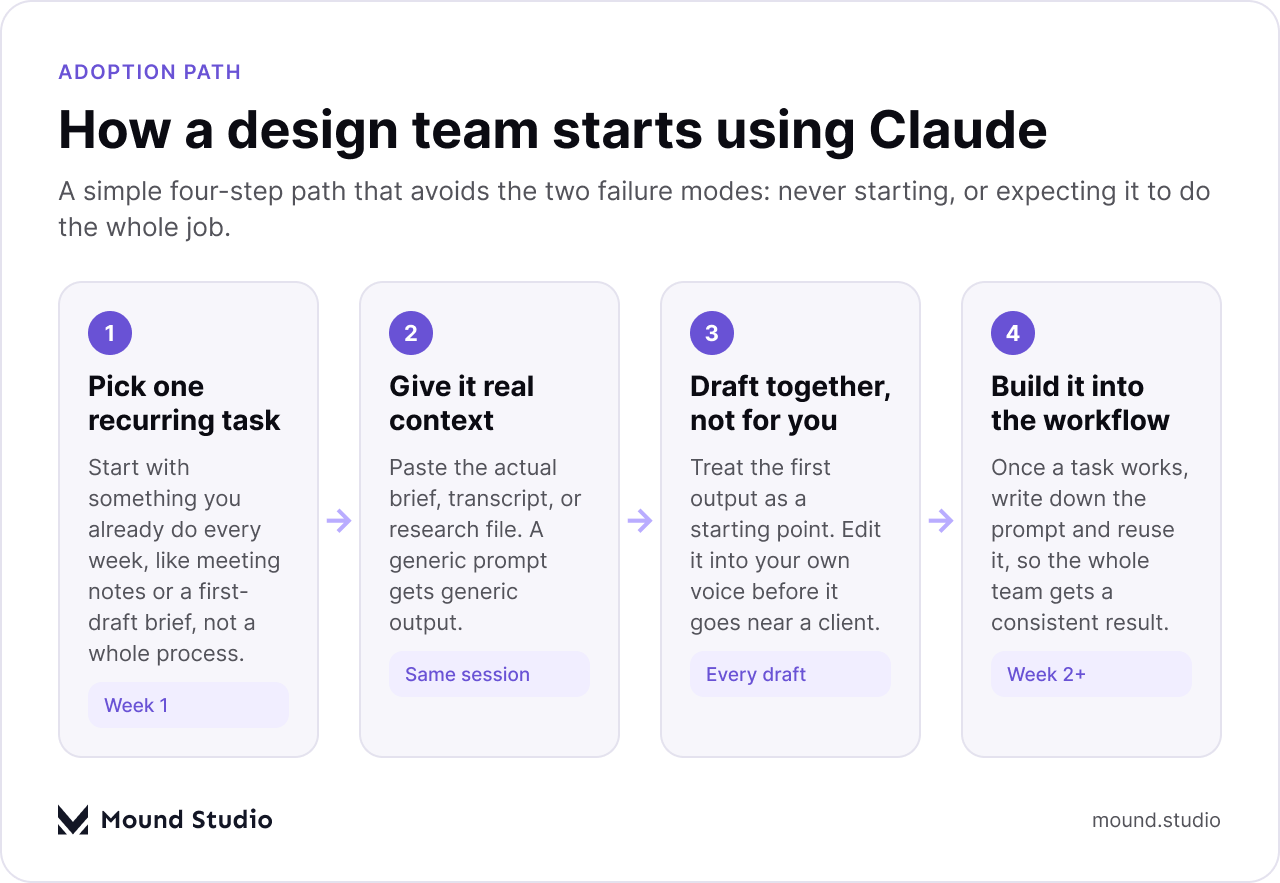
Start with something you already do every week, like turning meeting notes into action items or writing a first-draft brief. A whole redesign of your process is not the place to start. A single, repeated task is, because it is small enough to judge quickly and repeated often enough to be worth the setup.
Paste the actual brief, transcript, or research file into the conversation. A one-sentence prompt with no material behind it gets a generic answer back. The more real context you give it, the more specific and useful the draft, and the closer it lands to something you can actually edit instead of rewrite from scratch.
The first draft is rarely something you would ship as is. Edit it into your own voice, cut what does not apply, and treat it the way you would treat a junior teammate's first pass: useful, but not final. This step is where most of the quality actually comes from, not from the initial draft itself.
Once a prompt produces something useful for a task, save it. The second and third time you do that task, you start from a working prompt instead of a blank page, and the result gets more consistent across the team, which matters when more than one person is producing client-facing work.
Use this as a rough checklist before you commit real time to trying it out on client work.
Claude is not a replacement for design judgment, research, or testing. It is a practical tool for the writing, synthesis, and documentation that sit around all of that work, and for a lot of agency and product teams, that is where the hours actually go. If you want a wider view of where AI tools fit into a design process beyond just this one, our guide on how AI fits into a modern product design workflow is a useful next read, and if you want help figuring out where a tool like this fits into your specific workflow, talk to us about your project.
No. Both are AI chat assistants, but they come from different companies and are built with different priorities. Claude is built to hold longer, more structured conversations, which tends to matter most on tasks that take more than one sitting.
Not directly. Claude works in text, so it can describe a layout, outline a flow, or draft copy, but it does not open Figma or make visual design decisions. A designer still builds and judges the actual screens.
Anthropic offers a free tier alongside paid plans with more usage, similar to most AI assistants. Check Anthropic's own site for current plan details, since pricing and limits change over time.
Pick one recurring task, like turning meeting notes into action items or drafting a first pass at UX copy, and give it real material to work from rather than a one-line prompt. Expand to other tasks once that one works well.
No. It can help you synthesize research faster or draft a testing script, but it cannot run sessions, read a participant's reaction, or replace the judgment that comes from actually talking to users.


.png)


