








.avif)
.avif)
.avif)

Ai
How AI Fits Into a Modern Product Design Workflow
Neither tool is simply better. Claude tends to hold onto more of a long document without dropping earlier details, which helps with research notes, long specs, and design system files. ChatGPT tends to be faster for a first pass and sits inside a wider set of plugins, custom tools, and built-in image generation, which helps with quick brainstorming and rough drafts. The right pick depends on the task in front of you on a given day, not on which tool your team happens to have opened first.
This guide is not a sales pitch for either company. We use both tools at Mound Studio, on real client work, and this is what we have noticed about where each one tends to earn its place.
For a short, self-contained task, like one headline option or a quick brainstorm, either tool works fine and the difference rarely matters. For longer work, like reading through a stack of interview notes, drafting a multi-page spec, or working alongside a large design tokens file, a tool that keeps more of the document in view across the session tends to hold together better and lose fewer earlier details. For fast, low-stakes drafts, or for a team already living inside one ecosystem's apps and habits, the tool that is already open usually wins on speed alone.
We are not reviewing these tools in the abstract, and we are not paid by either company to say anything in particular here. We use both on real client work: writing and editing UX copy, reading through interview transcripts before a synthesis, turning a pile of loose meeting notes into something a client can act on, and checking a component's props or a design token against a style guide before we ship a change. That everyday use is what this guide reflects, not a lab test or a benchmark score, and we are not naming a version number for either tool because both change too often for that to stay true for long.
We also switch tools mid-project without much thought, because the task changes more often than the project does. A single engagement might involve a fast brainstorm on Monday and a careful edit of a fifteen-page spec on Thursday, and those two moments call for different strengths. Neither tool has replaced judgment on our side. Both have replaced the blank page as the starting point for a first draft.
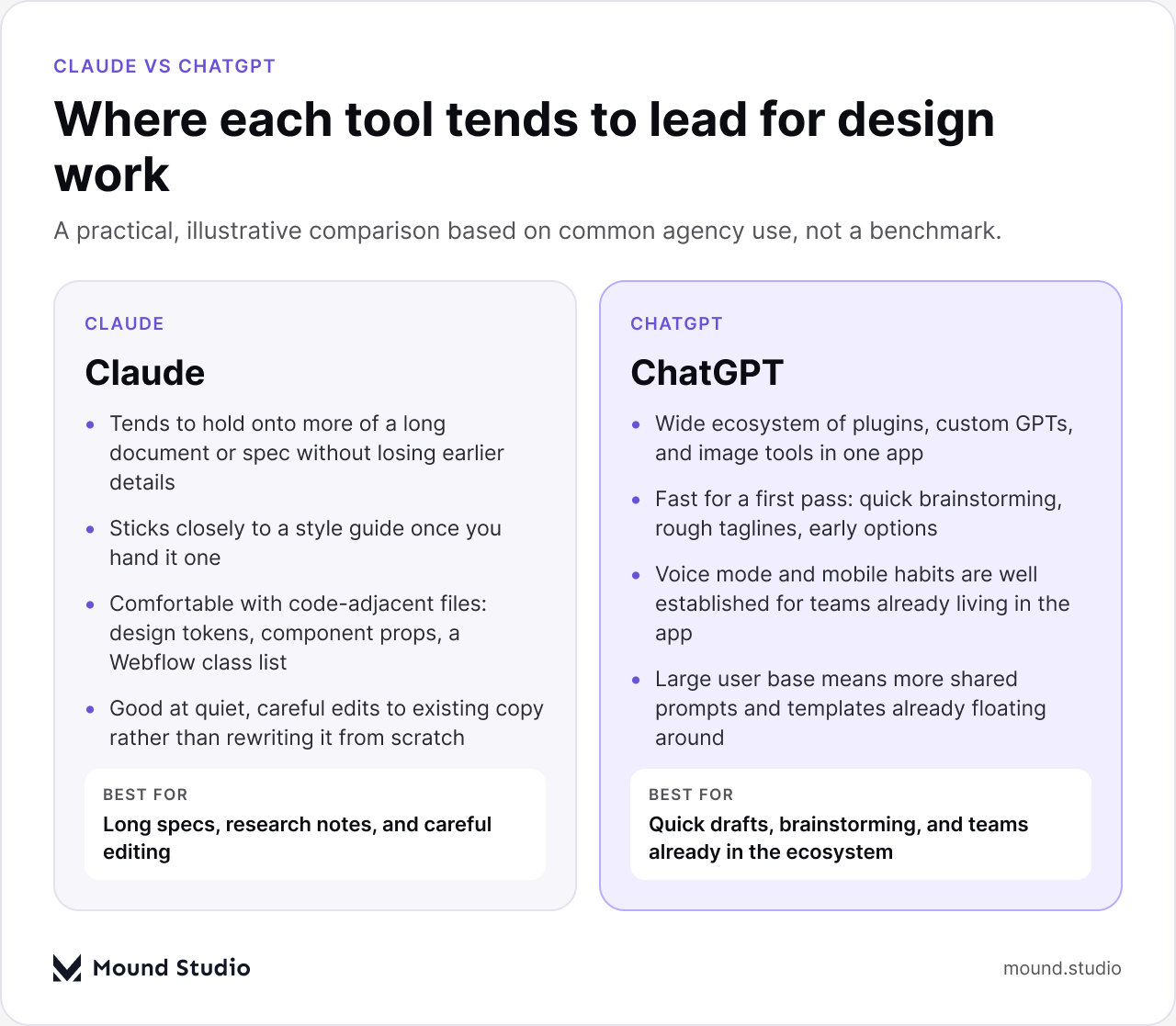
Claude is often the tool we reach for when a task involves a long file that needs to stay coherent from the first page to the last. Research transcripts, a multi-page spec, or a design system document tend to hold together better across a longer working session, so a detail mentioned early is less likely to get dropped by the time the summary reaches the end. It also tends to stick closely to a style guide once you hand it one, which matters when you need copy written in a specific voice rather than a generic one that has to be rewritten anyway.
For code-adjacent work, like reading through a list of design tokens, checking a component's props, or looking at a Webflow class list, it tends to be comfortable working directly with the structured file rather than needing everything explained in plain language first. That saves a step when the file itself is the clearest source of truth.
It is also useful for careful, targeted edits to copy that already exists. Instead of rewriting a paragraph from nothing, it can hold the original tone and change only what actually needs to change, which cuts down on a review step later where someone has to hunt for what silently shifted.
ChatGPT tends to be the faster first move for early-stage thinking: a first pass at naming options, a handful of rough tagline directions, or a quick outline before anyone on the team has decided what the piece should even say yet. Its wider ecosystem of plugins, custom GPTs, and built-in image tools means a lot of adjacent tasks, like a rough visual or a quick chart to drop into a deck, can happen without switching apps mid-thought.
Voice mode and mobile habits are well established too, which suits a team member who does their early thinking from a phone between meetings rather than at a desk. Because more people already use it day to day, there also tend to be more shared prompts and templates floating around a team, which can shorten the ramp-up time for someone newer to AI-assisted work.
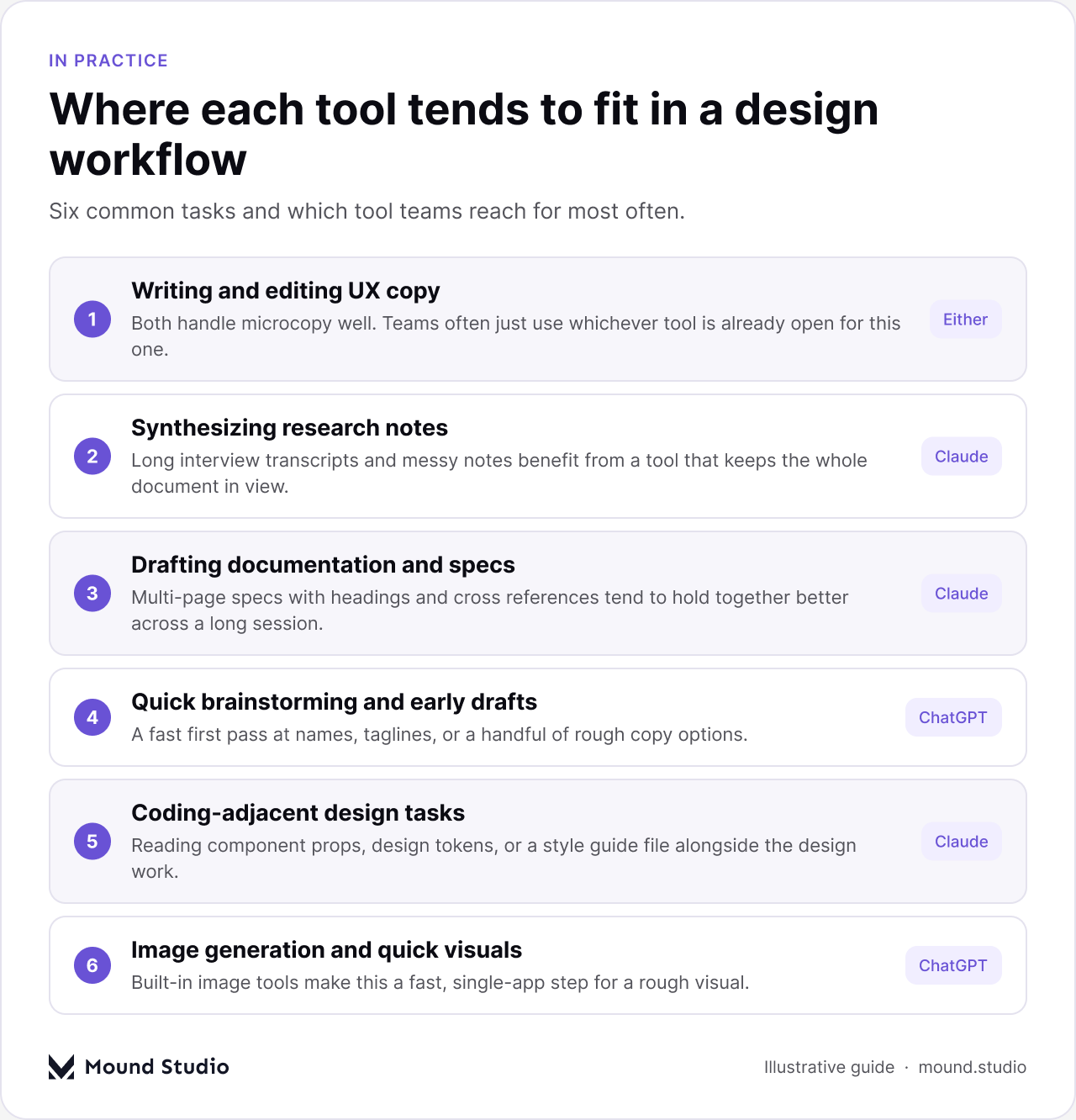
Both handle short UX copy, like button labels, empty states, and microcopy, about equally well, and we would not tell a team to switch tools for this alone. The difference shows up at length and at revision. If you are drafting a handful of options for one line of copy, reach for whichever tool is already open on your screen. If you are editing a copy deck across fifteen screens and need the tone to stay consistent from the first screen to the last, a tool that can hold the whole deck in view at once tends to introduce fewer small inconsistencies along the way.
The real skill either way is still the brief you give it. A vague prompt produces vague copy from both tools equally. A tight brief that names the audience, the goal of that specific screen, and two or three real examples of your existing voice will outperform tool choice every time. We have a separate guide on how AI fits into a product design workflow if you want the fuller picture beyond copy alone.
This is where the gap is most noticeable in our day-to-day use. Interview transcripts and messy research notes tend to be long, repetitive, and full of small details that only matter once you reach a later section. A tool that keeps more of that document in view while it writes the summary is less likely to drop a theme that came up only once but still mattered to the finding. We tend to paste the raw notes in whole and ask for themes, direct quotes, and open questions, rather than a polished write-up, so nothing gets smoothed over before a person actually reads it.
Neither tool replaces sitting with a client's users yourself. What either can do well is turn six hours of loose notes into a first structure you can then argue with, which is a faster starting point than a blank page.
Design documentation tends to be long, cross-referenced, and easy to get subtly wrong if a tool loses track of an earlier decision by the time it reaches a later section. Drafting a spec with several sections, each referring back to a choice made earlier in that same document, is a case where holding more context in view tends to pay off in practice. That said, we still read every draft line by line before it goes anywhere near a developer. An AI draft saves time on the first pass. It does not remove the need for a person to check that the details still line up.
Designers increasingly work next to code without writing much of it themselves: reading a list of design tokens, checking a component's props, or looking through a Webflow class list to understand how a section was actually built before changing it. This is workable ground for both tools, though one that can hold a longer file, like a full tokens file or an entire style guide, alongside the specific question you are asking, tends to give a more grounded answer instead of a generic one pulled from general knowledge. If this kind of work is becoming a regular part of your process, our guide to AI prototyping tools for UX designers covers the wider toolset around it. If your interest leans more toward the coding side of that overlap, our piece on agentic coding versus vibe coding is a useful next read.
| Task | Claude tends to fit | ChatGPT tends to fit |
|---|---|---|
| Long research synthesis | Strong fit | Workable |
| Quick brainstorming | Workable | Strong fit |
| Style guide consistency | Strong fit | Workable |
| Rough image or quick chart | Workable | Strong fit |
Probably not, and that is a harder answer to act on than picking a winner. Standardizing on one tool is simpler to manage, easier to bill for, and easier to write a policy around. It also means giving up whatever the other tool does better, on every task, for the life of that policy. Most of the teams we work alongside end up with both available, and let the task decide which one gets opened, the same way a studio keeps more than one type of pen on the desk.
Where standardizing does make sense is around what you paste in. Settle, as a team, on what kind of client material is fine to paste into either tool and what should stay out, before someone pastes in something unreleased by habit rather than by decision.

| If your task is | Reach for |
|---|---|
| A quick headline or tagline option | Either, whichever is open |
| Reading through long interview notes | Claude |
| Drafting a multi-page spec | Claude |
| Fast early brainstorming | ChatGPT |
| A rough visual or quick chart | ChatGPT |
| Checking a design token or component prop | Either, Claude if the file is long |
Claude and ChatGPT are not competing for the same job. One tends to hold a long file together better across a session. The other tends to move faster on a first pass and sits inside a wider set of everyday tools your team may already use. Most design teams end up using both, and the real skill is knowing which one to open for the task sitting in front of you, not picking a permanent favorite and forcing every task through it.
If you want a second opinion on how AI tools fit into your own design workflow, talk to us about your project.
Both handle short UX copy about equally well. Claude tends to hold a longer copy deck more consistently across many screens, while ChatGPT is often faster for a quick first pass at a few options.
Claude tends to fit better here, because it holds more of a long, messy set of interview notes in view while writing a summary, which helps it avoid dropping a detail that only came up once.
No. Both tools speed up a first draft or a first pass at synthesis, but a person still needs to check the details, catch what got smoothed over, and make the final call.
It depends on your settings and your client agreements, not on the tool alone. Check each tool's data handling settings and agree, as a team, on what kind of material is fine to paste in before anyone does it by habit.
Not usually. Most teams get more value from keeping both available and letting the specific task decide, since a tool that is strong on one kind of work is often just workable on another.



.png)


