








.avif)
.avif)
.avif)

Ai
How AI Fits Into a Modern Product Design Workflow
At Config 2026, Figma pushed AI agents further into the design canvas than any previous release. Agents can now help build and iterate on screens directly inside a file, blurring the line between code, motion, and design in a way that used to require switching tools. For a UI/UX studio, the change that matters is not the demo. It is what happens the next morning, when a designer opens a real client file and has an agent available as part of the normal toolkit.
What stood out from the keynote was less about a single new feature and more about direction: agent steps sitting next to layout tools, component tools, and motion tools in the same file, rather than living in a separate plugin window. That framing matters for a studio, because it means agent-assisted steps are not a side experiment anymore. They sit in the same file a client will eventually see, on the same layers a developer will eventually build from, which is exactly why the review habits around them need to be deliberate from day one.
The short version: agents are a first-draft and iteration accelerator, not a replacement for design judgment. They remove blank-canvas time and repetitive edits. They do not remove the need for a designer to decide what the product should actually do, how it should look next to a brand, whether it is usable, or whether a client will accept it. Treat agent output as a fast draft that still goes through your normal review, and the tool is a genuine time saver. Treat it as a finished screen, and you ship problems faster than before.
Figma's newer agent workflows let you describe a screen, a flow, or an edit and get a working draft inside the file, built from real frames and components rather than a flat image. That draft still needs a design lead to review structure, a pass for accessibility and brand consistency, and a human read of what the client actually wants. The agent changes how fast you get to a reviewable draft. It does not change who is responsible for the result.
Strip away the keynote framing and the practical use cases are fairly specific. Here is where an agent earns its place in a working file, and where it is really just a faster version of something a designer already did by hand.
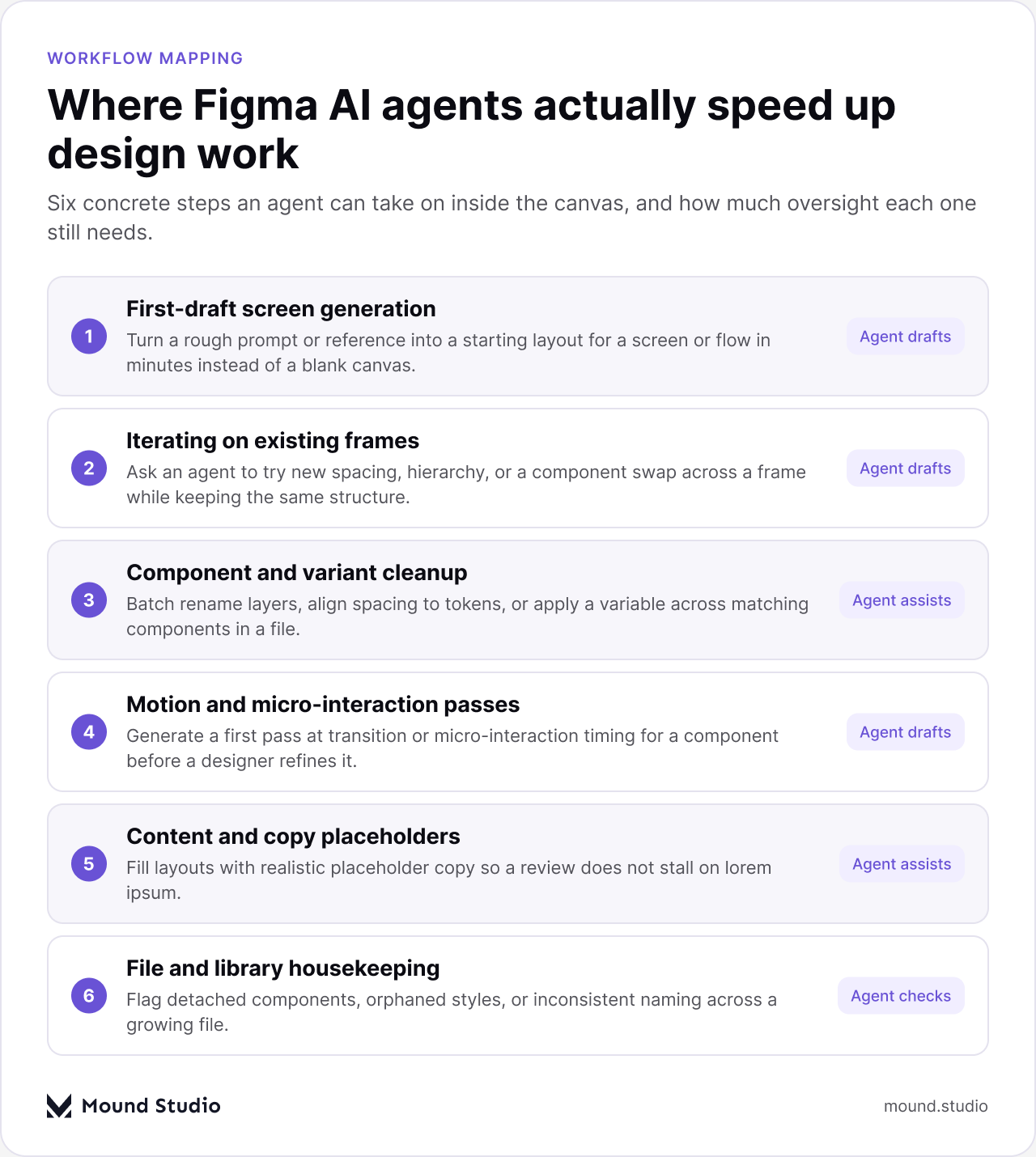
Two patterns show up across all six. First, agents are best at work that is repetitive, has a clear reference to work from, or does not require weighing competing priorities. Second, every one of these still produces something a person looks at before it goes anywhere near a client. An agent that renames fifty layers correctly saves real time. An agent that renames them wrong and nobody checks costs more time than it saved.
Design teams have had access to AI-assisted tools for a while now, mostly in the form of layout suggestions, copy generation, or image plugins bolted onto the side of a file. What changed with agent workflows moving deeper into the canvas is that the output is no longer a flat suggestion to copy and paste. An agent draft arrives as real frames, real components, and real layers inside the working file, which means it inherits your existing structure instead of sitting apart from it.
That is also why the risk changed shape. A pasted-in suggestion was easy to spot as external and easy to discard if it did not fit. A draft built with real components inside the actual file looks native from the first glance, and it is far easier to accept without noticing that the underlying structure, naming, or spacing quietly drifted from the rest of the product. The tool got better. The discipline required around it went up at the same time, not down.
The most useful mental model we have found is a simple split: agents carry volume and speed, designers carry judgment and consequence. It sounds obvious written down, but it is easy to blur in practice once a tool feels fast and confident.
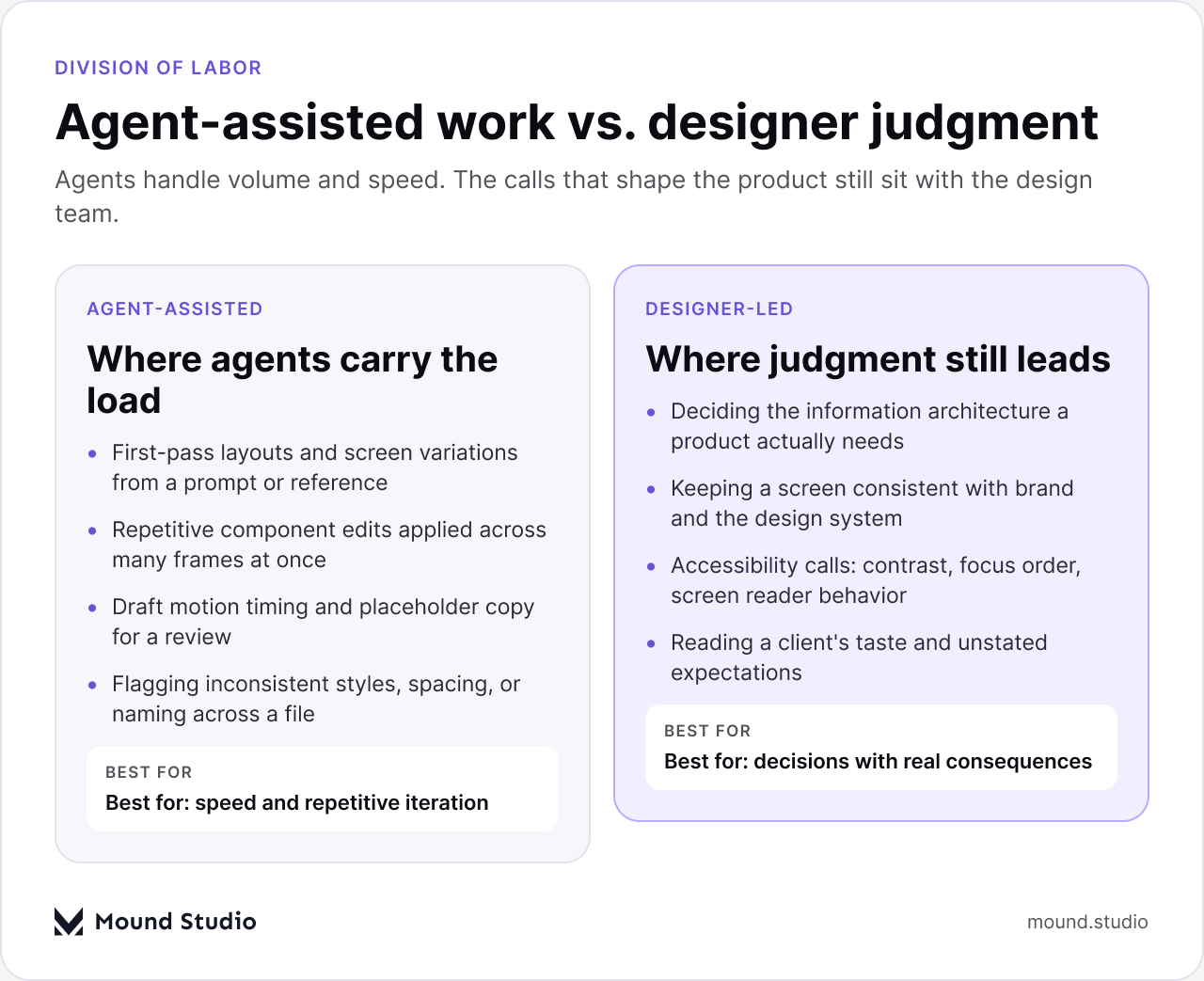
Notice what sits on the designer side of that split: information architecture, brand consistency, accessibility, and client taste. None of those are style preferences. They are the parts of a project where a wrong call is expensive to undo, either because a user gets stuck, a brand looks inconsistent across dozens of screens, or a client loses confidence in the direction. That is exactly why they stay with a person, agent tooling or not.
The teams that get the most out of agent-assisted design are not the ones using it the most. They are the ones who decided, in advance, exactly where an agent step sits in their existing process, instead of letting agent output skip straight to a client call. A workable pipeline looks close to what any studio already runs, with one new step added near the start.
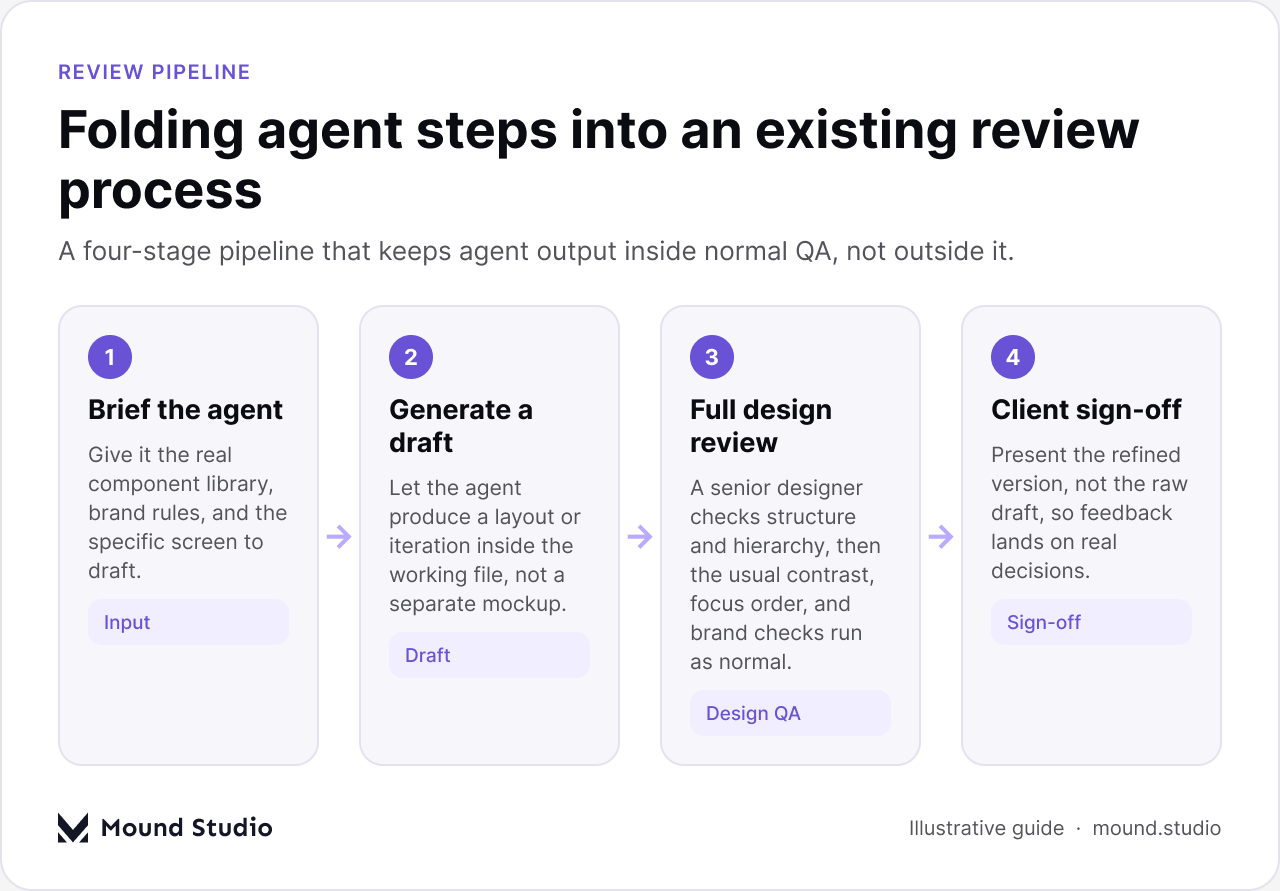
The step most teams skip is the brief. An agent given a vague prompt and no access to the real component library will draft something that looks plausible and fits nothing. An agent given the actual design system, brand rules, and a specific, scoped ask produces a draft worth reviewing in the first place. Treat the brief as part of the deliverable, not a shortcut around it.
| Stage | Who owns it | What can go wrong if skipped |
|---|---|---|
| Brief the agent | Design lead | Draft ignores the design system and has to be redone from scratch |
| Generate the draft | Agent, inside the working file | Draft lives in a separate file and never gets merged properly |
| Full design review | Senior designer | Weak hierarchy or IA choices ship because no one questioned the structure |
| Client sign-off | Design lead + client | Client reacts to a raw draft instead of a considered option |
This is also where handoff quality still matters as much as it always did. A draft that looks right on screen but is not built from real components, variables, and states is not actually faster once a developer opens it. Our guide on Figma to developer handoff covers the checks that still apply whether a human or an agent built the first version.
It helps to be specific about this, because "designers still add judgment" is easy to agree with and easy to ignore in practice.
None of this is an argument against using agents. It is an argument for being precise about what they are good at, so the time they save gets reinvested in the parts of the work that still need a person's full attention.
Not every task is a good fit, and pretending otherwise wastes the time it is supposed to save. This rough guide reflects how we think about it in practice.
| Situation | Agent-first is a good fit | Design a person should start |
|---|---|---|
| Early exploration | Several first-pass directions from a clear brief | A brand-new product with no existing pattern to work from |
| Component work | Bulk edits across many similar frames | Defining a new core component from scratch |
| Content | Realistic placeholder copy for a review | Final client-facing copy and tone |
| Motion | A rough first pass at timing | Signature interactions tied to the brand |
A useful habit is to ask, before starting any task, whether getting it wrong would be expensive to notice later. If the answer is no, an agent draft is worth trying first. If the answer is yes, start with a person and consider where an agent might still help with the repetitive parts of that same task. Our take on where AI fits into a modern design workflow goes further into sequencing decisions like this across a whole project, and our guide to AI prototyping tools covers the adjacent question of testing ideas quickly once a direction is picked.
This is the short version of everything above, meant to be checked quickly rather than reasoned through each time. Keep it close to wherever your team already tracks review sign-off, so it becomes a habit rather than an extra step someone has to remember to add.
If any answer is no, the draft is not ready to leave the file, regardless of how finished it looks on screen.
Figma's push toward agent-assisted design inside the canvas is a real change in how fast a studio can get from a blank file to a reviewable draft. It is not a change in who is responsible for information architecture, brand consistency, accessibility, or reading what a client actually needs. Build agent steps into the review process you already trust, rather than around it, and the speed becomes a real advantage instead of a new source of risk.
The studios that get this right treat agent output the same way they would treat a fast, junior teammate's first pass: useful, worth having, and never the version that goes out the door unchecked. That framing does not slow a project down. It keeps the real speed agents offer from turning into rework later, which is the outcome that actually costs a project time.
Curious what an agent-assisted workflow would look like on your own product? Tell us what you're building and we'll walk you through it plainly.
No. They speed up first drafts and repetitive edits, but decisions like information architecture, brand consistency, accessibility, and reading client taste still need a designer.
It can generate a first-draft screen from a prompt or reference, iterate on an existing frame, clean up components and naming, draft rough motion timing, and fill layouts with placeholder copy.
Treat an agent draft the way you would treat a fast first pass from a teammate: brief it properly, have a senior designer review structure, run the usual accessibility and brand checks, then show the client the reviewed version, not the raw draft.
Not if the draft is built from real components, variables, and states. If it isn't, a developer still has to rebuild it, which erases the time the agent saved.
It's most useful for repetitive or well-referenced tasks like bulk component edits and first-pass layouts. New products with no existing pattern, and any decision with real consequences if it's wrong, still start with a person.



.png)


