








.avif)
.avif)
.avif)

Ai
How AI Fits Into a Modern Product Design Workflow
Product teams use Claude to draft the first version of button labels, error messages, empty states, and onboarding copy, then edit and test what comes back. Someone describes the screen, the user's goal, and the product's existing voice, and gets several options in seconds instead of staring at a blank text field. A writer or designer still picks the line that fits, tightens the wording, and checks it against the style guide. Claude speeds up the draft. It does not make the call on what the product actually sounds like.
This is not about handing tone of voice to a model. It is about moving the slow, repetitive part of UX writing, coming up with five different ways to say "delete this file", out of someone's head and onto the screen, so the team spends its time choosing the right version instead of producing the first one from scratch.
We started using Claude for this the same way most product teams do: on the smallest, most repeated tasks first. A button label that needed rewording for the fourth time. An error message copied straight from a server log. Once those small wins built up, the same approach moved into onboarding flows and full style guide reviews, without ever becoming the thing that decides what the product sounds like.
Claude works best for drafting several copy variants at once, turning a technical error into plain language, and checking a paragraph of copy against a written style guide. It is less useful, and less trusted, for deciding a product's actual tone of voice, judging how copy reads across a full user flow, or wording anything legal or sensitive. Those calls stay with a person, on every project we run.

A button label sounds simple until you are staring at "Submit" for the fourth time wondering if it fits the rest of the screen. Claude drafts five to ten label variants for the same action at different lengths and tones, "Save changes", "Save and continue", "Done", and the team keeps whichever one matches the surrounding copy. The value is not any single label. It is skipping the blank-page moment and starting from a short list instead. This matters more than it sounds, because a label that reads fine in isolation can still clash with the four other buttons on the same screen, and seeing several options side by side makes that clash obvious in a way that staring at one option never does.
An empty state has one job: explain why the screen is bare and what to do next, without repeating the section header word for word. Teams describe the screen, what a first-time user sees, and what action fixes it, then ask for a plain sentence and a short call to action. Claude drafts that pairing quickly, and a designer trims it to fit the layout. The common failure mode with empty states is writing them as an afterthought, one generic line reused across a dozen different screens, and a quick draft pass tends to surface how different each situation actually is once someone looks closely.
Raw error text from an API is rarely something a user should read. Claude takes a technical message and rewrites it as a plain explanation plus the next step, in the product's own voice rather than a generic one. This is one of the places where Claude earns its keep fastest, because rewriting the same category of error, a failed upload, a timed-out session, a validation mismatch, over and over is exactly the kind of repetitive task worth handing off. The person reviewing the result still checks two things every time: does the explanation match what actually happened, and does the suggested next step actually exist in the product.
Onboarding copy has to read as one voice across five, ten, or fifteen steps written by different people over different sprints. Teams paste the full flow into Claude and ask it to flag steps that break rhythm: a step that suddenly gets formal, a verb tense that shifts, a sentence twice as long as its neighbors. Fixing tone drift after the fact is harder than writing consistently the first time, and this catch works well as a review pass before a flow ships. It also helps on flows that get edited piecemeal over months, where the version written in one sprint never quite matches the version written in the next, and nobody notices until a new user hits both back to back. Our guide to SaaS onboarding UX covers the structure side of the same problem.
The quality of what comes back depends entirely on what goes in. A prompt that just says "write a button label" returns something generic. A prompt that includes the screen, the user's goal, and a line or two of existing copy from the same product returns something usable. The table below is a starting point teams reuse across projects.
| What you need | What to include in the prompt | What you get back |
|---|---|---|
| Button or CTA label | The action, the screen, one nearby label already in the product | Several label lengths and tones to pick from |
| Error message | The raw error text, what caused it, what the user should do next | A plain rewrite plus a suggested next step |
| Empty state copy | What's missing, why, and the one action that fixes it | A short explanation paired with a call to action |
| Style guide check | The paragraph of copy plus the actual rules from the guide | A list of exactly where the copy breaks a rule |
Notice the pattern: every row asks for context, not just a task. Teams that skip the context step end up rewriting most of what comes back anyway, which erases the time saved.
A few starter prompts that tend to work well in practice: "Here's our error copy style: [examples]. Rewrite this raw error in the same voice, with a next step." Or: "Give me eight variants of a button label for [action], ranging from two words to a short phrase." Or: "Here is our full onboarding flow. Flag any step where the tone or sentence length breaks from the rest." None of these are complicated. What they share is a habit of describing the surrounding product, not just the single string that needs writing.
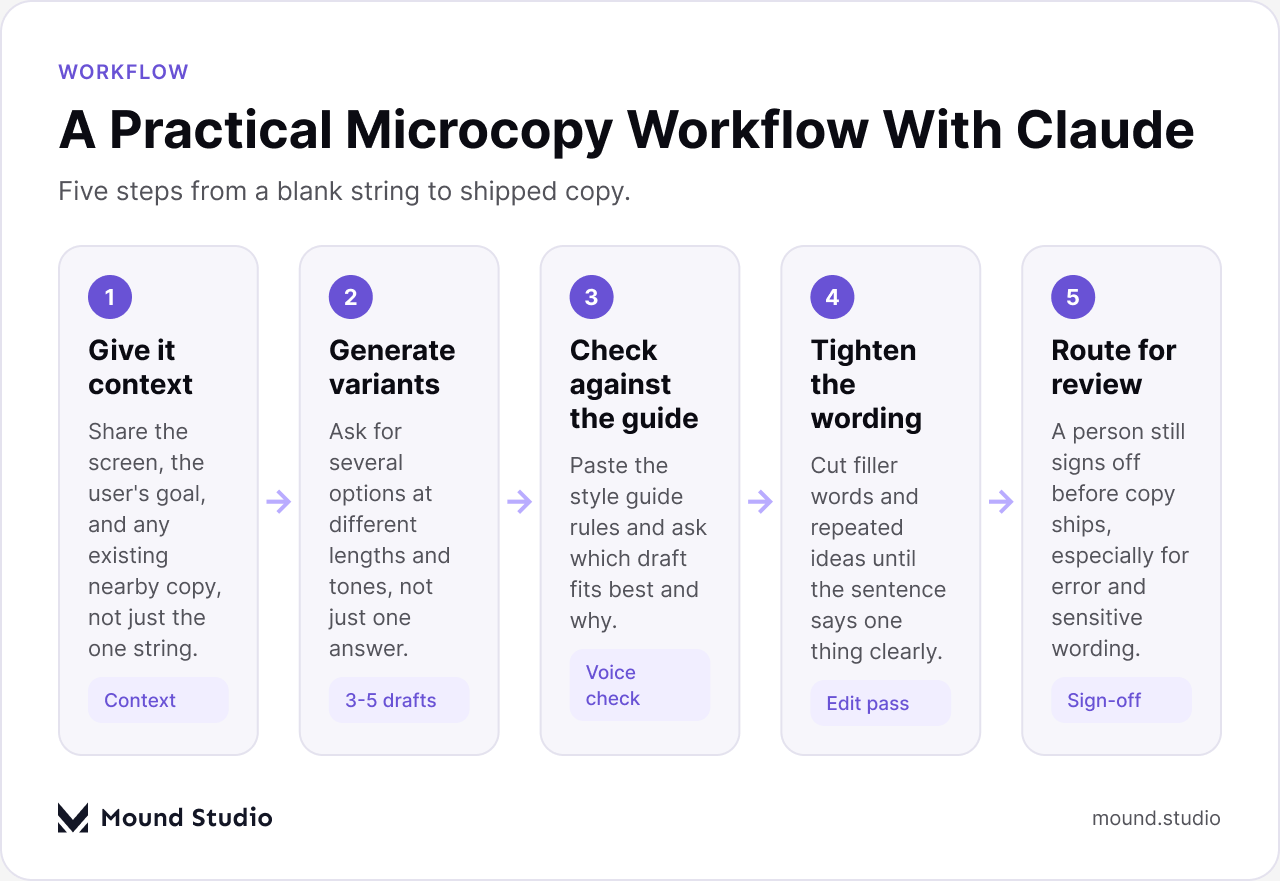
In practice the work follows a short loop rather than a single prompt. First, give Claude context: the screen, the user's goal, and any nearby copy already in the product, not just the one string that needs writing. Second, ask for several variants at different lengths and tones instead of accepting the first answer. Third, paste in the actual style guide and ask which draft fits best and why, rather than trusting a guess. Fourth, tighten the wording by hand, cutting filler words and repeated ideas until the sentence says one thing clearly. Fifth, route the result to a person for sign-off before it ships, which matters most for error copy and anything touching a sensitive action like account deletion or a payment.
None of these steps take long individually. What they replace is the version of this work where someone opens a blank document, writes one line, and calls it done because there was no time to try a second option. The loop works the same whether it runs across a single screen or an entire feature release: the context and the variants stay the same size of task, only the number of strings changes. Our piece on how AI fits into a modern product design workflow walks through where this loop sits next to the rest of a design process.
Most teams already have a style guide sitting in a document somewhere, rules about sentence case, contractions, how the product refers to itself, which words are banned. The fastest check is pasting both the guide and the draft copy into the same conversation and asking, plainly, where the copy breaks a specific rule. That is a narrower, more checkable question than "does this sound right," and it tends to return a usable list instead of a vague opinion.
| Style guide item | How teams check it |
|---|---|
| Sentence case vs title case | Paste the rule and the copy, ask for every heading that breaks it |
| Banned or discouraged words | Paste the word list, ask for exact matches in the draft |
| Contractions allowed or not | Ask for a line-by-line check against the stated rule |
| Product name and terminology | Ask it to flag any inconsistent name or term across the file |
This kind of check is fast precisely because it is narrow. Asking a broad question like "is this good UX copy" invites a broad, unhelpful answer. Asking "does this line follow rule four" gives you something you can act on in the next five minutes.
Most of these mistakes share one root cause: treating the tool as a replacement for a decision instead of an input to one. The fix is rarely technical. It is a habit of pausing before a draft ships and asking who actually reviewed it, and against what.
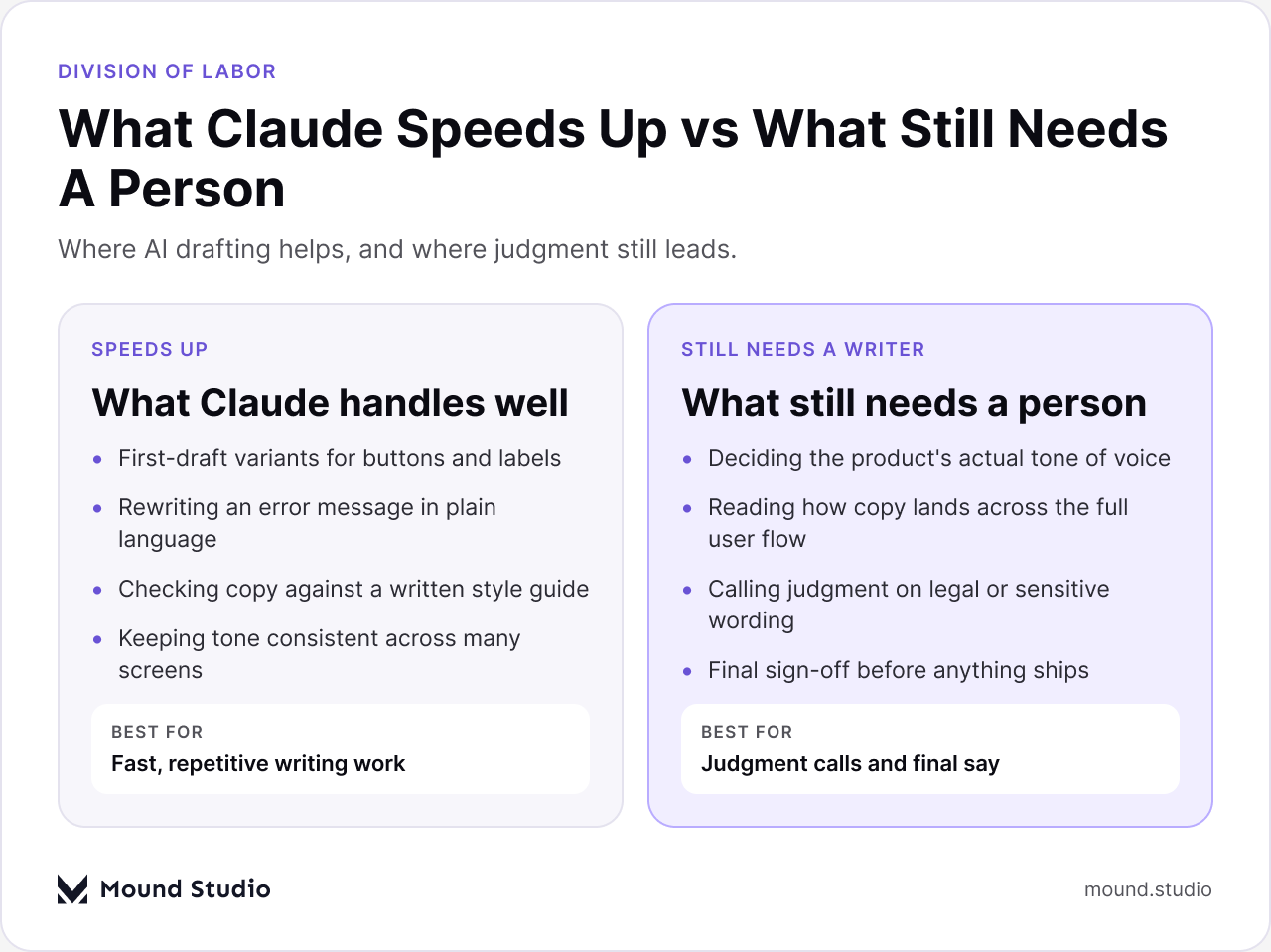
Use the list below as a quick decision guide before you hand a task to Claude or to a writer on the team.
The pattern holds across the projects we have worked on: Claude is strongest wherever the task is "write several versions of this one thing." It is weakest wherever the task is "decide what this product should sound like." Keeping that line clear is most of what makes the workflow actually save time instead of creating a new review problem. Teams evaluating tools for this kind of work sometimes ask us to compare options directly, which is the same question we cover in our roundup of AI prototyping tools for UX designers, even though writing and prototyping are different tasks solved the same way.
Claude is not a UX writer. It is a fast way to get a first draft, a batch of variants, or a rule-by-rule check, so the person doing the actual writing spends their time deciding instead of typing from nothing. If you want help setting up a microcopy workflow that fits your product's own voice, tell us about your product and we will show you where it fits.
No. Claude drafts copy once a tone already exists somewhere in the product, in existing screens, a style guide, or example copy you paste in. Deciding what a product should sound like in the first place is a call a person makes, then Claude helps keep it consistent across new screens.
Not for anything touching billing, account deletion, legal terms, or safety. Those categories get a person's sign-off every time. Lower-stakes copy like a button label or an empty state can move faster, but a quick review pass still catches details Claude can't judge on its own.
Paste the actual style guide rules alongside the draft copy and ask exactly where it breaks a rule, rather than asking a general "does this sound right" question. A narrow, checkable question returns a usable list instead of a vague opinion.
No. It removes the blank-page part of the job, drafting a first pass and multiple variants quickly, so a writer or designer spends more time deciding and less time producing options from scratch.
Button and CTA labels, error message rewrites, empty state copy, and drafting several tone variants of the same message. It is less suited to judging how copy reads across a full user flow or deciding a product's tone of voice.



.png)


