








.avif)
.avif)
.avif)

Ai
How AI Fits Into a Modern Product Design Workflow

The short answer: AI has moved past being a novelty generator and is now showing up inside real steps of the design process, not just as a party trick for a pitch deck. Concepting, design systems, accessibility checks, and parts of prototyping are where it earns its keep today. Fully autonomous design pipelines and one-prompt rebrands are still mostly marketing, not something you can hand a client and walk away from.
For an agency, the useful question isn't "should we use AI." Almost every studio already does, in some form. The useful question is which specific trend is worth building into a repeatable process, which ones are worth a cautious pilot, and which ones are worth ignoring until the tooling actually catches up to the claims.
What changed to get here matters too. The earlier wave of AI design tools was mostly about generating a single artifact: a logo, a landing page mockup, a moodboard. It was impressive in a demo and thin in practice, because a client project is never really about one artifact. It's a chain of decisions that has to hold together across a whole product. What's different now is that AI has spread across more links in that chain at once: concepting, component drafting, QA, and parts of prototyping all have usable tools behind them. That spread is exactly why the evaluation question got harder. A studio isn't deciding whether to use "AI in design" once, it's making a separate call for each part of the process.
Across client work this year, AI has settled into a handful of places where it consistently saves time without lowering the bar, plus a couple of places where it's used more selectively. The pattern below is what shows up most often in practice.
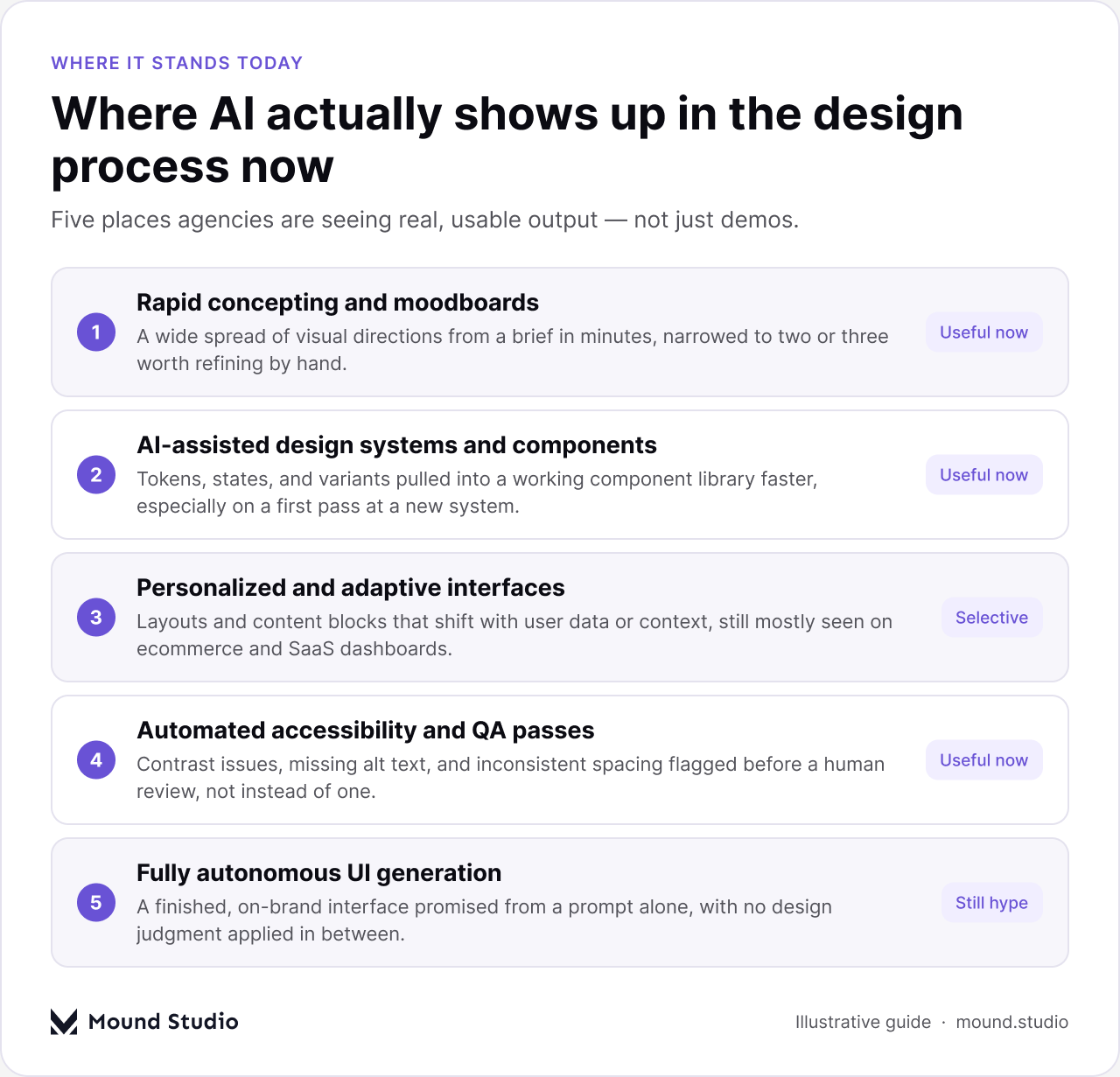
The common thread across the first four rows is that AI is doing the first pass, not the final one. A designer still decides which direction fits the brand, still checks contrast and hierarchy by hand, still edits the copy an AI tool wrote for a placeholder. That's the difference between a trend that holds up in client work and one that only holds up in a demo.
The design-systems row deserves a closer look, since it's the one most agencies underrate. Building a component library from scratch, with consistent tokens, sensible naming, and states for every interactive element, used to eat weeks of production time on a new engagement. AI-assisted tooling can now draft a working first version of that library from an existing style reference or a rough set of screens, which shifts the team's time toward reviewing and refining rather than typing out every variant by hand. It doesn't replace the judgment that goes into naming conventions or deciding what belongs in the system at all. It just removes a lot of the repetitive setup that used to come before that judgment could even start.
Here's a plain read on where the most talked-about trends stand right now, based on what actually ships in agency work rather than what's promised in a product launch.
| Trend | What it actually does | Where it stands for agencies |
|---|---|---|
| Rapid concepting and moodboards | Turns a written brief into a spread of visual directions in minutes | Useful now, strong for early exploration |
| AI-assisted design systems | Drafts tokens, states, and component variants from an existing pattern | Useful now, still needs a system-level review |
| Personalized or adaptive interfaces | Reorders layout or content blocks based on user data or context | Selective, mostly ecommerce and SaaS today |
| Automated accessibility and QA checks | Flags contrast issues, missing alt text, and spacing inconsistencies | Useful now, pairs with manual review |
| AI-assisted research synthesis | Summarizes interview notes or survey responses into rough themes | Selective, a draft input, not a final finding |
| Fully autonomous UI generation | Promises a finished, on-brand interface from a single prompt | Still hype, no design judgment in the loop |
The short answer: anything that claims to remove the designer from the loop entirely. The trends that hold up are the ones that speed up a specific, well-defined task. The trends that don't hold up are the ones that promise to replace judgment rather than support it.

Notice the shape of each column. The useful list is made of concrete tasks with a clear start and end point: concept, check, resize. The hype list is made of outcomes, not tasks: a finished pipeline, a finished rebrand, a finished set of research findings. Whenever a claim describes an outcome instead of a task, that's usually the trend to treat with more skepticism, not less.
This doesn't mean the hype-column ideas never mature. Personalized interfaces and adaptive layouts were considered speculative a couple of years ago and are now solidly useful in specific categories like ecommerce and SaaS dashboards. The list moves. What matters is testing that movement yourself instead of taking a vendor's word for it.
The short answer: treat every new AI tool the way you'd treat a new hire on trial. Give it a real task, review the output against your existing standard, and only fold it into the standard workflow once it clears that bar more than once.
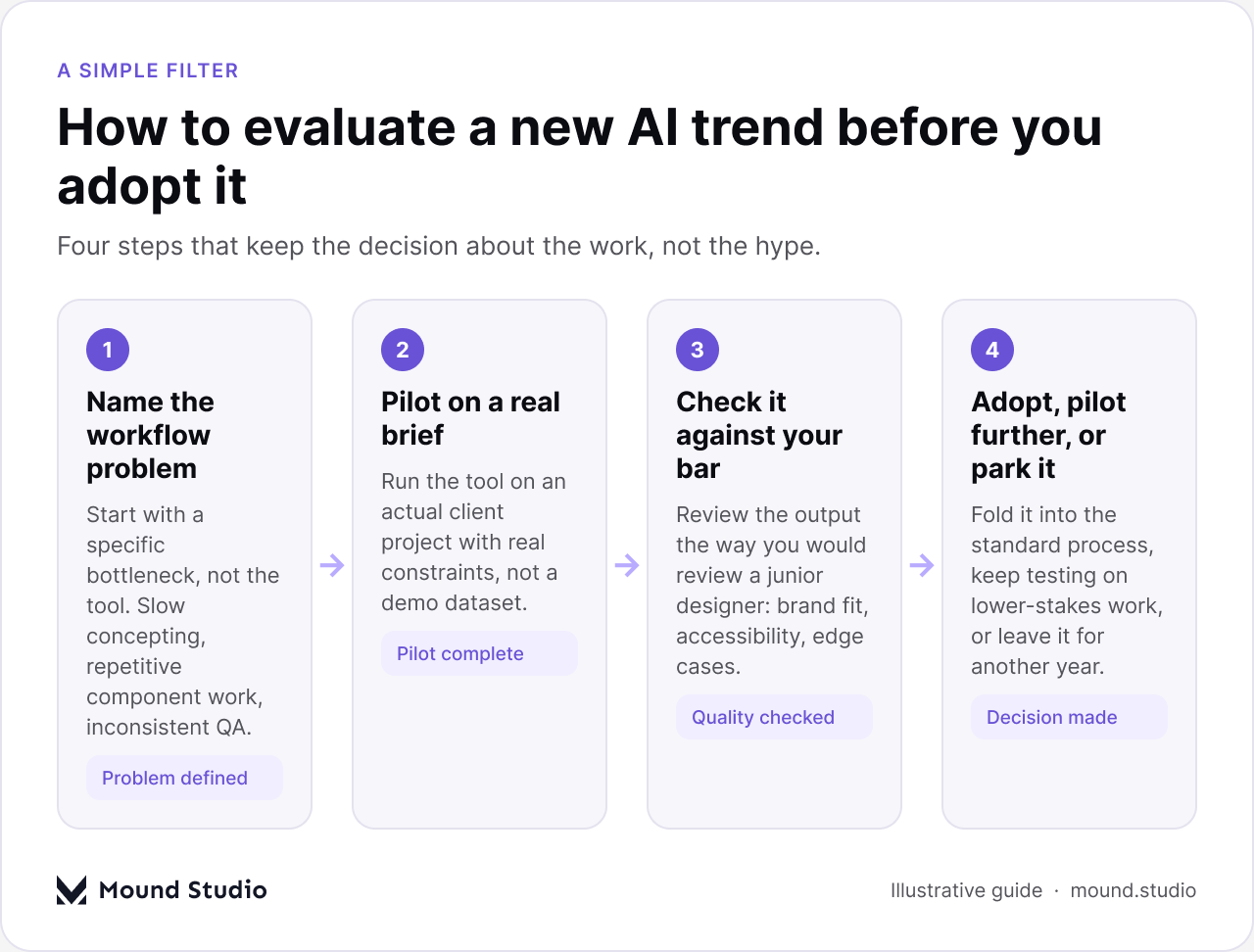
A few notes on each step, since this is where most studios either move too fast or stall out entirely:
Beyond the four-step filter, a few concrete signals separate a tool that's ready to touch client deliverables from one that still belongs in internal testing.
| Signal | Ready for client work | Still too risky |
|---|---|---|
| Output quality | Matches your studio's usual bar without heavy cleanup | Needs constant rework to hit brand standard |
| Repeatability | Performs consistently across different briefs | Works well once, then breaks on the next brief |
| Review time | Cuts review time compared with doing it by hand | Adds more review time than it saves |
| Data handling | Client material stays within agreed tools and terms | It's unclear where client data goes or how it's stored |
| Team comfort | The team can explain what the tool did and why | Nobody on the team can explain the output |
That last row matters more than it looks. If a designer can't explain why a layout came out the way it did, they can't defend it in a client review either. A tool that produces output nobody on the team can stand behind isn't saving time, it's just moving the work to a later, more stressful point in the project.
Adopting an AI trend changes more than the workflow behind the scenes, it changes the conversation with the client too. A few things are worth setting expectations on early:
Being upfront about this tends to build more trust than it costs. Clients who work with agencies regularly already assume some AI-assisted tooling is in play somewhere in the process. Studios that treat it as an obvious, sensibly-managed part of the workflow come across as more in control of their process, not less.
A few patterns show up again and again once a studio starts experimenting seriously:
Before rolling a new AI trend into a live client workflow, run through this list:
If you can answer all six without hesitating, the trend is probably ready for client work. If two or three of these are shaky, it belongs in internal testing for a while longer, not on a paid engagement.
None of this replaces the fundamentals. A trend worth adopting still has to slot into a workflow built on a solid design system, sensible prototyping practices, and a clear view of how AI fits the broader product design workflow. Tools change fast. The underlying process, and the judgment applied on top of it, is what actually protects client work.
AI in design isn't one trend, it's a handful of them moving at different speeds. Rapid concepting, AI-assisted design systems, and automated accessibility checks are already earning their place in real client work. Autonomous UI generation and one-prompt pipelines are still mostly promise. The studios that get the most value aren't the ones adopting everything first, they're the ones running a consistent filter on every new claim before it touches a client deliverable. If you want a second opinion on which of these trends are worth building into your own process, get in touch with our team.
Rapid concepting, AI-assisted design systems, and automated accessibility or QA checks are the trends holding up best in real client work right now. They speed up a specific task and still leave a designer reviewing and deciding on the output.
Not yet. Tools that promise a finished, on-brand interface from a single prompt still skip the judgment calls that a client project depends on, like brand fit, accessibility, and edge cases. Treat these as something to watch, not something to ship.
Name the specific workflow problem it should solve, pilot it on a real client brief, review the output the way you'd review a junior designer's work, then make an actual call: adopt it, keep piloting, or park it.
Yes. Most clients already assume some AI-assisted tooling is involved somewhere. Being upfront about where it's used, and being clear that a human still reviews every deliverable, builds more trust than it costs.
Not necessarily. A faster first draft doesn't reduce the review, judgment, and client-specific decisions that make up most of the value in a design engagement. Price the work you deliver, not just the time a draft took to produce.



.png)


