








.avif)
.avif)
.avif)

Ai
AI in UX Design: How Designers Use AI in 2026

AI chatbot UX design works best when the bot handles a narrow, repeatable set of questions, sets expectations in its first message, and hands off to a human the moment it runs out of confidence — not when it tries to replace a contact page or imitate a person. The best chatbot interfaces in 2026 are judged less on how smart the model sounds and more on how quickly a visitor gets an honest answer or a clear way to escalate.
We design and build a fair number of support and onboarding flows that include a chat widget, and most of the mistakes we see are not about the AI model behind the bot. They are UX decisions: where the widget sits, what the first message says, what happens when the bot does not know the answer, and whether the whole thing works on a phone with one thumb and a shaky connection. This guide covers the practical side of that work — not the model, the interface around it.
A chatbot earns its place when three things are true at once: visitors ask variations of the same questions often enough that a human answering each one by hand wastes time, the answers depend on a small number of branching conditions (plan tier, region, order status, account type), and there is a real queue or inbox to hand off to when the bot cannot help. Pricing pages, onboarding flows, and product FAQ sections tend to meet all three.
A simple form or a visible support email does the job better when requests are varied, detailed, or need an attachment; when the team is small enough to read and reply to every message personally anyway; or when the topic is sensitive, like billing disputes, account security, or anything legal. In those cases a chatbot adds a layer between the visitor and the answer instead of removing one.
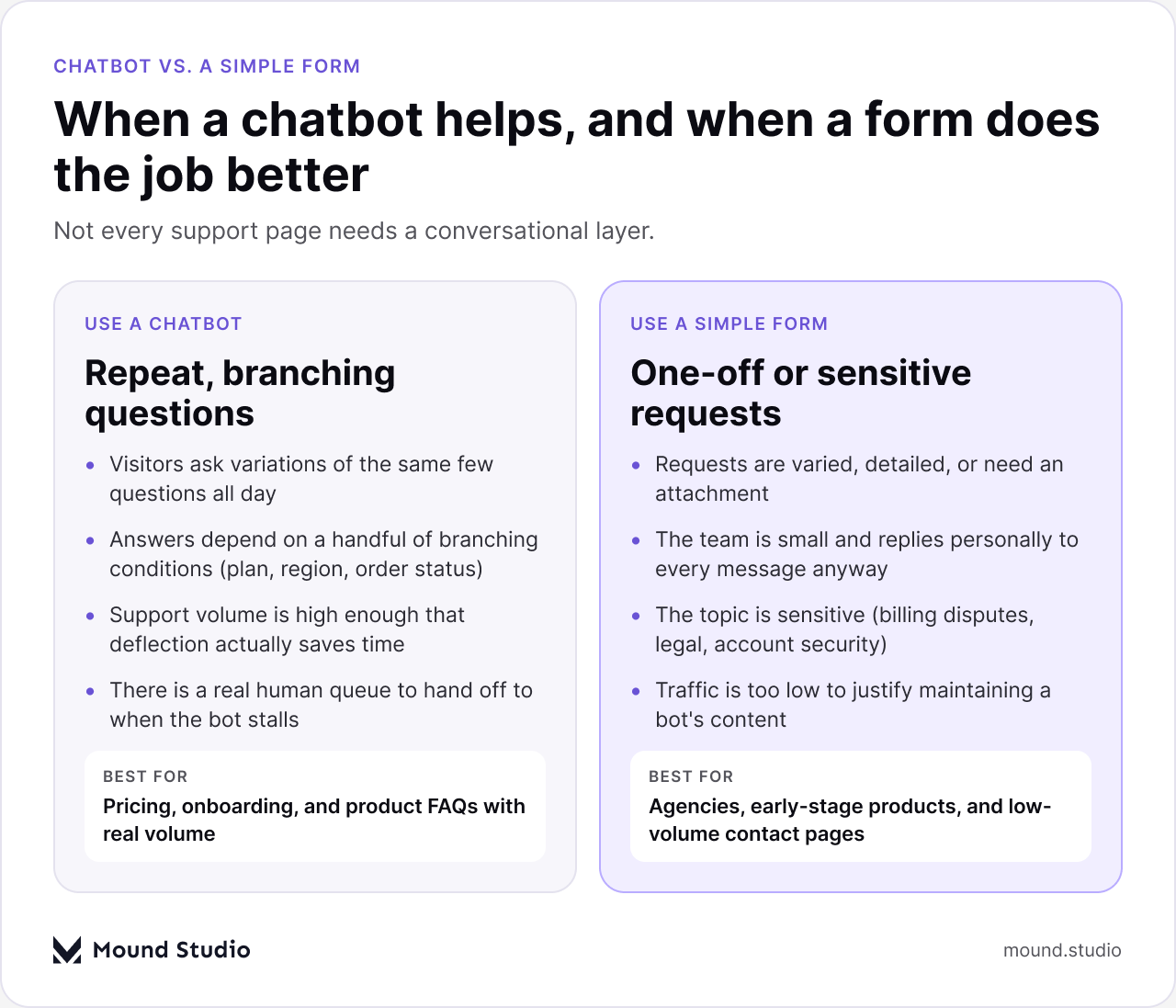
If your site gets a handful of contact submissions a week, building and maintaining a chatbot's content library is usually more work than it saves. If you're seeing the same five questions every day, a well-scoped bot in front of a human queue is worth the investment. We've written about related decisions around SaaS onboarding UX and how AI shows up across a product in our piece on AI personalization in SaaS, both of which touch the same "only where it earns its place" principle.
Pull your last month of support tickets or contact form submissions. If more than a third cluster into three or four repeatable topics, a chatbot is worth prototyping. If the list is long and varied, spend that budget on better self-serve documentation and a clearer contact form instead.
The first message is the whole interface, for a few seconds. It has to do three jobs at once: say who or what is replying, say what it can help with, and give the visitor an easy first move instead of a blank text field.
Conversation starters do double duty as documentation: if you can't write four honest starter buttons for your bot, that's a sign its scope isn't defined yet.
The handoff is where most chatbot UX actually fails. A bot that can't answer and has no graceful way to say so will either loop on the same unhelpful response or confidently guess — both erode trust fast. Plan the handoff before you plan the happy path.
| Signal | What it usually means | What should happen next |
|---|---|---|
| Same question rephrased twice | The bot's answer didn't land | Offer a human handoff directly, don't retry a third phrasing |
| Visitor types "agent" or "human" | They've already decided the bot can't help | Skip further bot replies and route immediately |
| Low model confidence on intent | The question is outside the bot's trained scope | Say so plainly and offer the next-best channel (form, email, chat queue) |
The handoff itself should preserve context — nobody wants to repeat what they just told the bot to a human. At minimum, pass along the conversation transcript and whatever the visitor already shared (page they were on, plan they're interested in, order number if given). And always give the visitor a visible way to trigger the handoff themselves, not just wait for the bot to offer it; an escape hatch that only appears after the third failed reply is not an escape hatch.
A chatbot is a voice for the brand, which means it should sound like the same company that wrote the homepage and the pricing page — not a generic, overly chipper assistant persona bolted on top. If your site's copy is direct and a little dry, the bot's replies should be too. If it's playful, the bot can be playful, within reason.
Two practical habits keep tone consistent: write the bot's canned replies as part of the same content pass as the rest of the site copy (not as a separate "chatbot content" task handed to whoever is free), and read a transcript of a real conversation out loud before launch. If it sounds like a different company wrote it, rewrite it. Consistency matters more than personality — a slightly plain bot that sounds like the rest of the brand beats a quirky one that doesn't.
Bottom-right is the default for a reason — it's out of the way of primary navigation and most reading content, and visitors expect it there. Bottom-left works too, as long as it doesn't collide with cookie banners, help icons, or a sticky mobile nav bar that also likes that corner.
Mobile chat windows need to behave like the rest of the mobile web: full-width or close to it, with the keyboard, the browser's own UI chrome, and the safe area all accounted for. A few specifics worth testing directly on a phone, not just in a resized desktop browser:
If your analytics show meaningful mobile traffic, test the whole conversation flow on an actual device before launch — a chatbot that works in a desktop browser at full width can fail in several small ways on a real phone.
A chat widget is a small application sitting on top of your page, and it needs the same accessibility care as any other interactive component.
None of this is exotic — it's the same checklist you'd apply to a modal or a dropdown menu. The difference is that chat widgets are often built with a third-party embed, so it's worth actually testing the vendor's accessibility claims rather than assuming them.
Resolution and deflection are the two concepts worth separating, and conflating them is a common reporting mistake. Deflection means the visitor didn't reach a human — that's a cost metric, not a success metric on its own. Resolution means the visitor's actual question got answered or the visitor got routed to where they needed to go. A bot can have high deflection and terrible resolution if it simply doesn't surface a way to escalate.
| What to track | What it tells you |
|---|---|
| Conversations that end without a handoff | How often the bot believes it resolved the question — check a sample against the actual transcripts |
| Conversations that request a human | Where the bot's scope runs out, and whether the handoff was smooth |
| Drop-off after the first bot reply | Whether the first message set the wrong expectation |
| Repeated questions across sessions | Gaps in the bot's content that are worth writing new replies for |
Read a sample of real transcripts regularly, not just the dashboard numbers — a bot can look successful in aggregate metrics while individual conversations are quietly frustrating people. We treat this the same way we treat any other AI feature inside a product; our note on AI in UX design covers the broader version of this same "check the transcripts, not just the dashboard" habit.
The figure below lists the five we run into most, but it's worth calling out the two with the highest cost: pretending to be human, and giving the visitor no way out of a conversation that isn't working. Both are trust problems more than technical ones, and both are simple to avoid once a team knows to check for them during review rather than after launch.

Before a chat widget goes live in front of real traffic, we run through the same short list regardless of the project. It's less about covering every edge case and more about catching the mistakes that are easy to miss in a demo but obvious to a real visitor.

Two more worth adding if your bot pulls from an AI model rather than fixed scripts: confirm it has a way to say "I don't know" instead of guessing, and confirm someone is reviewing a sample of transcripts weekly during the first month after launch, not just checking a dashboard.
Good chatbot UX design in 2026 is mostly discipline, not novelty: scope the bot to questions it can actually answer, write a first message that sets honest expectations, build a handoff that never leaves a visitor stuck, and test the whole thing on a real phone with a keyboard and a screen reader before it meets real traffic. Get those right and the model behind the bot matters far less than most teams assume. If you're weighing whether a chatbot belongs on your site at all, or want a second opinion on one that's already live, get in touch with our team.
No. A chatbot earns its place when visitors ask the same few questions often enough that a human answering each one by hand becomes a real cost, and when there's a queue to hand off to when it can't help. Low-traffic or highly varied support needs are usually better served by a simple contact form.
It should identify itself as an assistant, name two or three things it can actually help with, and offer a few tappable conversation starters alongside the open text field. That sets expectations before the visitor types anything.
Look at resolution, not just deflection. Deflection only tells you the visitor didn't reach a person; resolution tells you whether their actual question got answered or routed correctly. Reading a sample of real transcripts is more useful than watching a single dashboard number.
No — most chat widgets need the same accessibility work as any other interactive component: keyboard access to every control, correct focus trapping when the panel opens and closes, and screen reader announcements for new messages. Test these directly rather than assuming a vendor has covered them.



.png)


