








.avif)
.avif)
.avif)


Product
Should Your SaaS Add an AI Agent? A Practical Framework

AI personalization in a SaaS product means the interface adapting to what a specific user or account actually does: a different onboarding sequence for a different role, a dashboard that reorders itself around the metrics someone checks, a suggested next step based on the account's own history. It does not mean a chatbot bolted onto the sidebar or a vague promise of "smart" features on a pricing page. Most teams that want it are not short on ambition. They are short on the groundwork: clean event data, clear segments, and a way to tell whether the personalization is actually working.
This article walks through what AI personalization looks like in practice, what has to be true about your product and data before you build it, where simple rules beat a full model, the mistakes we see most often, and a decision guide for whether your team should take this on now or later.
The phrase gets used loosely in product marketing, which makes it hard to scope as an actual project. Treated as a single checkbox feature, it tends to arrive late, cost more than planned, and under-deliver because nobody agreed on what it was supposed to change. Treated as a set of specific product behaviors tied to specific data, it becomes something a small team can plan, build, and measure one surface at a time.
In practice, it is a handful of specific product behaviors, not one feature. The marketing version of the term suggests a single intelligent layer sitting on top of the product. The product version is narrower and more useful: a set of surfaces where the interface changes based on who is using it and what they have done.
None of these require a machine learning model on day one. Most of them start as conditional logic against a segment, and that is the right place to start for almost every team. We cover the full picture of what each of these looks like, including where a model earns its place, in the visual below.

If you read through that list and realize your product already does two or three of these in a basic form, you are closer to a real personalization strategy than a team starting from a blank page with a model in mind. The gap is usually not technical ambition. It is whether the underlying data supports any of it reliably, which is the next question to answer before writing a line of code.
Three things have to be true before AI personalization of any kind is worth building: the event data is clean enough to trust, the user segments are defined clearly enough that two people on the team would group the same account the same way, and there is a feedback loop that tells you whether a change actually helped. Skip any one of these and the personalization work either breaks quietly or never gets measured, which in practice means it never gets improved.
It does not mean a data warehouse or a dedicated analytics hire. It means every action that matters to the product fires one reliable event, tagged with the right user and account identifiers, every time. If "created a report" sometimes fires and sometimes does not depending on which part of the app triggered it, nothing built on top of that event will be trustworthy, rules-based or otherwise.
A segment is clear when it is based on something already true about the account: plan tier, role, signup source, or an observable behavior like "has not created a report in 14 days." Segments built on a guess about intent ("power users," "at risk of churn") need a behavioral definition behind them before they are usable in a rule or a model, or they end up meaning something slightly different to every person who references them. The same discipline applies to onboarding, which is usually the first place these segments get used; if you have not reviewed that flow recently, our guide to SaaS onboarding UX is a good place to check it against.
It is a specific, named metric, measured before and after the personalization ships, for the segment it targets. "Adoption went up" is not a feedback loop. "Report creation within the first session went from a known baseline to a higher rate among new signups on the Team plan" is one, because it names the metric, the segment, and the comparison point.
| Signal | Why it matters | Minimum bar |
|---|---|---|
| Event data | Everything downstream depends on it firing the same way every time | One reliable event per key action, with user and account IDs attached |
| Segments | Rules and models both personalize against a segment, not an individual | A behavioral definition the whole team agrees on, not a guess |
| Feedback loop | Without it you cannot tell if personalization helped or just changed something | One named metric with a baseline, measured per segment |
| Product UX | Personalization amplifies what is already there, including friction | Core flows are usable without any personalization at all |
That last row matters more than it looks. Personalizing a confusing dashboard just produces a confusing dashboard that rearranges itself, which is often worse. If the core experience is not solid yet, that is the higher-impact place to spend the time first — our note on SaaS dashboard design best practices is a reasonable starting point for that review.
For almost every SaaS team, rules-based personalization is not a lesser version of "real" AI personalization. It is the correct first version. A rule is an if/then statement against a segment: if the account is on the Team plan and has not invited a teammate, show this prompt; if the role is "analyst," skip the setup steps meant for admins. It ships fast, it is fully explainable to anyone on the team, and it needs almost no historical data to work on day one.
A model earns its place later, once you have enough volume per segment to train on, event history that goes back far enough to show patterns, and a team able to own retraining and monitoring over time. Jumping straight to a model without that groundwork usually produces something that performs worse than the simple rule it replaced, and is far harder to debug when it does.
There is also a maintenance cost to a model that a rule does not carry. A rule stays correct until someone changes the product or the segment definition, and the change is visible in the code. A model drifts quietly as user behavior shifts, and without monitoring in place, nobody notices until the recommendations stop making sense. That ongoing cost is worth factoring into the decision alongside the upfront build effort, since it tends to outlast the initial project by a wide margin.
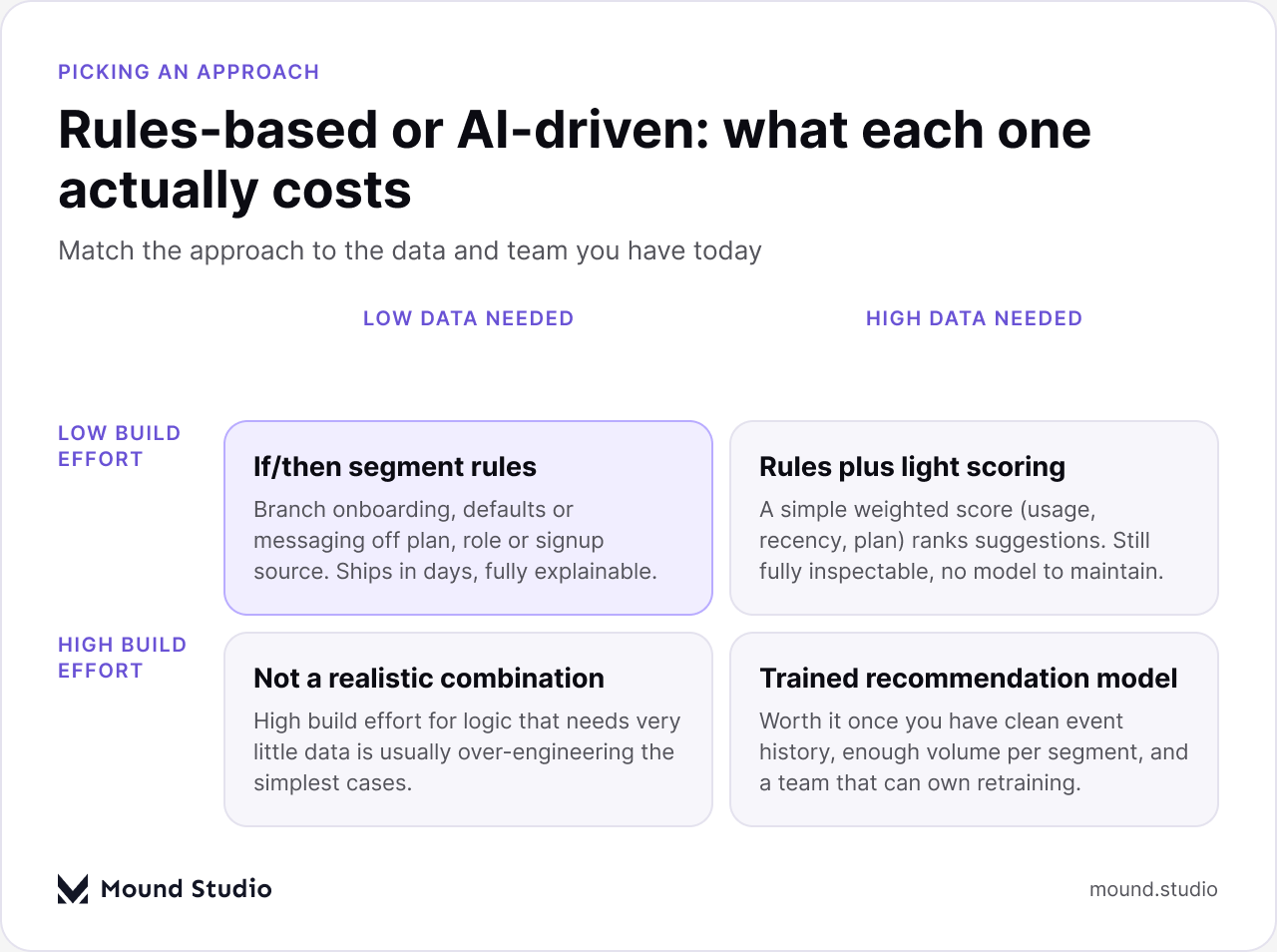
A useful middle step, once rules are in place and working, is rules plus a simple weighted score: usage frequency, recency, and plan tier combined into one number that ranks suggestions. It is still fully inspectable by a person, it still needs no model to maintain, and it often captures most of the lift a full model would have provided for a fraction of the build and operating cost.
We see the same handful of mistakes repeat across different products and teams.
Most of these come back to the same root cause: starting from the feature instead of the groundwork. Teams that have already done the work to understand their segments and their core product behavior tend to avoid all five mistakes without much extra effort, because the discipline is already in place. Teams that have not tend to repeat several of them at once, often inside a single release.
Work through the groundwork in order rather than jumping to the feature. The sequence below is the one we walk client teams through, and skipping a step is the most common reason these projects stall or get quietly shelved after launch.

If the answer to most of those is yes, you are ready to build and the only open question is which surface to start with. If the answer to two or more is no, that is not a reason to abandon the idea, but it is a reason to spend the next cycle on the groundwork instead of the feature. The table below is a quick way to match your situation to the right next step, including whether an AI agent is even the right shape of feature for what you are trying to solve.
| Your situation | What to do next |
|---|---|
| Event data is inconsistent or missing IDs | Fix instrumentation before scoping any personalization work |
| Segments exist but nobody agrees on their definition | Write down a behavioral definition for each one the team actually uses |
| Core flow still confuses new users | Redesign the flow itself before personalizing around it |
| Data and segments are solid, no rules shipped yet | Start with if/then rules against your clearest segment |
| Rules are live, measured, and visibly capped | Scope a scoring layer or a model for that specific surface only |
AI personalization in a SaaS product is a set of concrete behaviors, not a single feature, and the model is usually the last piece rather than the first. Clean event data, clearly defined segments, and a measured goal make the difference between personalization that compounds over time and personalization that quietly gets turned off six months later. Start with rules against a real segment, measure what they move, and let the data tell you when a model is worth the added cost. If you want a second opinion on where your product actually stands before you scope this work, get in touch with our team.
No. A chatbot is one possible feature. AI personalization refers to the interface itself adapting to a user or account, through onboarding, defaults, dashboards, recommendations, and help content, with or without any conversational element involved.
Less than most teams assume for the first version. Rules-based personalization needs reliable events and a clear segment definition, not a large historical dataset. A trained model is the part that needs real volume and history, which is why it belongs later in the process.
Start with rules. They ship faster, stay fully explainable, and work with the data most teams already have. Move to a model only once the rules-based version is live, measured, and visibly hitting a ceiling it cannot get past on its own.
Personalizing a product whose core flows are not solid yet. Adaptive onboarding or a dynamic dashboard built on top of a confusing base experience just rearranges the confusion instead of removing it, and makes the real problem harder to spot.
Name one metric it is meant to move, for the specific segment it targets, with a baseline measured before launch. Without that baseline and that segment, it is not possible to tell whether a change in the metric came from the personalization or something else entirely.


.png)


