








.avif)
.avif)
.avif)

Agency
Using Claude to Draft Agency Proposals and Scope Docs
Agencies use Claude to draft the paperwork that surrounds a new client, not to run the relationship itself. That means a discovery questionnaire shaped to the type of project, a clean recap pulled from raw kickoff-call notes, and a first-draft project brief with the standard sections already in place. The call itself, the follow-up questions that were not on the list, and the read on what a client is actually asking for still come from the team. Claude removes the blank page. It does not replace the person running the meeting.
That distinction matters more than it sounds like it should. Onboarding is where a client forms their first real opinion of how an agency works, and a slow or scattered start colors everything that follows. Most of the slowness is not about judgment, though. It is about paperwork: writing a questionnaire from scratch for the fifth time this quarter, typing up forty minutes of notes into something a client can actually read, and starting a brief from a blank document at nine at night. That is the part worth handing off.
Claude works well as a drafting layer at three points in onboarding: before the kickoff call (questionnaire), right after it (recap), and once the recap is settled (project brief). At each point, someone on the team still reviews, corrects, and personalizes what comes out. Used this way, onboarding gets faster and more consistent across clients without becoming impersonal, because the personal part of the process was never the document. It was the conversation.
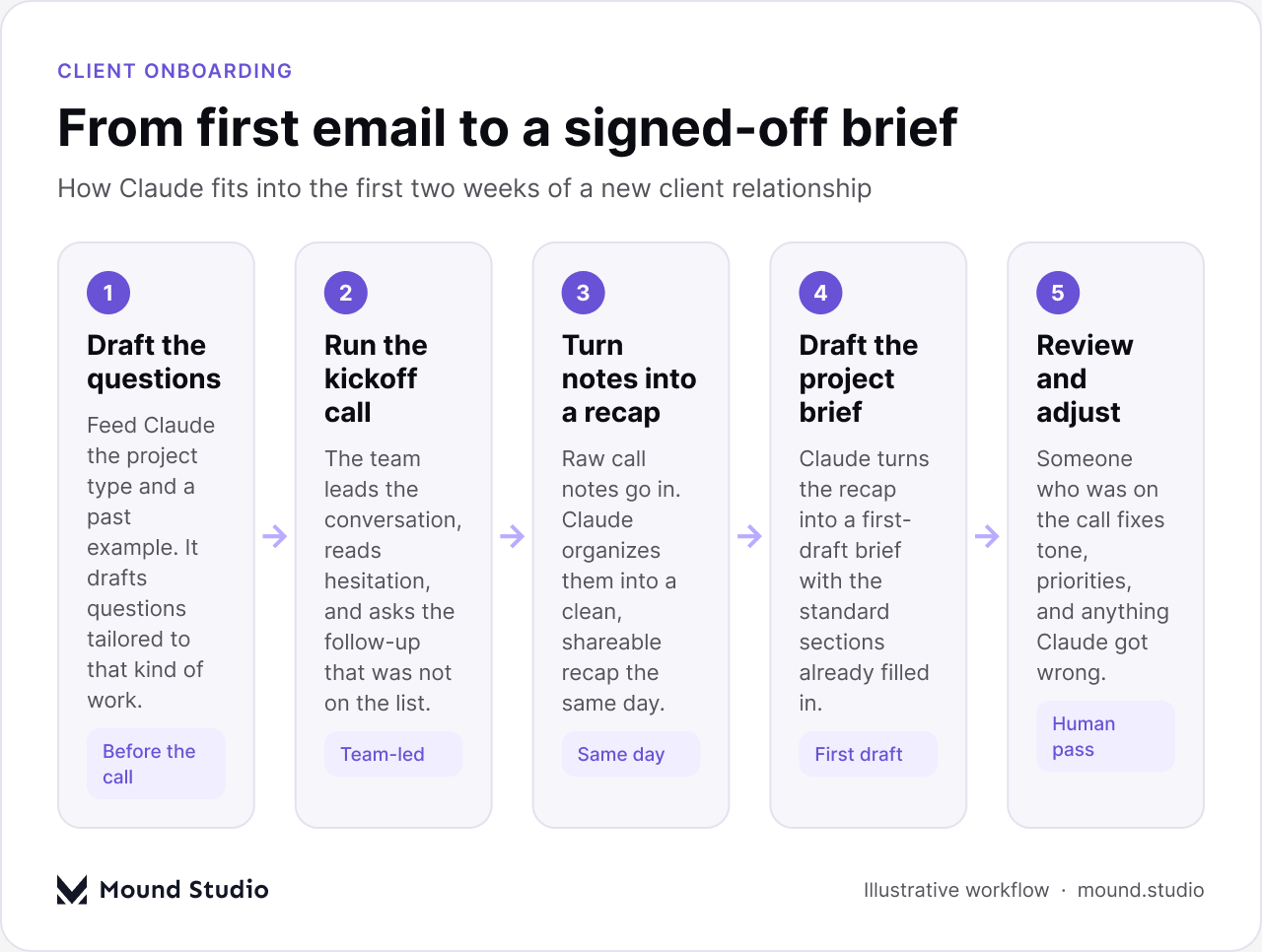
A questionnaire for a Webflow marketing site and a questionnaire for a full product redesign should not look the same, but most agencies keep reusing one generic form because writing a new one takes time nobody has that week. Claude closes that gap. Give it the project type, a short description of the client, and one or two questionnaires you have used before, and it drafts a version shaped to that kind of work: the right sections, questions that match the scope, and a sensible order so a client is not asked about brand voice before they have described their audience.
The team still needs to look it over before it goes out. A generated question can be too broad, or miss something specific to that client's industry, or use a term the client would not recognize. That editing pass takes a few minutes. Writing the whole thing from nothing takes much longer, and that is the time being saved here, not the thinking.
A useful habit is keeping one short list of what to add on top of the standard questions, by project type, and feeding that list to Claude alongside the request. The table below is a starting point.
| Project type | Sections every version needs | Section worth adding |
|---|---|---|
| Webflow website | Goals, audience, content status, timeline | Existing CMS structure and redirects |
| Brand identity | Goals, audience, competitors, timeline | Existing brand assets and where they live |
| Product or app UX | Goals, audience, user roles, timeline | Current analytics and known pain points |
| Ongoing retainer | Goals, audience, priorities, cadence | Decision-maker and approval chain |
None of this is complicated, and that is exactly why it works well as a template. The variation between project types is small and predictable, which is the kind of pattern a drafting tool handles well. The variation between clients within the same project type is where a person still has to pay attention.
Kickoff calls produce good information in a messy shape: half-typed notes, a few voice-memo fragments, things said in passing that turn out to matter later. Paste that raw material into Claude and ask for a structured recap, and it will organize it into sections a client can skim in two minutes: goals, constraints, open questions, and next steps. Sending that recap the same day, while the call is still fresh for the client, is a small thing that makes an agency look organized before any design work has started.
What Claude cannot do here is decide what actually mattered on the call. If a client's tone shifted when a topic came up, or they hesitated before agreeing to a deadline, that context lives in the room, not in a transcript. Someone who was on the call needs to read the recap before it goes out and add the parts a machine would not have caught.
Once the recap is settled, it already contains most of what a project brief needs. Claude can turn that recap into a first-draft brief with the sections an agency always uses filled in: background, goals, scope, constraints, success criteria, and a rough timeline. It is a first draft in the honest sense of the word. It gets the structure right and pulls the obvious facts across correctly. It does not know which constraint is the one the client will actually push back on, or which goal is the real priority behind the stated one.
That is the part that separates a usable brief from a rubber-stamped one. A brief that goes to a client without a real review is a brief nobody actually owns, and it shows the first time a decision has to be made that is not written down anywhere.
Consistency is an underrated benefit here. When five different people at an agency each write their own version of a questionnaire or a brief, formatting drifts, sections get renamed, and clients start noticing that the process feels different depending on who they got assigned. A shared prompt and a couple of reference documents keep the shape of these materials the same across the whole studio, even as different people run different projects. That consistency reads as professionalism to a client, even though what changed was mostly internal.

Everything that depends on being in the room. Reading hesitation, noticing when a client's answer to one question quietly contradicts their answer to another, and asking the follow-up question that was never on any template, all of that is still the team's job, every time. A questionnaire and a brief are containers. What goes into them, and what gets asked when the container is not enough, is where the actual expertise sits.
There is also a trust cost to getting this wrong. A recap or a brief that reads as generic, or that repeats a client's own words back to them without adding anything, tells a client the agency was not really listening. Claude drafts fast. It does not know your client, their history, or what they actually meant by an offhand comment on the call. That is exactly the layer a person needs to add before anything goes out under the agency's name. Our guide on using Claude to draft agency proposals and scope docs covers the same balance for the sales side of a new relationship.
Most of the agencies doing this well settle on a short, repeatable sequence rather than a complicated tool setup. The table below shows where each document sits and who does the last pass.
| Document | When it's drafted | Who signs off | Typical turnaround |
|---|---|---|---|
| Discovery questionnaire | Before the kickoff call, once the project type is known | Whoever will run the call | Same day |
| Call recap | Right after the kickoff call, from raw notes | Whoever was on the call | Same day |
| Project brief | Once the recap is reviewed and settled | Project lead | Within a day or two |
| Client-facing summary | After the brief is internally approved | Account owner | Before the next call |
The pattern worth noticing is that every row ends with a person, not with Claude. That is not a limitation to work around. It is the point. A first draft that saves an hour is useful. A first draft that goes out unread is a risk, and the risk lands on the agency's reputation, not on the tool.
Not every document benefits equally from a Claude-assisted template, and setting one up takes real effort the first time. It helps to weigh how often a document repeats against how much work it takes to get the template right.
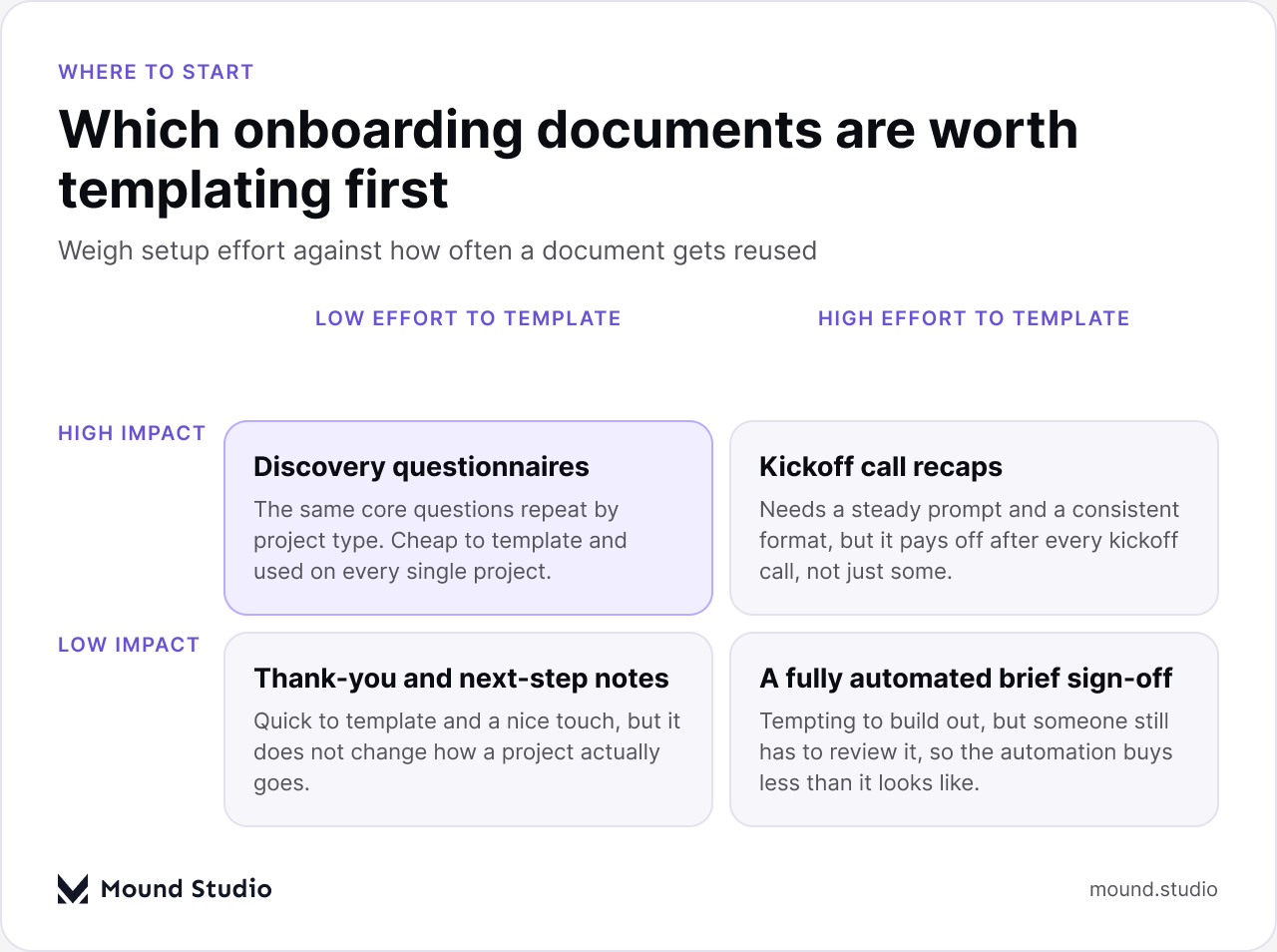
Discovery questionnaires are the easiest starting point precisely because the core questions repeat by project type and the setup cost is low. Call recaps take a bit more care to template consistently, but they run after every single kickoff, so the effort pays for itself quickly. A fully automated brief sign-off looks appealing on paper and is usually not worth building, because a person has to review the brief either way, so the automation buys less than the effort it costs.
If the answer to any of those is no, the document is not ready, no matter how polished it looks. Speed is the benefit Claude offers here. It is not a substitute for the last read-through.
Onboarding is one piece of a longer relationship, and the same principle holds at every later stage: Claude drafts, a person decides. That is the same approach we use for bringing Claude into an agency's day-to-day workflow, and it is worth reading if onboarding goes well and the next question becomes how to use the same approach through the rest of a project. For teams still deciding whether any of this is worth adopting at all, our overview of what Claude actually is is a reasonable place to start before picking specific use cases.
The pattern that holds across all of it: draft with Claude wherever the output is mostly structure, and keep the judgment calls with the people who were in the room. Onboarding is one of the clearest places to see that split, because the stakes are visible right away. A client's first impression is being formed in real time, and it is formed by both halves of the process, the speed of the draft and the care in the review.
It also helps to be honest internally about why this matters. A faster first draft is not the goal by itself. The goal is spending less of the team's attention on the parts of onboarding that do not need a designer's judgment, so there is more of it left for the parts that do: the actual questions worth asking, the scope decisions that shape the whole project, and the small signals in a client's answers that a template will never catch on its own.
Claude can take the blank page out of onboarding: a questionnaire shaped to the project, a same-day recap, and a first-draft brief with the right sections in place. None of that replaces the conversation itself, the follow-up question that was not on the list, or the read on what a client actually meant. Used that way, onboarding gets faster without getting less personal. Tell us about your next project and we'll show you what a real kickoff with us looks like.
Yes, as a first draft. Give it the project type and an example from a past client, and it will draft questions shaped to that kind of work. Someone on the team should still review it before it goes out, since it will not know anything specific to that client's industry or history.
Not without a read-through from whoever was on the call. Claude organizes raw notes into a clean structure well, but it cannot judge tone, hesitation, or which parts of the conversation actually mattered most.
Not if it stays limited to drafting. The parts that make onboarding feel personal, the conversation, the follow-up questions, and the review before anything is sent, still come from the team. Claude only speeds up the paperwork around that.
Start with the discovery questionnaire. It repeats by project type, the setup cost is low, and it gets used on every single project, which makes it the fastest template to pay for itself.
It can produce a strong first draft with the standard sections filled in. It will not know which constraint the client actually cares about most or which stated goal is the real priority, so a project lead still needs to review and adjust it before it is finalized.



.png)


