








.avif)
.avif)
.avif)

Ai
How AI Fits Into a Modern Product Design Workflow
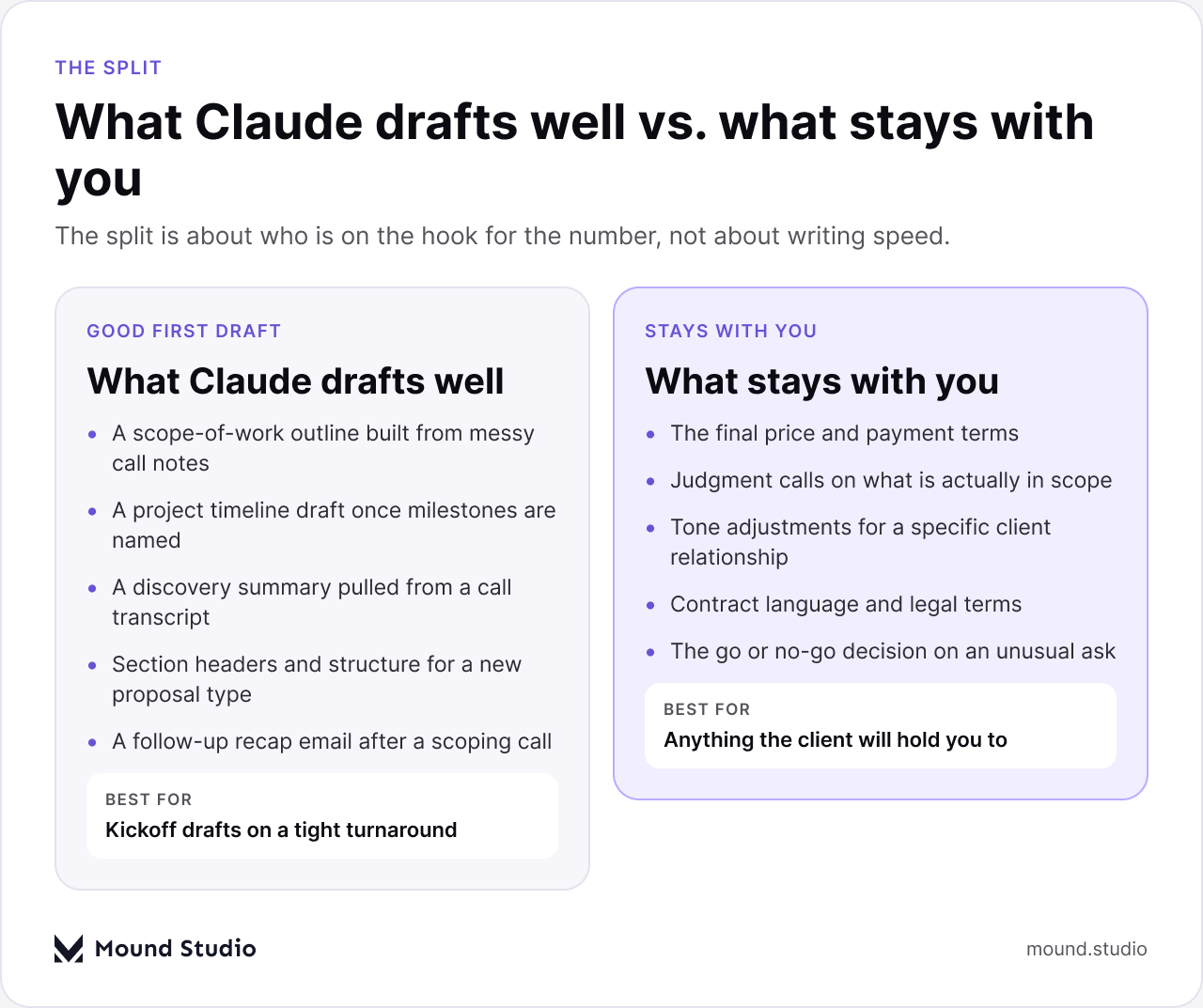
Yes, for a first draft. Claude can turn a set of discovery notes into a structured proposal outline, a scope-of-work section, or a project timeline in a few minutes. What it should not do is set your price, decide what is actually in scope, or write in a voice that does not sound like your agency. Those parts stay with you, every time.
This is the unglamorous part of agency work: the proposal, the scope doc, the timeline, the discovery recap. Nobody enjoys writing these, and they all take longer than the design or development work they describe. A good discovery call can still turn into a proposal that sits half-written for three days, because the person who ran the call is also the person who has to build the next client screen. Used carefully, Claude removes the blank-page problem from that stack of documents without removing the judgment that makes a proposal actually land.
None of this is about replacing the person who scopes the work. It is about not losing a week to formatting a timeline or restating the same discovery notes in paragraph form. The time that frees up is time you can spend on the parts of a proposal that actually decide whether it gets signed: the price, the framing, and the specific promises you are comfortable making.
Claude is good at structure and first drafts: turning messy notes into an outline, filling in a timeline once you have named the milestones, and writing a clean discovery summary from a call transcript. It is not good at knowing what your client will actually pay, which asks are reasonable to include for free, or how much risk your team can absorb on a fixed scope. Keep the first kind of work on Claude's desk. Keep the second kind on yours.

The proposal and scope stage of a project is mostly writing, not thinking. The thinking already happened on the discovery call. Claude is useful for the writing part that comes after, especially the parts that follow a predictable shape from project to project.
After a call, most of what you need is already sitting in your notes or a recorded transcript. Paste it in and ask for a summary organized by goals, constraints, and open questions. It is much faster to edit a summary than to write one from a blank page once the details have started to fade, and a written summary also gives the client something to correct if you misheard a detail.
Give Claude a past scope document as an example, then describe the new project in plain language. It can produce a section-by-section outline: what is included, what is out, what depends on the client, and where a phase splits. You still fill in the specifics that make it real, but the structure no longer has to come from memory every single time.
Once you know the milestones and rough durations, Claude can turn that into a written timeline section with phases and dependencies spelled out in plain sentences instead of a bare list of dates. It will not know your team's actual availability or which client tends to sit on feedback for two weeks, so treat the dates as a draft structure, not a promise you have already made.
The short email that recaps a call and sets expectations for what comes next is easy to draft and easy to skip. Claude can write a clean version in seconds, which makes it more likely you actually send one after every call instead of only the ones that feel urgent.
Not everything needs to be client-facing. A short internal note summarizing what was agreed on a call, what still needs pricing, and who owns the next step keeps a project from stalling between the call and the proposal going out. Claude can draft that note directly from the same source material you used for the client summary.
For a broader look at where AI fits into the rest of a design project, see our guide on how AI fits into a modern product design workflow.
| Document | Claude's role | Your role |
|---|---|---|
| Discovery summary | First-pass structure from notes or a transcript | Flag what matters most to the client |
| Scope of work | Section outline and plain-language descriptions | Decide inclusions, exclusions, and price |
| Timeline | Phase structure once milestones are named | Confirm real dates against your team's load |
| Follow-up email | A clean first draft in your voice | A final read before it goes out |
Picture two agencies using the exact same discovery call notes for the exact same prospective client. The first pastes the raw notes into Claude and asks for "a proposal." The second pastes the same notes in, but also includes their actual proposal template and a past proposal that the client-facing team knows converted well, and asks for a first draft the team member will personally edit.
The first draft reads fine on its own. It is also generic: safe phrasing, a tone that could belong to any agency, and a scope section that hedges on details the notes actually made clear. Whoever reviews it before sending has to rebuild half of it to sound like the agency at all.
The second draft already sounds close to how that agency actually writes, because it was shown an example of that voice. The scope section reads more specific, because Claude had a real reference for how much detail this team normally includes. The reviewer's job shrinks from a rewrite to a proper edit: check the price, check the scope lines, confirm the dates, and send. Same notes, same tool, a very different amount of cleanup afterward.
The failure mode with AI-drafted documents is rarely bad writing. It is quietly letting a draft make a decision it was never meant to make, simply because the sentence reads confidently.
If you are still deciding what to even ask a prospective client before scoping anything, our piece on what to ask before you hire a UI/UX design agency works from the other side of the table and is a useful check on what a proposal should cover in the first place.
The easiest way to get a weak result from Claude is to ask it to write a proposal cold, with no examples and no template. Set it up properly first and the output improves by a lot, with very little extra effort on your side.
| Section | What goes there | Good source for a first draft |
|---|---|---|
| Summary | The problem and the outcome you are proposing | Discovery call notes |
| Scope | What is included, phase by phase | A past scope doc for a similar project |
| Timeline | Phases, milestones, and dependencies | Your team's rough availability |
| Investment | The price and payment terms | Your own pricing model, never a draft |

Run through this before anything goes out the door, no matter how good the draft looks on a first read.
If pricing itself is the part you are unsure about, our guide on how much it costs to hire a design agency breaks down what typically goes into that number.
Claude is a fast way to get past the blank page on proposals, scope docs, timelines, and discovery summaries. It is not a substitute for the judgment that decides price, scope, and tone, and treating it that way is how a proposal stops sounding like your agency. Use it for the first draft, keep the decisions for yourself, and the document still closes the way your best proposals always have. Tell us about your next project and we will scope it properly, not by guesswork.
It can produce a full first draft if you give it your template and real discovery notes, but the price, scope decisions, and final tone still need a person to check them before it goes out.
No. Claude has no visibility into your margins, workload, or the value of the relationship, so any number it produces is a placeholder, not a decision.
Raw discovery notes plus one or two past scope documents for similar projects. The more specific the input, the less generic the draft.
It can, if you skip giving it an example to work from. Feeding it a proposal that actually won keeps the tone closer to your agency's voice instead of a generic default.
No. A second read from a person on your team before sending is still the step that catches scope creep, pricing errors, and tone that does not fit the client.



.png)


