








.avif)
.avif)
.avif)

Ai
How AI Fits Into a Modern Product Design Workflow

Claude fits best as a fast first draft, not a decision-maker. It turns a call transcript into a clean recap, a scope conversation into a proposal outline, and a messy set of notes into a document that reads like it was written once, not stitched together. A person still edits it, checks it against the client relationship, and decides what actually goes out. The tasks it helps with are the repeatable, structural parts of agency work. The tasks it should never own are the ones a client will remember as coming from a person: pricing conversations, design decisions, and anything that carries the studio's name.
None of this replaces a process an agency already runs. Most studios already have a proposal template, a brief format, and a way of writing up an audit. What changes is how long the first pass of each of those takes, and how much of a junior designer's day goes to a stuck moment instead of the actual work. The value shows up in hours saved on drafting, not in better decisions being made, because the decisions were never the slow part to begin with.
It's worth being specific about this distinction early, because it's where most confusion about AI tools in creative work comes from. A drafting tool that's treated like a decision-maker will eventually produce something wrong that nobody catches in time. A decision-maker that's treated like a drafting tool gets under-used, because a team keeps double-checking work that didn't need a person to originate it in the first place. Getting the split right is most of what this article is about.
The clearest wins sit in tasks that are repeated often enough to be worth a template, but specific enough each time that a rigid template alone doesn't cover it. A meeting recap is the easiest example: every call produces a slightly different mix of decisions, open questions, and action items, and turning a transcript or a set of rough notes into a recap with owners and dates is exactly the kind of drafting Claude is reliable at. The same applies to a first pass on a proposal. Give it the scope discussion, the deliverables you already agreed to, and your studio's usual structure, and it will return an outline that's ready to edit rather than a blank page.
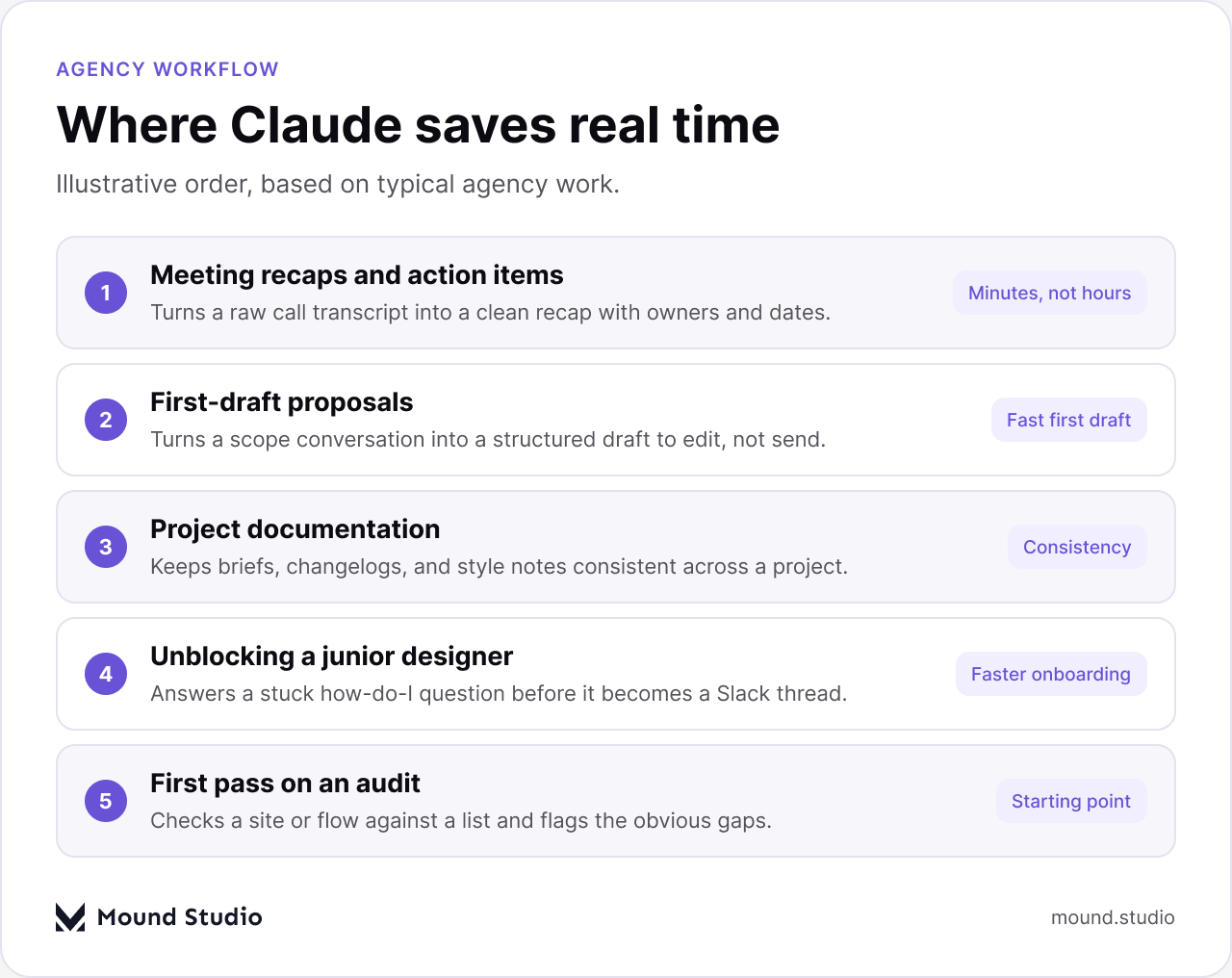
Project documentation is another place it earns its keep quietly. A brief, a changelog, and a set of naming conventions tend to drift apart over the life of a project, especially once more than one person is touching the file. Asking Claude to keep a style note or a changelog consistent with earlier entries removes a small but constant source of friction. It's also useful for unblocking a junior designer who's stuck on a how-do-I question, the kind that would otherwise turn into a Slack message and a wait. And it's a reasonable starting point for a first pass on a UX or content audit, checking a site or a flow against a list and flagging what's obviously missing before a person does the real review.
What ties these together is that each one produces a draft, not a final answer. A recap still needs someone who was on the call to catch a misread nuance. A proposal outline still needs someone who knows the client's budget sensitivity. An audit still needs a designer's eye for what actually matters versus what's just on a checklist.
Take a mid-size website redesign. A kickoff call runs an hour and covers scope, timeline, and a handful of open questions about content. Instead of a person spending twenty minutes turning notes into a recap that evening, Claude produces a first version immediately after the call, with action items grouped by owner. A person reads it in two minutes, fixes one line where a nuance got lost, and sends it. Multiply that across a handful of calls a week, a proposal draft here, a changelog update there, and the time back adds up, even though no single instance looks dramatic on its own.
The mistake most teams make when they try this is starting too broad. Trying to rebuild an entire workflow around a new tool in one go usually produces a lot of half-finished setup and not much usable output. A narrower start works better.
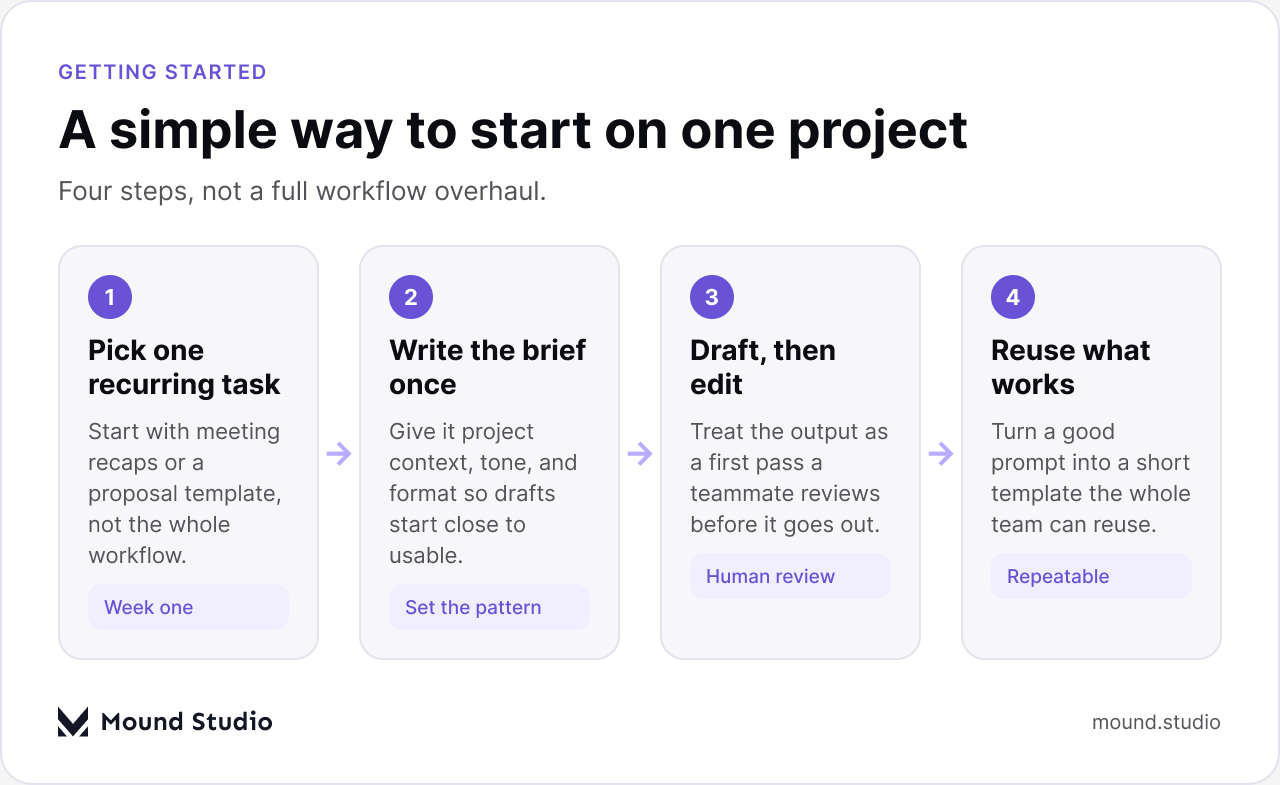
Pick one recurring task first, not the whole workflow. Meeting recaps or a proposal template are good places to start because they happen often enough to build a habit around, and the cost of a rough first attempt is low. Next, write the context once instead of re-explaining it every time: your studio's voice, the format you want back, and any structure a document should always follow. This is the part teams skip most often, and it's the reason a first attempt can feel generic. Once the context is set, treat every output as a first pass. A teammate reviews it the same way they'd review a junior designer's draft, before anything reaches a client. Finally, once a prompt produces something consistently usable, turn it into a short template the rest of the team can reuse, rather than everyone re-writing their own version of the same request.
This is also where it helps to be clear internally about scope, something we've written about in more depth in our piece on what to ask before you hire a design agency. The same clarity that helps a client understand what they're paying for also helps a team decide what a tool like Claude should and shouldn't touch on a given project.
The honest boundary is judgment and relationship. Claude can draft the words in a proposal. It can't read that a client went quiet on a call because they're worried about budget, or that a stakeholder's one-line email actually means the whole direction needs to change. It can restructure a set of notes into a document. It can't decide which design direction is right for a brand, or where a trade-off between speed and quality should land for a specific client. Those calls come from the person who has been in the room, not from a tool summarizing what was said in it.

Pricing and contract conversations belong in the same category. A quote isn't just a number, it reflects how well you know a client's constraints, what you're willing to negotiate on, and what past experience with similar projects has taught your studio. Handing that reasoning to a draft tool risks producing something that reads confidently but misses context only a person carrying the account actually has. The same goes for anything that goes out under the studio's name without a review: a final proposal, a client-facing audit, a piece of brand messaging. Claude can get each of these most of the way there. It shouldn't be the last set of eyes on any of them.
Laid out against a project's stages, the pattern is consistent: Claude helps most where drafting starts from a blank page, and steps back where a decision needs to be made and owned.
| Project stage | Where Claude helps | What stays with the team |
|---|---|---|
| Discovery call | Recap, action items, follow-up notes | Reading tone, unstated concerns |
| Proposal | First-draft structure and wording | Pricing, scope trade-offs |
| Design phase | Documentation, naming, style notes | Actual design decisions |
| Review and handoff | Draft summaries, checklist pass | Final sign-off, client presentation |
The common thread down that middle column is drafting. The common thread down the right column is anything a client would associate with a specific person's judgment rather than a document's formatting.
The most frequent one is sending its output straight to a client without a review pass, treating a fast draft as a finished one because it reads cleanly. A close second is under-explaining the brief: dropping in a vague request and expecting studio-specific tone and structure to appear on its own, then blaming the tool when the result feels generic. Some teams also make the opposite mistake and over-engineer the setup, spending more time building an elaborate prompt system than the time it will ever save on the tasks it's meant to speed up.
Another common gap is treating every output as equally trustworthy. A meeting recap and a client-facing audit carry very different risk if something is slightly off, and they deserve different levels of review. Finally, some teams skip building institutional habits altogether: a good prompt gets used once by one person and never turned into something the rest of the team can reuse, so the same time gets spent rewriting it every time. Our note on how AI fits into a modern product design workflow covers a related version of this same pattern, where the tool works best as a fixed step in a process rather than an occasional favor someone remembers to ask for.
There's also a quieter mistake worth naming: using it as a search engine for facts rather than a drafting tool for structure. It's better at organizing what you already know than at telling you something new and unverified about a market, a competitor, or a statistic you haven't checked yourself. Any number, claim, or client-specific detail that comes out of a draft needs the same fact-check a person's first draft would get, if not more, since a confident tone can make an unchecked claim harder to catch than a hesitant one would be.
A short set of questions tends to sort most tasks correctly. Is this a first draft or a final answer. Is it something you'd be comfortable a junior teammate produced without asking anyone first. Does getting it slightly wrong cost you an edit, or does it cost you a client's trust. Would the client be surprised to learn a tool helped write the first version. If the task is repeatable, low-risk if imperfect, and clearly a draft rather than a decision, it's a reasonable candidate. If it touches pricing, a design decision, or anything that carries the studio's name without another pass, it stays with a person.
| Signal | Hand to Claude | Keep with the team |
|---|---|---|
| Repetition | Happens weekly or more | One-off, high stakes |
| Risk if wrong | An edit fixes it | Costs client trust |
| Nature of task | Draft or structure | Decision or judgment |
As a quick checklist before you hand something over, it helps to run through a few questions first:
If you can answer all four comfortably, the task is a reasonable one to hand over. If any answer gives you pause, that's usually the task telling you it needs a person to lead it from the start.
This same sorting logic is worth applying at the agency-model level too, not just the task level. How much you lean on tools like this often depends on whether you're running lean and project-based or carrying an ongoing retainer relationship, a distinction we get into in retainer versus project-based agency work.
Claude is useful in an agency for exactly the reasons it's limited: it drafts fast and consistently, and it has no sense of a client's history, tone, or trust. Used for recaps, first-draft proposals, documentation, and unblocking a stuck teammate, it removes a real amount of repetitive work. Used as the final word on anything a client will remember, it puts the relationship at risk. The agencies that get the most out of it are the ones that treat every output as a draft a person reviews, not a replacement for the person reviewing it. If you're weighing how a tool like this could fit into your own studio's workflow, or want a second opinion on where the line should sit for your team, get in touch with Mound Studio.
No. It's a drafting tool for recaps, proposals, and documentation. Design decisions, pricing, and the client relationship still need a person who knows the account.
Meeting recaps or a proposal outline. Both happen often enough to build a habit around, and a rough first attempt is low-risk to fix.
No. Treat every draft as a first pass a teammate reviews before it reaches a client, the same way you'd review a junior designer's work.
It can reduce time spent on drafting and documentation, but pricing still reflects scope, research, design decisions, and review, not just drafting speed.
Give it the same context every time: tone, format, and structure. A one-off vague request is the most common reason a draft feels generic.



.png)


