








.avif)
.avif)
.avif)

Webflow
Claude and Webflow: AI-Assisted Site-Building Workflows
Claude can read every page of copy on a site you are about to launch and flag where the tone shifts, where a CTA says three different things, where terminology drifts from page to page, and where placeholder text or draft headlines got left behind. It can turn a long list of small issues into a short, prioritized punch list your team can work through before you go live. What it cannot do is open the site in a browser, click every link, resize the window, or confirm a form actually submits. That part of QA still needs a person, a device, or a dedicated testing tool.
We run this kind of pass in the final week before almost every launch, alongside our regular design and build work. It is not a replacement for a real QA checklist, and it does not touch code, layout, or anything that lives outside the text on the page. It is a fast first read that catches the kind of copy problems a tired team, working late before a deadline, tends to miss: a stray placeholder, a CTA that says something slightly different on every page, a term that got renamed halfway through the project and never fully updated.
Use Claude to review pasted copy for tone, wording, and terminology consistency, to sweep for placeholder text, and to turn your findings into a punch list ranked by how visible or damaging each issue is. Pair that with a separate pass for visual QA in a real browser, functional testing of forms and links, and a check on any accessibility gaps. Claude speeds up the text-based half of launch QA. It does not replace the other half.
Most launch QA passes happen in a rush. The build is close to done, the client wants a date, and someone has to read every page one more time before it goes live. That is where a text-based review earns its place: it is fast, it does not get tired, and it treats page ten the same way it treated page one.

The pattern is simple. Someone pulls the copy from each page: headlines, subheads, body copy, button labels, form fields, error and confirmation messages. That copy gets pasted into a prompt that asks Claude to check it against a short set of rules, borrowed from your Webflow build workflow if you already keep one. Claude returns a page-by-page list of what it noticed. A person on the team reviews that list, decides what actually needs fixing, and works through it before the site goes live. Nothing here skips a step. It just moves the first read of every page from a person's evening to a few minutes.
A vague prompt gets a vague answer. The useful version names exactly what you want checked, page by page, and gives Claude something to check against: a style guide, a list of approved terms, or just the homepage copy as a reference for tone.
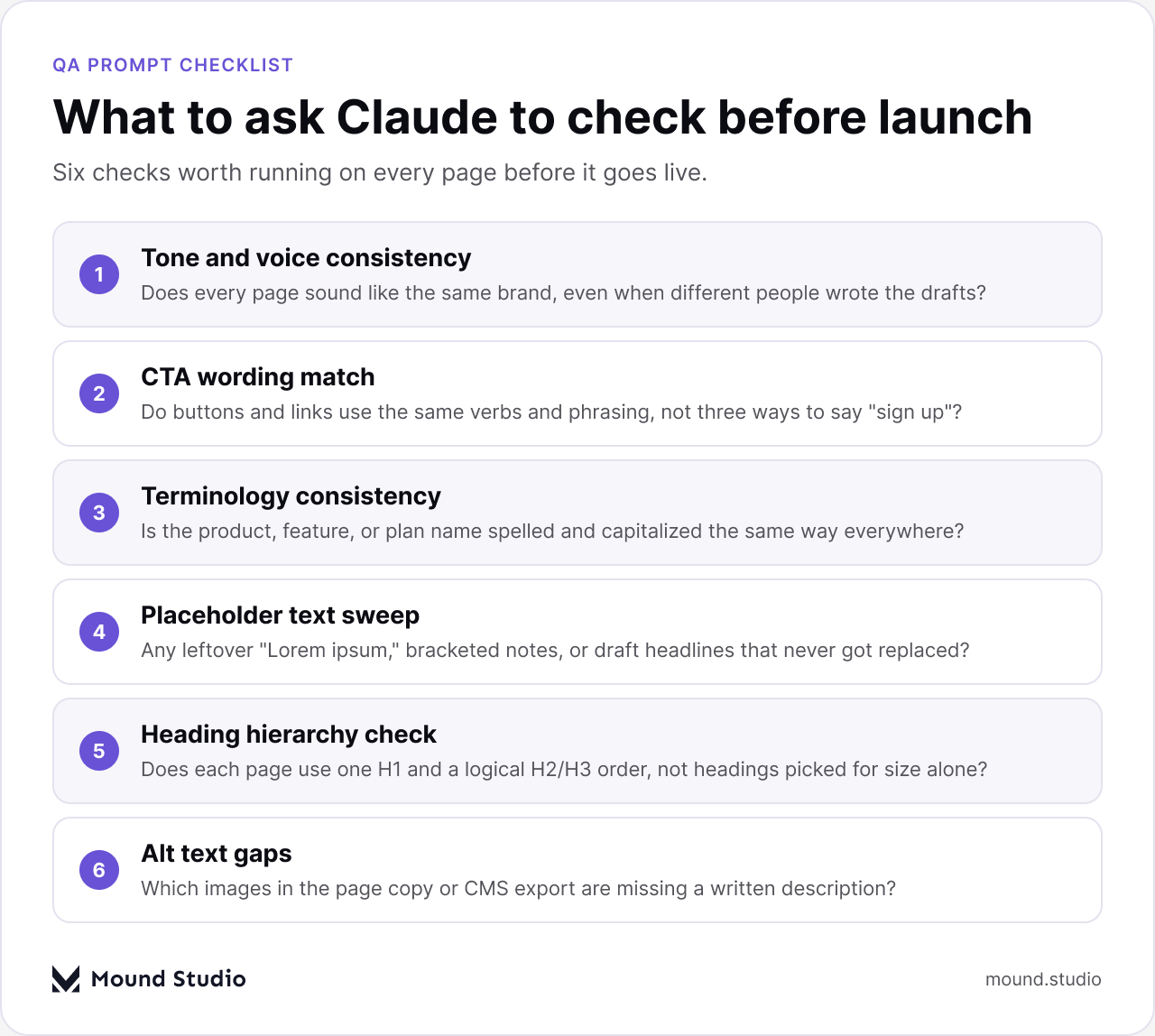
Paste every button and link label from the site into one list and ask Claude to group anything that means the same action but says it differently. "Get started," "Sign up now," and "Create your account" might all point at the same signup flow. That is fine if it is a deliberate choice. It is usually not. Claude is good at spotting the pattern across dozens of buttons faster than a person scanning page by page.
Export the page copy from your CMS and ask Claude to flag anything that reads like a placeholder: bracketed notes, "Lorem ipsum," a headline that is clearly a working title, or a stat with no source. This catches the specific failure mode where a section got built with sample copy and the real copy never made it in before launch, which is one of the more common last-minute embarrassments we see.
Paste the outline of a page as plain text, in order, and label each line H1, H2, or H3 as it appears in the CMS. Ask Claude whether the hierarchy is logical: one H1, headings that nest sensibly, nothing skipped for the sake of a bigger font. This is a text check, not a code check, so it will not catch an H2 styled to look like an H1 in your CSS. It will catch the more common problem, which is a page with three H1 tags because three sections were each built as if they were the top of the page.
Build a short glossary first: the exact name of your product, each plan or tier, each feature, and any term you have deliberately chosen over a more generic one. Paste that glossary alongside the site copy and ask Claude to flag every place a term is spelled, capitalized, or referred to differently than the glossary says. This matters more on larger sites, where a feature might get named once by a designer, once by a copywriter, and once by whoever wrote the help center, all before anyone notices the drift. It also matters on sites with a CMS, where the same term can live in dozens of individual entries that nobody reads end to end before launch.
A twelve-page site can turn a copy review into a hundred small notes, and a hundred small notes is not something a team can act on the morning of launch. The useful output is not the raw list. It is a punch list: what to fix, where, and how urgent it is.
Ask Claude to group its findings by page, then by severity, using categories your team already understands: something a visitor will notice immediately, something that reads oddly but will not stop anyone, and something so minor it can wait for the next content update. This is close to how we handle a developer handoff checklist, where the goal is also turning a long review into a short list someone can actually work through before a deadline.
| Page | Issue | Priority | Owner |
|---|---|---|---|
| Pricing | Three different CTA labels for the same signup flow | High | Copy |
| About | Draft headline still in place ("TK - fix this") | High | Copy |
| Features | Plan name spelled two different ways | Medium | Copy |
| Contact | Error message tone does not match the rest of the site | Low | Copy |
A table like this is easier to hand off than a wall of notes. Whoever owns the fix can work straight down the list, and whoever owns the launch date can see at a glance whether the high-priority items are closed.
It is worth being plain about the edges of this, because a QA pass that only checks copy will still ship a broken site if that is where the team stops.
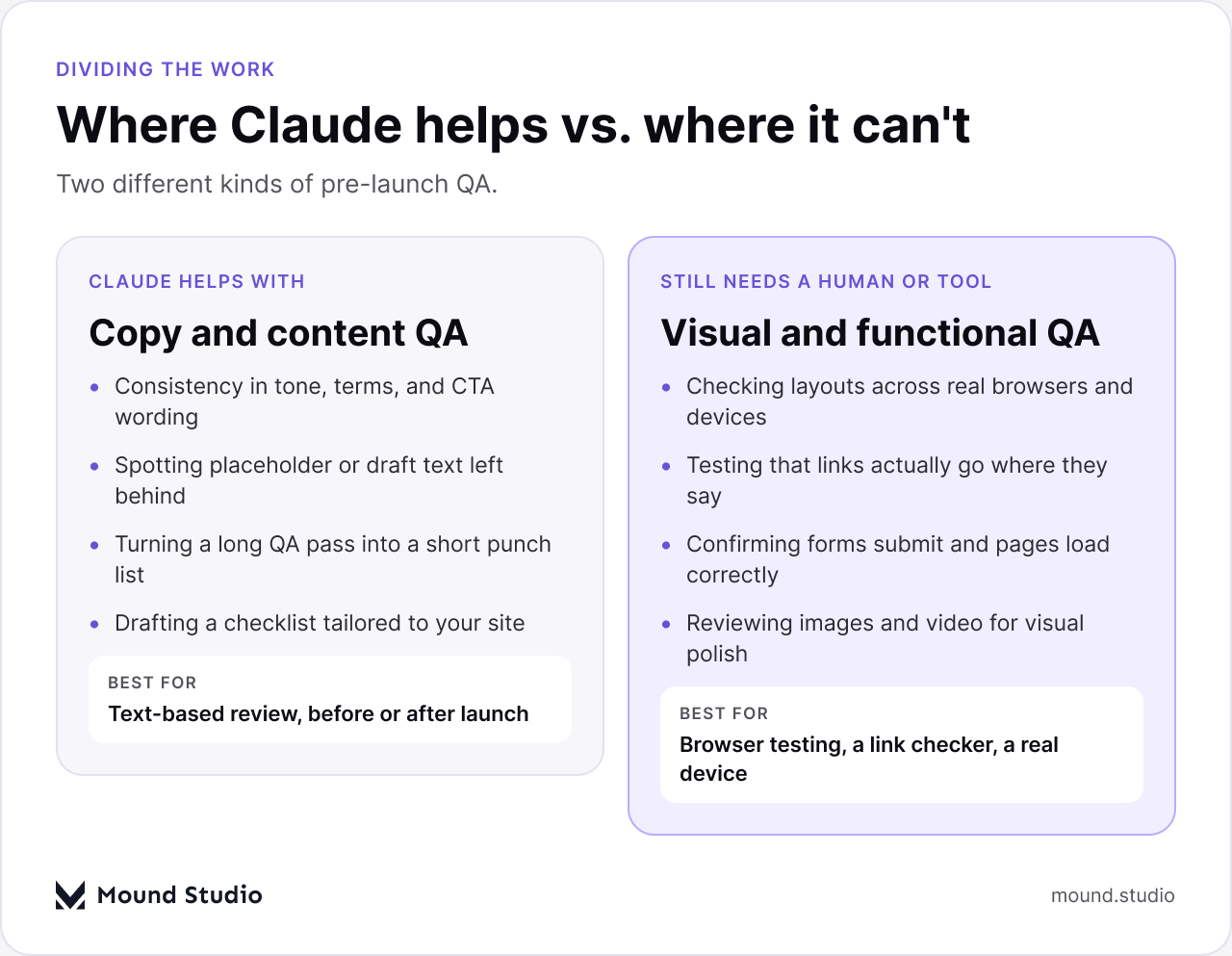
Claude reads text. It does not render a page, so it cannot tell you that a heading overlaps an image on a narrow screen, that a button is unreachable on a real phone, that a form silently fails to submit, or that a link points to the wrong page. Those checks belong to a real browser pass across a few screen sizes, a link checker, and a person clicking through the actual site, ideally on a real device rather than only a simulator. A website accessibility checklist covers a similar split: some of it is a text-level check, and a meaningful part of it only shows up when you use the site the way a visitor would.
Not every site needs the same checklist, but most benefit from splitting the work into categories with a clear owner for each one.
| Category | What to check | Typical owner |
|---|---|---|
| Copy and tone | Consistency, terminology, CTA wording, placeholder sweep | Copywriter or Claude-assisted review |
| Structure | Heading hierarchy, page titles, internal link targets | Content or SEO owner |
| Visual QA | Layout at several breakpoints, image quality, spacing | Designer |
| Functional QA | Forms, links, redirects, tracking scripts, page speed | Developer |
Keep the checklist short enough that someone will actually use it under deadline pressure. A long, generic checklist gets skipped. A short one, matched to how your site is actually built, gets followed.
Running a copy QA pass too early wastes the effort, because half the findings will be overtaken by edits before launch. Running it too late leaves no time to act on what it finds. The point that tends to work best is right after content freeze, once every page has its real copy in place but before the team has moved on to other work. That gives you time to fix what comes back and still leaves room for a second, shorter pass in the last day or two before launch, focused only on whatever changed since the first review.
It is also worth running a light version of this pass after launch, especially on a site with a CMS where content keeps getting added. A quarterly check against your glossary and style guide catches the same kind of drift that builds up gradually, long after the original launch checklist has been closed and forgotten.
Claude is a fast, consistent first read on the copy across a site that is about to launch. It catches tone drift, mismatched CTAs, inconsistent terms, and leftover placeholder text, and it can turn a long list of findings into a punch list your team can actually work through before a deadline. It is not a substitute for opening the site in a browser, testing it on a real device, or checking that every link and form works. Use it for the part it is good at, and still budget time for the part it cannot do.
Want a second pair of eyes on your launch QA process? Tell us about your site and we will tell you where a text-based pass fits and where it does not.
No. Claude reads and reviews text, so it can check the copy on every page, but it cannot open a browser, click a link, resize a window, or confirm a form submits. Those checks still need a real browser pass, a link checker, or a person testing on an actual device.
Ask it to check tone and voice consistency, CTA wording across pages, terminology against a glossary, leftover placeholder text, and whether each page's heading outline is logical. Give it your style guide or homepage copy as a reference before you paste in the pages to review.
A copy pass covers only the text on the page. A full checklist also covers layout across screen sizes, functional testing of forms and links, page speed, and accessibility, each of which needs a browser, a device, or a dedicated tool rather than a text review.
No. Claude can flag missing alt text in a content export and check whether heading levels are used in a logical order, but a real accessibility check also covers color contrast, keyboard navigation, and screen reader behavior on the live, rendered page.
Run it once after content freeze, once more right before launch on whatever changed since the first pass, and then periodically afterward on any site where a CMS keeps adding new content that can drift from your original terminology and tone.



.png)


