








.avif)
.avif)
.avif)

Product
Claude for User Research Synthesis: A Practical Guide
You paste every comment you have collected — from email, Slack, and the Figma file itself — into one place, then ask Claude to group them by theme, flag where reviewers disagree, and produce a short summary you can act on. Instead of scrolling through a dozen comment threads before a review meeting, you read one document that says what people actually think and where they do not agree. Claude does the sorting and the first pass at grouping. Your team still decides what to prioritize and how to settle the disagreements.
This matters most on projects with more than a handful of reviewers: a stakeholder committee, a client with several departments weighing in, or an internal team where product, marketing, and a founder all have opinions on the same screen. The feedback rarely arrives in one channel. It shows up as a paragraph in an email, three short comments pinned to a Figma frame, and a Slack message from someone who saw the screen once and had a reaction. Reading all of it in order is not the same as understanding what it means for the design.
Collect the raw comments in one document, however messy that document looks. Ask Claude to sort them into themes, note who said what, and call out any comment that contradicts another. Read the summary before your next review call instead of digging through three inboxes. Then decide what to change, what to defer, and who needs to weigh in on the disagreements. Claude can describe a disagreement clearly. It cannot tell you whose opinion should win.
On most projects, feedback does not arrive as a single organized document. It arrives in pieces, from whoever happens to be looking at the design that day, in whatever tool they had open.
| Source | What it usually looks like | Where it gets lost |
|---|---|---|
| A long reply with several unrelated points mixed together | Buried in a thread by the time you look for it again | |
| Slack | A quick reaction, often without context on which screen or version | Scrolled past within a day, never revisited |
| Figma comments | Short notes pinned to a specific frame or element | Resolved and hidden, or left open with no owner |
| Verbal, in meetings | A comment made out loud, sometimes never written down at all | Remembered differently by everyone in the room |
None of these sources is wrong on its own. The problem is reading them separately. A marketing lead's Slack comment about the hero section and a support lead's Figma comment about the same section are talking about the same problem from two angles, but nothing forces you to notice that unless you go looking.
The collection step is manual and there is no way around that — someone still has to gather the comments. What changes is what you do once they are gathered. Copy the raw text of every comment into a single document: reviewer, source, date if you have it, and the comment itself, unedited. Do not clean it up first. Half-finished thoughts and contradictory notes are exactly what you want Claude to work with, because sorting through that mess is the point.
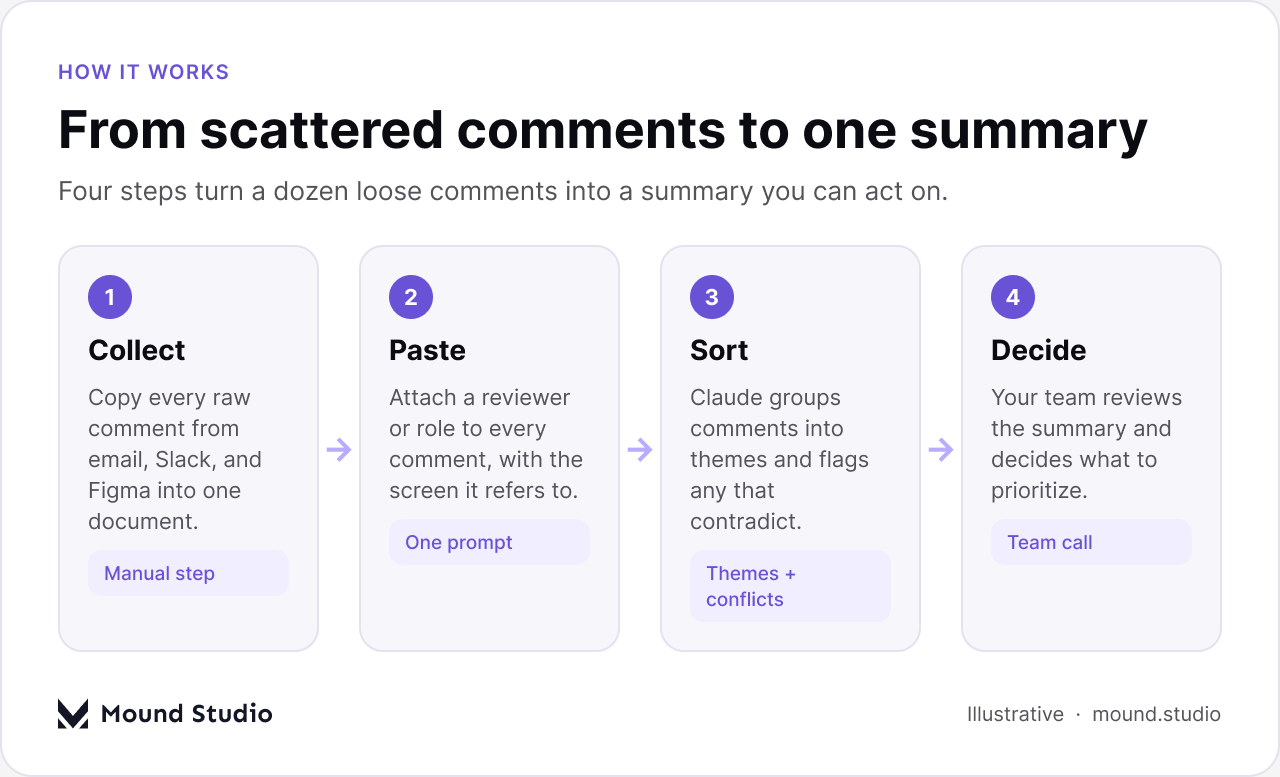
Once you have the raw list, the prompt itself can be simple: ask Claude to read every comment, group them into themes, name which reviewers raised each theme, and separately list any comments that conflict with each other. Paste the whole raw list in, comment by comment, with the reviewer's name or role attached to each one. The more context you give about who said what and on which screen, the more useful the grouping.
The quality of the summary depends on the quality of the raw list, not on how clever the prompt is. A few habits make a real difference to what comes back.
None of this takes long to gather once you know to ask for it up front, and it saves a second round of clarifying questions later, when someone asks "wait, was that about the old design or the new one?"
Claude reads for repeated concerns rather than repeated words. Five reviewers phrasing "the pricing table is confusing" five different ways still counts as one theme, not five. That is the part manual review misses most often: when everyone says the same thing in different language, it is easy to log five separate notes instead of noticing one real problem with five votes behind it.
| Raw comment (paraphrased) | Theme | Flag |
|---|---|---|
| "Marketing lead: the CTA doesn't stand out against the hero image" | Hero section contrast | |
| "Support lead: customers won't notice the button here" | Hero section contrast | |
| "Sales lead: I actually like how quiet the hero looks, don't change it" | Hero section contrast | Conflicts with the two above |
| "CEO: can we shorten the onboarding flow?" | Onboarding length |
That third row is the useful part. A plain list of comments would put "don't change it" next to two requests to make the button stand out and leave you to notice the contradiction yourself, usually mid-meeting. Asking Claude to flag conflicts explicitly means that contradiction is sitting at the top of the summary before anyone opens the file.
The grouping also picks up on how strongly something was said, not just what was said. A comment phrased as "might be worth a look" and one phrased as "this needs to change before we launch" can land in the same theme, but they carry different weight, and a good summary keeps that difference visible instead of flattening every comment into the same neutral tone.
This is the part no synthesis tool can do for you, and it is worth being direct about that. Claude can tell you that the sales lead and the support lead disagree about the hero section. It cannot tell you which one is right, because that depends on things Claude was never given: who owns the decision, what data exists on actual customer behavior, and what the business is trying to protect. A clean summary turns a hidden disagreement into a visible one. Turning a visible disagreement into a decision is still a conversation between people.
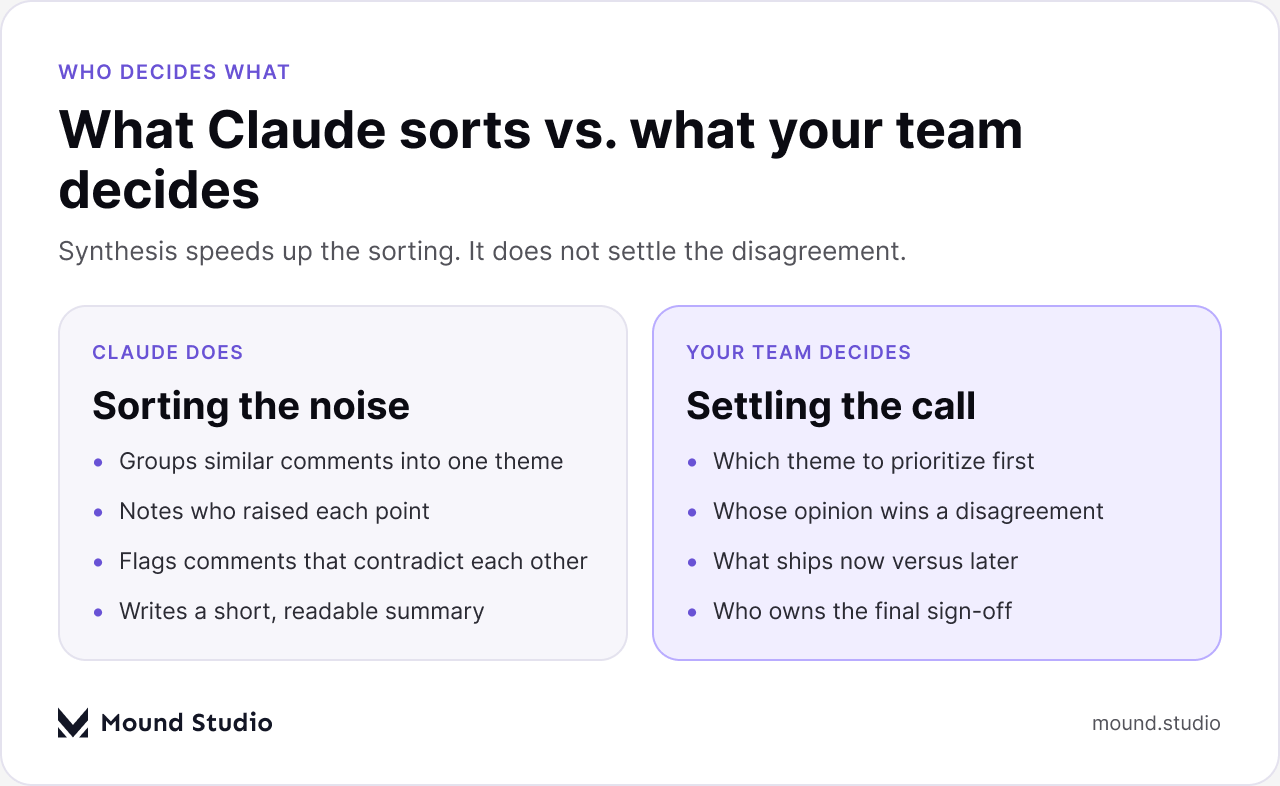
In practice, the most useful output is a short list of flagged conflicts, written as plainly as possible: who said what, and where the comments contradict. Bring that list to the review meeting instead of trying to resolve it over Slack one reviewer at a time. It is much faster to settle a disagreement out loud, with both people in the room, than to guess at a compromise from written notes days apart. This is a related but different problem from turning raw interview transcripts or support tickets into insight, which we cover in our guide to using Claude for user research synthesis. That piece is about understanding what users need before you design; this one is about making sense of what your reviewers think about a design you have already made.
A summary that is actually useful before a meeting tends to have the same handful of parts, in the same order, no matter how messy the raw comments were.

Keeping the same structure every round means reviewers start to recognize it, and the meeting itself gets shorter, because half the agenda is already answered before anyone speaks.
If most of these are a yes, you are ready to bring the summary into the room instead of the raw comment threads. This is also where a scattered feedback process usually shows up in a wider agency workflow. See our notes on using Claude across an agency-client workflow for how synthesis fits alongside the rest of a project.
No, and it is not meant to. A synthesized summary makes the meeting shorter and more focused, because the group is not spending the first twenty minutes reading comments out loud to catch each other up. It works best paired with a clear review process to begin with — our guide on running a UX audit covers how to structure a review so the feedback you collect is easier to act on in the first place. Synthesis cleans up what people already said. It does not replace deciding what to do about it.
Stakeholder feedback rarely arrives organized, and it does not need to. Collect it wherever it lands, let Claude sort it into themes and flag where people disagree, and bring a short summary into the room instead of a pile of comment threads. The sorting can be automatic. Deciding what to prioritize, and whose opinion wins when two reviewers disagree, is still a job for your team. If you want a second set of eyes on how your review process is set up, tell us about your project and we will help you figure out where it is breaking down.
No. Claude can group comments into themes and flag where reviewers disagree, but deciding what to prioritize and whose opinion wins is still a decision for your team.
Paste the raw, unedited comments with a reviewer or role attached to each one, plus which screen or flow it refers to. Cleaned-up notes strip out the tone and detail that make sorting accurate.
Research synthesis turns interviews, tickets, or survey answers into insight about what users need. This is about sorting what your reviewers think of a design you have already built, which is a different kind of input.
No. It makes the meeting shorter by sorting the comments beforehand, so the group can spend the meeting deciding instead of catching each other up on what was said.
Claude will flag the conflict plainly, naming who said what. Resolving it still needs a conversation between the people involved, usually settled faster out loud than through more written comments.



.png)


