








.avif)
.avif)
.avif)

Product
SaaS Dashboard Design: 9 UX Best Practices for 2026
You do a UX audit in four stages: scope one flow, gather evidence, review and test it, then rank the issues and write the plan. The point is not a long list of complaints. It is a short, ranked list of fixes your team can start on this month. This guide shows each step, the evidence to collect, a checklist you can copy and the mistakes that make audits useless.
A UX audit is a structured review of a website or product to find where users struggle, why it happens and what to fix first. It combines data, observation and expert judgment. You can run one before a redesign to know what to keep, or on a live product that is not performing as expected.
A little preparation keeps the audit short. Gather these before day one.
Most audits take a few days to a couple of weeks, depending on how big the flow is and how quickly you can reach users. Involve someone from support or sales early. They know the complaints that never reach a dashboard.
Four stages, and each one ends with something you can hand to the team.

| Stage | What you do | Output |
|---|---|---|
| Scope | Pick one flow, write the goal | Goal and scope |
| Gather | Analytics, recordings, support notes | Evidence |
| Review and test | Walk the flow, watch real users | Issue list |
| Rank and report | Score by impact and effort | Action plan |
Decide what you are auditing and why. "The whole website" is too broad. "The sign-up flow" or "the path from homepage to contact form" is workable. Write down the goal in one line: more demo requests, fewer support tickets, better activation. Also note who the users are and what they are trying to do.
Gather any research, personas or customer interviews you already have. If you have none, talk to a few customers or to your sales and support team. They hear the real questions every week, and ten minutes with them often saves a day of guessing.
Keep the questions open and specific to the flow you chose.
Write down the exact words people use. Their words often make better labels and headings than the ones your team invented.
Use three kinds together. Numbers show where the problem is, watching shows how it happens and talking shows why.
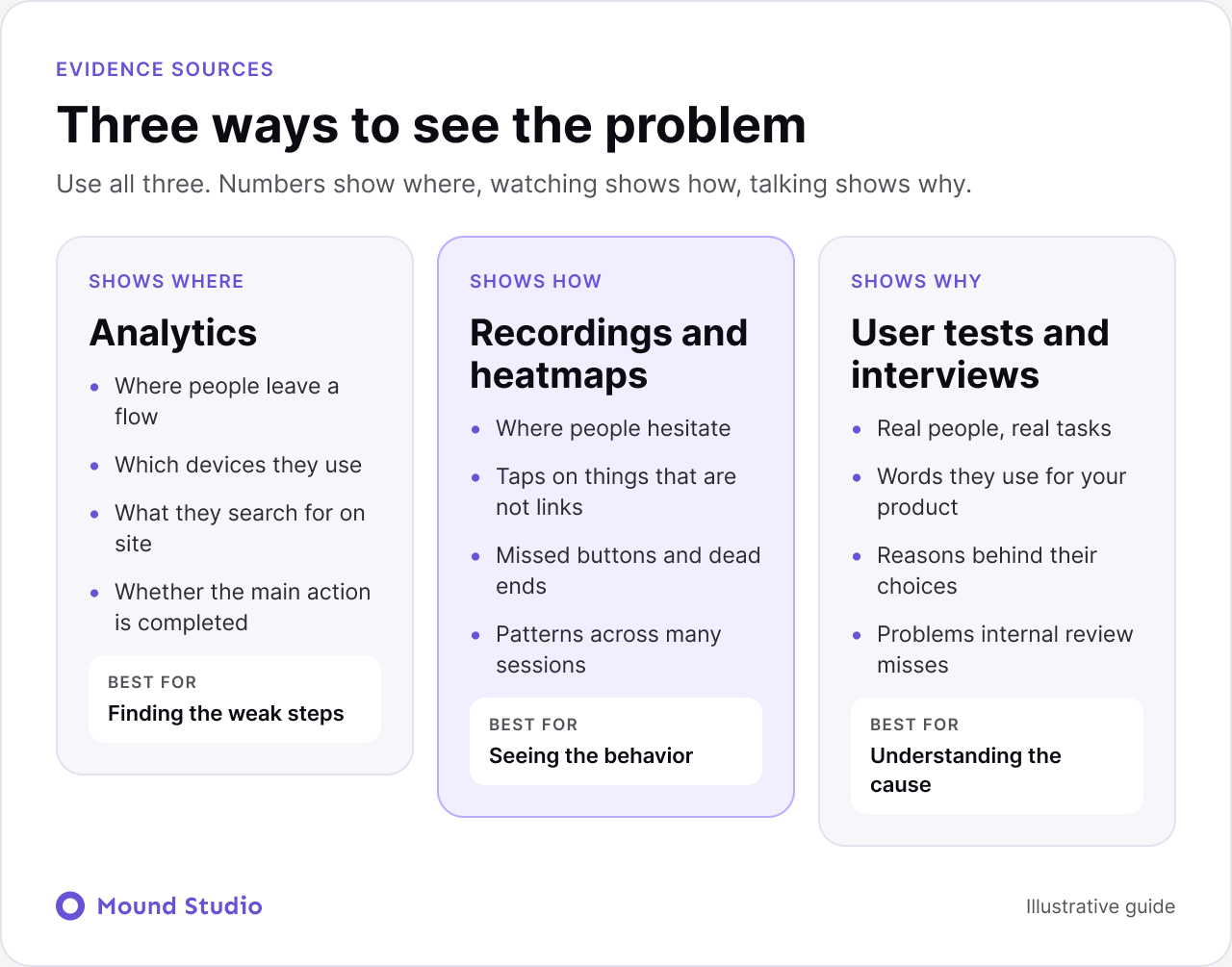
| Source | Shows you | Best for |
|---|---|---|
| Analytics | Where people leave, devices, searches | Finding weak steps |
| Recordings and heatmaps | Hesitation, dead taps, missed buttons | Seeing behavior |
| User tests and interviews | Reasons and the words users use | Understanding the cause |
In analytics, look at which pages get traffic and where people leave, how many complete the main action, which devices they use and what they search for on your site. Then watch a handful of session recordings. You often see the problem within minutes: someone hunting for a button, or tapping something that is not clickable.
Walk through the flow yourself, on desktop and on a phone, as if you were new. Check whether it is clear where you are, whether the next step is obvious, whether the design gives feedback and whether people can recover from errors. Use the checklist further down.
Ask a few people from your target group to complete key tasks while you watch. Do not help them. Where they hesitate or get lost is where the design needs work. Even a small round of testing reveals problems that internal review never catches, because you already know how the product is meant to work.
Give tasks, not instructions. Say "find out what a project like yours would cost", not "click the pricing page". The way people search for the answer is the finding.
After a few sessions, patterns appear. If several people trip on the same step, that step is a finding. If only one person does, note it and watch for it again. Five people is a common starting point, and you can repeat the round after the fixes ship.
Not every problem deserves attention now. For each one, note how many users it affects, how much it hurts the goal and how hard it is to fix. Then place it on the grid.

Keep it short and clear. For each issue include what you found, the evidence (data, a recording or a quote), why it matters and the recommended fix. End with a prioritized action list and owners. A report nobody acts on is wasted work.
| Field | Example |
|---|---|
| Finding | Users miss the main sign-up button on phones |
| Evidence | Recordings show repeated taps on a heading |
| Why it matters | Fewer people reach the form |
| Fix | Make the button larger and place it higher |
| Priority | High impact, low effort |
The way you share findings changes what happens next. Start with a one-page summary: the goal, the three to five biggest problems, and the fixes you recommend first. Put the full issue list after it for anyone who wants detail.
Show evidence, not just conclusions. A short recording clip or a direct user quote persuades faster than a paragraph of opinion. Keep the tone neutral. Describe what users did, not what the designer got wrong. Then walk the team through the ranked list in a short meeting and agree an owner and a target date for each fix-first item. Plan a quick follow-up review after the changes ship, so you can see whether the problem actually went away.
If you found that the dashboard or product screens are the problem, our guide to SaaS dashboard design covers what good looks like. If the audit points to a rebuild, read when to redesign your website before you commit.
Each one wastes the same scarce resource: your team's attention. An audit without a goal produces a long list nobody can act on. Opinion-led findings start arguments instead of fixes. Skipping mobile hides the experience many visitors have. Treating every issue as urgent means nothing gets done first. Fix these habits and the audit pays for itself, because the team spends its time on the few changes that matter. For help with structure problems that audits often reveal, read our information architecture guide, and use the website accessibility checklist to go deeper on the accessibility items above.
A team notices that many visitors start the sign-up flow and few finish. Analytics show most people leave on step two. Recordings show them tapping a plain heading that looks like a button. In testing, two of five people say they were not sure what happens after they submit. The fixes: restyle the real button, add one line that explains what happens next and remove one form field. All three are low effort, and they sit in the fix-first box. That is what a good audit produces: a small number of clear changes, backed by evidence.
Consider a company blog that gets steady traffic but few readers move on to the services pages. Analytics show most visitors leave after one article. Recordings show readers scrolling to the bottom and finding nothing to do next. In testing, people say they liked the article but could not tell what the company actually offers.
The fixes are modest. Add a short, clear next step after each article. Link related articles in the body where they help. Make the navigation label for services say what it is. Then connect the blog to a page built to convert, which our guide on how to design a website that converts explains. None of this needs a redesign. It needs an audit that noticed where readers were stuck.
A UX audit turns "something feels off" into a clear list of what to fix and in which order. Use data, watch real users, rank the problems and finish with actions your team can start on. Want a UX audit of your product or website? Get in touch and we will review it with you.
A UX audit is a structured review of a product or website to find usability problems and missed opportunities, followed by a list of recommended fixes ranked by impact and effort.
Before a redesign, after major changes or when results drop. Many teams also review key flows once or twice a year.
An audit reviews the product against goals, data and good practice. Usability testing watches real people use it. The two work best together.
Analytics, session recordings and a checklist are enough to start. Add user testing when you can.
A small group from your real audience is enough to reveal the biggest problems. Run another round after you fix them.


.png)


