








.avif)
.avif)
.avif)

Ai
Claude vs ChatGPT: Which AI Fits Your Design Workflow
Claude speeds up the parts of research synthesis that are mostly reading and organizing: working through long transcripts, grouping repeated language into rough themes, and drafting a first-pass summary you can react to. It does not replace the researcher's judgment about which pattern matters, what a hesitant answer really means, or which finding is worth acting on. Used well, it turns a pile of raw notes into a workable draft faster. Used badly, it turns a pile of raw notes into a confident-sounding draft that nobody checked.
That distinction matters more than it sounds. Synthesis has always been the part of research that eats the most time relative to how much credit it gets, and it is also the part where a shortcut is hardest to spot from the outside. A theme summary reads the same whether it was checked against the source material or not. The value of a tool like Claude here is not that it makes synthesis effortless. It is that it removes the slow, mechanical part of the work so a researcher's time goes into the part only a person can do.
Feed Claude the raw material — interview transcripts, survey responses, usability test notes, support tickets — and ask it to group related comments, pull supporting quotes, and draft a summary of what it sees. Then have a researcher who knows the project check that draft against the source material before it goes anywhere near a roadmap. That review step is not optional. It is the difference between a synthesis you can trust and one you can only hope is right.
The rest of this guide walks through where that split actually falls, the mistakes that tend to creep in, and a checklist you can run a draft through before anyone treats it as settled.
Before AI tools entered the picture, synthesis was already the slow part of research. Interviews get recorded, transcribed, and then somebody has to read all of it, notice what keeps coming up, and turn scattered comments into themes a product team can act on. That work does not get easier just because the volume of input grows. A project with twenty interviews and a stack of support tickets produces far more raw material than one researcher can hold in their head at once, and the pressure to skim rather than read properly grows with it.
This is where Claude fits. It reads fast, it does not get tired halfway through transcript twelve, and it can hold the whole set of inputs in view at the same time a person would need to flip between documents to compare. What it cannot do is know your product, your users, or your business well enough to decide, on its own, which of the twenty things it noticed actually matters. It can tell you that a phrase came up in eight of twelve sessions. It cannot tell you whether that phrase points at a real problem or a quirk of how one question was worded.
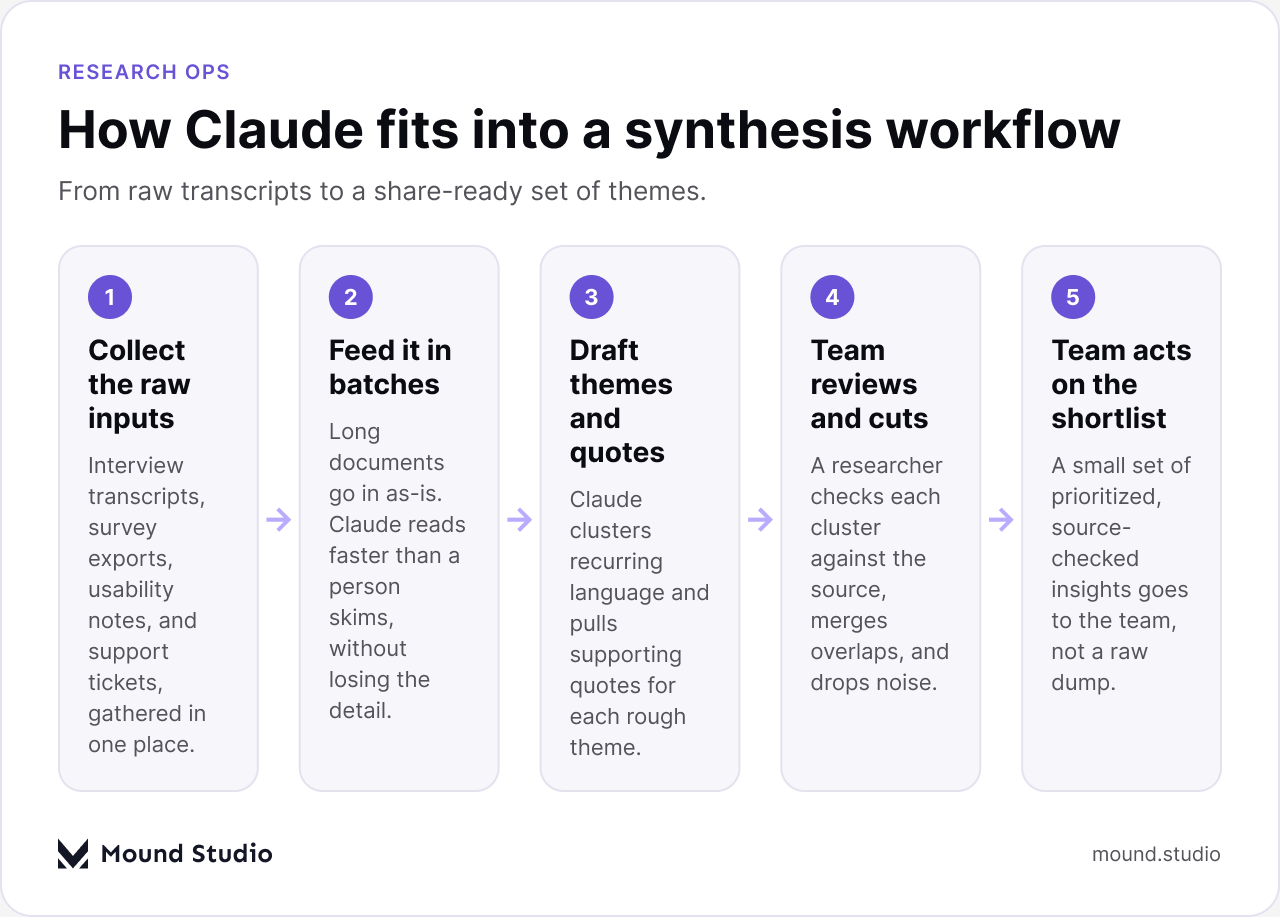
In practice, the workflow looks close to what we use across other parts of the design process: raw input in, a structured first pass out, then a person who reviews before anything ships. Research synthesis is no different. The inputs just happen to be interviews instead of user flows, and the review still has to happen before a finding reaches a stakeholder.
The quality of a synthesis draft depends heavily on how the inputs are framed, not just on what they contain. A few habits make a real difference.
Give it the research questions, not just the transcripts. Claude cannot guess what you were trying to learn from a set of interviews. Tell it what the study was for and it will group comments around that goal instead of around whatever surface similarity it happens to notice first.
Feed in batches you can still sanity-check. Dropping fifty transcripts in at once and asking for one theme summary makes the output harder to trace and harder to review. Working in smaller batches, then combining the results, keeps each pass checkable.
Ask for quotes attached to every theme, every time. A theme without a source quote is an opinion with no way to verify it. Requiring quotes forces the draft to stay honest about what it is actually built on.
Keep a human pass built into the process from the start, rather than added at the end if there is time. Teams that treat the review as optional are the ones most likely to skip it once a deadline gets tight.
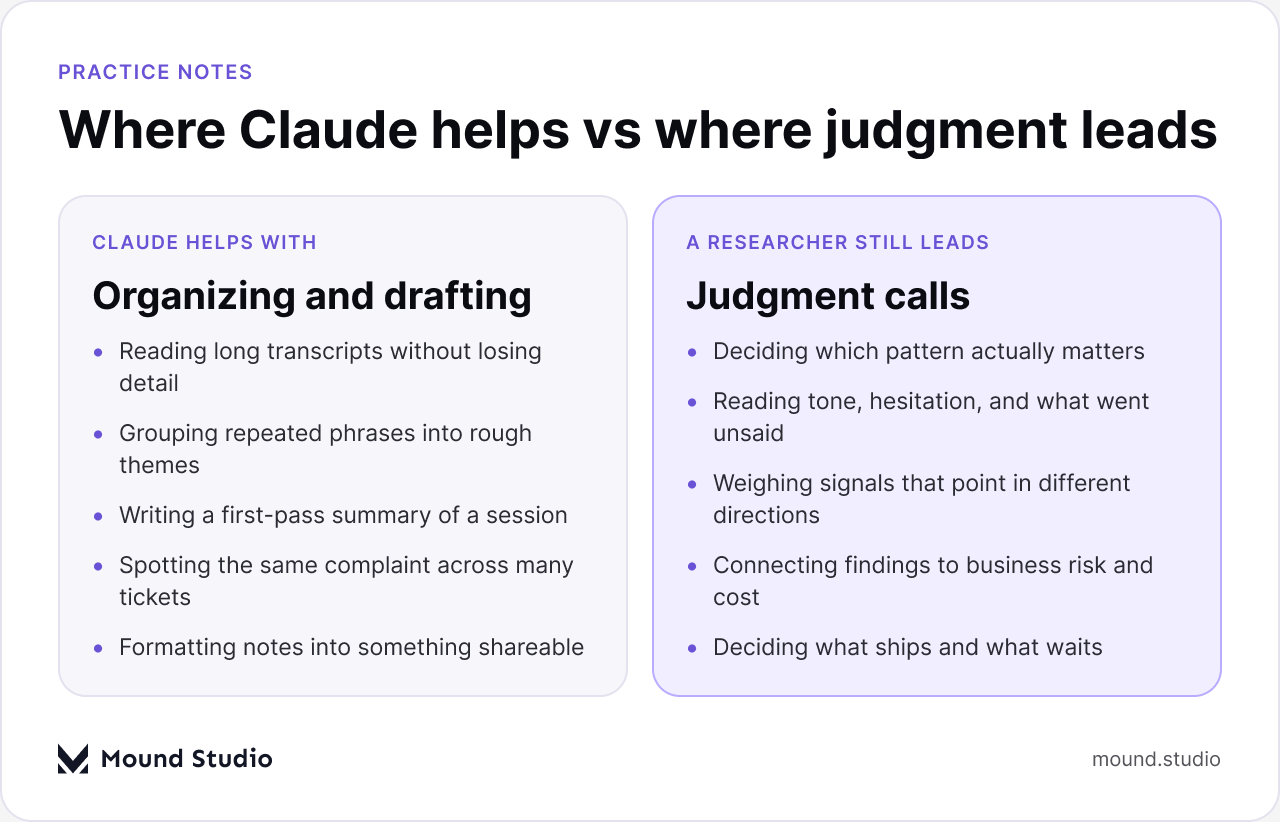
The clearest way to think about this is to split the work into two piles: the reading-and-organizing pile, and the judgment pile.
Claude is a strong fit for the first pile. Give it a batch of transcripts and it will read every one of them without skipping a section, note where the same complaint or request shows up across different sessions, and draft a summary with quotes attached so you can trace each point back to its source. That is a meaningful time save on a task that used to mean hours of highlighting and copy-pasting by hand. It is also useful for the unglamorous parts of the job: turning messy notes into something formatted well enough to share, or writing a first-pass summary of a single session right after it happens, while the details are still fresh.
The second pile is different. Deciding that a pattern found in three interviews out of twelve is the one worth acting on, reading the hesitation in someone's voice that a transcript does not capture, or weighing a finding against what it would cost to fix — all of that still needs a person who understands the product and the business. Claude can surface the raw material for that judgment. It should not be the one making the call, and treating it as though it can is where most of the risk in this workflow actually sits.
A usability test is a good example of where this split shows up clearly. Claude can watch a transcript of the session and note where a participant paused, backtracked, or asked a clarifying question, and it can draft a summary of what happened step by step. Whether that pause was confusion about the design or just someone thinking out loud, though, is a call that usually needs the researcher who ran the session, because it depends on context a transcript alone does not carry.
| Input type | What Claude handles well | What still needs a person |
|---|---|---|
| Interview transcripts | Reading in full, tagging recurring language | Reading tone and what went unsaid |
| Survey open-text | Grouping similar responses at volume | Judging which group is worth acting on |
| Usability test notes | Drafting a session summary fast | Deciding if a struggle was the task or the design |
| Support tickets | Spotting a repeated complaint across many tickets | Weighing the complaint against cost to fix |
A trustworthy draft has a few things in common. Every theme links back to specific quotes, not a vague paraphrase of "several users mentioned." The grouping reflects what actually happened in a session rather than just similar wording — two people can use completely different language to describe the same underlying problem, and a good synthesis catches that instead of treating them as unrelated. The summary is upfront about its own limits: how many people it is based on, over what time period, and from which segment of users.
A red flag draft looks confident but will not hold up to a second read. Themes are stated without any quote attached. Everything gets summarized at the same level of certainty, whether it came up once or in every single session. And the language sounds more decisive than the underlying evidence supports, which is easy to miss if nobody goes back to the source material to check it.
Most of the problems we have seen come from skipping the review step, not from the tool itself. The tool does what it is asked. The mistakes tend to show up in how the task was set up, or in what happened after the draft came back.
A rule of thumb we use internally: the more structured the input and the lower the stakes of the decision, the more comfortable we are letting a draft stand with a light read. The more open-ended the input and the higher the stakes of the decision, the more we go back to the source material ourselves. Neither end of that scale is fixed. It shifts depending on who the finding is going to and what happens if it turns out to be wrong.

| Decision | Input is structured | Input is open-ended |
|---|---|---|
| Internal, low stakes | Light read is usually enough | Fine as a first pass before a deeper look |
| Shapes the roadmap | Spot-check against source before presenting | Read the sources yourself |
This is close to how we think about choosing an AI tool for product work more broadly: match the tool to the task, and keep a person accountable for anything that reaches a stakeholder.
Before a theme summary moves from draft to something a team acts on, run it through a short checklist:
A synthesis that passes this checklist is one your team can act on with some confidence. One that skips it is a guess with good formatting. If your team is also weighing tools for the rest of the workflow, our take on where AI prototyping tools fit covers the same balance between speed and a person checking the output.
Claude is a solid fit for the reading-heavy, organizing-heavy part of research synthesis: working through transcripts, grouping recurring language, and drafting a first-pass summary with quotes attached. It is not a substitute for a researcher's judgment about what matters, what to act on, or what a hesitant answer really means. Teams that get the most out of it treat the draft as a starting point, not the finish line, and build the review step into the process rather than bolting it on afterward. If you want a hand setting up a research synthesis workflow that keeps a person in the loop, talk to us about your project.
No. It can speed up the reading and drafting side of synthesis, but deciding which pattern matters, reading tone and nuance, and connecting findings to business risk still need a researcher's judgment.
Interview transcripts, survey open-text responses, usability test notes, and support tickets all work well. Structured input like rating scores needs less review than open-ended comments.
Trace each theme back to the specific quotes or tickets it came from, and have someone who knows the project spot-check that against a sample of the source material before it reaches a roadmap.
Yes. It can read through long documents without skipping sections and hold the whole set of inputs in view at once, which helps once a project has more transcripts than one person can easily compare by hand.
Treat raw interview data the way you would any other research material: check what your organization's data handling policy allows, and remove or anonymize anything sensitive before it goes into any external tool.


.png)


