








.avif)
.avif)
.avif)


Branding
Using Claude to Strengthen Your Brand Voice Guidelines

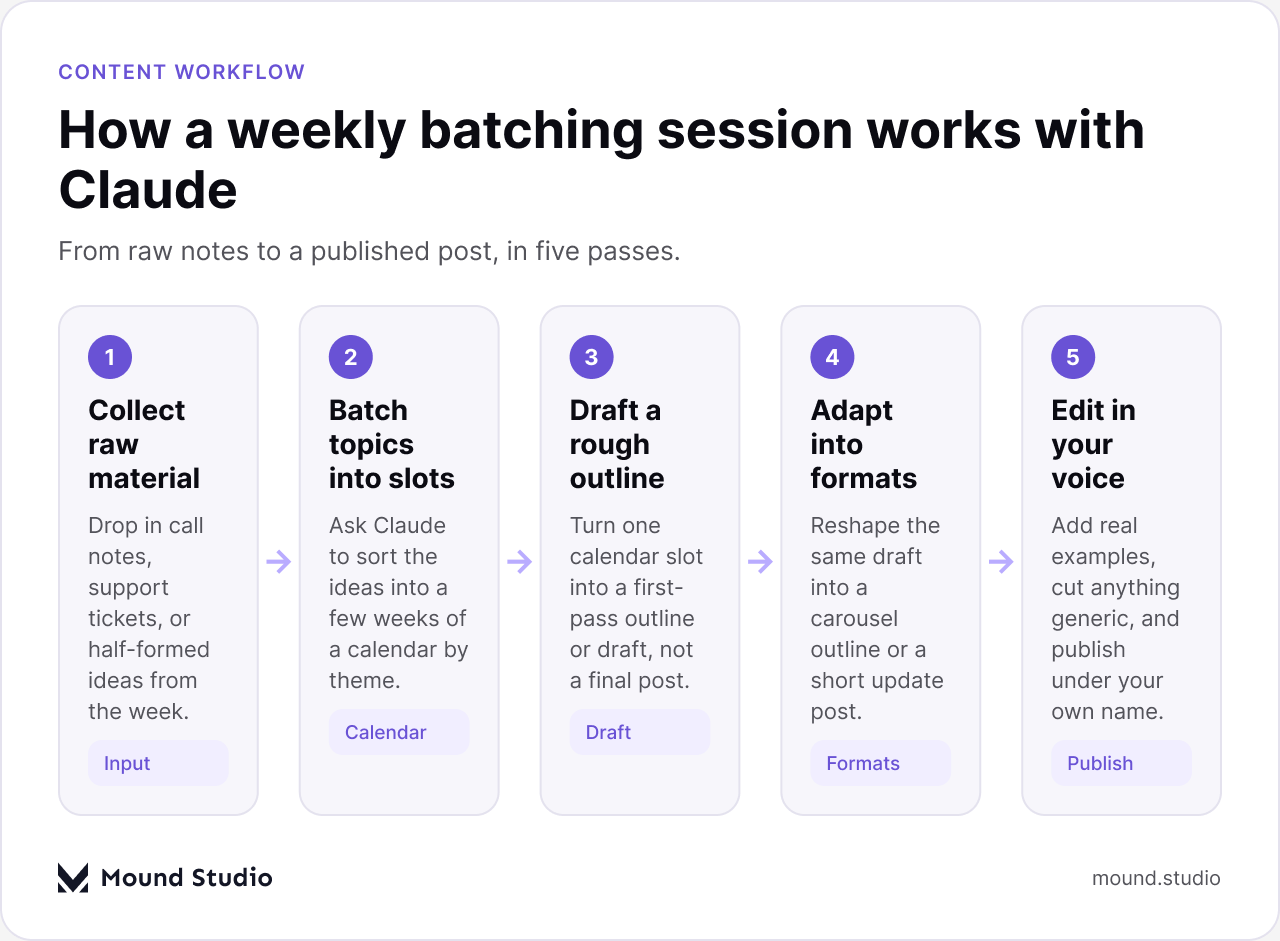
You use Claude to handle the batching and the first-pass drafting: turning a pile of loose topic ideas into a few weeks of a calendar, and turning one calendar slot into a rough outline or draft you can then edit. Claude is good at the parts that eat your time before you even start writing: sorting ideas, drafting a structure, reshaping one post into a shorter version for another channel. It is not good at the parts that make a post worth reading, which are your actual examples, your actual opinion, and the specific thing that happened on your last project. That part still comes from you.
Feed Claude your rough notes and ask it to group them into a calendar by week and theme. Pick one slot at a time and ask for a rough outline or first draft, not a finished post. Ask it to reshape that same draft into a shorter update or a carousel outline, so one idea covers two or three formats instead of one. Then edit everything yourself: cut anything generic, add your own examples, and check it against how you actually talk to clients. The calendar gets easier to keep up. The writing still needs you.
Most design teams do not stop posting because they run out of things to say. They stop because every week starts from a blank page: what do we write about, what have we already covered, and who has an hour free to draft something between client work. A content calendar is supposed to fix this, but a calendar full of empty slots is just a to-do list with a different name. The actual bottleneck is rarely the whole post. It is the first hour: picking a topic and getting some words on the page at all.
This is where Claude fits into a practical process, not a replacement for one. It removes the blank-page hour. It does not remove the thinking, the editing, or the judgment about what is actually worth publishing under your name.
Start with whatever raw material you already have lying around: notes from client calls, questions you answered in a Slack thread more than once, a pattern you noticed across a few projects, or a half-written note you left yourself weeks ago and never opened again. Paste all of it into one message and ask Claude to pull out possible post topics. You will usually get more ideas than you can use in a month, which is the point of the exercise. A calendar built from a backlog of real ideas holds up better than one built from staring at a blank spreadsheet every Monday.
Once you have a list, ask Claude to sort it into a few weeks: one longer post, one quicker take, one behind-the-scenes note, spread across whatever cadence you actually keep. Sorting by theme also catches repetition before it ships. If three ideas all make the same point about design systems, you want to know that while they are still three lines on a list, not after you have drafted all three.
Be specific about your audience and your usual formats. Tell Claude who actually reads your posts, whether that is founders, other designers, or potential clients doing due diligence, and what lengths you publish in practice: a full blog post, a short update, a carousel outline. Without that context you get generic topic lists that could belong to any design agency. With it, the topics come back shaped for the channels you actually use.
More than you would guess. A single client call rarely produces more than one or two usable topics, but a month of scattered notes, old proposals, and half-answered questions usually produces far more than you can publish in a quarter. If you are starting a calendar from nothing, spend twenty minutes pulling together everything you can find before you ask Claude to sort any of it. A thin starting pile produces a thin calendar, no matter how good the sorting prompt is.
It helps to be precise about which parts of the job move to Claude and which stay with you. The list below is what we have found it consistently useful for, in practice, across a real weekly habit rather than a one-off experiment.

| Format | What Claude drafts well | What still needs you |
|---|---|---|
| Blog post | A structured outline and a first-pass draft | Real examples, your own conclusion |
| LinkedIn carousel | Slide-by-slide points from a longer draft | The hook, the closing slide's tone |
| Short update post | A tight, one-idea version of a bigger post | Whether it is worth posting at all |
| Newsletter blurb | A short summary linking back to a post | The subject line, personal framing |
Pick a single calendar slot and give Claude the topic plus any specifics you already know: a client situation, with details changed if needed, a decision you made and why, or a mistake you have seen more than once. Ask for a rough outline first, not a finished post. An outline is easier to judge and easier to redirect than five hundred words you now have to unwind sentence by sentence.
Once the outline holds up, ask for a first-pass draft from it. Read the draft looking for one thing in particular: does it sound like something a stranger could have written about any agency? If the answer is yes, that is the part to rewrite. Swap in your own example, use your own numbers where you actually have real ones, and cut any sentence that only restates the heading above it.
This is also a good moment to reuse older work. If you wrote a similar post a year ago, paste it in and ask Claude to draft an updated version rather than starting from nothing. Our guide on using Claude for UX writing and microcopy covers a similar habit at the sentence level, which is worth borrowing here too.
The same topic can carry a blog post, a short social update, and a carousel outline, and drafting all three from scratch usually takes most of a day. Draft the long version first, then ask Claude to pull out the three or four points that would work as a carousel, or the single point that works best as a short update on its own. You are not writing three separate pieces from three separate ideas. You are finding three different doors into the same one.

Some formats hold up with a light edit once Claude has drafted them. Others, especially anything built around a specific client story, only ever get you a starting shape, because the real details are yours to add by hand, not something a draft can guess at.
Give Claude two or three of your best past posts as reference before asking for a new draft, and ask it to flag anywhere the new draft drifts from how those read. This catches the two most common voice problems: sentences that sound like they were written for no one in particular, and a tone that shifts partway through a post because it was drafted in a rush between other work.
Keep a short written note of your own style rules too. Short sentences. No exclamation points. Always "we," never naming an individual person. A model has no memory between sessions, so that note has to travel with the prompt every single time, not just the first time you set it up. If you want a deeper look at building and testing that kind of voice reference on its own, we cover it in our guide to documenting brand voice with Claude, which pairs well with the calendar habit here.
There is no single right cadence, but a simple weekly structure is easier to keep up than an ambitious one you abandon after a month. This is roughly the shape we use for our own posting habit, illustrative rather than prescriptive.
| Day | Task | Claude's role |
|---|---|---|
| Monday | Batch topic ideas for the next few weeks | Sorts raw notes into calendar slots |
| Tuesday | Draft a rough outline for this week's post | Turns one topic into a structure |
| Wednesday | Write the first-pass draft, then edit it | Produces a draft you rewrite from |
| Thursday | Adapt the post into a shorter format | Pulls out the carousel or update version |
| Friday | Final voice check before publishing | Flags drift from past posts |
Most calendars fail in week six, not week one. The first few posts get real attention because the process is new. By week six the batching session gets pushed for a client deadline, and the calendar quietly stops. The fix is not more discipline. It is making the weekly session small enough to survive a busy week: thirty minutes to batch, thirty minutes to draft an outline, and treat the edit as a separate short task you can do later the same day. A smaller, repeatable habit outlasts an ambitious one every time.
Use this as a quick checklist before you sit down with a calendar slot.
If you are earlier in the process and still deciding how Claude fits into client-facing work more broadly, our piece on using Claude inside an agency client workflow covers the same division of labor at a wider scale.
None, strictly. A shared document or spreadsheet is enough to hold the calendar itself: topic, target date, format, status. The value is in the habit, not the tooling. Keep the list of past posts somewhere Claude can be given easily, since that reference is what keeps the voice consistent from one week to the next. Beyond that, resist the urge to build an elaborate system before you have proven the simple one works for a few months.
A content calendar built with Claude removes the blank-page hour: the batching, the rough outline, the reshaping of one idea into a few formats. It does not remove the work of having something real to say. The teams who keep this up longest are the ones who treat every draft as a rough first pass, not a finished post, and who spend their own time on the parts a draft cannot fake: the example, the opinion, the voice. If you want help setting up a content habit that actually survives a busy quarter, tell us where your posting habit keeps breaking down and we will help you fix the part that matters.
It can draft them, but posts written without your own examples or opinion tend to read like they could belong to any agency. Use Claude for the first draft and the reshaping between formats, then edit each one before it goes out.
Every few weeks works better than batching months ahead. Ideas that felt relevant when you batched them can go stale before their slot arrives, so a shorter batching cycle keeps the calendar closer to what is actually happening in your work.
No. Paste in a couple of your best past posts and a short note of your style rules every time you ask for a new draft, since there is no memory carried over from one session to the next.
Publishing a draft without editing it. A rough outline or first pass is meant to save you the blank-page hour, not to replace the read-through where you add your own examples and cut anything generic.
Draft the long version first, then ask Claude to pull out the shorter formats from it. Reshaping an existing draft is quicker and more consistent than asking for several separate short posts on the same topic.



.png)


