








.avif)
.avif)
.avif)

Website
Custom Web Development vs No-Code in 2026: How to Choose the Right One

Custom web development cost varies by scope, backend complexity, and how many systems the site needs to talk to, not by a fixed price per page. A marketing site with a contact form and a logged-in product with custom permissions, a database of its own, and three external integrations will carry very different price tags even if both get called "a website." The number you should expect depends less on how many pages you want and more on what has to be built behind those pages: data models, authentication, integrations, and the testing that keeps all of it working.
That is the short answer. The rest of this guide breaks down exactly what moves the number, how build approaches change it, and what questions expose a quote that is missing something.
Design cost and development cost are often quoted together, but they are driven by different things. Design cost scales with screens and flows. Development cost scales with what sits behind those screens: how complex the data model is, how much custom logic the backend needs, how many third-party systems get connected, how deep the testing has to go, and what happens after launch. A site that looks simple on the front end can still carry a heavy backend, and that is where most underestimated quotes go wrong.

Every custom site or app is built on a data model: the entities it tracks (users, orders, listings, bookings) and how they relate to each other. A simple model with one or two entities is quick to build and quick to test. A model with several roles, nested relationships, and state that changes over time (an order that moves through statuses, a booking that can be rescheduled) takes longer to design correctly and longer to get right the first time. Getting the data model wrong early is one of the most expensive mistakes in a build, because fixing it later usually means touching the backend, the frontend, and the database all at once.
Logging in with an email and password is a solved problem. Logging in with multiple user roles, each seeing a different set of data and a different set of actions, is not. Custom auth with role-based permissions, team accounts, or single sign-on adds real engineering time, both to build and to test, because every role needs to be checked against every protected action. This is one of the factors that most often gets left out of a rough estimate and shows up later as a change request.
Payments, CRM, email platforms, shipping carriers, internal tools, analytics: every system your site needs to talk to adds setup time, error handling, and a new thing that can break. A single clean integration with good documentation is a day or two of work. An integration with a flaky API, no sandbox environment, or inconsistent data takes much longer, and you often cannot tell which kind you are dealing with until the build is underway. This is why integration-heavy projects are harder to quote with confidence upfront.
A dashboard with standard tables, forms, and charts can be built faster using well-tested patterns. A fully custom interaction, like a drag-and-drop builder, a real-time collaborative view, or a highly specific data visualization, takes meaningfully longer, because there is no existing pattern to lean on. It is worth asking, screen by screen, which parts of the interface are standard and which are truly custom, because the custom ones carry most of the frontend cost.
Testing scales with what there is to break. A static site needs a pass for broken links and responsive layout. A product with user roles, payments, and integrations needs functional testing across every role, edge-case testing for what happens when an integration fails, and often security testing around anything that touches user data. Testing is the phase most likely to get compressed under a deadline, and it is also the phase where that compression shows up fastest in the first weeks after launch.
A custom build does not stop costing money at launch. Dependencies need updating, integrations can change their APIs without warning, and real users find edge cases nobody anticipated. Budgeting only for the build and not for the months after it is one of the most common ways a project ends up feeling more expensive than it was quoted to be.

| Cost driver | Low impact when | High impact when |
|---|---|---|
| Data modeling | One or two simple entities | Multiple roles, nested relationships, changing state |
| Authentication | Single login, no roles | Multiple roles, team accounts, SSO |
| Integrations | One well-documented API | Several systems, flaky APIs, no sandbox |
| Custom UI | Standard tables, forms, charts | Drag-and-drop, real-time, custom visualization |
| QA and testing | Static site, few flows | Multiple roles, payments, integrations |
| Maintenance | No dependencies to track | Several integrations and dependencies post-launch |
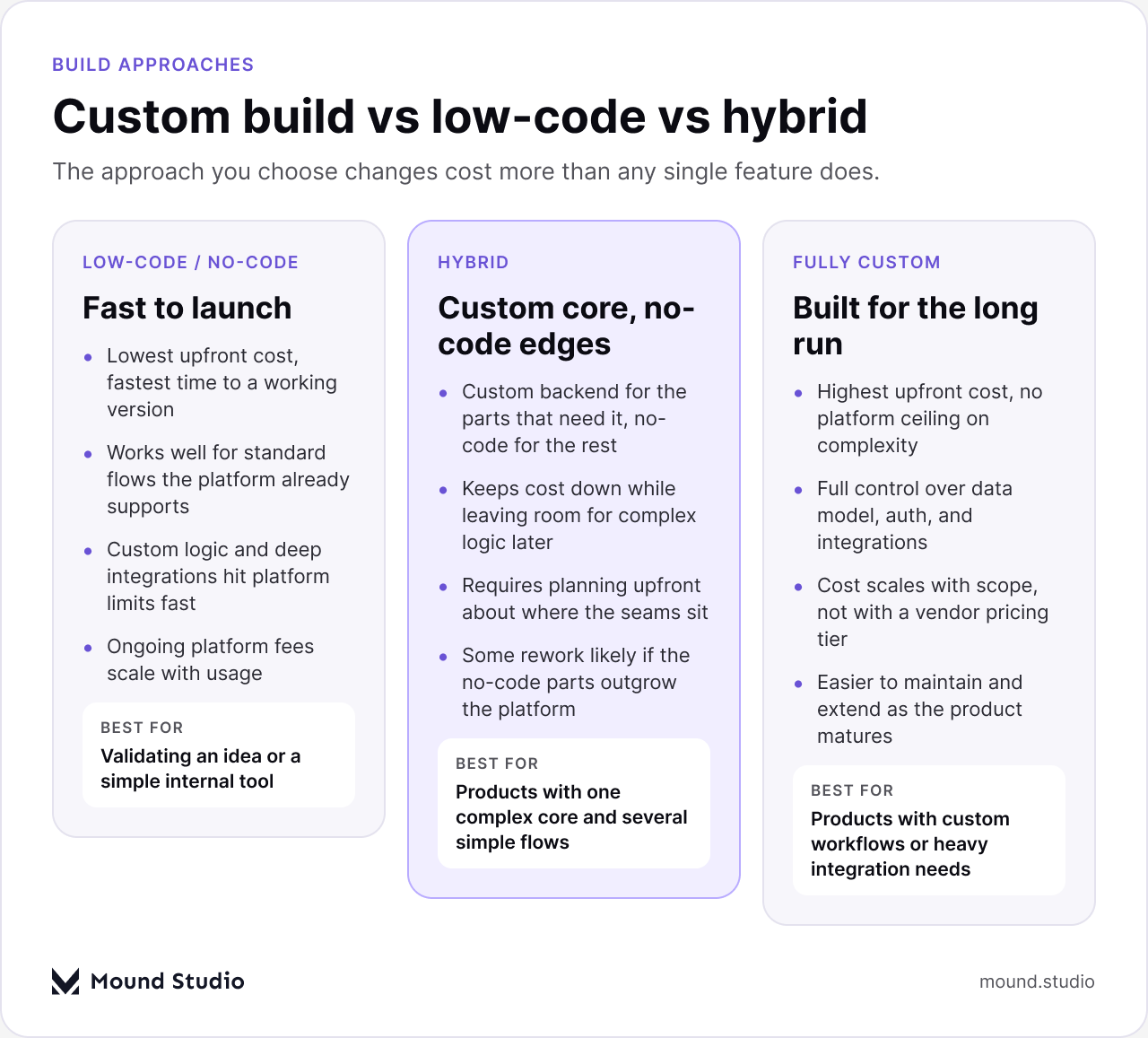
Not every project needs a fully custom build, and conflating the two is a common way budgets get set wrong in both directions. A low-code or no-code platform can get a standard flow (a booking form, a simple marketplace, a content site) live quickly and cheaply, because the platform has already solved the common cases. The tradeoff shows up the moment your requirements step outside what the platform expects: custom logic, a non-standard data model, or an integration the platform does not support natively. At that point, work that would have been simple in a custom build becomes a workaround, and workarounds tend to be fragile.
A hybrid approach, a custom backend for the part of the product that is truly different, with no-code or lighter tooling for the rest, is often the most cost-efficient path for products that have one complex core (a matching algorithm, a pricing engine, a scheduling system) surrounded by standard flows (account pages, settings, contact forms). It takes more planning upfront to decide where the seam between custom and no-code sits, but it keeps cost proportional to actual complexity instead of paying custom rates for every screen.
A fully custom build makes sense once the product has enough custom logic, enough integrations, or enough scale that a platform's limits would start working against you. It costs more upfront and gives you full control over the data model, the auth system, and how everything scales, which tends to pay off as the product grows rather than at launch.
Development projects are usually priced one of two ways. A fixed-scope project works when requirements are settled: a defined site, a defined MVP, a clear list of features. You know the number before work starts, and changes to scope go through a change request. An ongoing retainer works when the product keeps evolving: a growing platform adding features every sprint, a backend that needs continuous integration work as new systems get added. You are paying for capacity over time rather than a single deliverable.
Picking the wrong model creates friction either way. A fixed-scope project with a roadmap that keeps shifting turns into a stream of change requests that erodes the certainty you paid for. A retainer on a settled, well-defined scope can feel open-ended when a fixed number would have given you more clarity. If you are unsure which fits, write down whether your requirements are likely to change in the next few months. If the honest answer is yes, a retainer usually fits better.
If you are earlier in the process and still deciding whether to build custom at all, our guide on custom development versus no-code walks through that decision in more depth. If design and development costs are both on your mind, see what we cover in how much UI/UX design costs. And if you are comparing studios rather than approaches, our breakdown of what a design agency actually costs is a useful companion to this one.
Two quotes with the same total can represent very different projects. Before comparing numbers, check what each quote actually includes.
| What to check | Quote A | Quote B |
|---|---|---|
| Data modeling and architecture included | Yes / No | Yes / No |
| Custom auth and permissions scoped | Yes / No | Yes / No |
| Integrations listed by name | Yes / No | Yes / No |
| QA and testing phase included | Yes / No | Yes / No |
| Post-launch maintenance covered | Yes / No | Yes / No |
If one quote lists integrations by name and testing as a separate line, and another gives you a single number with no breakdown, you are not comparing the same project, even if the totals look close. A guide like our website redesign checklist is useful here too, since many of the same scoping questions apply whether you are starting fresh or rebuilding.
Cost is not only a function of what a development team builds, it is also shaped by how smoothly the project runs, and that depends partly on you.
Custom web development cost is not really about how many pages a site has. It is about what sits behind those pages: how complex the data is, how much custom logic the backend carries, how many systems it has to talk to, how deep the testing needs to go, and what it takes to keep it running after launch. A fully custom build, a hybrid approach, or a low-code platform can all be the right answer, and the right one depends on how much of what you are building is truly unique. If you can describe your data model, your integrations, and what happens after launch, you can get a quote that reflects the actual project rather than a guess.
Scoping a build and want a number tied to your actual requirements instead of a range? Tell us what you're building and we'll walk through what it would take.
Backend complexity drives the number more than anything else: how many entities the data model tracks, how custom the authentication and permissions are, and how many outside systems the site needs to integrate with.
It costs more upfront because there is no existing platform doing part of the work for you. For products with custom logic or heavy integrations, that upfront cost often pays off through fewer platform limits and lower rework later.
A fixed price fits a settled, well-defined scope. A retainer fits a product that keeps adding features or changing direction, since you are paying for ongoing capacity rather than a single deliverable.
Data modeling and architecture time, a dedicated QA phase, and a plan for post-launch maintenance are the most common gaps in a quote that looks cheaper than it actually is.
It depends on the data model, the number of integrations, and how custom the interface is. A simple custom build can take a few weeks. A product with multiple roles and integrations takes longer.



.png)


