








.avif)
.avif)
.avif)


SEO & AEO
Technical SEO Checklist for a Website Redesign

An SEO content audit is a structured review of every page on a site to decide, with evidence, whether each one should be kept, updated, merged and redirected, or removed. It matters because most sites accumulate pages faster than anyone prunes them, and a periodic audit is the only reliable way to find out which pages are still earning their place and which ones are quietly dragging rankings down.
"Page" here covers more than blog posts. Service pages, category pages, location pages, and old landing pages all belong in the same audit, because they all compete for the same crawl budget and the same internal links, and a weak service page can hold back rankings just as easily as a weak blog post can.
A content audit is not a copyedit pass and it is not a one-off keyword check. It is an inventory of URLs paired with a consistent set of grading criteria, applied page by page, that ends in a decision for every single page. The output is not a list of impressions — it is a short action plan: keep this, update that, merge these three into one, remove that one entirely.
We run audits for three recurring reasons. The first is after a redesign or a platform migration, when templates, URLs, or navigation have changed and old content needs to be remapped or retired. The second is before a content push, so new articles do not duplicate or compete with pages that already exist. The third is when organic traffic drops and the cause is not obvious — an audit is often the fastest way to find the pages that lost rankings and work out why.
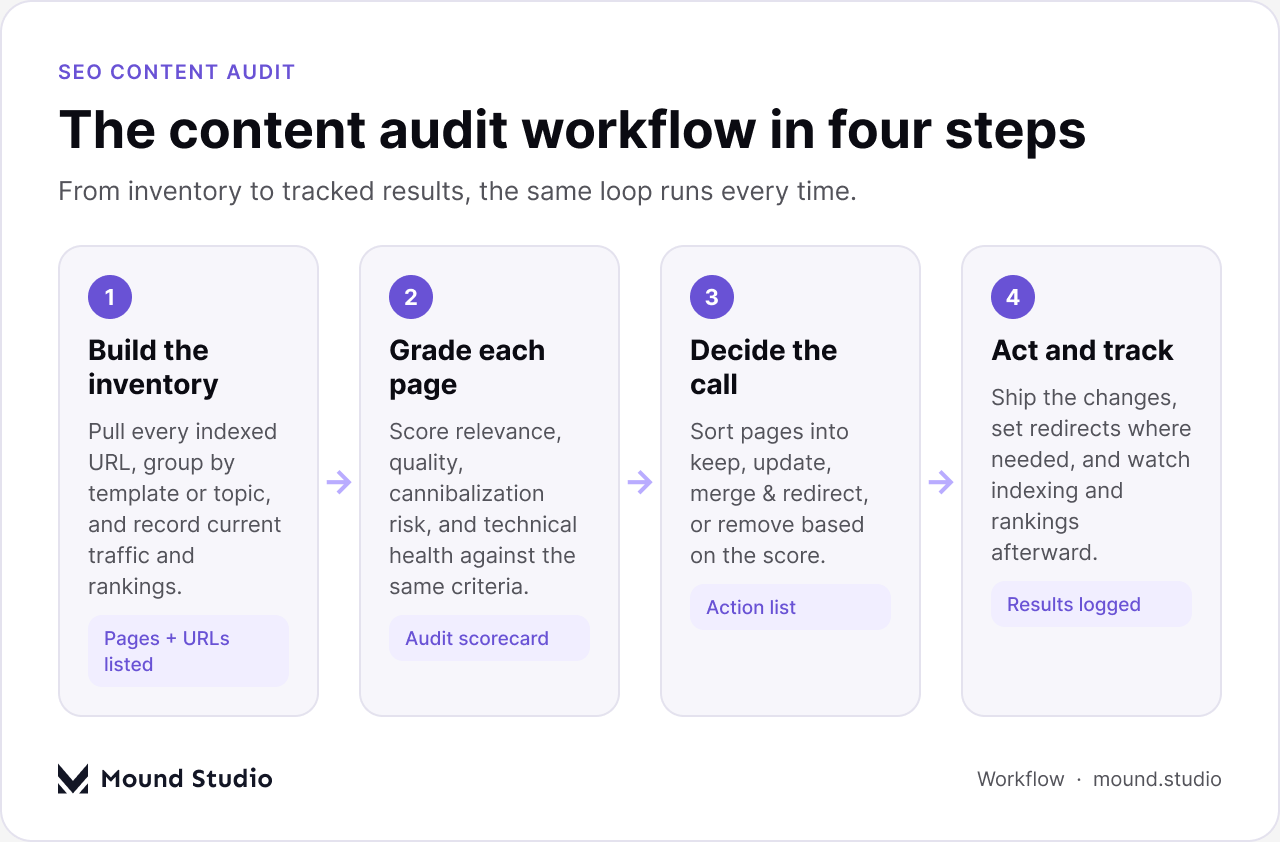
Outside of the three triggers above, a light audit on a fixed schedule — once or twice a year for most sites — keeps content debt from building up quietly. Waiting until a full redesign to look at every page means the backlog of outdated or duplicate content is much larger and much harder to fix in one pass. A smaller, more frequent audit is easier to act on and easier to budget for.
It is worth separating a full-site audit from a section audit. A full audit covers every indexed URL and is usually reserved for a redesign, a migration, or a serious traffic drop. A section audit — just the blog, just the product pages, just a category — is lighter and fits naturally into a content push, since it answers the question "what do we already have on this topic" before anyone writes something new.
Every audit starts with a single source of truth: a list of every URL that is live, indexed, or both. Pulling this from the site's sitemap plus a crawl is more reliable than relying on a CMS export alone, since a CMS list will not show orphaned pages, redirect chains, or URLs that exist but were never linked to from anywhere. Search Console's coverage report is worth cross-referencing here too, since it shows which URLs Google has actually indexed versus which ones are excluded or blocked.
For each URL, the inventory should record enough detail to grade it without having to reopen the page five times. At minimum that means the URL itself, its indexing status, its primary topic or target query, a rough word count, and the date it was last meaningfully updated. Traffic and ranking data for a recent period — sessions, top query, and current position for that query — rounds out the picture and makes the grading step much faster.
| Inventory field | Why it matters |
|---|---|
| URL + indexing status | Confirms the page is live and tells you whether Google can find it at all |
| Primary topic or query | Lets you spot pages competing for the same intent before you grade them |
| Word count + last updated | Flags thin or stale pages that are likely candidates for an update |
| Recent traffic + top query position | Separates pages worth protecting from pages with nothing left to lose |
None of this requires specialized audit software. A crawler gives the raw URL list and flags indexing issues, status codes, and duplicate titles or meta descriptions along the way. Search Console supplies the coverage report along with actual query and position data, which is far more reliable than guessing which pages matter. Analytics fills in session counts and engagement signals for each URL over a recent period.
A spreadsheet is still the best place to bring all of that together. One row per URL, one column per inventory field and grading criterion, keeps the whole audit in a single sortable view and makes the keep, update, merge, and remove decisions easy to filter and hand off to whoever is doing the work. Specialized audit tools can speed up the crawl and the data pull, but the decision-making still happens in a plain list.
Grading is where most of the audit's value comes from, and it only works if every page is scored against the same criteria. We use four: relevance, quality, cannibalization, and technical health. Scoring each one consistently — even on a simple scale — turns a pile of URLs into a sortable list with a clear next step for every row.
Relevance asks whether the topic still matches what people are actually searching for today, and whether it still matches the intent behind that query. A page written for a question nobody asks anymore, or one that answers a question in a way search intent has since shifted away from, scores low here regardless of how well it is written.
Quality covers depth, accuracy, and on-page experience: does the page actually answer the question completely, is the information current, and is it easy to read on the device most visitors use. A page can be perfectly relevant and still score poorly on quality if it is thin, outdated, or cluttered.
Cannibalization checks whether two or more pages on the same site are targeting the same query. This is one of the most common findings in any audit, and it is almost always worth fixing even when every page involved looks individually healthy, because competing pages tend to hold each other back in rankings.
Technical health covers whether the page is indexable, loads reasonably fast, uses correct heading structure, and carries the structured data appropriate to its type. A page can be excellent editorially and still underperform because a canonical tag points somewhere wrong or the page was accidentally noindexed during a past migration — this is also why a content audit and a technical SEO review work best run together rather than as separate projects.
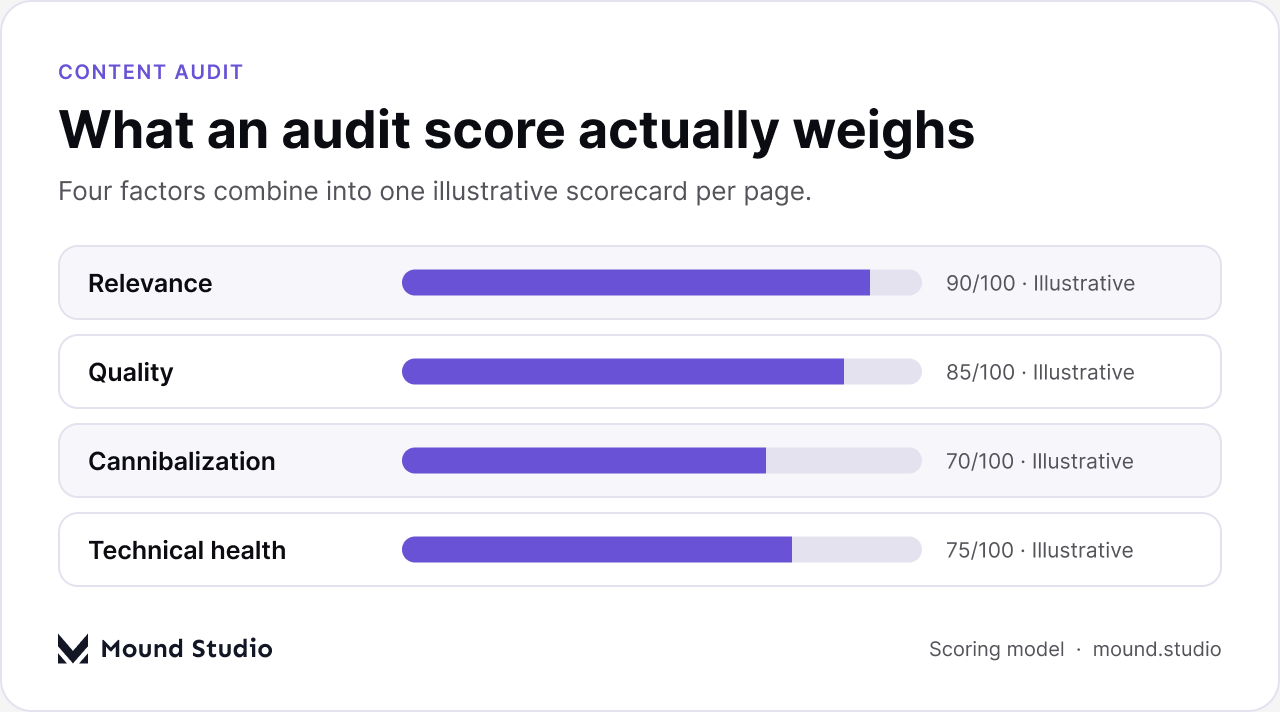
A workable scoring approach does not need to be elaborate. Scoring each of the four factors on a simple scale and adding them up gives every page a single number that is easy to sort and easy to explain to a client or stakeholder. The bands below are illustrative — the point is consistency, not precision down to a decimal.
| Illustrative score range | Typical call |
|---|---|
| Strong across all four factors | Keep as-is and recheck at the next audit |
| Relevant but dated or thin | Update and republish |
| Overlapping with another page | Merge the content and redirect |
| Weak across most factors | Remove and redirect to the closest relevant page |
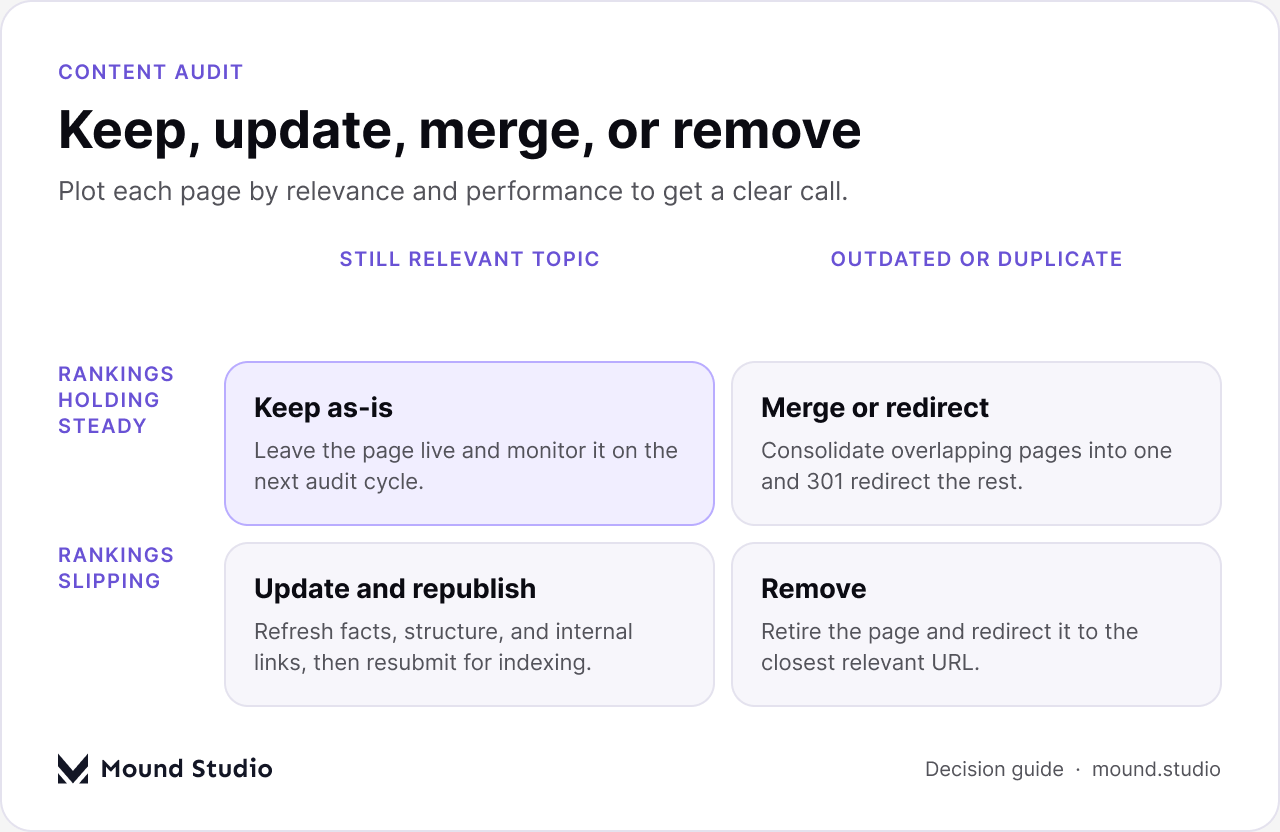
The grading step is only useful if it ends in a decision, and the decision should follow directly from the scores rather than from instinct. A page that is still relevant and still ranking reasonably well gets left alone. A page that is relevant but has slipped — in quality, in freshness, or in rankings — gets updated: refreshed facts, a clearer structure, better internal links, and a resubmission for indexing.
Pages that overlap with each other are candidates for merging: fold the strongest content from both into one page, then 301 redirect the weaker URL so any link equity it had carries over. Pages that score poorly across the board — no longer relevant, no longer ranking, no traffic worth protecting — should usually be removed and redirected to the closest page that is still relevant, rather than left live as dead weight on the site.
Answer engines and AI search features pull from pages that state their answer clearly near the top, structure the rest of the content in a way that is easy to parse, and carry accurate structured data describing what the page actually is. A content audit is a natural place to check for this, because grading a page for quality already means asking whether it answers the core question directly instead of burying it three paragraphs down.
Pages that pass a content audit with answer-first structure tend to hold up better as AI search features expand, simply because they were already built the way those systems read content. Updating a page during an audit is a good moment to tighten its opening paragraph into a direct answer and to confirm its headings are phrased the way people actually ask questions, rather than as generic section labels.
The most common mistake is auditing without a decision framework in place first. Scoring a hundred pages is wasted effort if there is no agreed rule for what a given score means in terms of action — define the keep, update, merge, and remove thresholds before the grading starts, not after.
A second common mistake is auditing content while ignoring technical SEO entirely. A page can score well editorially and still be invisible to search engines because of an indexing issue, a broken canonical, or a redirect chain nobody noticed. Pairing the content audit with a quick technical pass — the kind covered in a general SEO checklist — catches issues that content grading alone will miss.
The third mistake, and probably the most expensive one, is finishing the audit and not following through. A spreadsheet full of keep, update, merge, and remove decisions changes nothing on its own. Redirects need to be set, updates need to be scheduled and actually published, and removed pages need to be checked again a few weeks later to confirm the redirect is working and nothing important broke. Naming one person as the owner of that follow-through list, with a real date attached to each item, is usually the difference between an audit that changes the site and one that just sits in a shared drive.
Most of these steps take less time than expected once the inventory exists — the slow part is almost always agreeing on the grading criteria and the thresholds up front, which is exactly why that step belongs at the start of the checklist rather than somewhere in the middle.
An SEO content audit is most useful when it is treated as a decision-making process rather than a reporting exercise — the inventory and the grading only matter if they lead to pages actually being kept, updated, merged, or removed on a schedule someone sticks to. If a backlog of content needs this kind of review and a clear action plan, get in touch with Mound Studio.
Once or twice a year works for most sites, with a full audit added after a redesign, a migration, or a sudden traffic drop. A smaller, more frequent audit is easier to act on than letting content debt build up for several years between reviews.
A content audit grades the pages themselves — relevance, quality, and cannibalization — while a technical audit checks the underlying site health, like indexing, speed, and structured data. Technical health is one of the four grading factors in a content audit, so the two overlap, but a full technical audit goes deeper into site-wide issues.
A full-site audit makes sense around a redesign or migration, when every URL is in play. For a content push on one topic, a section audit — just the blog, or just one category — is usually enough and keeps the project manageable.
A merged page should have its strongest content folded into the page it is being combined with, then get a 301 redirect pointing there. A removed page should also redirect, to the closest relevant URL still on the site, rather than being left to return a dead link or a generic error page.
Grading a page for quality during an audit already involves checking whether it answers its core question directly near the top and uses clear structure. Pages that pass that bar tend to be read more easily by AI search features too, since those systems favor the same answer-first, well-structured content.




.png)


