








.avif)
.avif)
.avif)


SEO & AEO
How to Optimize Your Website for AI Search in 2026 (AEO Guide)
Search engines and AI assistants read your pages, but they still have to guess what things mean. Structured data removes some of that guessing. It tells machines, in a standard format, who you are, what a page is and which facts it contains. This guide explains what to add, how to do it, and what to expect, without hype.
Structured data is a block of code added to a page that describes its content in a standard vocabulary. The most common format is JSON-LD, written with types and properties from schema.org. A blog post might be labelled as an Article with a headline, an author and a date. A company home page might be labelled as an Organization with a name, a logo and links to its official profiles.
People often say schema markup when they mean structured data. In practice the two are used as the same thing. The markup does not change how the page looks. It sits in the page source for machines.
The short answer: it can make your content easier for machines to interpret, but it is not a switch that makes AI tools cite you. AI answer systems draw on many signals, including how clearly a page answers a question, how consistent your information is across the web and how trustworthy the source seems. Structured data supports the clarity and consistency parts.
That is the honest way to think about it. It is one input, it costs little to add correctly, and it forces good habits such as stating facts plainly and keeping them consistent. For the broader picture of writing pages that answer questions, read our guide on how to optimize your website for AI search.

Do not try to add every type. Start with the ones that match real pages on your site. This table shows the ones we reach for most often and where they belong.

Use it on the home page or the About page. It tells machines your official name, logo, website and links to your profiles. Keep the name and details identical to what you use elsewhere, because consistency helps systems connect the dots about who you are.
Use it on blog posts and guides. Include the headline, the author, the publish date, the modified date and the main image. Update the modified date only when the content really changes.
Use it only on pages that show real questions and answers to visitors. The questions and answers in the markup must match what is visible. Do not add an FAQ block to the code that is not on the page, and do not use it as a place to hide keywords.
On service pages, describe what you offer, who it is for and where you provide it. On product or app pages, use the type that fits, such as a software application with its name, category and operating platform. Keep the facts plain and current.
Use it on nested pages to show where the page sits in the site. It reinforces your structure, which helps when you have planned your information architecture carefully.
Take a small studio with a home page, three service pages, and a blog. Here is how we would plan the markup, without writing a line of code yet.
Notice what is missing. There is no markup for things the pages do not contain, and no attempt to label every page with every type. The plan is short, and each block can be checked against what a visitor sees. That is the test to apply before anything goes live.
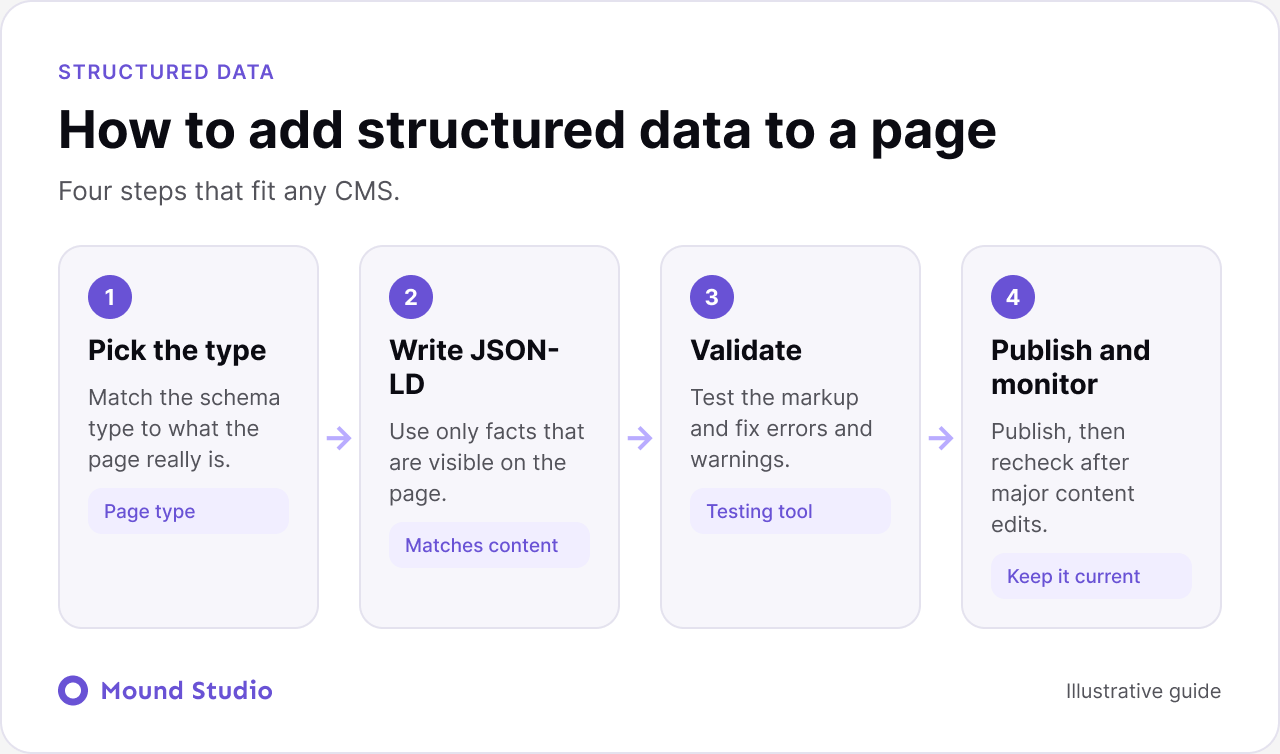
Four steps fit almost any site, whether it runs on Webflow, WordPress or custom code.
This is a question that gets skipped, and it causes most of the long term problems. Markup is written once and then forgotten, until a price, a name, or a service changes and the code still says the old thing.
Give one person the job. It does not need to be a developer. It needs someone who knows when business details change and who can ask for the markup to be updated. Add a line to your launch checklist and your content update routine: if the page facts change, check the markup too.
If your site is built with CMS templates, the owner also decides which fields feed the markup. That keeps editors from accidentally leaving a required field empty, such as an author or a date.
In Webflow, you can add JSON-LD in the custom code area of a page, or in a template for a CMS collection so that every item gets its own markup from its fields. In WordPress, you can use an SEO plugin that outputs common types, or add custom markup in the theme. The method matters less than the rules: keep it accurate, keep it matched to the page and keep it maintained.
For CMS-based blogs, the template approach is worth the setup time. It pulls the headline, date and author from each item, so every new post is marked up correctly without manual work. If you are working through search settings on Webflow, our Webflow SEO checklist covers the surrounding settings.
| Type | Key properties | Common mistake |
|---|---|---|
| Organization | Name, logo, URL, official profiles | Using a different name from the rest of the site |
| Article | Headline, author, dates, image | Changing the modified date without changing the content |
| FAQPage | Questions and answers shown on the page | Marking up questions that visitors cannot see |
| Service | Name, description, provider, area served | Vague descriptions copied from another page |
| BreadcrumbList | Ordered list of names and URLs | Breadcrumbs that do not match the visible trail |
Markup goes stale in quiet ways. A team renames a service, updates a page, and forgets that the code block still holds the old wording. The page looks right and the markup is now wrong.
If a redesign is coming, add structured data to the plan early. Our website redesign checklist shows where it fits, so the markup is rebuilt with the new templates rather than lost during the move.
Markup helps, but the page itself does most of the work. A page is easy to quote when the answer is stated early, in plain words, under a heading that matches the question. Use short paragraphs, lists for steps, and tables for comparisons. Name things consistently. If your service is called one thing on the home page and another on the pricing page, machines and people both lose the thread.
Warnings are not always problems. A validator often flags optional properties that a page could include but does not need. Read each message and ask whether the missing detail is true and useful for that page. If it is, add it. If it is not, leave it out rather than inventing something to make the warning disappear.
Errors are different. An error usually means a required property is missing or a value is in the wrong format, and that can stop the block from being used at all. Fix errors first, then decide which warnings are worth your time. If you also run a regular UX audit, add a markup check to it so the two stay in step.
Test in three places. First, run each template through a schema validator during development, so mistakes are caught before publishing. Second, use the rich result and inspection tools from search engines on the live page to confirm the markup is read. Third, check the enhancement and error reports in your search console after publishing, and set a reminder to review them after major site changes.
Then do a human check. Open the page, open the markup, and compare them line by line. Every name, date, price and question in the code should be visible to the visitor. This one habit prevents most problems.
A little preparation saves rework. Before you write or install anything, gather the following.
With these in hand, the actual writing is quick, and the details are consistent from the start.
| Check | Ready when |
|---|---|
| Types | Each page has a type that matches what it really is |
| Accuracy | Every fact in the markup is visible on the page |
| Consistency | Business name and details match across the site |
| Validation | No errors in a validator or search tools |
| Templates | CMS items generate markup from their own fields |
| Maintenance | Someone reviews it when content or details change |
Think of structured data as the last layer, not the first. The order that works is: useful content that answers real questions, a clear site structure, fast and accessible pages, and then markup that labels what is already good. If a page is thin or unclear, markup will not rescue it. If the page is strong, markup makes it easier to understand for search engines and for AI tools.
Accessibility work often overlaps with this. Clear headings, descriptive link text and honest labels help people using assistive tools and help machines too. Our website accessibility checklist is a good companion to this guide.
Structured data is a small, careful piece of work that makes your pages easier to interpret. Add the types that match real pages, keep the markup identical to what visitors see, validate it and maintain it. Do not expect it to work alone. If you want help building pages, templates and markup that are ready for search and AI answers, talk to us about your website.
Structured data is code added to a page that describes its content in a standard format, so machines can read it without guessing. The most common format is JSON-LD, using the vocabulary from schema.org.
It can help systems understand your pages and entities more clearly, but nobody can promise that it causes citations in AI answers. Treat it as a way to reduce ambiguity, alongside clear on-page answers and good content.
Structured data is the general idea of describing content in a standard format. Schema markup usually means structured data written with the schema.org vocabulary. Most people use the terms interchangeably.
Organization on the home page, Article on blog posts, BreadcrumbList on nested pages, and FAQPage only where a page truly contains visible questions and answers. Add Service or product types on the relevant pages.
Use a schema validator and the rich result testing tools from search engines to check for errors and warnings. Also read the markup against the page itself and confirm every fact appears on the visible page.




.png)


