








.avif)
.avif)
.avif)


Website
Website Redesign Checklist for 2026: What to Do Before, During, and After

A redesign puts your search rankings at risk the moment URLs change, pages move, or metadata gets rebuilt without a plan. Search engines have to relearn your entire site, and anything that breaks along the way — a missing redirect, a dropped title tag, a page that loads slower than before — shows up as a ranking drop within weeks of launch. The good news is that almost every one of these problems is preventable with a checklist you work through before, during, and after the new site goes live.
This guide walks through that checklist: what to prepare before launch, what to watch while the new site is being built, what to confirm once it's live, and the mistakes that cause the most damage when they get skipped.
None of this is really about design quality. A redesign can look better in every way and still lose traffic, because search engines don't rank a "look" — they rank specific URLs, with specific content, metadata, and technical signals attached. Change or remove those signals without a plan, and the ranking history attached to them goes with it.
The most common causes are simple to name and easy to overlook during a busy launch:
None of these mistakes are dramatic on their own. Together, on launch day, they can cost weeks of recovery time. A general website redesign checklist covers the full project; this one focuses specifically on the technical SEO work inside it.
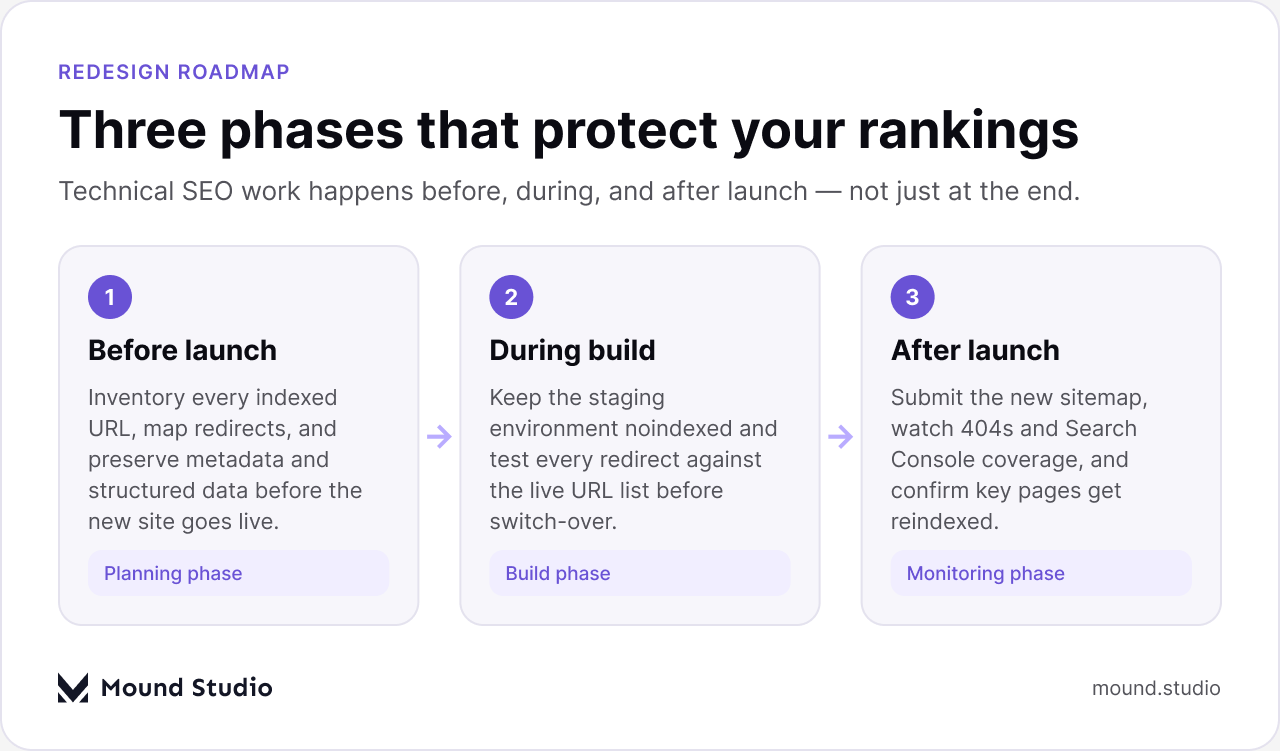
Pre-launch is where most ranking losses are actually prevented or created. The work here happens while the old site is still live, which means you have time to be thorough and nothing is at risk yet.
Before anything else, crawl the current site and export every indexed URL — not just the pages in your navigation, but old blog posts, category pages, tag pages, and anything Search Console shows as indexed. This list is your baseline. Every URL on it needs a destination on the new site, even if that destination is a redirect to a broader page because the exact content no longer exists.
Map each old URL to its new equivalent using 301 redirects, which tell search engines the move is permanent and pass along the ranking signal the old URL had built up. A redirect map built from a real crawl, not from memory, is the single most effective way to protect existing rankings through a redesign.
Export the title tags, meta descriptions, and image alt text from every page before the new templates go live. New CMS templates often generate their own defaults, and if nobody checks, those defaults quietly replace copy that took real work to get right. Carrying metadata forward, or improving it deliberately rather than losing it by accident, keeps your click-through rates from search results stable through the transition.
Your XML sitemap needs to match the new site's URL structure exactly. An outdated sitemap that still lists old URLs, or one that's missing new pages, sends search engines a mixed signal at exactly the moment you need clarity. Rebuild it against the final URL structure and validate that every important page is included and every removed page is left out.
If the current site has schema markup — for articles, products, FAQs, breadcrumbs, or reviews — that markup needs to be rebuilt into the new templates, not assumed to carry over. Structured data is what earns rich results in search, and losing it silently is one of the easier things to miss because the page still looks fine to a human visitor.
The staging environment where the new site is built needs to be blocked from search engines from day one. That usually means a site-wide noindex tag, password protection, or both. It sounds obvious, but staging sites get indexed more often than teams expect, and once Google has crawled and indexed a staging URL, removing it takes real effort. Our Webflow SEO checklist covers the platform-specific settings worth checking here if that's where the new site is being built.
Once the redirect map, metadata, sitemap, and structured data are ready, keep them organized in one place your whole team can reference. A simple table works well for the redirect map specifically, since it forces you to think through the reasoning for each URL type rather than just listing destinations.
| Old URL type | Recommended action | Why it matters |
|---|---|---|
| Ranking blog post or landing page | 301 redirect to its exact new equivalent | Preserves the specific ranking signal that page earned |
| Category or tag archive | 301 redirect to the closest matching new category | Keeps internal linking and topic structure intact |
| Discontinued product or offer page | 301 redirect to the nearest relevant current page | Avoids sending users and crawlers to a dead end |
| Duplicate or thin low-value page | 301 redirect to the main page it overlapped with, or let it 404 if truly obsolete | Consolidates any residual ranking value instead of splitting it |
Between the pre-launch planning and the actual switch-over, the site exists in an in-between state: built, but not yet live to the public. Two things matter most in this window.
It's worth checking staging's noindex status more than once, especially if multiple people are touching the environment or if it gets rebuilt partway through the project. A single deploy that clears a robots meta tag can leave staging exposed to crawlers for days before anyone notices.
Don't wait until go-live day to find out whether the redirect map actually works. Test it against the staging or a pre-launch environment: pull the full list of old URLs and confirm each one lands on the intended new page with a proper 301, not a 302, and not a redirect chain that bounces through two or three hops before landing. Redirect chains slow down crawling and can dilute the ranking signal being passed along, so a direct, one-step redirect is worth the extra setup time.
Launch day isn't the finish line — it's when the technical SEO work becomes visible to search engines for the first time, and the days after launch are when problems either get caught early or compound.
As soon as the new site is live, submit the new sitemap in Search Console. This nudges search engines to start recrawling the new URL structure right away, rather than waiting to discover it on their own schedule.
Check the Coverage and Pages reports daily for the first couple of weeks. A spike in 404 errors almost always means a gap in the redirect map — a URL type or an edge case that got missed during planning. Catching this early, while the gap is still small, is far easier than catching it a month later once traffic has already dropped.
Don't assume indexing is happening just because the site is live. Spot-check your highest-traffic and highest-converting pages directly in Search Console to confirm they've been recrawled and indexed under their new URLs. If a key page isn't showing up after a week or two, that's worth investigating rather than waiting out.
Compare page speed and Core Web Vitals scores on the new site against what the old site was scoring before launch. A redesign that adds animations, larger images, or new scripts can quietly undo speed work that took months to build up, and speed is a ranking factor search engines do measure directly.
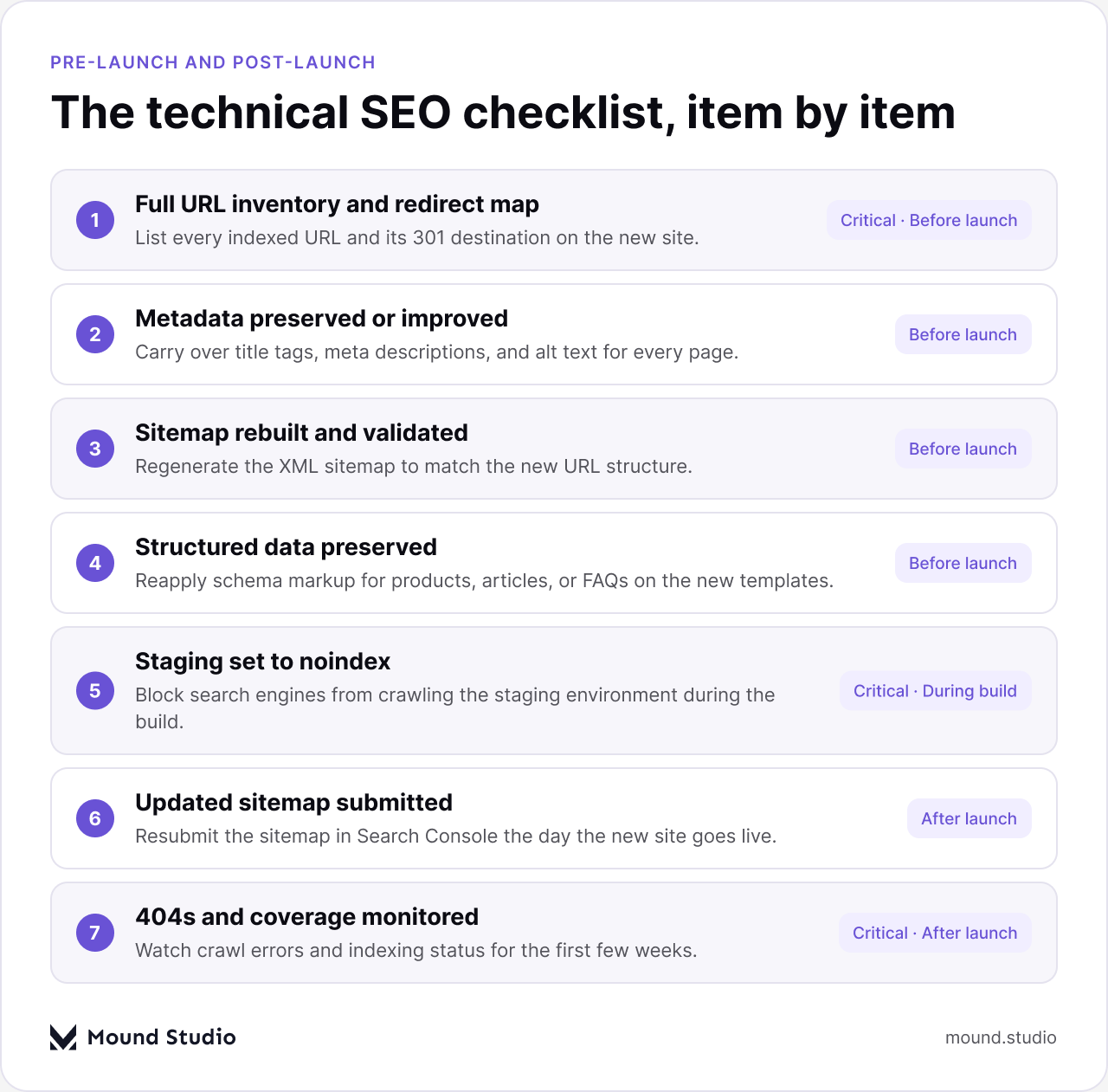
Laid out side by side, the difference between pre-launch and post-launch work is really a difference between preparation and verification — one phase builds the foundation, the other confirms it held.
| Pre-launch | Post-launch |
|---|---|
| Crawl and inventory every existing URL | Submit the new sitemap in Search Console |
| Build and test the full redirect map | Monitor 404 errors and fix redirect gaps |
| Preserve or improve metadata and alt text | Confirm key pages are recrawled and indexed |
| Rebuild the sitemap against the new URL structure | Compare Core Web Vitals against the old site |
| Rebuild structured data for key page types | Watch organic traffic and rankings for anomalies |
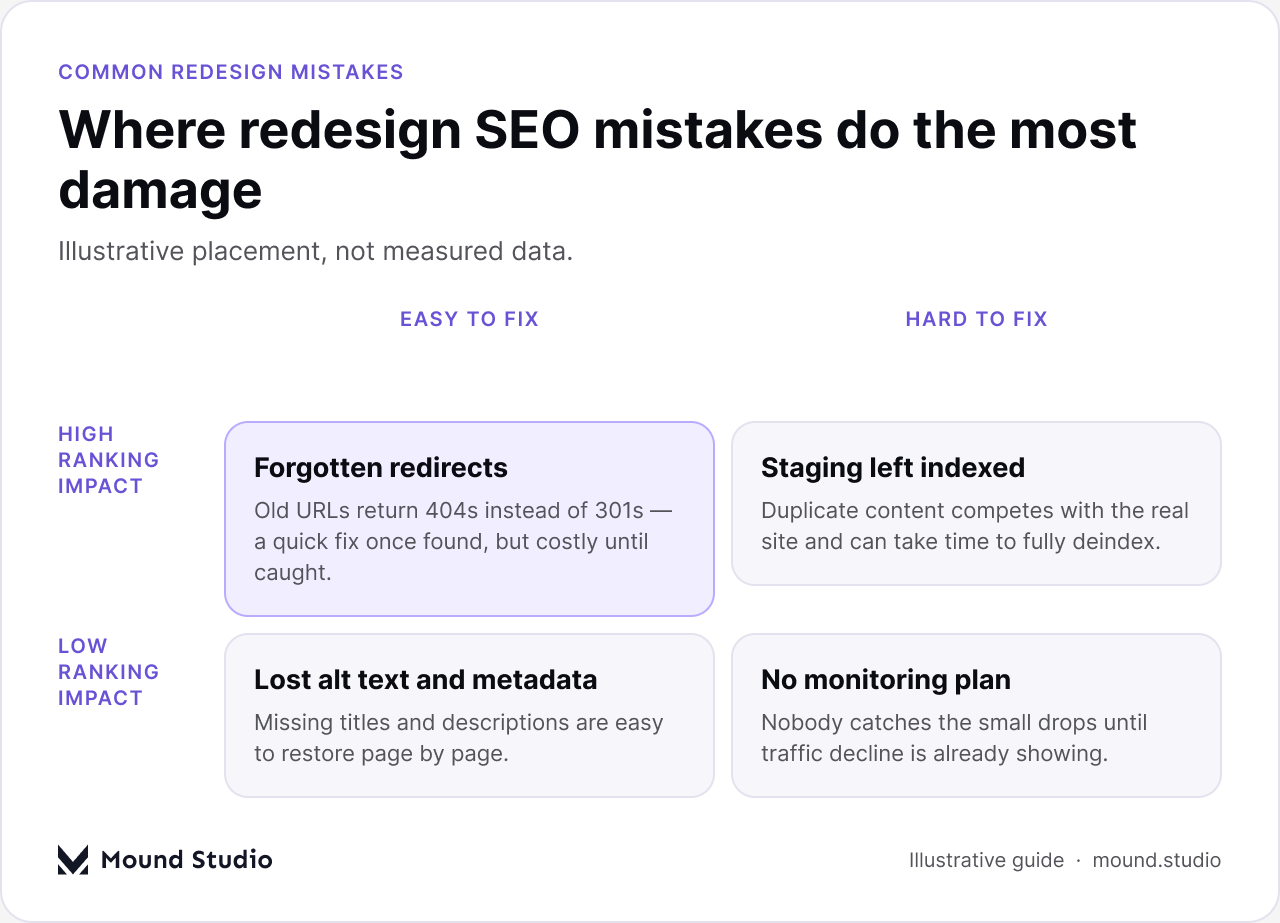
Most redesign ranking losses trace back to a short list of recurring mistakes, and they tend to cluster at the two ends of the difficulty-to-fix spectrum.
Redirect gaps and thin monitoring plans are the two mistakes worth guarding against most, because they're cheap to prevent but expensive once they've already cost you a few weeks of visibility.
Use this as a final pass in the days around launch, separate from the detailed work above. Each item should have a clear owner.
If your team is also weighing whether now is even the right time for a redesign, our guide on when to redesign your website is worth reading first — a technical SEO plan only pays off if the underlying decision to redesign was the right one.
A redesign doesn't have to cost you rankings. The sites that come through a redesign without a traffic dip aren't the ones with the fanciest new design — they're the ones that treated redirects, metadata, sitemaps, and structured data as part of the project plan instead of an afterthought, and that kept watching for a few weeks after launch instead of considering the job done at go-live.
If you're planning a redesign and want technical SEO built into the process from day one, get in touch with us.
Broken or missing redirects are the biggest risk. When old URLs return a 404 instead of a 301 to their new equivalent, both users and search engines hit a dead end, and the ranking signal built up on that URL is lost.
Not always, but every old URL needs a destination. If the exact page no longer exists, redirect it to the closest matching page rather than letting it 404, so any remaining ranking value carries over instead of being lost.
No. Staging should be blocked with a site-wide noindex tag, password protection, or both, from the start of the build through launch. An indexed staging site creates duplicate content that competes with the real site.
Start checking within the first day and keep monitoring daily for at least two weeks. Watch 404 errors and Search Console coverage closely, since most redirect gaps show up as a spike in errors early on.
It matters, though it usually causes slower, quieter losses rather than a sudden drop. Compare Core Web Vitals and page speed on the new site against the old one, since a heavier new design can undo speed work that took months to build.




.png)


