








.avif)
.avif)
.avif)

Product
UI vs UX Design: What's the Difference? A Plain Guide

Wireframe, mockup and prototype get used as if they mean the same thing. In a project kickoff, someone says "send me the mockup" and someone else sends a grey-box sketch. A week later, a client asks for a "prototype" and expects a finished website. Nobody is wrong, exactly. The words just overlap in everyday speech, and every team uses them a little differently.
The confusion costs real time. If you ask for the wrong deliverable, you either review something that is too rough to judge, or pay for polish before the basics are settled. This guide explains what each one is, what question it answers, and how to decide which you need right now.
A wireframe is a low-detail layout that shows structure and content placement. A mockup is a static, high-fidelity design that shows how the product will look. A prototype is an interactive version that shows how the product will work. Wireframes settle structure, mockups settle appearance, and prototypes settle behavior.
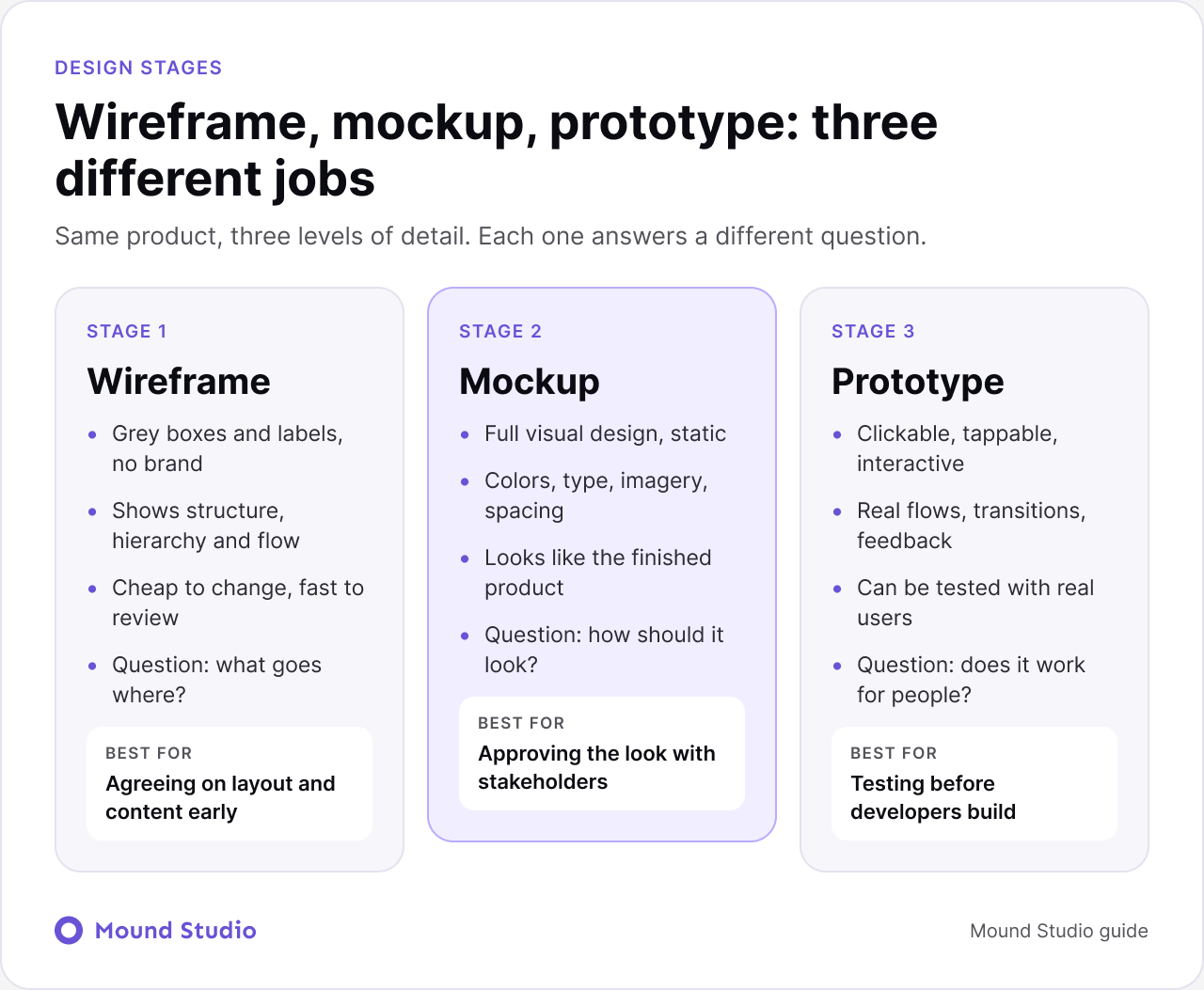
A wireframe is a simplified blueprint of a screen. It uses boxes, lines and placeholder text to show where things go: the headline, the navigation, the main call to action, the form, the footer. There is no brand color, no real photography and no fine typography. That is on purpose.
Because a wireframe looks rough, people talk about the right things. They ask whether the pricing should sit above the testimonials, or whether the sign-up form belongs on its own page. Nobody argues about whether a button should be purple. Structure gets fixed while it is still cheap to change.
It does not show brand, color, final type, imagery or motion. If you judge a wireframe on looks, you are using it wrong. Judge it on order, clarity and whether a visitor can find what they came for.
A mockup is a static, high-fidelity picture of the finished design. It takes the approved wireframe and adds the brand: color, typography, spacing, icons, photography and real content. If you exported it as an image and put it next to the live site, it would look almost identical.
Mockups exist so that people can react to the look and feel. Stakeholders who struggle to picture a wireframe usually understand a mockup immediately. It is also where accessibility choices, such as contrast and text size, are first checked in a realistic setting.
A mockup is still a picture. You cannot click it. It cannot tell you whether the flow feels natural, whether users notice the button, or whether the form causes people to give up. It shows how the product looks, not how it behaves.
A prototype is an interactive model. Screens are linked, so a tap on a button moves you to the next screen. Menus open, forms respond and transitions play. It can be built from wireframes for a quick test, or from mockups for a realistic one.
The point of a prototype is to learn. You put it in front of real people, ask them to complete a task, and watch where they hesitate. A prototype that takes an afternoon to build can save weeks of development on the wrong flow.
A low-fidelity prototype links plain wireframes. It is quick, and it is enough to test whether the flow makes sense. A high-fidelity prototype uses finished mockups and realistic motion. It is better for testing details such as microcopy, feedback and animation, and for showing the product to decision makers.
A prototype is not the product. It usually has no real data, no back end and no edge-case handling. Treat it as a learning tool, not a build. Developers should still receive a proper handoff file.
| Feature | Wireframe | Mockup | Prototype |
|---|---|---|---|
| Fidelity | Low: boxes and labels | High: final visuals | Low or high |
| Interactive | No | No | Yes |
| Shows | Structure and flow | Look and feel | Behavior and usability |
| Speed to make | Fastest | Slower | Depends on scope |
| Cost of change | Very low | Moderate | Moderate to high |
| Main audience | Team and client | Stakeholders | Users and developers |
In most projects the three stages follow one another, and each one feeds the next. You do not need to treat this as a rigid rule, but it is a reliable default.

In practice the loop is often tighter. We may prototype a wireframe first to test a risky flow, then again after the mockup is done. What matters is that a decision is made at each stage before the next one begins.
The right starting point depends on what you know and what you are trying to decide. Use this as a quick guide.
| Your situation | Start with |
|---|---|
| The idea is new and the page content is not settled | Wireframe |
| The layout is agreed but the visual direction is open | Mockup |
| You need approval from people who judge by appearance | Mockup |
| You are unsure users can complete a key task | Prototype |
| Developers are about to start building | Prototype, then handoff |

Not always. A small marketing site with a clear brief may go from a short wireframe straight to a mockup, and skip a formal prototype because the interactions are simple. A complex product with several user types and long flows usually needs all three, and often more than one round of prototype testing.
Skipping a stage is fine when the decisions it would answer are already made. What you should not skip is the thinking. A team that jumps straight to a mockup without settling structure often ends up redesigning polished screens, which is the most expensive way to change a layout.
Say a clinic wants a new booking website. Here is how the three stages would look in practice.
In the wireframe, we sketch the home page with a clear "Book an appointment" button above the fold, a services section, a short list of practitioners and a location block. We also wireframe the booking flow as four steps: choose a service, choose a time, enter details, confirm. The review conversation is about order. Should the price show before the time slot? Should the phone number be visible on mobile?
In the mockup, we apply the clinic's brand, real photography, a readable type scale and a calm color palette. We design the confirmation screen, the error message for a full time slot and the mobile menu. The review conversation is about tone and trust. Does this look like a clinic people would feel safe visiting?
In the prototype, we link the booking screens and ask a handful of people to book a visit without any help. We watch where they pause. Perhaps some of them miss the "Continue" button on mobile, or expect to pick a practitioner before a time. We fix it before a single line of code is written.
Each stage answered a different question, and no stage could have answered the others.
Different people are useful at different moments, and mixing them up slows everything down.
Keeping feedback focused is a skill. Before each review, tell reviewers what kind of feedback you want and what is already decided. It saves a surprising amount of time.
Most teams do all three stages in a design tool such as Figma. The same file can hold the wireframes, the mockups and the linked prototype, which keeps everything consistent. A reusable component library saves time too, because a button drawn once appears in every stage. If you plan to grow the product, read our guide to what a design system is before you start drawing screens.
A few habits keep the file useful for everyone:
| Moving from | Confirm first |
|---|---|
| Wireframe to mockup | Structure, content order and main flows are approved by the people who decide |
| Mockup to prototype | Visual direction is approved and key screens include real content |
| Prototype to handoff | Testing is done, fixes are applied and every screen state is designed |
For mobile products, the same sequence applies with extra attention to touch targets and gestures. Our mobile app design process guide shows how these stages fit inside a full project, and our post on the difference between UI and UX design explains which parts of this work belong to which discipline.
A wireframe decides what goes where, a mockup decides how it looks, and a prototype shows whether it works. Use them in that order, and skip one only when its decisions are already made. Need a partner to run the process for you? Tell us what you are building and we will map out which stages your project needs.
A wireframe is a low-detail layout that shows structure and content placement. A mockup is a static, high-fidelity design that shows colors, type and imagery as they will appear in the finished product.
No. A mockup is a static picture. A prototype is interactive, so people can click through screens and complete tasks. A prototype can be built from wireframes or from mockups.
Usually yes. Wireframes settle structure while changes are cheap. You can skip a formal wireframe for a small, simple page, but you should still decide the layout before designing the visuals.
Build one when you need to learn whether people can complete a task, and before developers start building. It is most useful for products with multi-step flows.
Figma handles all three stages in one file, which keeps components and content consistent from wireframe to handoff.


.png)


