








.avif)
.avif)
.avif)


Website
Framer Website Design: When It Is the Right Fit

For a large share of business websites, yes. Framer handles marketing pages, lead generation, and a blog without friction, and it gets a site live faster than most of the alternatives on the market today. The catch is scope. Framer is built for sites that mostly present information and point visitors toward an action, not for products with logins, internal tools, or content structures that outgrow a simple page-and-collection model. If that description matches your business right now, Framer is a sound choice. If your roadmap points toward an app, a multi-editor CMS, or integrations beyond a plugin ecosystem, you will likely outgrow it, and it is worth knowing that before you commit a year of content to it. The rest of this guide walks through where Framer holds up, where it starts to strain, and how to tell which situation you are actually in.
Framer works well for most small and mid-size business websites: marketing sites, agency sites, portfolios, landing pages, and blogs run by one editor or a small team. It becomes a weaker fit once a business needs a real content model with relationships between collections, several editors with different permissions, user accounts, or integrations that go past what a visual builder's plugin library covers. The question is less "is Framer good" and more "does Framer match what this site has to do over the next year," not only at launch.
Framer's strongest case is design control and publishing speed living in the same tool. A designer can build, animate, and ship a page without handing a spec to a developer, which removes a handoff step that slows down most website projects. For a small business or an agency launching a marketing site, that turns weeks of back and forth into days.
None of this is unique to Framer. Webflow covers similar ground with a more mature CMS. But Framer's design-first workflow is a real advantage for teams that think in layouts and motion rather than content models and data structure, and for a business that just needs a site to look sharp and launch quickly, that advantage is worth something.
Instead of asking whether Framer is a good platform in the abstract, it helps to run the specific project against a short list of criteria. These are the factors that, in our experience building and migrating business sites, separate the projects that stay happy on Framer from the ones that call a developer within a year.

If the site has posts, pages, and maybe a case study collection, Framer's CMS is enough. Trouble starts when collections need to reference each other in more than one direction: products that belong to categories that belong to regions, each with their own fields and filtering. A simple CMS can fake this with manual tagging for a while, but every new relationship adds editing overhead that a proper relational content model would handle for free.
One editor on Framer is painless. Three or four people editing the same site, with different roles and no formal review step, is where things get messy. Visual builders are not built around structured permissions, draft approval chains, or audit history the way larger CMS platforms are, so a growing content team tends to feel the gap first.
A marketing site and a product are different kinds of software. If logins, dashboards, billing, or any user-specific data are already on the roadmap, even eighteen months out, it is worth planning the architecture for that now rather than bolting it onto a site builder later. Retrofitting application logic onto a visual-first tool is almost always more expensive than building for it from the start.
A contact form, an email tool, and basic analytics are well within Framer's comfort zone. Once a business needs its site talking to a CRM, an internal booking system, a custom pricing engine, or more than one or two of these at once, plugin coverage gets thin, and each integration starts needing custom glue code that a visual builder was never designed to host cleanly. It is worth listing every tool the site needs to connect to before committing to a platform, rather than discovering the gaps one integration at a time after launch.
Basic SEO, titles, meta descriptions, and a sitemap, works fine out of the box. Advanced structured data, fine-grained redirect rules, or performance tuning beyond what the platform exposes in its settings panel require more direct control than a visual builder typically hands over, which matters more for a content-heavy or competitive site than for a five-page brochure.
A handful of static pages ages well on any platform. A site publishing several posts a week, running a resource library, or indexing hundreds of items leans on CMS performance and content tooling that a visual builder's collection system was not primarily built to carry at scale.
Here is how the two options typically stack up against each other on the factors that matter most for a business site.
| Criteria | Framer | Custom development |
|---|---|---|
| Launch speed | Fast, often days | Slower, weeks to months |
| CMS depth | Simple, mostly flat collections | As deep as the build requires |
| Team collaboration | Thin on roles and review steps | Can match any workflow |
| Logins and user accounts | Not a native strength | Fully supported |
| Integration depth | Good for common, simple tools | Handles anything the business needs |
| Ongoing cost | Lower for a stable, simple site | Higher upfront, scales with complexity |
None of these signs break a site overnight. They show up gradually, as small friction points that keep repeating. Seeing two or three of them together is usually a better signal than any single one on its own.

| Signal | What it looks like day to day | What to do about it |
|---|---|---|
| CMS workarounds pile up | Manual tagging, duplicate fields, and naming conventions standing in for real relationships | Map the content model you actually need, then check if the platform can model it directly |
| Editing gets territorial | People wait for each other, or overwrite each other's changes | Define roles and a review step, even an informal one, before adding more editors |
| Feature requests sound like a product | Logins, saved preferences, or a dashboard come up in planning meetings | Scope that work separately from the marketing site, with its own architecture |
| SEO work hits a wall | A developer is needed for redirects, schema, or page speed fixes the platform does not expose | Decide whether that is worth custom tooling or a platform switch |
| Integrations need custom code weekly | Internal tools, pricing, or booking systems need glue scripts to talk to the site | Weigh the cost of recurring workarounds against a one-time migration |
Most of the regret we hear about from businesses on the wrong platform traces back to one of a handful of avoidable decisions made early, usually before anyone had mapped out the content the site would actually carry.
Work through these questions in order. Most teams have a clear answer by the third one.
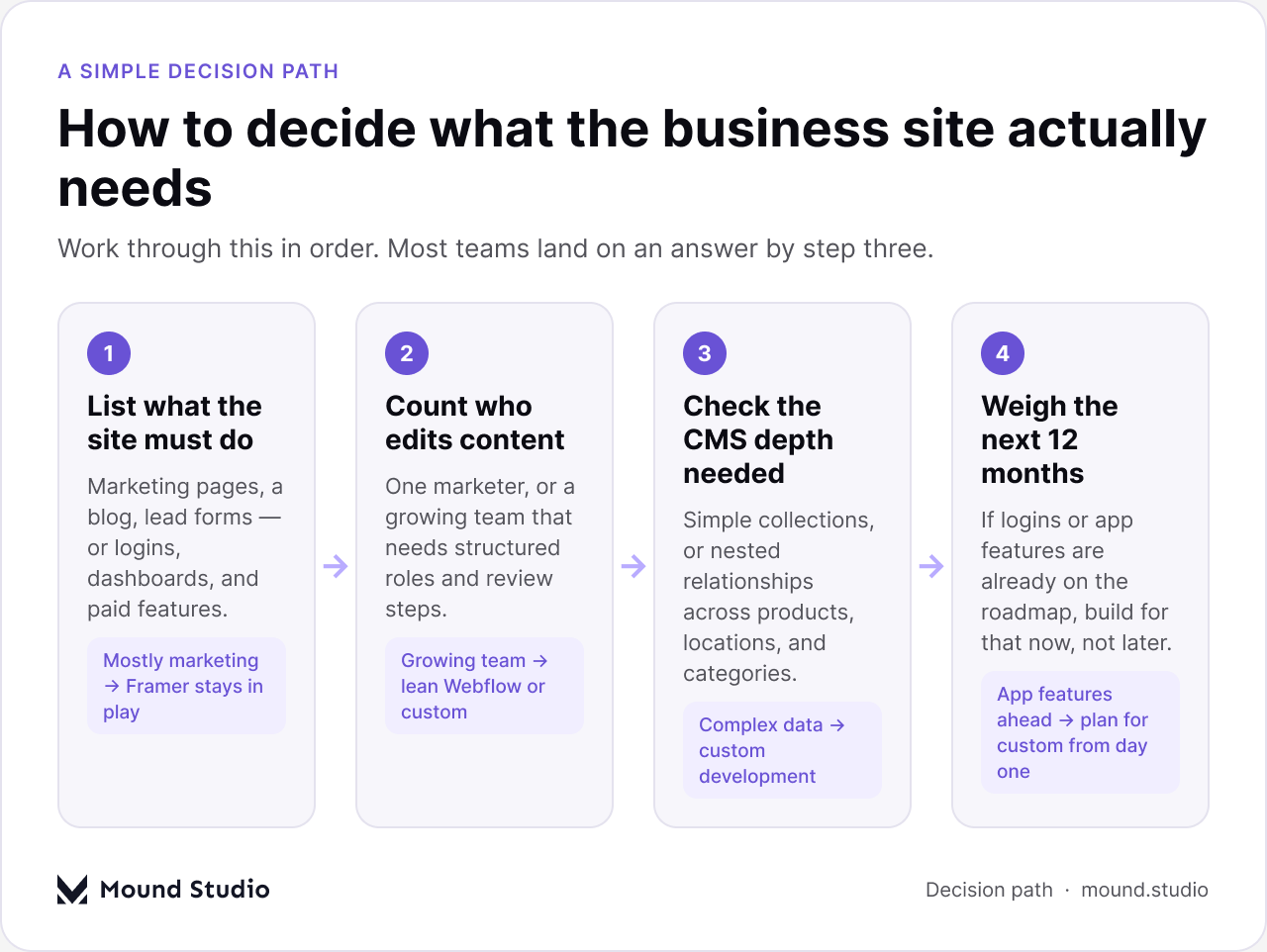
If the answers land cleanly on "simple marketing site, small team, no product features coming," Framer is enough, and probably the fastest route to a site that looks good and launches on time. If two or more answers point toward complexity, it is worth scoping a different platform, or a custom build, before investing another year of content into a tool that will need to be replaced.
Plenty of businesses sit in the middle: not a simple five-page brochure, not a product with user accounts, something in between. In that case, the safer move is usually a platform with more CMS depth than Framer offers, without jumping straight to a custom build. Our comparison of Webflow and Framer walks through that middle ground in more detail, and our guide on how to choose a CMS is a useful next step if the content model is the part you are unsure about. Starting with the content you actually plan to publish, rather than the visual theme you liked, tends to produce a better platform decision either way. It also makes the eventual migration, if one turns out to be necessary, considerably less painful, since the content model was already planned with room to grow instead of being reverse-engineered from a page builder after the fact.
Framer is good enough for a business website when the site stays close to marketing: pages, a blog, lead forms, and a small editing team. It stops being enough the moment the business needs a deeper content model, more editors with real roles, product features, or integrations beyond what a visual builder was designed to host. Neither answer is a verdict on Framer as a tool. It is a question of fit, and it is worth working out plainly before you build a year of content on top of the wrong platform. Tell us what your site needs to do and we will tell you plainly whether Framer fits or whether it is worth building for what comes next.
Yes, for most small businesses with a marketing site, a blog, and a handful of lead forms, Framer is a solid choice. It gets a polished site live quickly and lets non-developers make day-to-day edits without help.
It can handle a steady blog well, but a large resource library with many categories, tags, and cross-references puts pressure on its CMS. Flat content stays easy to manage; deeply connected content gets harder as it grows.
Not natively in the way a product needs. Framer is built for marketing sites, not application features like logins, dashboards, or user-specific data, so those needs usually call for custom development instead.
It depends on the content model. Framer tends to win on design speed and motion. Webflow tends to win on CMS depth and structured content. Our Framer vs Webflow comparison breaks down the difference in more detail.
Usually when two or more signs appear together: CMS workarounds, a growing editing team without clear roles, planned product features, or integrations that keep needing custom code. One sign alone is rarely a reason to switch.


.png)


