








.avif)
.avif)
.avif)


Product
How Long Does MVP Development Really Take To Launch?
You scope it by defining one core user flow first, sorting everything else into must, should, and could tiers, and treating the open questions as a separate, timeboxed discovery track instead of letting them block the build. A missing spec is not a blocker to starting. It is a signal that the scoping conversation has to happen out loud, with the client, before anyone opens a design file. Agencies that wait for a finished document before scoping end up scoping nothing. Agencies that build a lightweight framework into the first few conversations end up with a working MVP definition inside a week or two, even when the founder walks in with nothing but an idea and a deadline.
This guide walks through how we approach MVP scope at Mound Studio when a client doesn't have a full spec yet: the prioritization tiers we use, how to separate what needs to be learned from what needs to be built, how long a discovery phase should run, the scope-creep traps that show up when requirements stay loose, and a lightweight checklist you can reuse in your own early client conversations.
Before any prioritization framework is useful, the team needs to agree on the single journey the product has to support. Not a list of features. One flow: the shortest path a real user takes from arriving at the product to getting the value they came for. A marketplace app's core flow might be search, view a listing, and message the seller. A SaaS tool's core flow might be sign up, connect one data source, and see a first result. Everything else sits outside that flow until proven otherwise.
This step matters more than any tiering exercise, because most scope disagreements are really disagreements about what the core flow even is. A founder picturing the core flow as "browse and buy" and a designer picturing it as "browse, compare, save, then buy" are scoping two different products, even if they're both calling it an MVP. Write the flow down as a numbered sequence of screens or steps, read it back to the client in plain language, and get explicit agreement before moving to prioritization. That one sentence of alignment saves weeks of rework later.
Once the core flow is agreed, everything a client, stakeholder, or your own team proposes gets tested against it: does this feature exist to make the core flow work, to make it better, or to do something else entirely? That single question is the backbone of every tier below.
A must, should, could tier system works best in the first scoping conversation, because it doesn't require a complete requirements list to apply. You can sort a feature the moment someone mentions it, even mid-conversation, by asking one question per tier rather than waiting to see the whole picture.
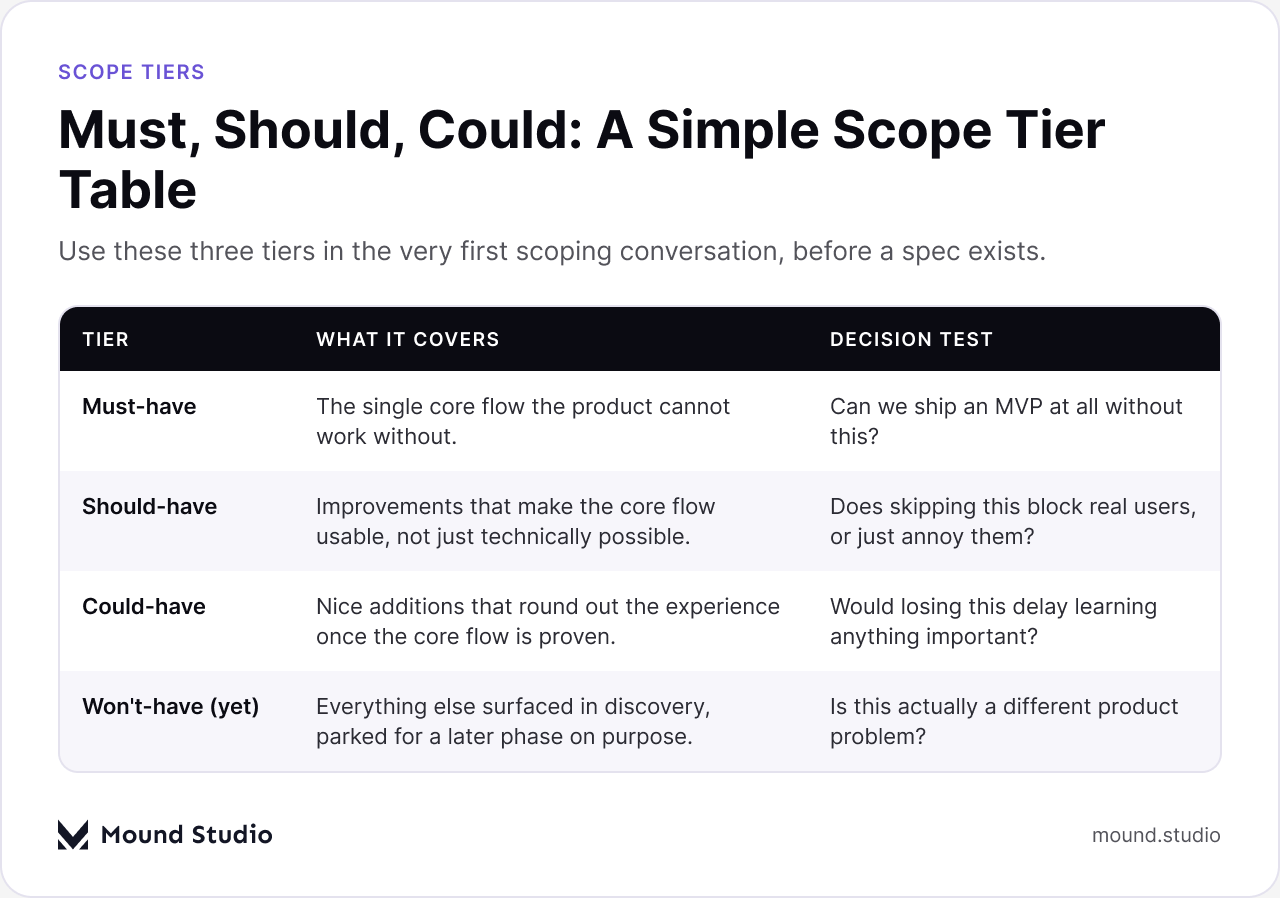
In practice, the must-have tier should stay short. If more than four or five items land there, the core flow from the previous section probably isn't tight enough yet, and it's worth revisiting before scoping goes further. The should-have tier is where most of the useful debate happens, because it's full of features that feel necessary but aren't, strictly, part of getting the core flow to work. The table below is the same framework written out as a working document, the kind worth pinning to the top of whatever doc the team shares with the client.
| Tier | What It Covers | Decision Test |
|---|---|---|
| Must-have | The single core flow the product cannot work without. | Can we ship an MVP at all without this? |
| Should-have | Improvements that make the core flow usable, not just technically possible. | Does skipping this block real users, or just annoy them? |
| Could-have | Nice additions that round out the experience once the core flow is proven. | Would losing this delay learning anything important? |
| Won't-have (yet) | Everything else surfaced in discovery, parked for a later phase on purpose. | Is this actually a different product problem? |
A plain HTML table like this one does double duty: it's a working document during scoping calls, and it becomes the artifact that keeps the build scoped once development starts, because anyone can check a new request against it without re-litigating the whole conversation.
A spec usually exists to answer two different kinds of questions: what the product should do, and what the team doesn't yet know. When there's no spec, those two categories get mixed together into one long list of uncertainty, and that's where scoping stalls. The fix is to physically separate them into two lists from the first working session onward.
The "need to build" list is anything the team already knows how to do: a login flow, a standard checkout, a dashboard with filters. These items go straight into the tiering exercise above. The "need to learn" list is different: does the target audience actually want this workflow, will a third-party integration behave the way the client assumes, does the pricing model hold up with five real users. These aren't scoping questions. They're research questions, and trying to answer them by building the full feature is the single most expensive way to find out.
Once the two lists are separate, the "need to learn" items get answered with the smallest possible test: a clickable prototype, a landing page, a handful of user interviews, or a manual version of the workflow before anything gets built. The answers then feed back into the must, should, could tiers with actual evidence behind them, instead of a guess dressed up as a requirement.
Long enough to answer the open questions on the "need to learn" list, and not a day longer. A discovery phase without a fixed end date tends to expand to fill the time available, because there's always one more thing worth learning. The way to prevent that is to timebox it before it starts: agree on a fixed window with the client, usually measured in days rather than weeks for a single core flow, and treat that window as a hard constraint on how deep the research can go, not a target.
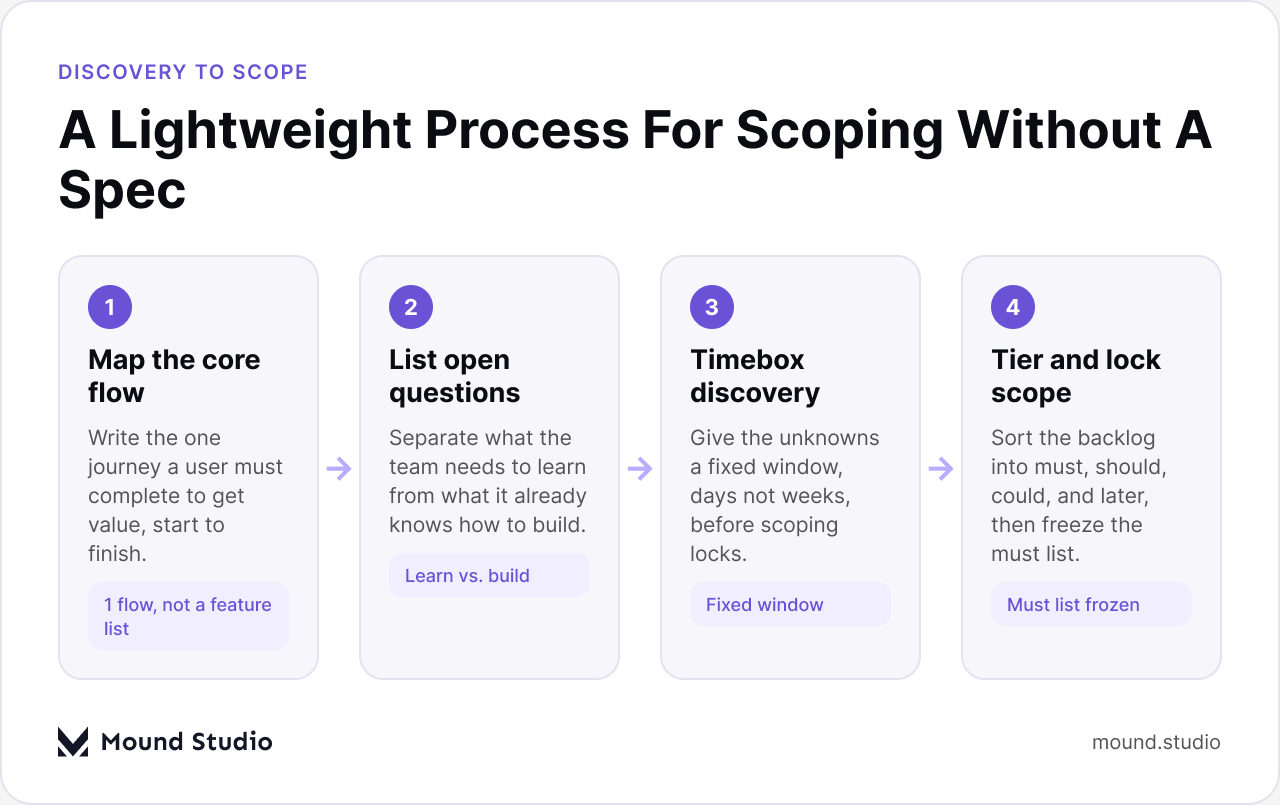
Notice that scope only locks at the last step. Everything before that is explicitly allowed to change, which is the point: the client isn't signing off on a feature list they half understand, they're watching the team narrow uncertainty step by step until the must-have tier is something everyone can commit to. That's a more honest process than asking a client to approve a long spec document written before anyone has validated the core assumptions underneath it.
If the discovery window runs out and questions remain, the answer isn't to extend it quietly. It's to tier the remaining uncertainty too: anything still unanswered when the window closes either gets a conservative default baked into the must-have scope, or gets pushed into the should-have or could-have tier, where getting it wrong costs less.
Tiers handle the first pass, but once a backlog has more than a dozen or so candidate features, it helps to weigh them on two axes at once: how much effort each one takes, and how much it actually teaches the team about whether the product is on the right track. This matters specifically for MVP scoping without a spec, because a lot of candidate features are really disguised research questions, and the effort-versus-learning view makes that visible.
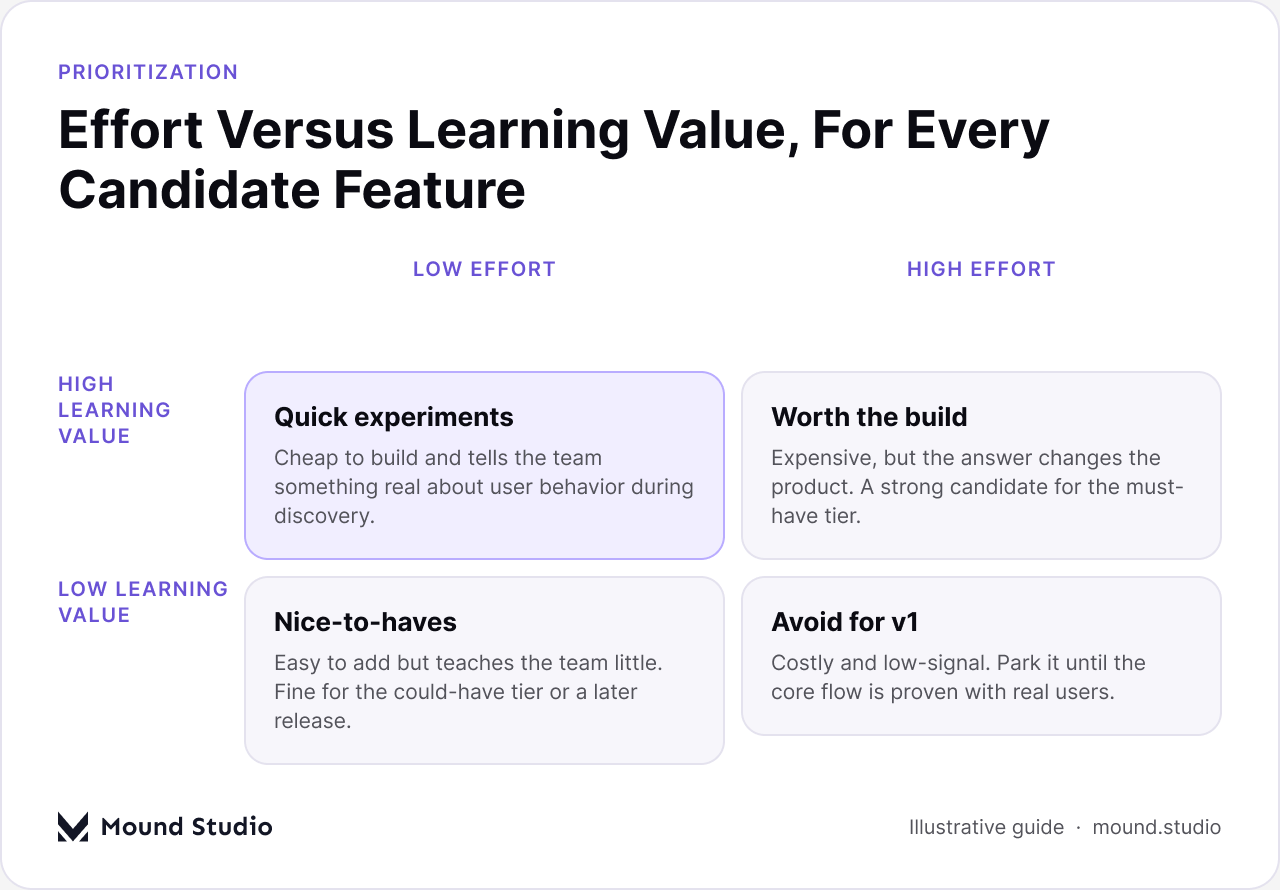
The upper-left quadrant, low effort and high learning value, is where discovery work should concentrate. These are the cheap tests mentioned earlier: the clickable prototype, the manual workaround, the five-user interview round. The upper-right quadrant, high effort and high learning value, is where true must-have candidates live, because the cost is justified by how much the answer changes the direction of the product. The bottom row is where scope creep usually hides, dressed up as "quick wins" that are neither quick in practice nor particularly informative.
Use this matrix as a gut-check after the tiers are set, not as a replacement for them. If something lands in must-have but also lands in the bottom-right quadrant of the matrix, high effort and low learning value, that's worth a second look before the client signs off on it.
A spec isn't required to run a structured scoping conversation. A short, repeatable checklist is. The table below is the version we bring into a first scoping call when a client doesn't have requirements written down yet.
| Question | Why It Matters | Who Answers It |
|---|---|---|
| What's the one flow a user must complete to get value? | Everything else gets scoped against this answer. | Client, with the team pressure-testing it |
| What do we already know how to build here? | Separates execution work from research work. | The delivery team |
| What are we assuming but haven't checked? | Becomes the discovery list, not the backlog. | Client and team together |
| What's the smallest test for each assumption? | Keeps discovery cheap and fast instead of becoming a second build. | The delivery team |
| What's the fixed window for discovery? | Prevents research from quietly becoming the whole project. | Client and team, agreed upfront |
| What's in the must-have tier once discovery closes? | This is the actual MVP scope, locked and shared. | Client signs off, team maintains it |
Walking a client through these six questions, in order, usually produces a workable MVP definition inside one or two sessions, even starting from nothing more than an idea. The output isn't a formal spec. It's a must-have tier, a discovery list with a deadline, and a shared understanding of what's deliberately out of scope for now. For a deeper look at how that early scope then maps onto an actual build timeline, see our guide to how long MVP development really takes.
A loose spec doesn't cause scope creep by itself. It removes the friction that would normally stop it. A few patterns show up often enough that it's worth naming them before a project starts, not after.
Most of these traps share a root cause: nobody wrote down what "must" actually meant, so the word slowly came to mean "anything anyone wants." The tiering table from earlier in this guide is the cheapest insurance against that drift, as long as the team actually checks new requests against it instead of treating it as a one-time exercise.
When a client shows up without a spec, run through this order rather than jumping straight into a feature discussion:
This same structure works whether the client's starting point is a single paragraph of notes or a long, unfocused document that reads like a spec but isn't specific enough to scope against. The length of what a client hands over matters far less than whether the team runs it through a process like this one before committing to a build. If the client's starting materials are mostly visual references or an existing product to redesign rather than written requirements, pair this scoping approach with a clear developer handoff checklist so design and build stay aligned once scope is locked.
You don't need a finished spec to scope an MVP responsibly. You need one agreed core flow, a simple tiering framework applied consistently, a separate and timeboxed track for open questions, and a written must-have list the whole team can check new requests against. Clients rarely walk in with more clarity than that, and they don't need to. For a closer look at how this kind of scoping plays out across an actual build, our guide to building your first SaaS MVP walks through what comes after the scope is locked. If you're starting a project without a full spec and want a second pair of eyes on scope before the build begins, talk to Mound Studio about scoping your MVP.
No. A core user flow, a simple tiering framework, and a short discovery window are enough to produce a workable MVP scope without a finished spec.
Must-have features are the ones the core user flow cannot work without. Should-have features make that flow more usable but aren't required for it to function at all.
Long enough to answer the open questions on the discovery list and no longer. Agree on a fixed window with the client before research starts, measured in days for a single core flow.
Write the must-have tier down early, check every new request against it, and keep open questions on a separate discovery list instead of folding them into the build.
The core flow, what the team already knows how to build, the assumptions that still need testing, a fixed discovery window, and a written must-have list the client signs off on.


.png)


