








.avif)
.avif)
.avif)

Webflow
WordPress to Webflow Migration: A 7-Step Guide

It's time to rebuild when patching costs more than starting over: when plugin conflicts break something new every month, the theme hasn't been updated in years, pages load slowly on mobile, and your team routes around the CMS instead of using it. Any one of these is a warning sign. Three or more together mean the site is no longer saving you time, it's costing you time.
Most WordPress sites don't fail all at once. They degrade slowly, one plugin update and one workaround at a time, until a team is spending more hours maintaining the site than building on it. The hard part is telling the difference between a site that needs a few fixes and a site that needs to be rebuilt from the ground up. This guide walks through the real signs, the decision factors, and what a rebuild actually involves, so you can make the call with evidence instead of a gut feeling. None of this is about chasing the newest framework or redesigning for the sake of it. It's about recognizing when the foundation underneath a site has become the thing holding the business back, rather than the thing supporting it.
Rebuild when the underlying structure, not just the surface, is the problem: an outdated theme, a tangle of conflicting plugins, security patches you're applying reactively, or a CMS your own team avoids. Patch and wait when the issues are cosmetic or isolated, like one broken form or a single slow page, and the foundation underneath is still sound.
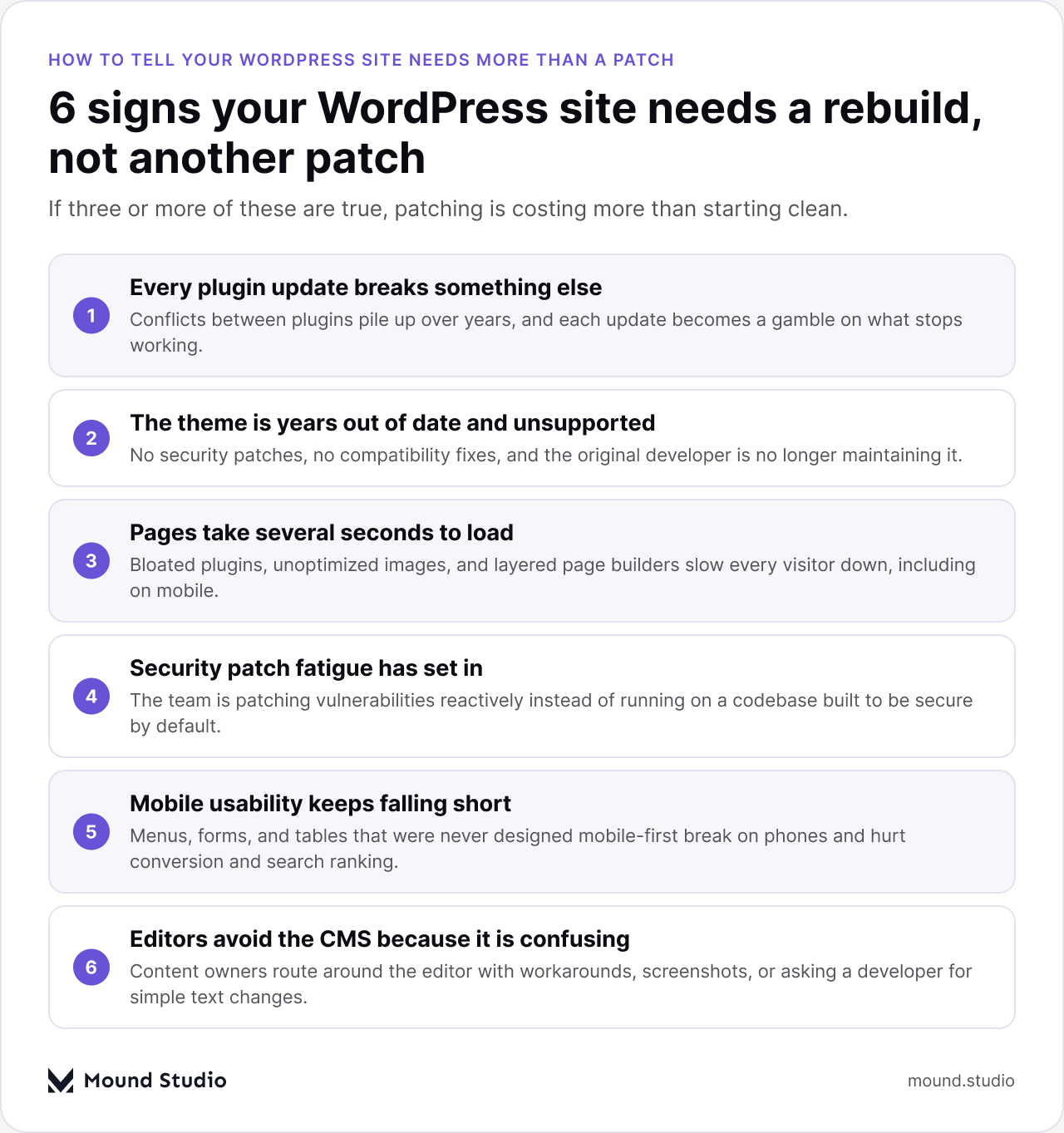
Plugins accumulate over years, and each one was built by a different team with its own assumptions. Updating one plugin can silently break another, and nobody notices until a form stops submitting or a page layout collapses. If your team has learned to dread the update button, that's not a quirk of WordPress. That's a sign the plugin stack has outgrown what the site can safely support.
A theme that hasn't been updated in years stops receiving security patches and compatibility fixes. The original developer may no longer exist. Every WordPress core update becomes a small gamble on whether the theme still renders correctly. An unsupported theme is not a cosmetic problem, it's a liability that grows every month it's left alone.
Slow load times usually trace back to the same culprits: unoptimized images, a page builder generating bloated markup, and plugins loading scripts on every page whether they're needed or not. Visitors notice within the first second or two, and so does search ranking. If your site has never been rebuilt, there's a good chance years of these small inefficiencies have stacked into a real performance problem.
If your team spends more time reacting to vulnerability alerts than building anything new, the site has shifted from an asset to a liability. Older themes and a wide plugin surface area multiply the number of places an attacker can get in. A site built on a maintained, documented foundation does not eliminate security work, but it reduces how much of that work is reactive.
Menus that don't collapse properly, tables that overflow the screen, and forms that are hard to tap on a phone all point to a site that was never designed mobile-first. Since most traffic to most sites is now mobile, usability gaps here aren't a minor annoyance, they directly affect conversion and how the site ranks in search. A site that was patched into mobile-friendliness years after launch tends to carry that history in small, persistent ways: a menu that technically works but feels wrong, a table that scrolls sideways instead of reflowing, a form field that zooms the page in on tap.
When the people who are supposed to update the site route around the editor, asking a developer to change a sentence or sending screenshots instead of logging in, the CMS has failed at its one job. A rebuild is also a chance to give content owners an editor they'll actually use, which matters more than most teams expect once they have it.
| Warning sign | Risk if ignored | What a rebuild fixes |
|---|---|---|
| Plugin updates keep breaking the site | Downtime grows with every update | Audited plugin stack sized to actual needs |
| Theme is years out of date | No security patches, growing exposure | Maintained, documented foundation |
| Pages load slowly on mobile | Lost visitors and lower search ranking | Optimized, mobile-first build |
| Security patch fatigue has set in | Reactive, costly incident response | Smaller attack surface, fewer unknowns |
| Mobile usability keeps falling short | Lower conversion on majority of traffic | Mobile-first layout and components |
| Editors avoid the CMS | Content goes stale, developers get bottlenecked | An editor the team actually uses |
Not every warning sign demands immediate action. The right call depends on two factors: how urgent the problem is, and how much effort a fix takes. Plotting your situation against both axes makes the decision clearer than any single symptom on its own.
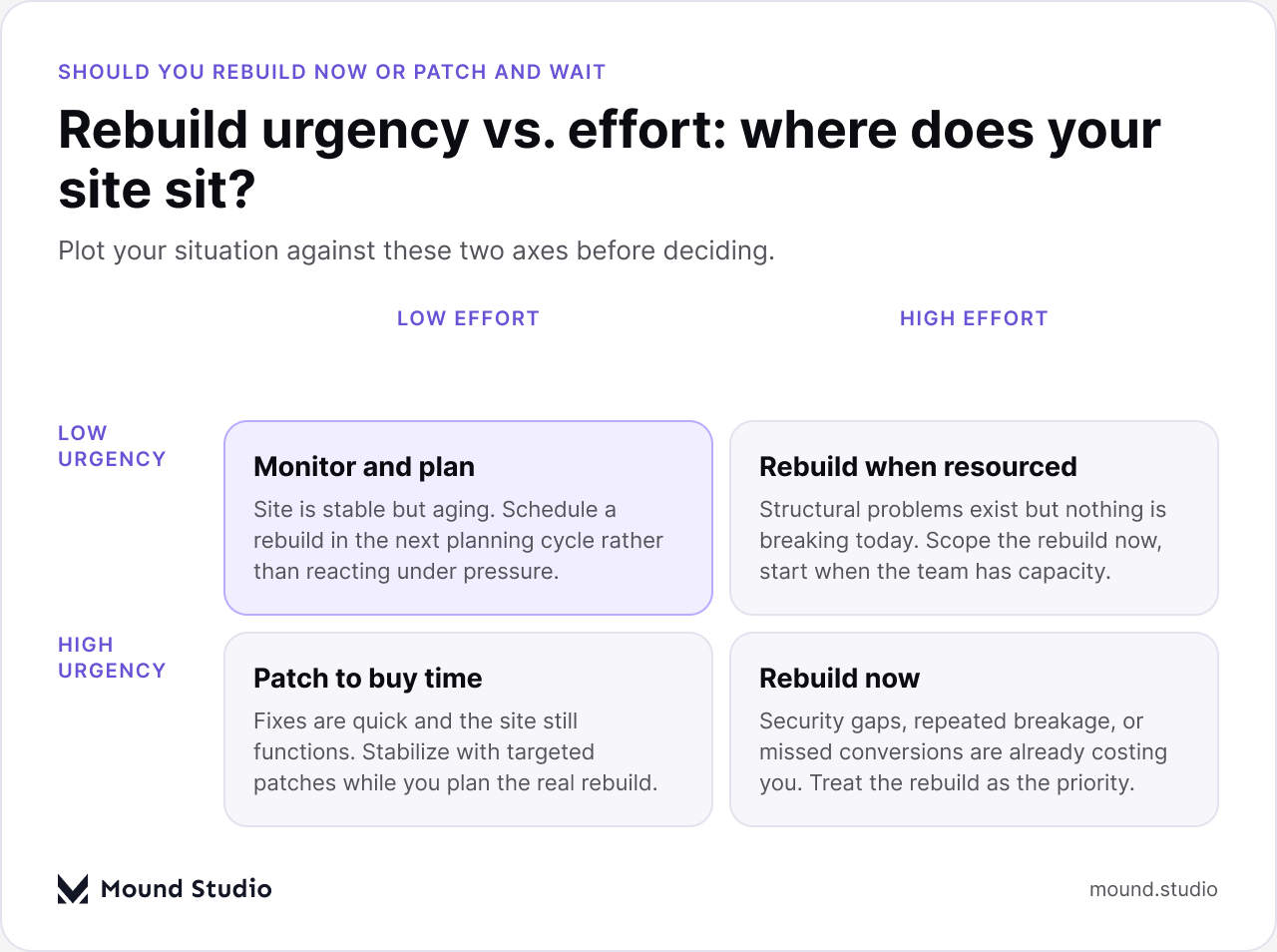
If your site sits in the low urgency, low effort quadrant, a scheduled rebuild in the next planning cycle is usually enough; nothing is actively costing you money or security exposure today. If urgency is high but a quick patch can actually buy time, do that first and use the breathing room to scope the real project properly. The quadrant to watch is high urgency with high effort: this is where teams get stuck patching indefinitely because the rebuild feels too big to start, while the cost of staying put keeps climbing.
| Factor | Patch and maintain | Rebuild |
|---|---|---|
| Plugin conflicts | Managed one at a time, recurring | Resolved by reducing and auditing the stack |
| Theme and security | Reactive patching as issues surface | Maintained foundation with fewer unknowns |
| Performance | Incremental, limited by existing structure | Rebuilt from a clean, optimized base |
| Content editing | Same CMS experience, same friction | Editor experience redesigned around real use |
| Upfront cost | Lower per fix, repeats indefinitely | Higher upfront, lower over time |
The pattern worth noticing in that table is the third column. Patching never really finishes, it just resets the clock until the next plugin conflict or security alert. A rebuild has a defined endpoint, and everything after that endpoint is maintenance on a system designed to be maintained, not a system that was never meant to last this long. That difference is why the upfront cost of a rebuild tends to look larger on paper while actually being the cheaper option once you add up a few years of patch work.
A rebuild is not just a new coat of paint on the same structure. It typically moves through four phases, each ending with something concrete you can review before the next phase starts.
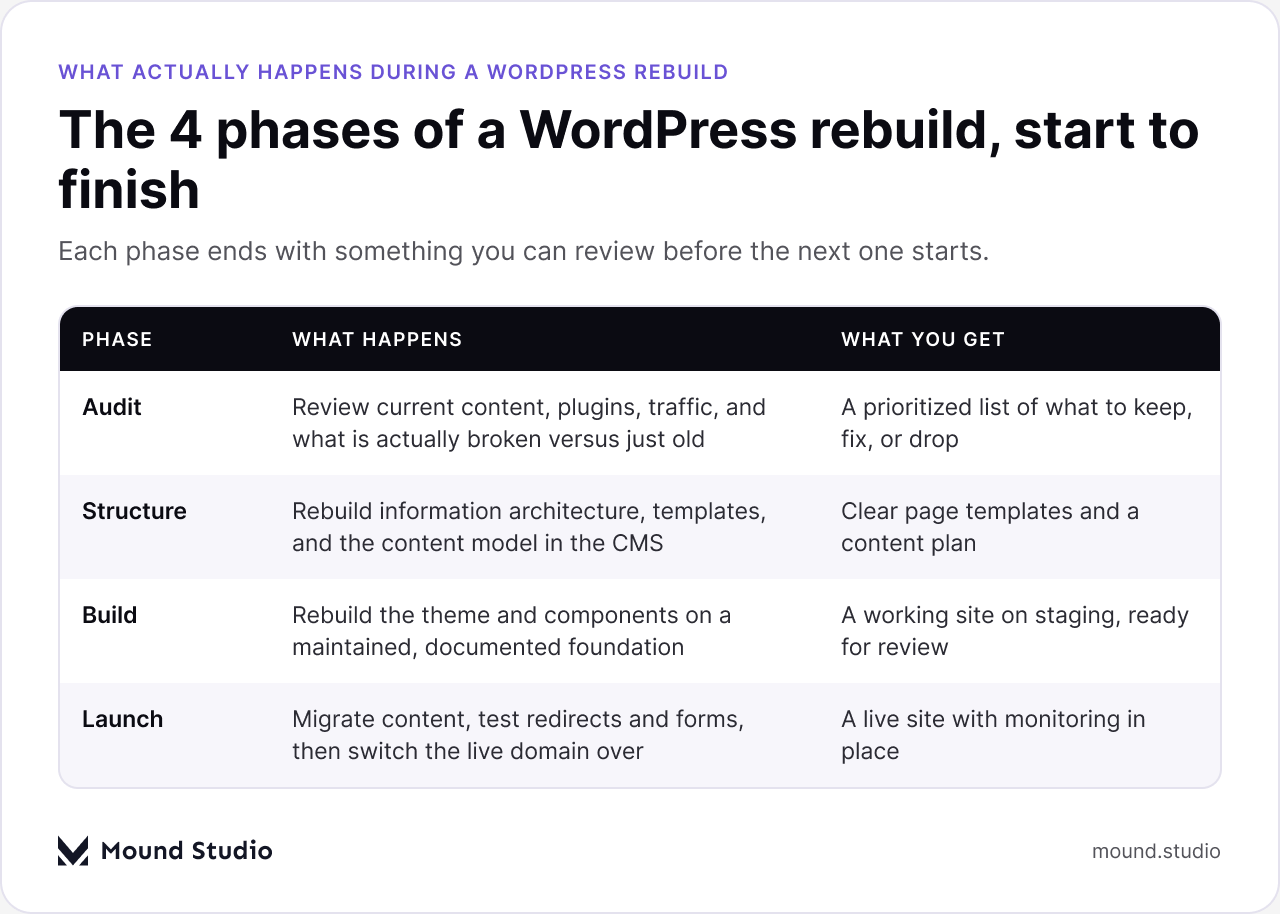
The audit phase looks at everything currently live: content, plugins, traffic patterns, and what is truly broken versus what simply looks dated. This produces a prioritized list instead of a vague sense that "everything needs work." The structure phase rebuilds the information architecture and the content model inside the CMS, which is where most of the long-term editing pain either gets solved or gets carried forward again. The build phase is where the theme and components get rebuilt on a maintained foundation, tested on staging before anyone sees it live. Launch migrates content, checks redirects and forms, and switches the domain over with monitoring in place from day one.
If you're trying to decide whether this is a rebuild or a smaller redesign, our website redesign checklist is a useful next step, and our piece on when to redesign your website covers the broader signals beyond WordPress specifically.
A rebuild doesn't have to mean leaving WordPress. If the core issue is an outdated theme and a bloated plugin stack, a rebuild on a modern WordPress foundation, or a move to a platform like Webflow, can both solve the same underlying problems. The deciding factor is usually who maintains the site day to day. Teams without a developer on staff tend to do better with a visual, no-code CMS that doesn't depend on plugin updates to stay secure. Teams with ongoing custom functionality needs may be better served staying on WordPress with a leaner, audited plugin stack. If you're already leaning toward a platform change, our comparison of WordPress to Webflow migration walks through what that move actually involves, and our piece on custom WordPress theme vs. page builder is worth reading if you're staying put but rethinking how the site gets built.
Before you bring in a team to quote the work, a short internal audit makes the eventual estimate far more accurate and makes it easier to compare proposals that come back.
Once you've gathered this, you'll have a scope document, not a vague request. A team quoting from a real audit will give you a number tied to what's actually wrong, and you'll be able to tell the difference between a quote that covers the whole problem and one that only covers the parts that are easy to fix. It also sets realistic expectations for timeline: a focused rebuild of a marketing site with a handful of templates moves faster than a rebuild of a site with years of custom functionality, multiple content types, and a large content library to migrate. Either way, the clearer the scope going in, the fewer surprises come up once the build is underway.
A WordPress site rarely fails all at once. It accumulates small warning signs, plugin conflicts, an aging theme, slow pages, security patch fatigue, mobile gaps, and a CMS your own team avoids, until the cost of keeping it running quietly exceeds the cost of rebuilding it properly. The signs above are not abstract. If three or more are true for your site today, the patch-and-wait approach is no longer the cheaper option, even if it feels that way month to month.
If you're weighing whether your WordPress site needs a rebuild or just a few targeted fixes, tell us where it's breaking down and we'll help you figure out which one it actually is.
It needs a full rebuild when the problems are structural: an outdated theme, conflicting plugins, security patches you're applying reactively, or a CMS your team avoids. It needs only a redesign when the foundation is sound and the issues are visual or limited to a page or two.
Patching looks cheaper per fix, but it never really finishes, every update resets the clock until the next plugin conflict or security alert. A rebuild costs more upfront and less over time, because it removes the underlying causes instead of treating each symptom separately.
It depends mainly on scope. A focused rebuild of a marketing site with a handful of templates moves faster than a site with years of custom functionality, several content types, and a large content library to migrate. Scoping the project with an internal audit first gives a far more realistic timeline.
Not necessarily. If the core issue is an outdated theme and a bloated plugin stack, a rebuild on a modern WordPress foundation can solve the same problems as switching platforms. Teams without a developer on staff often do better moving to a no-code CMS, while teams with ongoing custom functionality needs may be better served staying on WordPress with a leaner plugin stack.
The first step is an audit: reviewing current content, active plugins, traffic and page speed data, and what editors find frustrating about the existing CMS. That audit turns a vague sense that "the site needs work" into a prioritized, scoped plan.



.png)


