








.avif)
.avif)
.avif)

Website
Framer Website Handoff: What to Give Your Client's Team

The short answer: use Framer animation to support a message the page is already making, triggered by scroll, hover, page load, or a click, built with Framer's native animation and scroll-effects tools, and tested on a real phone before launch. Animation that does not meet those four conditions usually makes a marketing site slower and harder to read, not more persuasive. The rest of this guide walks through how to plan, choose, and ship Framer animation that holds up once a visitor actually lands on the page.
Framer gives a design and development team more animation control than most website builders, because transitions, scroll effects, and component states live inside the same canvas as the layout. That proximity is useful, but it also makes it easy to add motion simply because the option is there. An animation is worth the build time when it does one of a few jobs: it draws attention to the single most important element on a screen, it confirms that an interactive element responded to a click or hover, it eases a transition between two states so the layout change does not feel abrupt, or it paces a long page so content arrives as the visitor scrolls instead of all at once.
If a proposed animation does not map to one of those jobs, it is decoration. Decoration is not automatically wrong, but it competes for the same attention and page weight as the content that is actually meant to convert. On a marketing site, where most visitors are scanning rather than reading, every added motion effect should earn its place by making the page easier to understand, not just more interesting to look at.
Planning an animation before opening Framer saves far more time than it costs, mostly because it stops the back-and-forth of building a motion effect, deciding it does not fit, and rebuilding it with a different trigger or easing curve. We run through the same four questions on every project, in the same order, before any timeline gets touched.
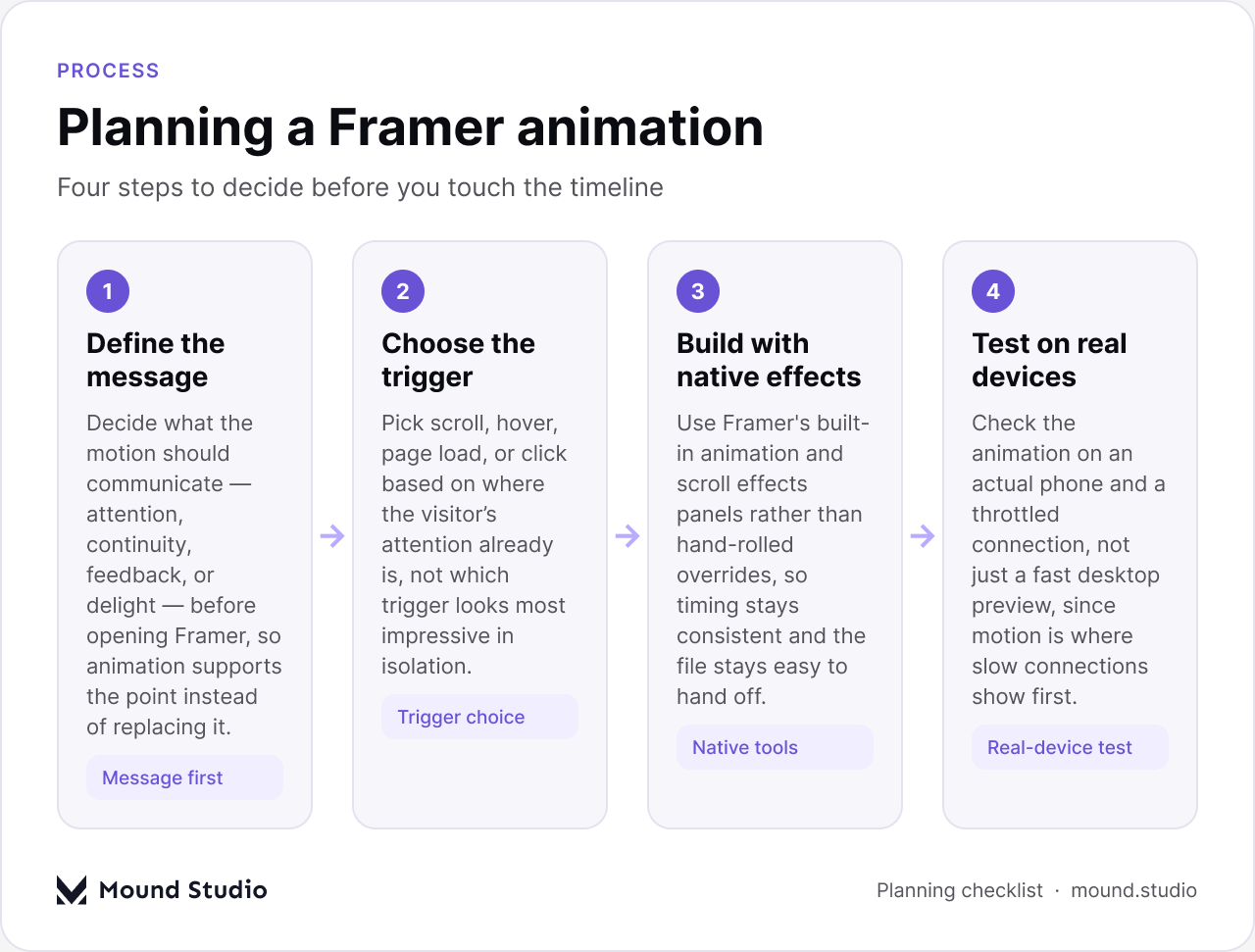
Defining the message first matters because it changes every decision after it. An animation meant to signal "this card is clickable" needs a different duration and easing than one meant to signal "this is the hero statement, read it first." Choosing the trigger next means being honest about where a visitor's attention already sits on that part of the page: scroll makes sense for content below the fold, hover only works for an element the visitor is already looking at with a cursor nearby, and page load should be reserved for the handful of elements that actually benefit from a first impression. Building with Framer's native animation and scroll-effects panels, rather than layering custom code on top, keeps the file consistent and means another designer can open the project and understand the setup without a walkthrough. Testing on a real device closes the loop: a phone on a slower connection will show jank, delay, or a stutter that a fast laptop preview never reveals.
Most of the animation on a well-built marketing site falls into a small set of repeating patterns. Recognizing them makes it faster to decide what a given section actually needs, instead of inventing a new motion treatment for every page.

Scroll-triggered section reveals are the most common pattern on a marketing homepage, because they let a page breathe: instead of dumping every section on the visitor at once, content fades or slides into place as it is scrolled to, which gives each section a moment of its own. Hover microinteractions do a smaller but still important job: a button that lifts slightly or a card that gains a shadow on hover tells the visitor, before they click, that the element is interactive. Smooth page transitions matter more on a Framer site than most builders because the whole point of the tool is a composed, considered feel, and a hard page reload undercuts that in half a second. Looping background motion, used sparingly, adds atmosphere behind a hero section without asking for direct attention. A slow gradient drift or a subtle particle field reads as intentional rather than distracting, as long as it never becomes the thing the eye keeps returning to. Sticky scroll narratives are the most ambitious of the five: a panel stays pinned in place while its content updates as the visitor scrolls past it, which works well for walking through a product's features or a process in a guided order rather than a plain list.
For a site weighing whether a Framer build fits the project at all, it helps to read a wider comparison first. See our guide on Framer website design for when the platform is the right fit and when it is not.
Every animation needs a trigger, and picking the wrong one is one of the fastest ways to make a motion effect feel out of place. The table below is the reference we come back to most often when deciding how a given element should fire.
| Trigger | What it does | Good for |
|---|---|---|
| Scroll into view | Fires once (or continuously, if scroll-linked) as the element enters the viewport | Section reveals, pacing long pages, sticky narratives |
| Hover | Fires while the cursor is over the element, usually reversing on hover-out | Buttons, cards, nav items — anything clickable on desktop |
| Page load | Fires once, immediately or after a short delay, when the page finishes rendering | Hero headline, logo, the first thing a visitor should notice |
| Click/tap | Fires on direct interaction and usually drives a state change, not just a visual flourish | Accordions, tabs, modals, menu toggles |
Scroll and page-load triggers tend to carry the most weight on a marketing site because they run without the visitor doing anything, which means they need to be right the first time, since there is no second chance to adjust based on how a visitor interacts. Hover and click triggers are more forgiving because they respond directly to what the visitor just did, so the motion reads as a reaction rather than a performance.
Not every brand or page calls for the same intensity of motion, and matching intensity to context is one of the clearer ways to tell a considered Framer build from an over-decorated one.

A pricing page, a lead-generation form, or a product comparison table is almost always better served by restraint: short durations, opacity and transform changes rather than anything that shifts layout, and easing that settles quickly instead of bouncing past its target. The goal on these pages is for the visitor to read and decide, and motion that competes for attention slows that decision down. A portfolio, an agency homepage, or a brand story page can carry more. Longer sequences, scroll-linked scenes that change as the visitor moves through a section, and more expressive easing curves are appropriate when the motion itself is part of what the visitor came to see — in that context, restraint can actually undersell the work.
The mistake we see most often is applying one intensity site-wide regardless of the page's job. A single Framer site can use both approaches, as long as the shift between them is intentional rather than accidental.
An animation that looks right in the Framer canvas can still perform poorly once it is live, and performance problems are harder to notice during design than they are to fix after launch. The checklist below covers the factors that cause the most trouble on real marketing sites.
| Factor | Why it matters | Quick fix |
|---|---|---|
| Number of simultaneous animations | Several elements animating at once compete for the same frame budget, especially on mid-range phones | Stagger entrances instead of firing them together; cap how many elements move at once per section |
| Image/video weight in animated sections | A heavy background video or oversized image behind a scroll effect adds load time on top of the animation itself | Compress and resize media before it goes into an animated section; use video sparingly behind motion |
| Animating layout properties vs transform/opacity | Animating width, height, or position forces the browser to recalculate layout every frame, which is expensive | Animate transform and opacity wherever possible; reserve layout-affecting properties for rare cases |
| Mobile testing | A desktop preview on a fast machine hides jank that shows up immediately on a mid-range phone | Test on an actual device over a throttled connection before calling the build finished |
Of these four, the layout-versus-transform distinction causes the most hidden damage, because it is invisible in the Framer editor and only shows up as dropped frames once the page is live. Keeping animated properties limited to transform and opacity is the single habit that prevents most performance complaints before they start.
A handful of mistakes show up repeatedly across Framer marketing sites, and most of them come from treating animation as a final polish step rather than part of the design.
Most of these mistakes are easy to catch in a review pass, which is why we treat animation review as part of the same handoff conversation covered in our guide to Framer website client handoff — a client taking over a site needs to know not just how to edit the animation, but which parts are load-bearing.
Before a Framer site with animation goes live, we run through a short checklist rather than relying on a general sense that it "feels right." A page can look finished in the editor and still fail on at least one of these points.
A site that passes all eight points is in good shape to publish. A site that fails even one or two is usually still salvageable without a rebuild — most fixes at that stage are adjustments to trigger settings or animated properties, not a full redo of the motion design. For teams deciding whether Framer is the right platform at all before investing in animation work, our piece on whether Framer is a good fit for a business website is a useful starting point, and if the comparison is specifically against Webflow's own animation tools, our Webflow animations guide covers the equivalent setup on that platform.
Framer animation earns its place on a marketing site when it supports a specific message, uses a trigger that matches where the visitor's attention already is, is built with the platform's native tools so it stays easy to maintain, and has been tested on a real device before launch — get those four right and most of the common mistakes take care of themselves. If you are planning a Framer site and want a second set of eyes on where animation should and should not go, get in touch with Mound Studio.
Enough to support specific moments, such as a hero statement, a button state, or a section reveal, and no more. Most marketing pages need three or four distinct animated moments rather than motion on every element.
Animation itself rarely adds meaningful load time, but the media often paired with it does. A heavy background video or an oversized image inside an animated section is usually the real cause of a slow page, not the animation logic.
No. Small UI feedback like a hover state should resolve quickly, while a section reveal can run a little longer. Matching timing to the size of the moment keeps the page from feeling mechanical.
A scroll-triggered animation fires once when an element enters the viewport. A scroll-linked animation ties directly to scroll position and keeps changing as the visitor scrolls through a section, which is how sticky scroll narratives work.
Yes, by building a reduced-motion fallback that respects the visitor's operating-system setting. Most core Framer animation can be set to skip or simplify when that preference is detected.



.png)


