








.avif)
.avif)
.avif)


Branding
How to Choose Brand Colors: A Practical Guide to Building Your Palette
The fastest way to choose brand fonts is to pick one typeface for headings and a different, more neutral typeface for body text, then limit the whole brand to those two families plus their weight variations. Most font problems come from skipping that second step: a business picks a striking display font, uses it everywhere, and ends up with a brand that looks loud in a hero banner and unreadable in a footer.
Fonts carry more weight in brand perception than most teams expect. Before anyone reads a word of copy, the shape of the letters has already signalled something — serious or playful, expensive or accessible, old or new. The same logo set in a geometric sans-serif and a slab serif reads as two different companies. Getting this right is less about taste and more about a short list of practical decisions: what each style communicates, how a heading font pairs with a body font, whether the type is legible at the sizes it will actually be used at, how it's licensed, and how it's organized into a hierarchy everyone on the team can follow.
Typography is one of the few brand elements a person encounters in almost every interaction — a website, an invoice, a packing slip, an app notification. Unlike a logo, which shows up occasionally, the brand's font appears constantly, in paragraphs most people barely notice they're reading. That makes it a quiet but persistent signal: a rounded, friendly sans-serif suggests approachability, a sharp, high-contrast serif suggests formality or heritage, a tightly spaced geometric sans suggests precision and technology. None of these associations are universal rules, but they're common enough that a mismatch between a brand's voice and its typeface creates friction a visitor can feel without being able to name it.
This is also why changing a brand font later is riskier than it looks. Type touches everything — the website, templates, pitch decks, packaging — so a font chosen early tends to stick around for years. Treating the decision with the same care as choosing a brand color pays off, since both are foundational brand identity elements that everything else gets built on top of.
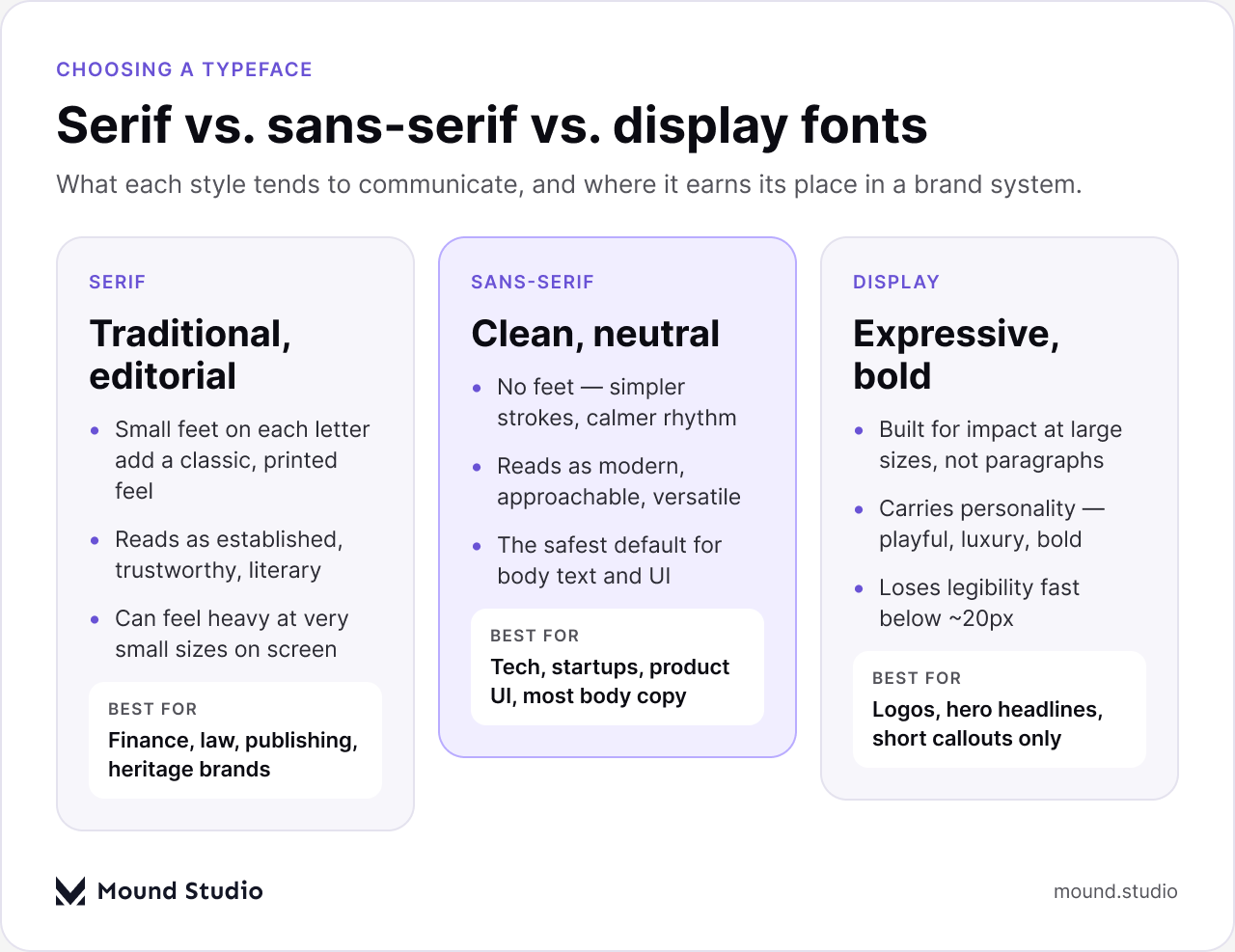
Most typefaces fall into one of three broad categories, and each tends to carry a different set of associations.
Serif fonts have small decorative strokes ("feet") at the ends of letters. They read as traditional, editorial, and trustworthy — the default choice for law firms, financial institutions, publishers, and heritage brands. At large sizes a well-made serif looks confident and literary; at very small sizes on a screen, some serifs can look heavier or less crisp than a sans-serif equivalent, which matters for body copy on mobile.
Sans-serif fonts drop the feet for plainer, more uniform strokes. They read as modern, neutral, and versatile, which is why they dominate tech, startups, and product interfaces. A good sans-serif is also usually the safest choice for body text and UI copy, because the simpler letterforms tend to render cleanly at small sizes across devices.
Display fonts are built for impact, not paragraphs — bold, often unusual letterforms designed to be seen at large sizes for a few words at a time. They carry the most personality of the three categories, which also makes them the riskiest: a display font that looks striking in a hero headline will usually fall apart in two lines of body copy, and a font that feels fresh today can look dated within a couple of years if it was popular specifically because of its moment.
None of these categories is "better" — they solve different problems. Treat the category as a starting filter: pick a serif or sans-serif as the working typeface for headings and body, and reserve a display font, if used at all, for logos, hero headlines, and short callouts.
Font pairing is really a decision about contrast versus harmony. A pairing with more contrast — a bold geometric sans heading with a classic serif body — creates visual interest and a stronger hierarchy, but only works if the contrast feels intentional rather than accidental. A pairing with more harmony — two fonts from the same broad style, or two weights of one family — feels calmer and more unified, which suits brands that want type to stay in the background.
A few habits make most pairings work:
One pairing that avoids most of these problems entirely: use a single variable-font family for both roles, leaning on a bolder weight for headings and a lighter weight for body text. It guarantees the two feel related, because they are, and it simplifies licensing and file size as well.
A typeface that looks good in a brand deck can still fail in production if it isn't legible at the sizes people actually read it. A few specific things are worth checking directly, not assuming:
Licensing is the part of font selection most often skipped, and it's the part most likely to cause a problem after launch. A few basics are worth understanding before picking a typeface for a brand:
None of this requires the most expensive option — plenty of well-licensed, well-made fonts are available at no cost or a modest one. It just requires checking the terms before the typeface becomes load-bearing across a brand's materials.
Once a heading and body font are chosen, the next step is deciding how they're used — consistently — across every piece of content the brand produces. A basic hierarchy needs four roles:
Writing this hierarchy down — sizes, weights, line-heights, and which font covers which role — turns it into documentation the whole team can apply consistently, the same way a brand identity package documents logo usage and color rules.

Before a typeface is locked into a brand kit, it's worth running it through a short, repeatable checklist:
| Step | What to confirm |
|---|---|
| Contrast | Heading and body fonts are different enough in weight or structure to create a clear hierarchy. |
| Weight range | At least four weights are available across the chosen family or families. |
| X-height & small sizes | Lowercase letters stay legible at the smallest size the brand will actually use, such as a caption or footer. |
| Licensing | A web font license (or open license) covers the expected use and traffic. |
| Device test | Headline and body text have been checked on a real phone and laptop, not only in a design tool. |
Running through this once, before the font is written into brand guidelines, is far easier than discovering an issue after templates, packaging, or a live website are already built around it.

When narrowing down options, it can help to work backward from the brand's personality rather than from a list of fonts:
| Brand direction | Typical type approach |
|---|---|
| Formal, established | Serif heading, neutral sans-serif body |
| Modern, product-led | Sans-serif heading and body, varied by weight |
| Expressive, memorable | Display font for logo/hero only, calm font elsewhere |
| Multi-touchpoint | One variable font family across all weights |
Choosing brand fonts well is less about finding a flawless typeface and more about making a short set of deliberate decisions: pick a style that matches the brand's personality, pair a heading font with a body font that complements rather than competes with it, confirm legibility and licensing before committing, and write the resulting hierarchy down so it stays consistent across every page and document. If narrowing down these decisions for your own brand feels like a lot to work through alone, our team is glad to help you choose and test the right typefaces.
Two is usually enough — one for headings, one for body text. A third can work for a narrow accent use, but each additional family adds inconsistency and page load time.
A desktop license covers use in design software; it does not automatically include the right to embed a font on a website. Web use typically needs a separate web font license, sometimes scoped by site traffic.
Often, yes. A variable font bundles multiple weights into one file, which can reduce page weight compared with loading several static font files.
Check its x-height and test it at the smallest size it will realistically be used — a caption, footer, or form label — on a real phone and laptop, not just in a design file.


.png)


